

 Español
 Català
 Deutsch
 Français
 Português
 Italiano
 Nederlands
 Polski
The Deel invoice the paying company sees
Search for "deel invoice" and most results explain how a contractor creates an invoice in Deel. This guide covers the other side: the company that receives those invoices and has to get them into its books. In Deel, the company handles payments and invoices on the Billing tab, under Finance, where it can download them one at a time or in a zip of up to 50 documents. Without a connector, someone retypes each PDF into Odoo.
The Deel API returns more than the PDF shows. Its invoice list only includes paid and refunded invoices by default, so the connector asks for status=all and gets the pending ones as well. Invoices for Deel's own fees come from a separate call, GET /invoices/deel, and the connector imports those too.
The connector was tested end to end through FlexigoTech Cloud against a Deel demo organization (demo.deel.com): the connection, legal entities, a contract with its person and vendor, webhooks and a second sync without duplicates. That organization had no invoices, payments or payroll cycles yet, so that part was tested with answers modelled on Deel's API reference. Whether Deel's invoice list also includes EOR invoices still has to be confirmed with a real organization.
| What Deel sends | Where it ends up in Odoo |
|---|---|
The invoice's line items (line_items) | One vendor bill line per item, with its description |
amount and deel_fee | When the invoice has no line items, one line for the amount and one for the Deel fee |
vat_percentage | The Odoo tax you mapped to that rate under VAT rates |
| Issue date and due date | Bill date and, when there are no payment terms, the due date |
| Deel invoice number | Bill reference and payment reference |
| Attachment on the vendor bill, up to 20 MB |
How it becomes a vendor bill
Each Deel invoice is stored in Odoo with its Deel ID, and the connector never lets the same invoice produce two vendor bills, even when two runs overlap or two connections read the same Deel organization. The Deel legal entity decides the Odoo company, the purchase journal and the vendor, and a contractor who has their own vendor in Odoo goes to that vendor. A negative total produces a vendor refund.
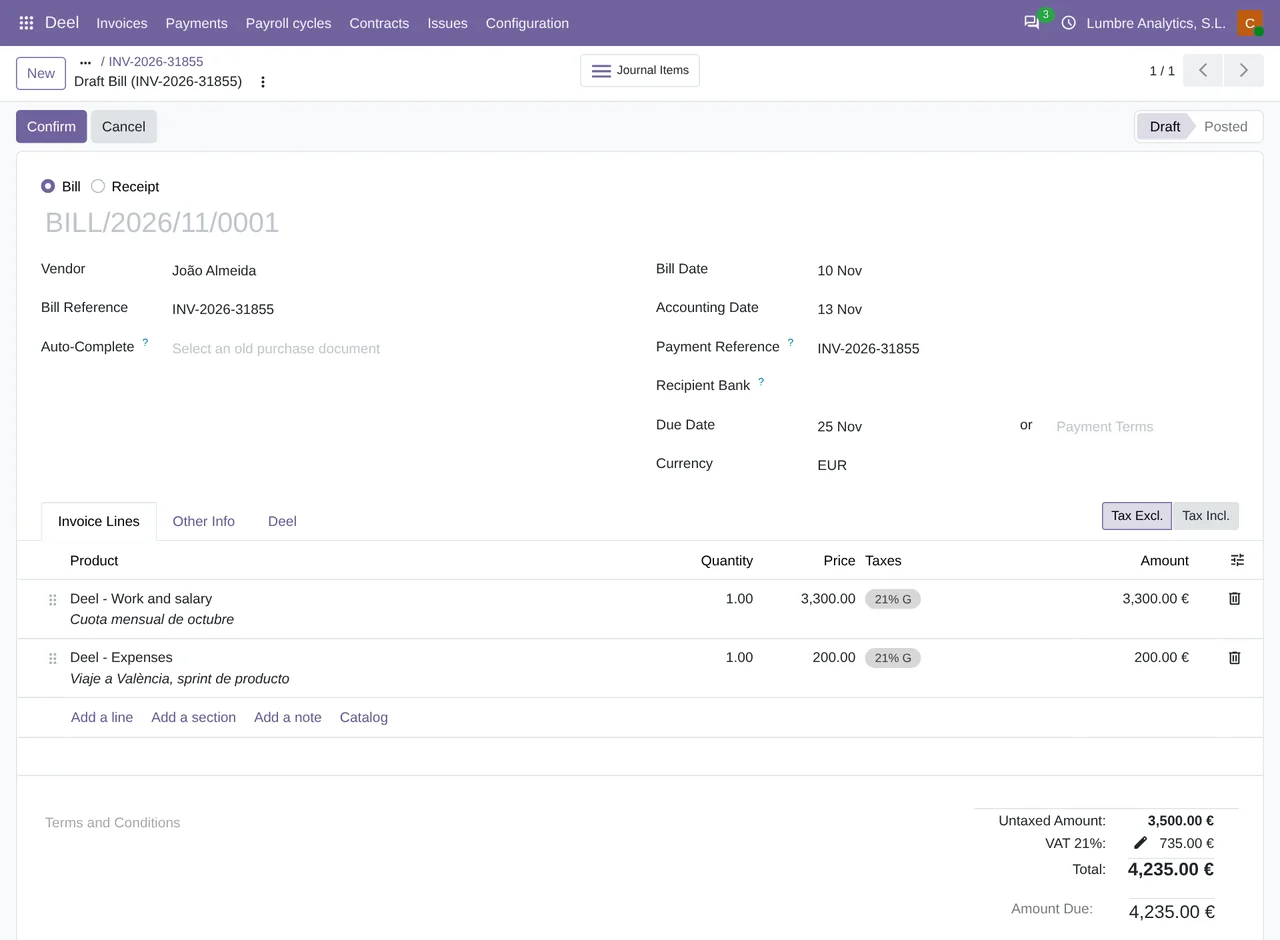
The lines come from the invoice's line items in Deel and carry the contract's analytic distribution, so the cost centers arrive already filled in. Only the Deel fee line of an invoice without line items goes without it. The import stops with a warning, without creating the bill, when a Deel VAT rate has no Odoo tax mapped in the connection, when the currency is not active in Odoo or when the Deel legal entity has no purchase journal, among other cases.
Before it calls the bill done, the connector compares the Odoo total with the Deel total. If they differ by more than 0.01, it sets the invoice to To review with a message that gives both totals and asks you to check the taxes before posting. The connection's Vendor bills field decides the rest: with Draft, to review, the default, every bill stays in draft; with Posted when everything matches, bills post themselves when the total matches.
The states of a Deel invoice in Odoo
| State | What it means |
|---|---|
To import | Read from Deel, no vendor bill yet |
Bill created | Its vendor bill exists in Odoo |
To review | The total does not match, or Deel changed it later, and a person decides |
Invoices with a zero total do not produce a vendor bill, and neither do invoices for contractors or EOR employees that Deel marks as cancelled, failed or unpayable. If something needed to create the bill is missing, such as a tax or a currency, the invoice goes to error with a warning that says what is missing.
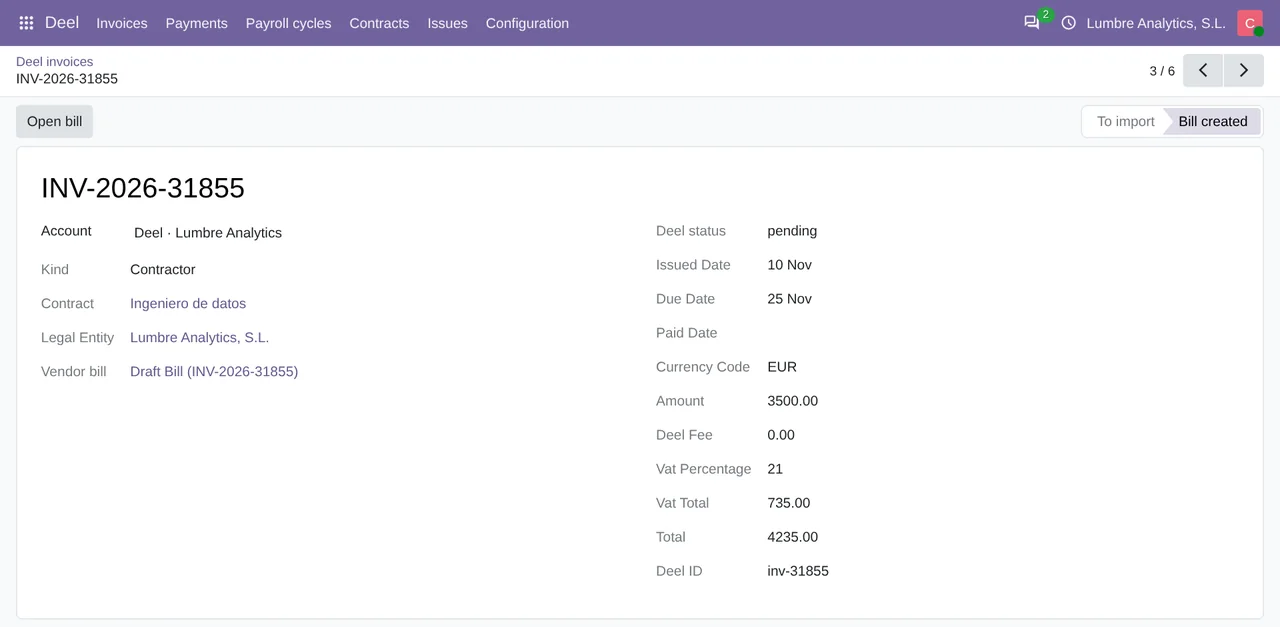
Bill created state and linked to its draft vendor bill.When Deel changes or cancels the invoice later
If Deel changes an invoice's total, or cancels an invoice for a contractor or an EOR employee, after the vendor bill exists in Odoo, the connector leaves that vendor bill alone, because it may already be posted or paid. It moves the Deel invoice to To review and opens a warning with what changed, so someone can cancel the bill or add a credit note. To catch those changes, the sync runs every 30 minutes and reads again whatever was issued in the 7 days before the previous run. Older invoices that already have a vendor bill and are still unpaid get checked one by one, up to 100 per run.
Before you switch it on
- Odoo 17, 18, 19 or 20 on your own server or on Odoo.sh. The module does not work on Odoo Online.
- A Deel organization token with read permissions, created by a Deel admin in the Developer Center. You paste it into the connection and FlexigoTech Cloud keeps it encrypted; it never stays in your Odoo. The
Authorize with Deeloption will work once Deel approves the FlexigoTech app; until then the connector asks you to use the token. - An Odoo tax for every VAT rate your invoices carry, under
VAT rates. - The
Payments journalof each Deel legal entity, which starts empty. Without it, the connector does not register payments to Deel in Odoo; with it, it registers them on vendor bills that are already posted. - The date to import from. If you leave it as it is, invoices issued in the 60 days before you created the connection come in.
When one Deel organization pays from several entities, each legal entity goes to its own Odoo company, with its own journals and vendor. If you also run Global Payroll, payroll arrives as one journal entry per cycle, and we compare that with what Deel offers in its accounting integrations. The connector is explained in full on its page and published on Odoo Apps.
Keep reading
Checked in the connector's source code (version 20.0) and the linked sources
Sources
- help.letsdeel.com/hc/en-gb/articles/20301708484753-How-to-Download-Invoices-and-Manage-Pay
- developer.deel.com/api/reference/endpoints/accounting/retrieve-invoices-v-2026-01-01
- Module source code: flexigo_deel_connector 20.0 (18442307): models/deel_invoice.py
- Module source code: flexigo_deel_connector 20.0 (18442307): data/deel_cron.xml
- Module source code: flexigo_deel_connector 20.0 (18442307): models/deel_account.py
- apps.odoo.com/apps/modules/20.0/flexigo_deel_connector
- Module source code: flexigo_deel_connector 20.0 (18442307): models/deel_payment.py
- Module source code: flexigo_deel_connector 20.0 (18442307): models/deel_legal_entity.py