

 Español
 Català
 Deutsch
 Français
 Português
 Italiano
 Nederlands
 Polski
Deel's accounting integrations
Deel's help center article on accounting integrations, updated on 24 April 2026, describes two parts that can run together on the same integration. Bill Sync handles invoices and GL Sync posts payroll to the general ledger. These are the systems it connects to:
| System | How it connects | What it syncs |
|---|---|---|
| NetSuite | OAuth | Bill Sync and GL Sync |
| Xero | OAuth | Bill Sync and GL Sync |
| QuickBooks | OAuth | Bill Sync and GL Sync |
| Sage | API credentials | Bill Sync and GL Sync |
| SAP | API credentials | GL Sync only |
| Microsoft Dynamics Finance | API credentials | Bill Sync and GL Sync |
Deel says its standard accounting integrations come at no additional cost. Odoo is not on that list, so a company that keeps its books in Odoo has to move the data itself or use a connector.
Bill Sync and the connector: invoices
For every invoice from contractors, EOR employees or COR workers, Bill Sync creates a bill, a bill payment and the PDF in the accounting system. Each contractor is a vendor of their own, while EOR and COR go to a single Deel billing vendor. It syncs when the invoice is issued, when the payment is initiated or when it is confirmed, whichever you choose, and runs a daily catch-up for invoices from the past 48 hours that failed or were missed.
| Point | Deel Bill Sync | Deel connector in Odoo |
|---|---|---|
| What it creates | Bill, bill payment and PDF per invoice | A vendor bill with its PDF per Deel invoice and, once Deel is paid, one Odoo payment per posted bill, if its entity has a payments journal |
| Vendor | One per contractor; EOR and COR share a Deel vendor | The vendor of the Deel legal entity, unless the contractor has their own vendor in Odoo |
| When | On issue, payment initiated or payment confirmed, plus a daily catch-up | Every 30 minutes, reading again what was issued in the previous 7 days |
The connector also imports the invoices for Deel's own fees, which the API returns through a separate call. Payments come from the breakdown of each payment to Deel: a statement that pays several invoices becomes one Odoo payment per bill, in the payments journal of its entity and dated the day Deel was paid. Only posted vendor bills of an entity that has a Payments journal get paid this way. Out of the box, bills stay in draft and the entity has no payments journal, so the payment waits until you choose that journal and post the bills. How each invoice comes in, step by step, is in Deel invoice in Odoo.
GL Sync and the connector: Global Payroll
GL Sync posts Global Payroll and PEO data to the general ledger as journal entries, based on a mapping template the customer configures, and you trigger it by hand once the payroll report is generated. Without an integration you are left with the gross-to-net (G2N) report, and Deel warns that this report shows payroll outcomes, not accounting rules: no debit and credit direction, no mapping logic and no validation. Building each cycle's journal entry from it is work for the finance team.
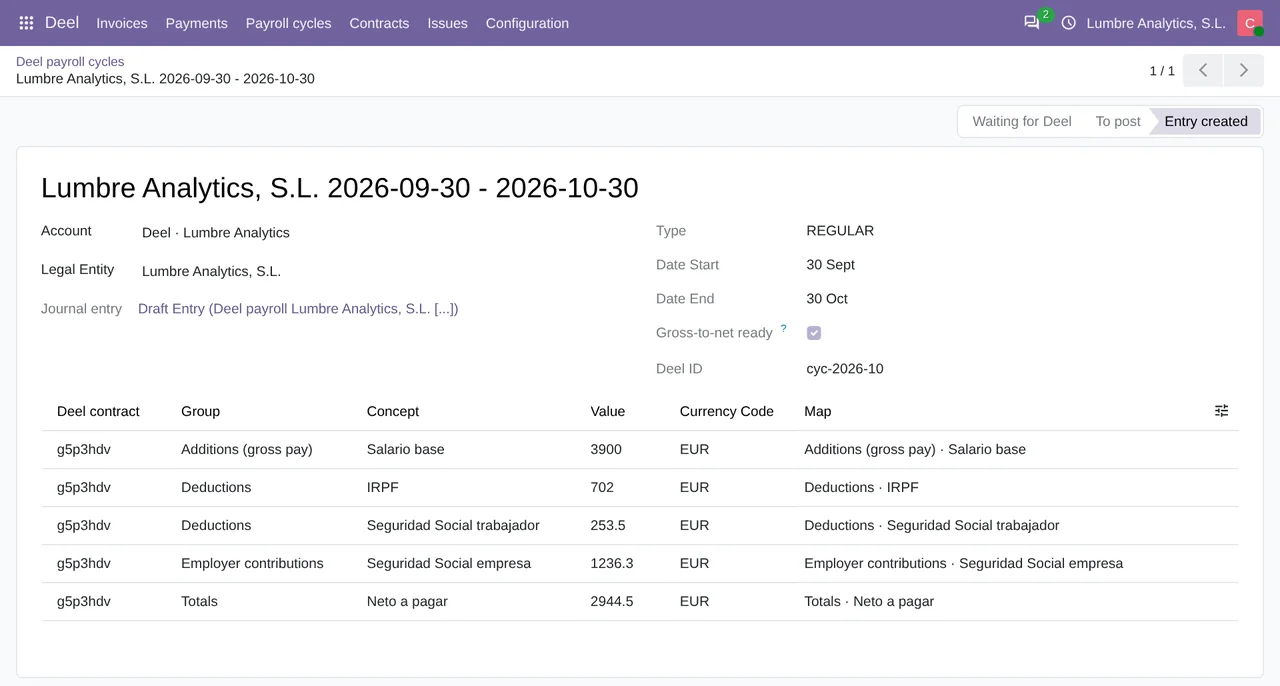
The connector builds that entry inside Odoo. It reads each cycle's gross-to-net report and creates one journal entry per cycle, where every concept goes to its debit account and its credit account according to the Payroll accounts map, and the debit side carries the contract's cost centers. When a concept has no accounts, the cycle stops and the connector adds its row to the map for you to fill in. The Payroll entries field decides whether the entry stays in draft, the default, or gets posted.
How Odoo connects to Deel
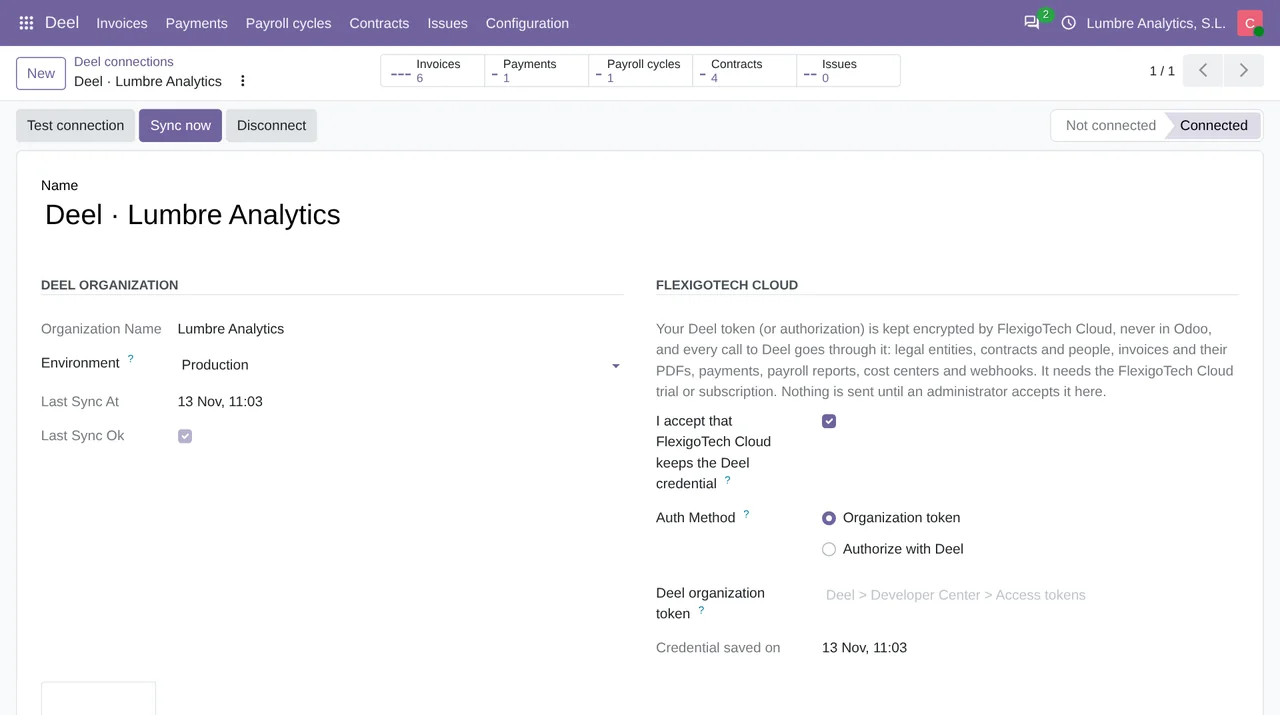
A Deel admin creates an organization token with read permissions in the Developer Center and pastes it into the Odoo connection. The token does not stay in Odoo: FlexigoTech Cloud keeps it encrypted, and every call to Deel goes through it. The Authorize with Deel option will work once Deel approves the FlexigoTech app; until then the connector asks you to use the token. Deel allows 5 requests per second per organization, across all its tokens, which matters if another integration already reads the same organization. The connector was tested end to end through FlexigoTech Cloud against a Deel demo organization (demo.deel.com), which had no invoices, payments or payroll cycles yet; that part was tested with answers modelled on Deel's API reference.
Which one fits you
If your books are in one of the systems in the table, Deel's own integration does this job without anything else. If they are in Odoo, the connector covers invoices, payments and payroll in that same Odoo, though not everything Deel covers: COR worker invoices only come in once they are paid, because the connector does not request them when listing; it does not read credit notes, which Deel's API returns through another call; and PEO payroll, which GL Sync handles, gets no treatment of its own. It runs on Odoo 17, 18, 19 and 20 installed on your own server or on Odoo.sh, not on Odoo Online, and one Deel organization can feed several Odoo companies, each legal entity into its own. The details are on the connector page and the download is on Odoo Apps.
Keep reading
Checked in the connector's source code (version 20.0) and the linked sources
Sources
- help.letsdeel.com/hc/en-gb/articles/46057955155217-Accounting-Integrations-Overview
- help.letsdeel.com/hc/en-gb/articles/45125127111825-Accounting-Integrations-Pricing-and-Set
- Module source code: flexigo_deel_connector 20.0 (18442307): models/deel_invoice.py
- Module source code: flexigo_deel_connector 20.0 (18442307): models/deel_payment.py
- Module source code: flexigo_deel_connector 20.0 (18442307): data/deel_cron.xml
- Module source code: flexigo_deel_connector 20.0 (18442307): models/deel_payroll.py
- Module source code: flexigo_deel_connector 20.0 (18442307): models/deel_account.py
- apps.odoo.com/apps/modules/20.0/flexigo_deel_connector
- developer.deel.com/api/reference/endpoints/accounting/retrieve-invoices-v-2026-01-01
- Module source code: flexigo_deel_connector 20.0 (18442307): models/deel_legal_entity.py
- Module source code: flexigo_deel_connector 20.0 (18442307): models/deel_contract.py
- developer.deel.com/api/rate-limits