

 Polski
Who has to file ZAW-FA
| Situation | Do you file ZAW-FA? |
|---|---|
| Company, foundation, association or local government unit without a qualified seal | yes, before first using KSeF |
| Company with a qualified seal that carries its NIP | no, it uses default owner rights |
| Sole trader (natural person) | no, logs in personally |
| Natural person whose qualified signature carries neither NIP nor PESEL | yes, to register that signature |
| Enforcement authority | yes, to grant and withdraw permissions |
| Court bailiff (natural person) | no, KSeF recognises them from the registers |
| Foreign company with a Polish NIP acting through a proxy | yes |
| Company loses its only person with full permissions | yes, a new ZAW-FA naming the next person |
ZAW-FA names only the first person with the widest permissions. That person then adds everyone else, including staff at an outside accounting firm, directly in KSeF.
How to file ZAW-FA, step by step
- Check whether the company has a qualified electronic seal with its NIP. If it does, it does not need ZAW-FA.
- Choose the natural person who will be the first to get full KSeF permissions and gather their details.
- Fill in form ZAW-FA(3): part A is where and why you file, B the company, C the authorised person, D unique data linked to a certificate, and E the signature. The paper form is filled in block capitals in black or blue ink.
- Have it signed by the people who represent the company.
- File it with the competent tax office, on paper or by post, or electronically through e-Urząd Skarbowy or e-Doręczenia. Since 1 January 2026, documents sent to a tax office through ePUAP are not treated as validly delivered.
- Wait for the confirmation email. The tax office checks the notification before it enters the permissions in KSeF.
After the permissions are active
The person named in ZAW-FA logs in to KSeF and grants access to others under permissions management, choosing the scope, for example issuing invoices or only viewing them. Invoicing software connects to KSeF with a KSeF token or a KSeF certificate. A type 1 certificate is for authentication; a type 2 certificate is needed for the second QR code on invoices issued offline. We compare the login methods in token, certificate or Trusted Profile.
The notification does not need updating while the company's NIP and the authorised person's NIP or PESEL stay the same. If the company parts ways with that person and nobody else has full permissions, it files a new ZAW-FA.
ZAW-FA and Odoo
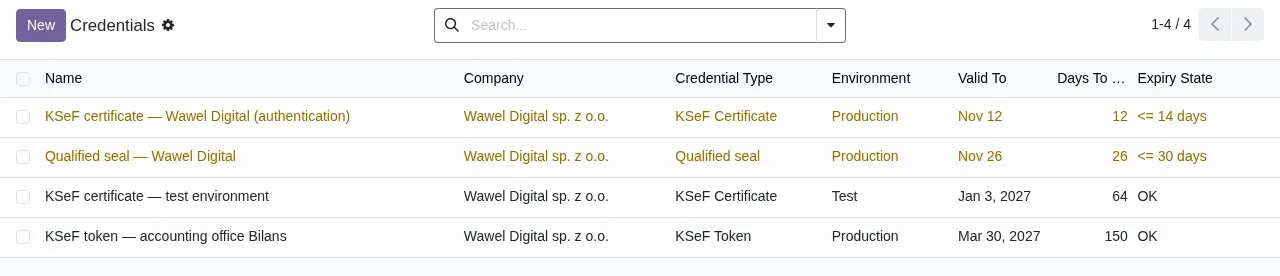
Odoo does not file ZAW-FA for you. The tax office has to grant the permissions first; only then can Odoo's l10n_pl_edi module (Odoo 18, 19 and 20) connect to KSeF with the company's certificate. Our module, KSeF 2.0 Validator Odoo, keeps a register of KSeF credentials, meaning certificates and tokens, with expiry dates and warnings before they run out, and an invoice with an expired credential cannot be marked ready for KSeF. It is only a register: the module uses no secret and sends nothing to KSeF itself. It costs €9 on Odoo Apps per Odoo version and needs a FlexigoTech Cloud subscription from €29 a month, VAT excluded, with 14 days free. Who must use KSeF and from when is covered in our KSeF guide.

Frequently asked questions
Does a sole trader file ZAW-FA?
Usually not. A natural person logs in to KSeF personally and needs ZAW-FA only if their qualified signature carries neither a NIP nor a PESEL.
Can ZAW-FA name several people with full permissions?
No. It names one person, the first. That person adds others with full permissions electronically in KSeF.
Can I send ZAW-FA through ePUAP?
No. Since 1 January 2026, documents sent to a tax office through ePUAP are not treated as validly delivered. File it electronically through e-Urząd Skarbowy or e-Doręczenia instead.
When do the permissions start to work?
Once the tax office has checked the notification and entered the permissions. You get a confirmation by email.
Does our accounting firm file ZAW-FA too?
No. The person with full permissions gives the accountant or the firm access directly in KSeF.
Does a foreign company file ZAW-FA?
Yes, if it has a Polish NIP and acts in KSeF through a proxy. In that case the foreign company itself files ZAW-FA.
We checked this page on 17 November 2026 against the Ministry of Finance notice of 31 March 2026, the KSeF 2.0 questions and answers on ksef.podatki.gov.pl and the ZAW-FA(3) form in the regulation of 12 December 2025 (Dz.U. 2025 item 1815).
Keep reading
Checked in the module's source code (version 17.0, 18.0, 19.0 and 20.0) and the linked sources
Sources
- ksef.podatki.gov.pl/wyjasnienia/co-warto-wiedziec-przed-startem-ii-etapu-wdrozenia-krajowe
- ksef.podatki.gov.pl/pytania-i-odpowiedzi-ksef-20/
- dziennikustaw.gov.pl/DU/2025/1815
- ksef.podatki.gov.pl/etapy-wdrozenia-ksef/
- Module source code: flexigo_poland_ksef_2_0_e_invoice_connector_and_migrati, __manifest__.py line 26 in 17.0 (a5ba945), 18.0 (cdfae8f), 19.0 (197910f) and 20.0 (3310ca0)
- Module source code: flexigo_poland_ksef_2_0_e_invoice_connector_and_migrati, __manifest__.py line 13 in 17.0 (a5ba945), 18.0 (cdfae8f), 19.0 (197910f) and 20.0 (3310ca0)
- github.com/odoo/odoo/tree/18.0/addons/l10n_pl_edi
- apps.odoo.com/apps/modules/20.0/flexigo_poland_ksef_2_0_e_invoice_connector_and_migrati