

 Español
 Polski
What KSeF says and what the Ministry tests
| Code | KSeF text | Case in the Ministry's tests |
|---|---|---|
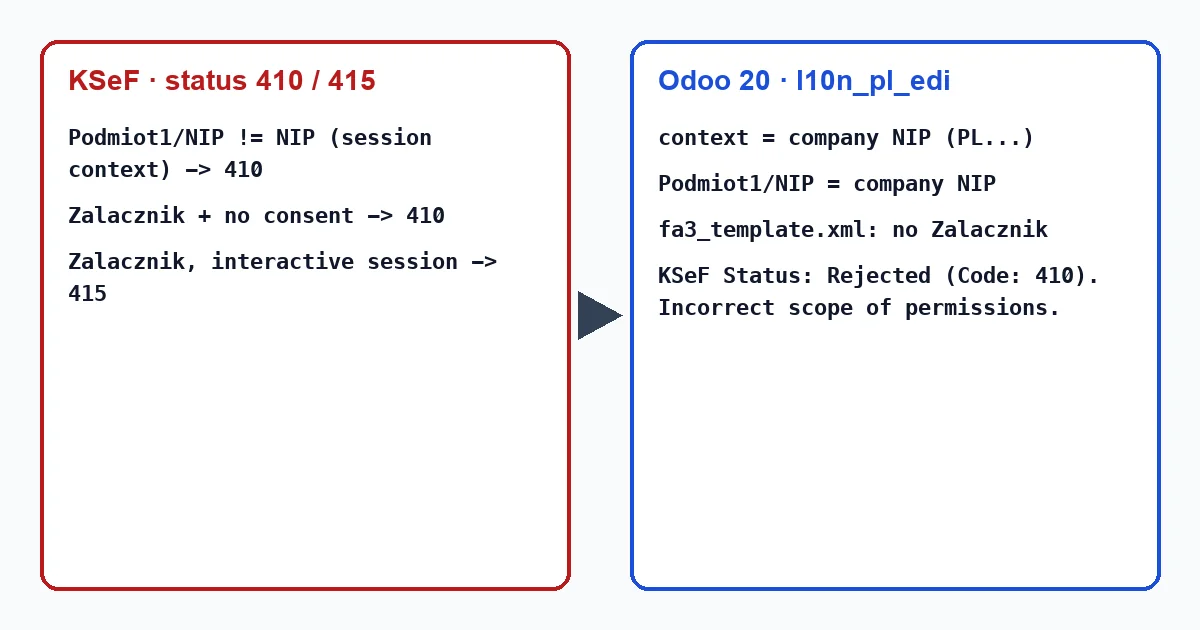
| 410 | “Nieprawidłowy zakres uprawnień” (invalid scope of permissions) | Invoice with a seller NIP other than the NIP the session was authenticated with. |
| 410 | “Nieprawidłowy zakres uprawnień” | Seller without consent for attachments; details: “Sprzedawca {nip} nie posiada zgody do wysyłania faktur z załącznikami”. |
| 415 | “Brak możliwości wysyłania faktury z załącznikiem” (an invoice with an attachment cannot be sent) | Invoice with an attachment sent in an interactive session. |
The KSeF documentation adds two rules. Sending an invoice requires the right to issue it in the context of that taxpayer. Invoices with attachments may only go in batch mode (the exception is the technical correction of an offline invoice), and only after that option is registered in e-Urząd Skarbowy.
What it looks like in Odoo 18, 19 and 20
l10n_pl_edi signs in to KSeF with the KSeF certificate from the settings, using the company's NIP as context, and writes that same NIP in Podmiot1. It requires the company VAT number to start with PL (“A polish VAT number must be set on your company.”). After a 410 it sets the status to Rejected and writes “KSeF Status: Rejected (Code: 410). Incorrect scope of permissions.” (in Polish on 18 and 19: “Status KSeF: Odrzucono (Kod:410). Nieprawidłowy zakres uprawnień.”).
Code 410 arrives as an invoice status, like 450, so Odoo shows it in the history after checking the status: right after sending, or later with the “Check Sending” button. Permissions are granted and checked in KSeF itself, not in Odoo: Odoo only knows the certificate and the company NIP.
Odoo's FA(3) template has no Zalacznik element, and Odoo sends in an interactive session. So 415, and a 410 caused by attachments, should not come from an invoice Odoo generated; if you see them, the file came from another program.
What to check for a 410
- The company NIP in Odoo is exactly the NIP the certificate owner holds permissions for.
- The certificate owner has the right to issue invoices for that NIP in KSeF; the company owner grants it. With no permissions at all, KSeF already stops the sign-in (status 415 at authentication: “Brak przypisanych uprawnień”, no permissions assigned).
- If you changed the company NIP in Odoo, save the certificate in the settings again. Odoo writes the current NIP in
Podmiot1while, until the next automatic renewal, its access comes from a sign-in on the previous one, which is exactly the Ministry's test case. - In a database with several companies, each has its own certificate; an invoice goes with the context of the company it belongs to.
Sending it again
After the fix, reset the invoice to draft (for a rejected one Odoo clears the KSeF status and number), confirm it and send it again. Our module, Poland KSeF 2.0 Validator, takes the Rejected status and later the Accepted one from l10n_pl_edi, but it sends nothing itself and does not change permissions in KSeF.
Keep reading
Checked in the module's source code (version 20.0) and the linked sources
Sources
- github.com/odoo/odoo/blob/2fec20391a8a61ea3a3bf15e9f24d59dba910a8d/addons/l10n_pl_edi/mode
- github.com/odoo/odoo/blob/2fec20391a8a61ea3a3bf15e9f24d59dba910a8d/addons/l10n_pl_edi/mode
- github.com/odoo/odoo/blob/2fec20391a8a61ea3a3bf15e9f24d59dba910a8d/addons/l10n_pl_edi/data
- github.com/CIRFMF/ksef-api/blob/ce3670ea042de380039de4c5849fd6455811b292/open-api.json
- github.com/CIRFMF/ksef-api/blob/ce3670ea042de380039de4c5849fd6455811b292/faktury/weryfikac
- github.com/CIRFMF/ksef-api/blob/ce3670ea042de380039de4c5849fd6455811b292/faktury/weryfikac
- github.com/CIRFMF/ksef-client-csharp/blob/a66cbc669814e6c2a615748a13a0a04a650ba04f/KSeF.Cl
- github.com/CIRFMF/ksef-client-csharp/blob/a66cbc669814e6c2a615748a13a0a04a650ba04f/KSeF.Cl
- github.com/CIRFMF/ksef-client-csharp/blob/a66cbc669814e6c2a615748a13a0a04a650ba04f/KSeF.Cl
- github.com/odoo/odoo/blob/2982b5f44af03fae6a9888f20632c1cc19f623ba/addons/l10n_pl_edi/mode
- github.com/odoo/odoo/blob/4d2d4b5895db70596863df941d9a1f0beeb117f8/addons/l10n_pl_edi/mode
- github.com/odoo/odoo/blob/2fec20391a8a61ea3a3bf15e9f24d59dba910a8d/addons/l10n_pl_edi/mode
- github.com/odoo/odoo/blob/2fec20391a8a61ea3a3bf15e9f24d59dba910a8d/addons/l10n_pl_edi/mode
- github.com/odoo/odoo/blob/2982b5f44af03fae6a9888f20632c1cc19f623ba/addons/l10n_pl_edi/i18n
- github.com/odoo/odoo/blob/2fec20391a8a61ea3a3bf15e9f24d59dba910a8d/addons/l10n_pl_edi/mode
- github.com/odoo/odoo/blob/2fec20391a8a61ea3a3bf15e9f24d59dba910a8d/addons/l10n_pl_edi/mode
- github.com/odoo/odoo/blob/2fec20391a8a61ea3a3bf15e9f24d59dba910a8d/addons/l10n_pl_edi/data
- github.com/odoo/odoo/blob/2fec20391a8a61ea3a3bf15e9f24d59dba910a8d/addons/l10n_pl_edi/mode
- Module source code: flexigo_poland_ksef_2_0_e_invoice_connector_and_migrati 20.0 (ba7c60f1): models/account_move.py