

 Español
 Català
 Deutsch
 Français
 Português
 Italiano
 Nederlands
 Polski
Two families of messages
The easiest way to sort the module's messages is by what you are doing when they come up:
- Settings values that do not add up:
Day values cannot be negative.,Scan interval and retention must be at least 1.,Backorder threshold and lookback must be at least 1.,Age bucket boundaries must increase strictly.andMajor overdue threshold cannot exceed critical threshold.
- Actions or data on an exception:
Ignoring an exception requires a reason.,Cannot change route exception from %(old)s to %(new)s.,The source document no longer exists or is not accessible.andSource record id must be positive.
For Ignoring an exception requires a reason. the fix is to enter a reason before ignoring the exception.
If you would first like to see which menus the module adds and what a record goes through, see how the module works under the bonnet.
One example from start to finish
Example Illustrative case: the company and its figures are made up to explain the flow.
Garbí Distribution is a made-up distributor that has just installed the module in its Odoo. Marta, the warehouse manager, is in charge of setting it up and reviewing exceptions every morning. We follow what she does and which message she gets at each point.
Step one: the settings
Marta opens Inventory › Route Exceptions › Route Exception Settings, which holds a single record.
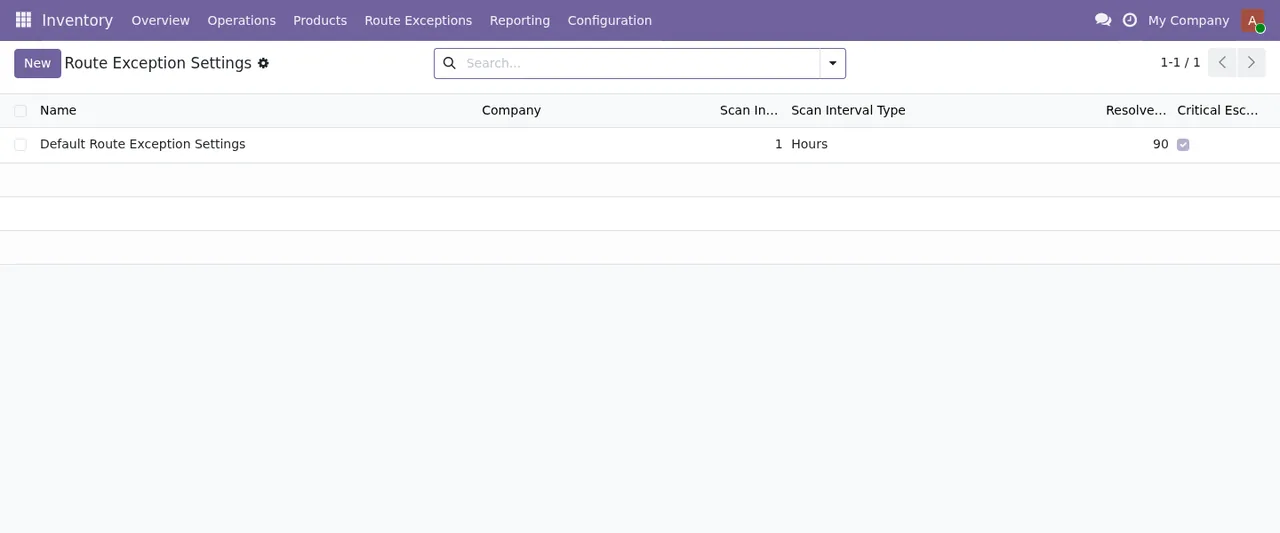
First she sets the scan interval to zero as a test, and the module responds with Scan interval and retention must be at least 1. The message states the minimum clearly: both the scan interval and the retention must be 1 or more. Marta puts a valid value back and saves.
Next she mistakenly types a negative number into a days value and gets Day values cannot be negative. Changing it to a value that is not negative is enough.
Something similar happens with the backorder threshold: she leaves it at zero and gets Backorder threshold and lookback must be at least 1. As before, the threshold and the lookback period must be at least 1.
Then she adjusts the age buckets and repeats the same boundary in two consecutive buckets. The module rejects it with Age bucket boundaries must increase strictly. Boundaries have to go up in order with no repeats, so Marta sets each one above the previous one.
Finally, she puts the Major overdue threshold above the Critical one. She gets Major overdue threshold cannot exceed critical threshold. The fix is to lower Major or raise Critical until the first no longer exceeds the second.
Step two: working the exceptions
With the settings saved, Marta moves on to Inventory › All Route Exceptions.
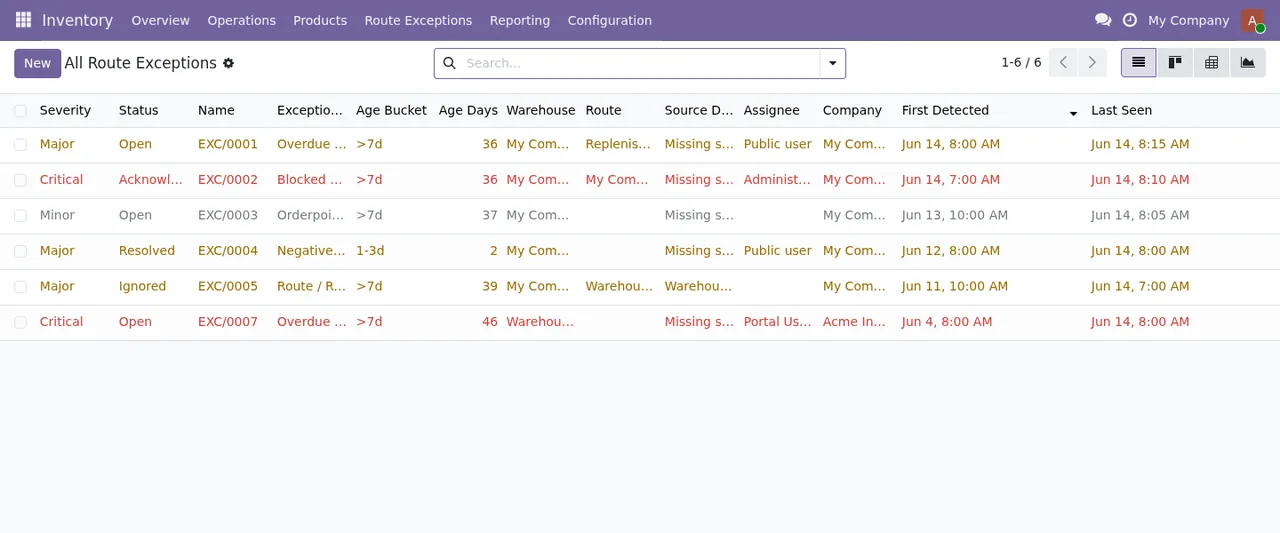
There is one exception she decides does not need follow-up, and she tries to ignore it without writing anything. The module stops the action with Ignoring an exception requires a reason. Marta adds the reason and can then ignore it.
On another exception she attempts a change and gets Cannot change route exception from %(old)s to %(new)s. The message shows where the change starts and where it was trying to go, and it means the module does not allow that particular step. Marta checks which status the exception is in before choosing a different change.
On a third one, an action that needs the source document ends in The source document no longer exists or is not accessible. The text gives two possibilities: the document no longer exists, or it is not accessible to her user. Marta asks the administrator whether the document still exists and whether her permissions cover it.
Step three: follow-up
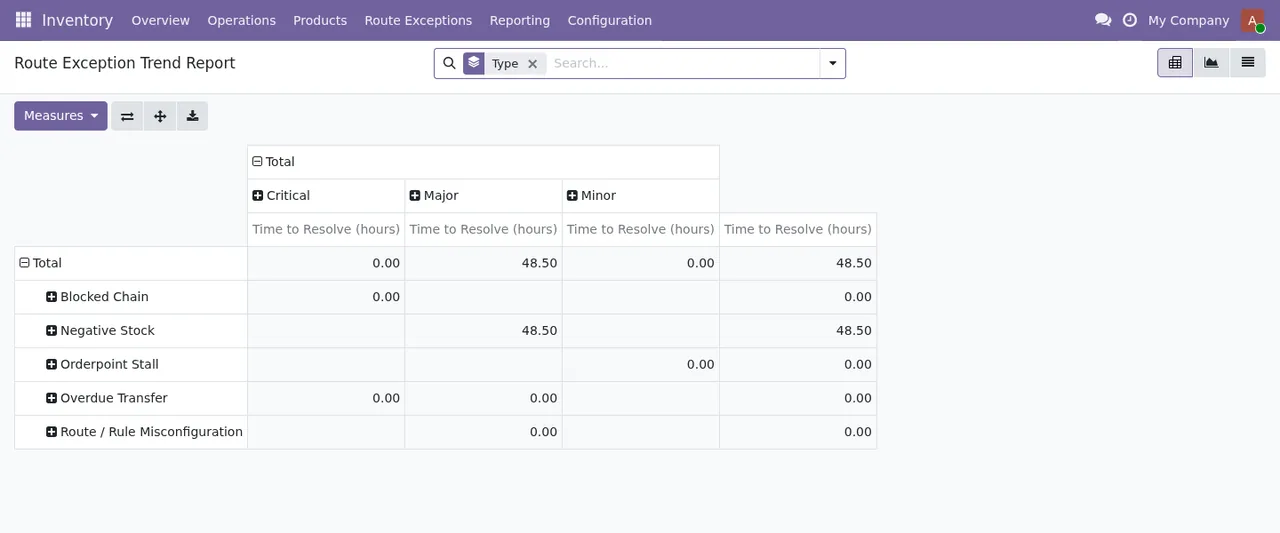
With no alerts outstanding, Marta reviews the dashboard and the report to see the open exceptions and the time to resolve by type.
The message that did not come up in the example
Marta never saw Source record id must be positive., but it is worth knowing. If an exception is created with a source record identifier that is not positive, this message appears. Check which value is being assigned to that identifier.
Summary of messages and what to do
| Message | What to do |
|---|---|
Day values cannot be negative. | Change the days value to one that is not negative |
Scan interval and retention must be at least 1. | Enter 1 or more for scan interval and retention |
Backorder threshold and lookback must be at least 1. | Enter 1 or more for threshold and lookback |
Age bucket boundaries must increase strictly. | Order the bucket boundaries from lowest to highest, with no repeats |
Major overdue threshold cannot exceed critical threshold. | Keep the Major threshold equal to or below Critical |
Ignoring an exception requires a reason. | Enter the reason before ignoring |
Cannot change route exception from %(old)s to %(new)s. | Check the current status and choose another change |
The source document no longer exists or is not accessible. | Check the document exists and that you have access |
Source record id must be positive. | Check which value is assigned to the source identifier |
What to take from the example
Most of the messages in the example came up during setup, and every one was solved by reading the text: it states the minimum, the order or the relationship between thresholds that the module expects. Before touching the settings, be clear on which values you will enter and how the buckets are ordered.
In day-to-day work, the messages stop two things: ignoring an exception without a reason and making a change the module does not allow. When the alert mentions the source document or its identifier, the problem lies in the document or in the identifier's value, not in the exception.
How FlexigoTech can help
FlexigoTech implements Odoo 17, 18, 19 and 20 and builds bespoke connectors and integrations. The module is published on Odoo Apps for 17, 18, 19 and 20, at €9 excluding VAT per Odoo version, one-off payment. You will find more on the module page and its Odoo Apps listing.
Keep reading
Checked in the module's source code (version 20.0) and the linked sources
Sources
- Module source code: flexigo_warehouse_route_exception_dashboard 20.0 (8c481836): models/route_exception.py
- Module source code: flexigo_warehouse_route_exception_dashboard 20.0 (8c481836): models/route_exception_config.py
- apps.odoo.com/apps/modules/20.0/flexigo_warehouse_route_exception_dashboard
- apps.odoo.com/apps/modules/17.0/flexigo_warehouse_route_exception_dashboard
- apps.odoo.com/apps/modules/18.0/flexigo_warehouse_route_exception_dashboard
- apps.odoo.com/apps/modules/19.0/flexigo_warehouse_route_exception_dashboard
- flexigotech.com/en/services.html