
 Español
 Català
 Deutsch
 Français
 Português
 Italiano
 Nederlands
 Polski



Warehouse Exceptions for Odoo
Every hour, delays, bottlenecks and negative stock in your Odoo become exceptions, and FlexigoTech Cloud's AI explains the cause.
€29/month14 days free, no card
Yearly and Pro
- Standard€29/month · €290/year
- Pro€58/month · €580/year
Reply within 1 working day; with Pro, 4 hours. FlexigoTech Cloud pricing
After you buy
- You pay for the license (€9 + VAT) and get an email with the link to download the module.
- You install it in your Odoo, on Odoo.sh or your own server.
- In Settings → FlexigoTech Cloud you accept the data list and press «Try free for 14 days». The trial doesn't ask for a card.
- To continue, you press «Subscribe», create your account on app.flexigotech.com and pay for the plan by card.
Every purchase includes 2 months of support: we help you install it, set it up and get it working, by email and video call.
- Tested on Odoo 17, 18, 19 and 20
- Odoo Learning Partner
 The cause, explained by AIReal Odoo screenshot
Get started in 3 steps
- Install the moduleFrom Odoo Apps or flexigotech.com, on Odoo.sh or your own server.
- Start the trialIn Settings › FlexigoTech Cloud, an administrator connects the database and starts the 14-day trial, no card needed. In Settings › Route Exceptions they read what the AI receives and press «Accept and switch on».
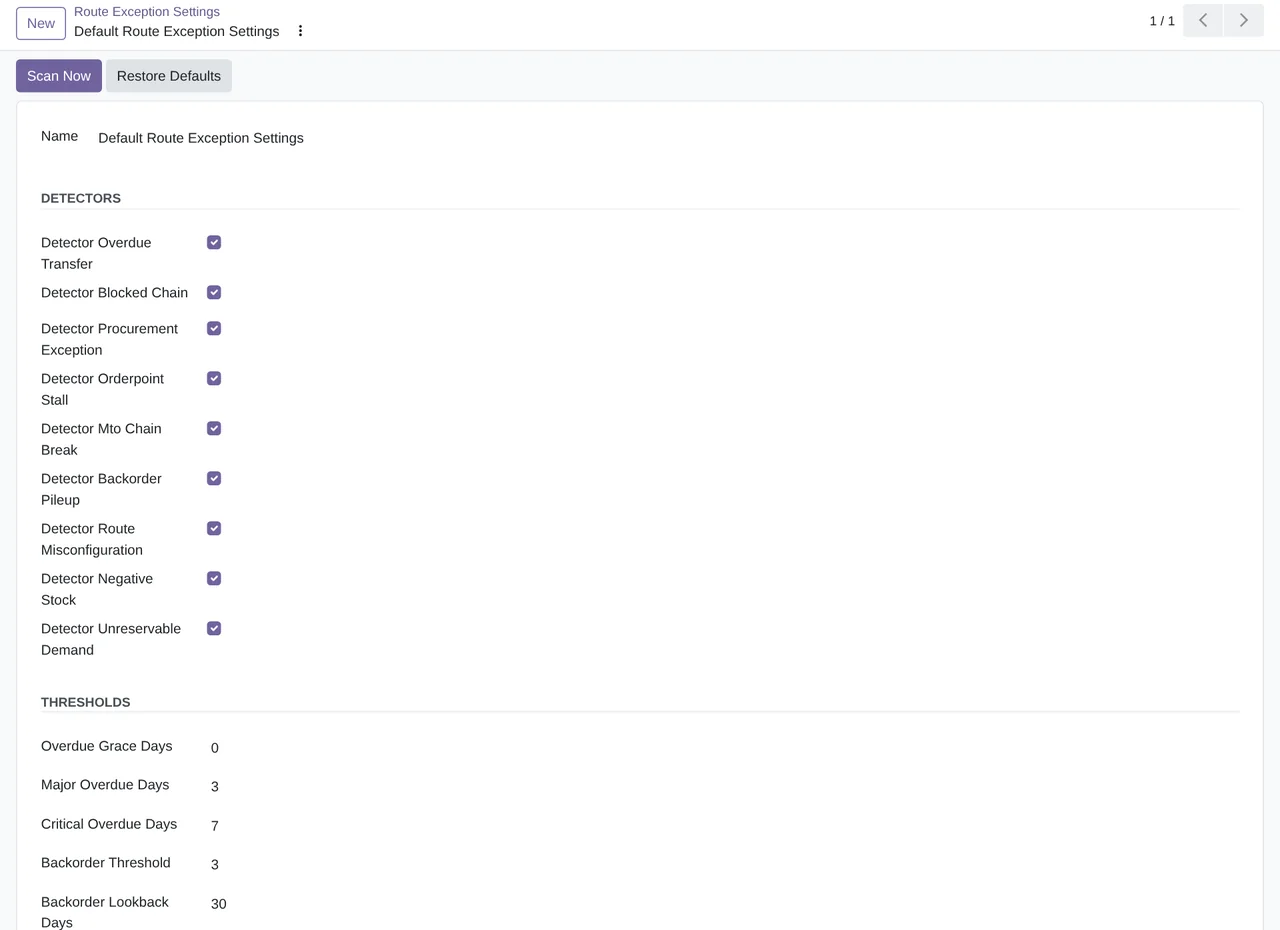
- Choose what to watchIn Route Exception Settings you switch detectors on, set the thresholds and press «Scan Now».
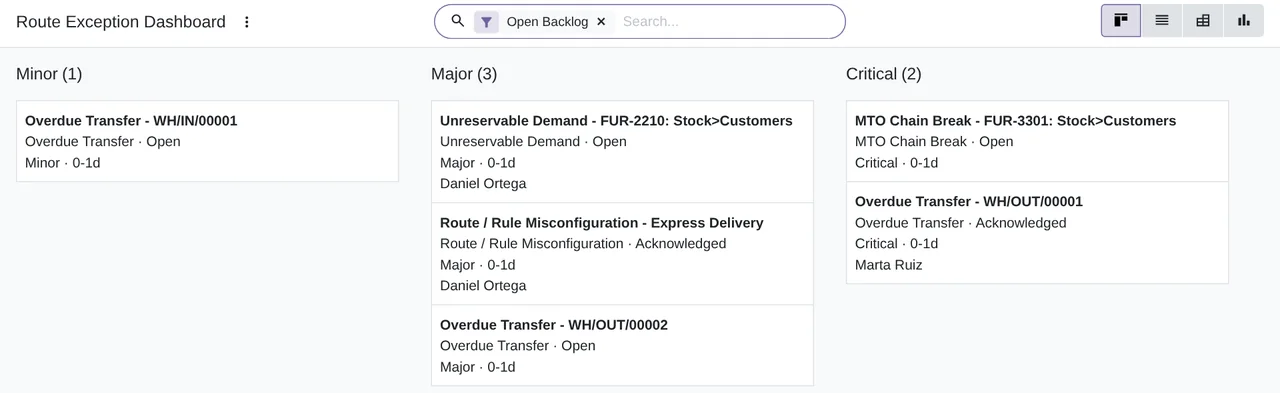
Work the dashboard Assign, acknowledge or resolve each exception, and ask for the AI diagnosis when you cannot see the cause.
What you need Odoo 17, 18, 19 or 20 with Inventory, on Odoo.sh or your own server, not Odoo Online. The FlexigoTech Cloud subscription or its 14-day trial. The module's screens are in English.
What it does
- Nine detectors, every hourOverdue transfers, stalled chains, rules that do not replenish, broken routes and negative stock.
- Every problem has an ownerAn exception with severity, age, status and history.
- The cause, explained by AIFlexigoTech Cloud suggests the likely cause and the steps; a person decides.
- What comes back is reopenedA resolved exception that is still wrong reopens on its own at the next scan.
How it works
Sent from your Odoo
- The exception you pick: type, severity, age and detector text
- The reference and state of its document, the route with its rules, the moves and the stock of those products
Back from FlexigoTech Cloud
- The likely cause and up to 8 steps to fix it
- What to check first, the confidence and the fix area

When someone presses «AI diagnosis», FlexigoTech Cloud reads the exception with an open-weights AI model on the servers we rent from Netcup in Germany, without passing it to any other AI provider, and returns the likely cause and the steps. It receives no customers or people, nothing is written to disk or used for training, and the AI never touches your stock.
Where you see it in Odoo
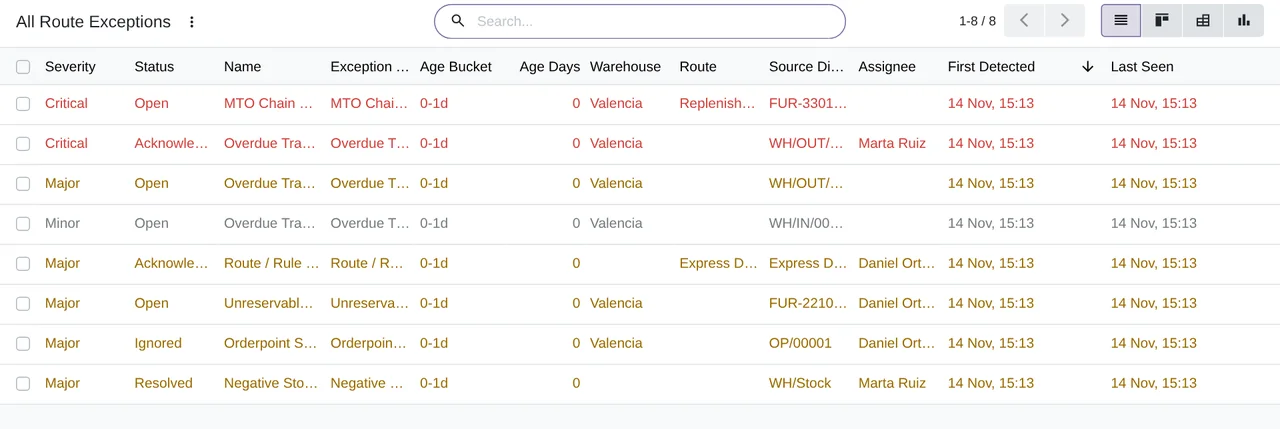
- Inventory › Route Exceptionsthe dashboard, all exceptions, trends, scan logs and settings
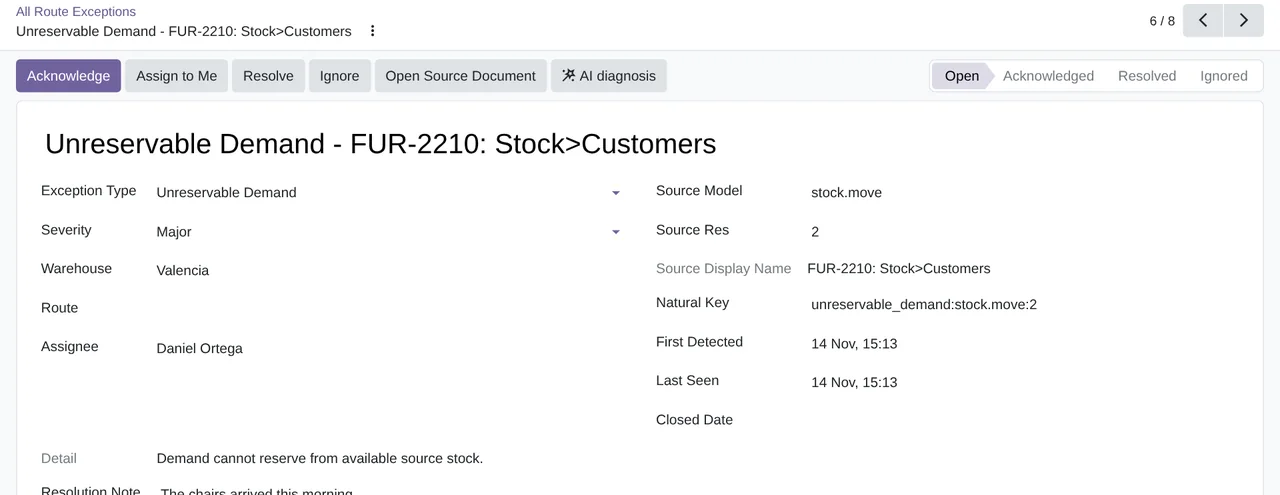
- Each exceptionits source document, the AI diagnosis and its history
- Settings › Route Exceptionswhat the AI receives and an administrator's permission
Inside Odoo
Real Odoo screenshots.

Price
Standard
€29a month + VAT
€290 a year + VAT 2 months free
- Hosted AI: 500 documents a month (Pro, 1,000)
- First response 1 working day
- Video call included for the first 2 months
Pro
€58a month + VAT
€580 a year + VAT 2 months free
- Everything in Standard
- First response 4 working hours
- Video call if needed
- + €9 for the module license, per Odoo version
- 14 days free, no card
- Cancel in two clicks
- Every purchase includes 2 months of support: we help you install it, set it up and get it working, by email and video call. While you're subscribed, support for the service stays included. Still integrating or testing? Extend your free trial.
If you cancel What the subscription gives stops. Your data stays in your Odoo.
- Support with response timesMonday to Friday, 9:00 to 18:00 (Barcelona), except public holidays.
- Maintenance and improvementsOdoo 17-20, on Odoo.sh or your own server
- You decideThe AI suggests the cause and the steps; a person reviews them before acting.
- Servers in GermanyNo customers or people, and nothing kept to train the AI
- Tested On Odoo 17, 18, 19 and 20. With 88 automated tests that simulate FlexigoTech Cloud. The screenshots on this page come from a real Odoo 20 running the published version; the diagnosis they show was answered by those tests' simulator.
- 4,563 lines of code · 14-11-2026
- 88 automated tests · 14-11-2026
- No reviews yet · leave yours
Frequently asked questions
What does it detect?
Nine kinds of problem: overdue transfers, chains stalled by a cancelled move, what the scheduler could not replenish, reordering rules with no supply, make-to-order demand with no source, piling backorders, misconfigured routes or rules, negative stock and demand that cannot reserve.
Does it change anything in my warehouse?
No. The module only reads transfers, moves, rules and stock. It never runs procurement or touches the stock, and neither does the AI.
What does the AI receive and where does it run?
Only when someone presses «AI diagnosis»: the exception, the reference and state of its document, the route with its rules, the moves and the stock of those products. Never customers, vendors or people. An open-weights model reads it on the servers we rent from Netcup in Germany, without going through any other AI provider, and nothing is kept to train it.
Who decides whether anything leaves my Odoo?
An administrator. Until they press «Accept and switch on» in Settings › Route Exceptions nothing is sent, and they can withdraw it at any time.
What if I resolve an exception and the problem is still there?
The next scan opens it again with its history and the reason. If it comes back after 7 days, it counts as a new incident.
Are the screens translated?
The module's screens are in English. Odoo's and FlexigoTech Cloud's menus show in your language, and the AI answers in the language of whoever asks for the diagnosis.
Does it work without FlexigoTech Cloud?
No. Warehouse Exceptions works with an active subscription: the AI diagnosis of each exception runs in FlexigoTech Cloud.
What happens after you press «Buy now»?
1. You pay for the license (€9 + VAT) and get an email with the link to download the module. 2. You install it in your Odoo, on Odoo.sh or your own server. 3. In Settings → FlexigoTech Cloud you accept the data list and press «Try free for 14 days». The trial doesn't ask for a card. 4. To continue, you press «Subscribe», create your account on app.flexigotech.com and pay for the plan by card.
Does it work on Odoo Online?
No: Odoo Online does not allow third-party modules. It is for Odoo 17, 18, 19 and 20, on Odoo.sh or on your own server.
Who installs it?
You do: you buy it on flexigotech.com or on Odoo Apps and install it in your Odoo. We help you install it and set it up, by email and video call, during the 2 months of included support. Custom development and data migration are quoted separately.
What support is included?
Every purchase includes 2 months of support: we help you install it, set it up and get it working, by email and video call. While you're subscribed, support for the service stays included.
What if the diagnosis does not arrive?
The exception stays in your list with its status and history; you cancel the diagnosis and ask for it again. And support has response times: first response within 1 working day; with Pro, within 4 working hours.
Where is my data?
In your Odoo: it stays there, and you can always view and export it. Only when someone asks for a diagnosis does the exception go to FlexigoTech Cloud, which reads it with an open-weights AI model on the servers we rent from Netcup in Germany. It receives no customers or people, goes to no other AI provider, and is neither written to disk nor used for training.
Not on Odoo yet?
We set up Odoo with inventory and warehouse, and stay on.
From €2,450 + VAT
Start with OdooMore about Warehouse Exceptions
What it does
A FlexigoTech module for Odoo 17, 18, 19 and 20, Community and Enterprise. It watches your Inventory and tells you what is wrong, who owns it and why.
- A scan every hourThe scheduled task checks the transfers, moves, reordering rules, routes and stock of each company every hour. «Scan Now» runs it right away.
- Nine detectors, each with its severityOverdue transfers, chains stalled by a cancelled move, what the scheduler could not replenish, reordering rules with no supply, make-to-order demand with no source, piling backorders, misconfigured routes, negative stock and demand that cannot reserve. Each detector can be switched off and has its thresholds.
- A dashboard and a list to work themEach problem is an exception with severity, age, assignee and a link to its document. You acknowledge, assign, resolve or ignore it with a reason and, if you like, an expiry date.
- Several at onceFrom the list's Action menu you acknowledge, resolve or reopen several exceptions in one go, and the module tells you how many it changed and how many it skipped.
- What comes back is reopened, with its historyIf you resolve an exception and the problem is still there, the next scan reopens it with the reason. After 7 days it counts as a new incident. What the scan no longer sees is resolved on its own.
- The cause, explained by AI«AI diagnosis» sends the exception to FlexigoTech Cloud and within minutes you get the likely cause, up to 8 steps and what to check first, in your language and marked as AI-generated.
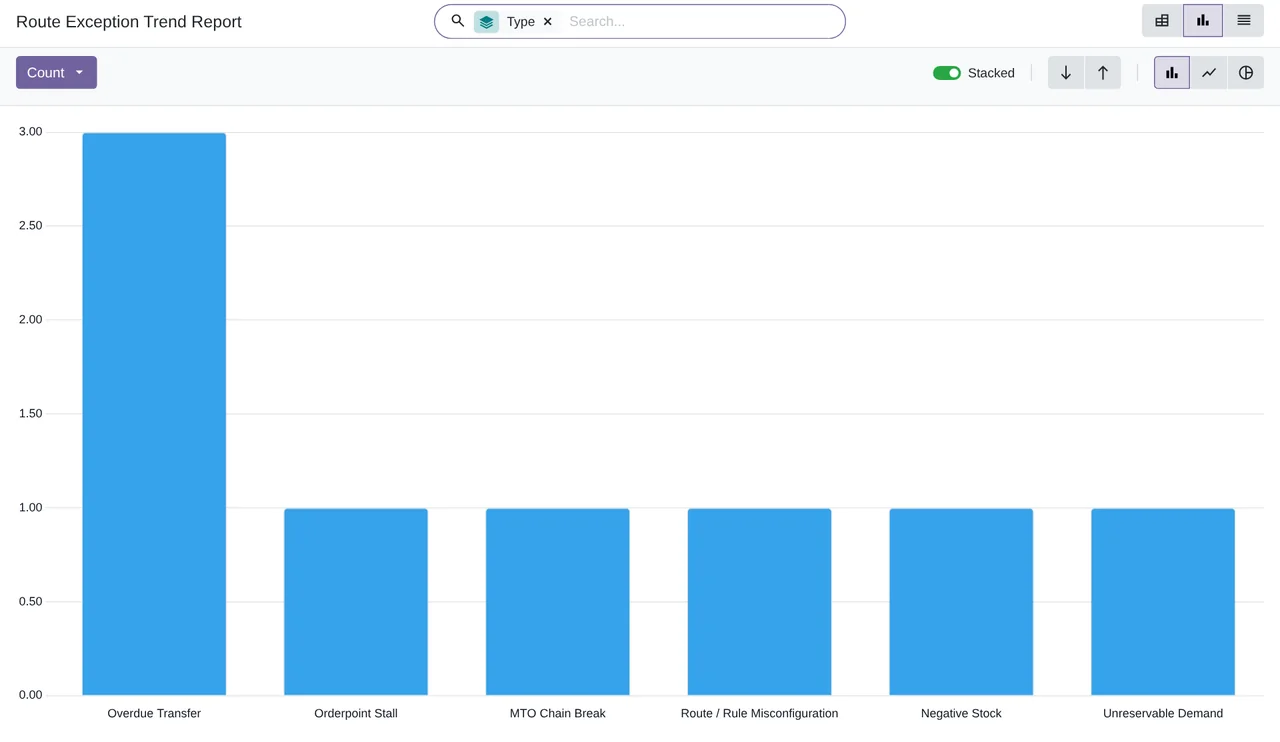
- Internal escalation and trendsA new critical exception creates an activity for the escalation user, never an outside e-mail. The trend report counts exceptions by type, severity and age, archived ones included.
What it does not do
- It does not touch your warehouseIt only reads stock documents. It never runs procurement or changes the stock, and neither does the AI.
- The AI does not decide for youIt suggests the cause and the steps; a person reviews them before acting.
- It sends nothing without permissionUntil an administrator accepts what the AI receives in Settings › Route Exceptions, nothing leaves your Odoo for it.
- The subscription is not includedFlexigoTech Cloud is paid separately, monthly or yearly, with a 14-day trial.
What it looks like inside Odoo
Real screens of the module installed on Odoo 20, with the data of a sample furniture maker. The module's screens are in English.
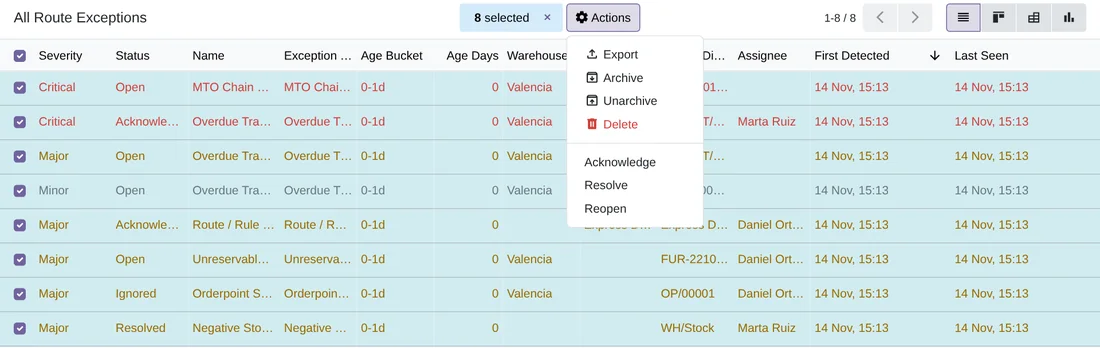
Several at once
Eight exceptions selected and the Action menu with Acknowledge, Resolve and Reopen.
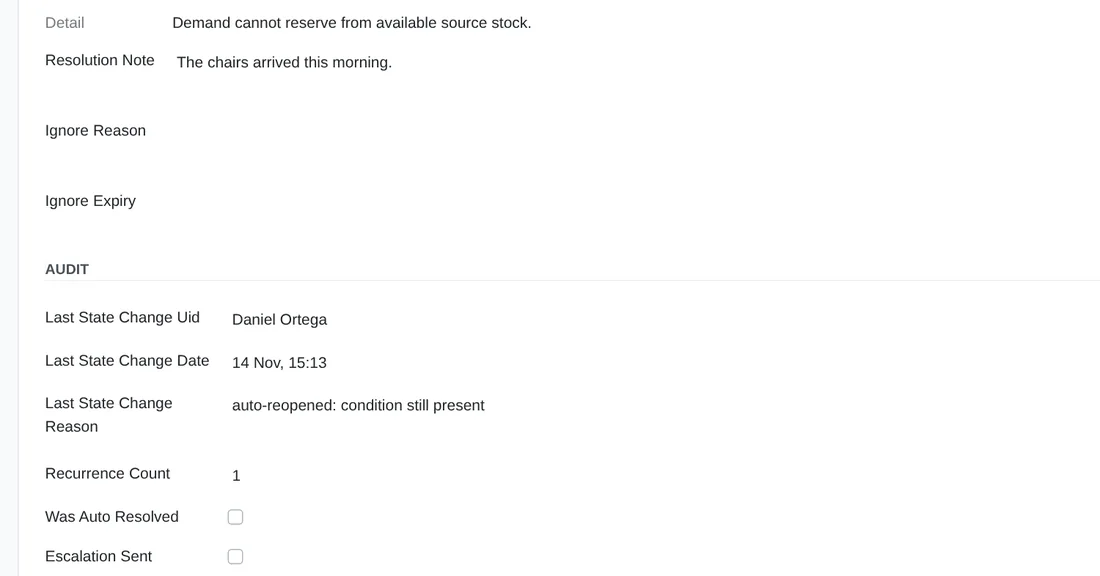
Reopened by the scan
The note of whoever resolved it, the reason «auto-reopened: condition still present» and how many times it came back.
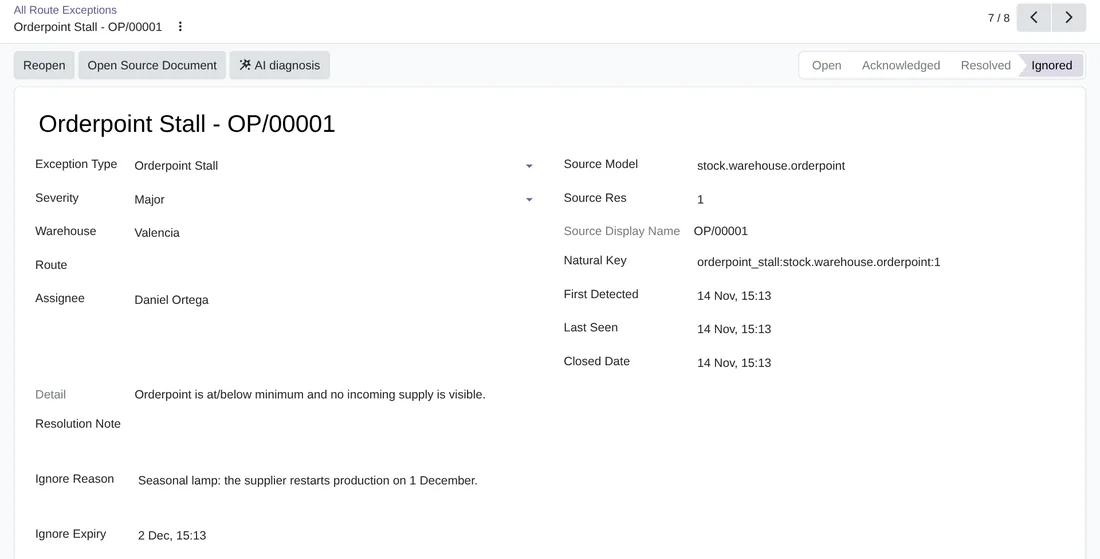
Ignored, with a reason and a date
A reordering rule ignored until the supplier makes the product again; when it expires, if nothing changed, it comes back.
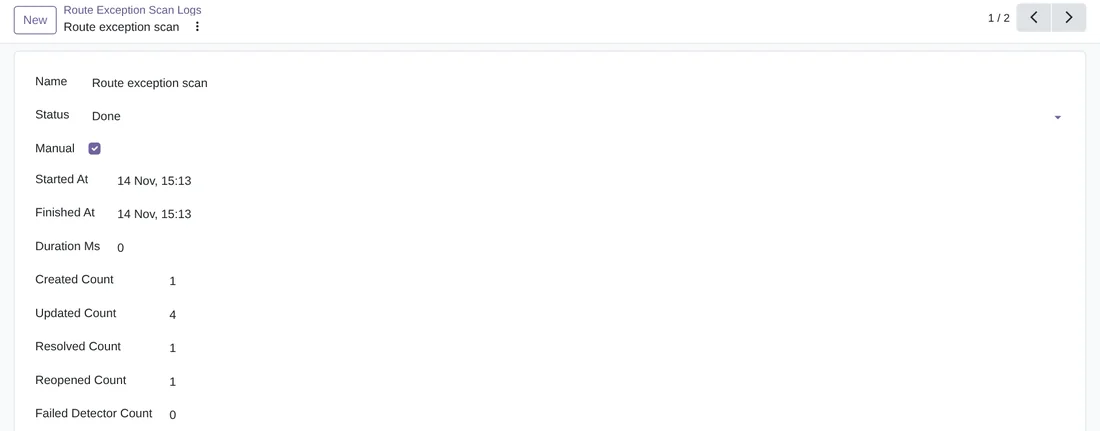
Every scan, logged
What one run created, updated, resolved and reopened, and the detectors that failed.
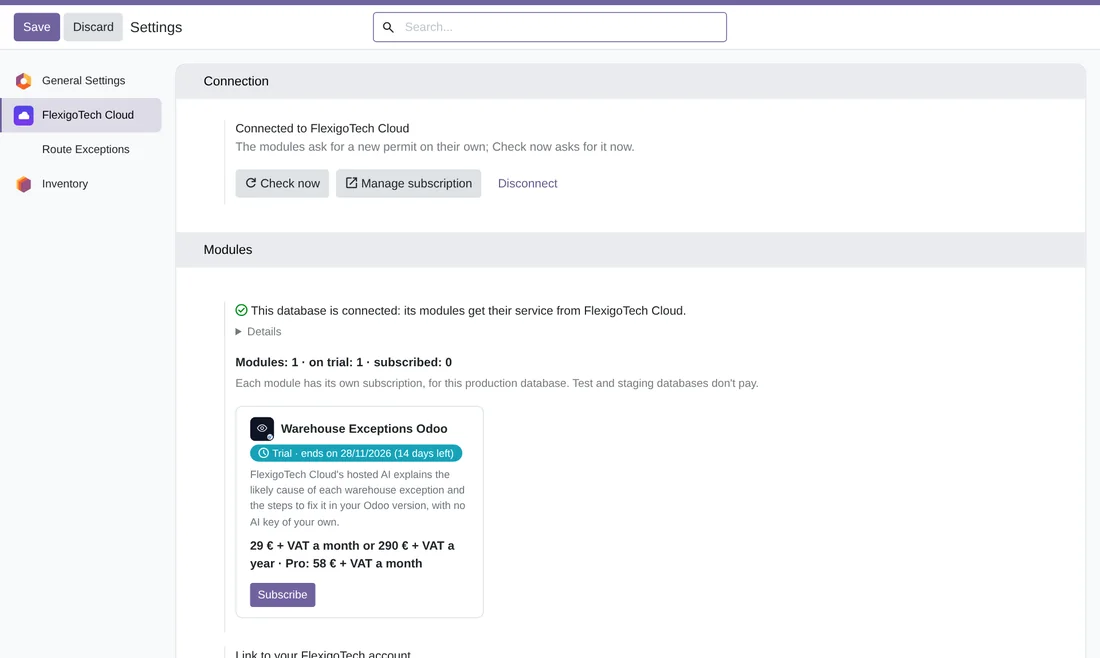
Warehouse Exceptions in FlexigoTech Cloud
Settings › FlexigoTech Cloud: the database connected and the module in its 14-day trial.
Technical sheet
Questions before you buy? Talk to the engineer.
We tell you whether Warehouse Exceptions fits your warehouse and your Odoo routes, and we help you set it up.
Related
Warehouse Exceptions is a FlexigoTech module for Odoo.
Flexigo Warehouse Route Exception Dashboard guides
2 practical guides on this module: FAQs and use cases.