

 Español
 Català
 Deutsch
 Français
 Português
 Italiano
 Nederlands
 Polski
Where it lives: the Settings › Authentication menu
The Odoo Apps listing introduces the module with the heading SSO and two-factor login for Odoo Community. Once installed, everything sits under Settings › Authentication. Below it you will find seven entries, grouped here by topic. Names are given exactly as they appear on screen.
Identity provider connection
IdP Connections- Path
Settings › Authentication › IdP Connections. The list of connections to identity providers (IdPs). The screenshot below shows two records, Google Workspace OIDC and Microsoft Entra ID SAML, with columns for protocol, company, active, JIT provisioning and fallback mode.
Provisioning Log- Path
Settings › Authentication › Provisioning Log. A dedicated log for provisioning, kept separate from the authentication event log.
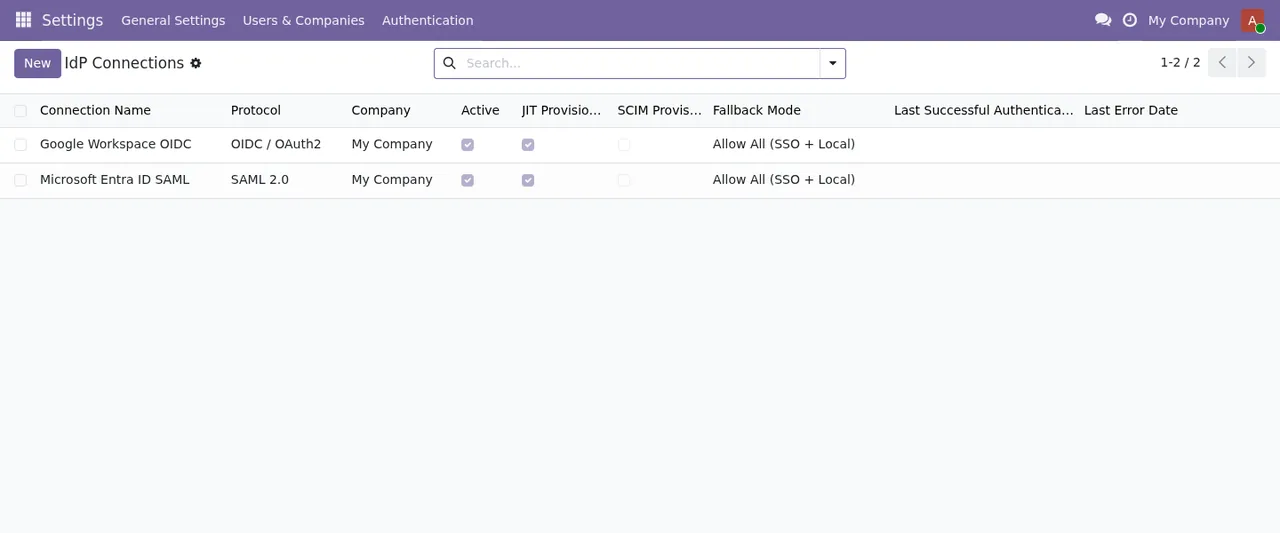
IdP Connections list with two records and its protocol, company, active, JIT provisioning and fallback mode columns.Two-factor authentication
MFA Policies- Path
Settings › Authentication › MFA Policies. Where the multi-factor (MFA) policies live.
MFA Coverage Report- Path
Settings › Authentication › MFA Coverage Report. In the animated walkthrough it appears as a list with two policies, Admin MFA Enforcement and Regular User MFA, showing company, accepted factor types, grace period and active status.
Control and auditing
Auth Event Log- Path
Settings › Authentication › Auth Event Log. The module's authentication event log.
Active Sessions- Path
Settings › Authentication › Active Sessions. A list of sessions with columns for start, user, IdP connection, authentication method, IP and last activity, plus aTerminatebutton.
Settings- Path
Settings › Authentication › Settings. The module's own settings entry, inside the same menu.
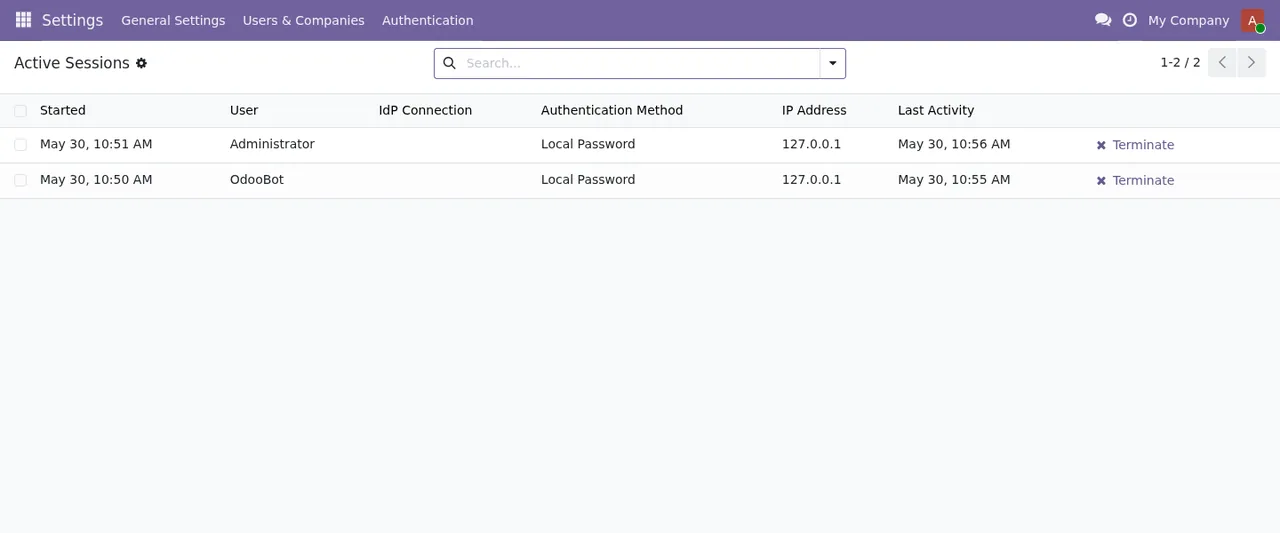
MFA Coverage Report with two MFA policies.The records underneath: the module's models
If you are a consultant, or you are about to touch access rights, reports or imports, it helps to know the technical model names. Besides flexigo.active.session (description FlexigoTech Active Session), flexigo.event.log (FlexigoTech Authentication Event Log) and flexigo.fido2.credential (FlexigoTech FIDO2 Credential), these are the ones worth recognising:
Identity models
flexigo.idp.connection- Description
FlexigoTech IdP Connection. The model for identity provider connections.
flexigo.idp.attribute.mapping- Description
FlexigoTech IdP Attribute Mapping. A separate model for IdP attribute mapping.
flexigo.idp.group.mapping- Description
FlexigoTech IdP Group Mapping. Another separate model, this one for IdP group mapping.
flexigo.idp.user.binding- Description
FlexigoTech IdP User Binding. The model holding the binding between IdP and user.
Access control models
flexigo.mfa.exemption- Description
FlexigoTech MFA Exemption. The model for MFA exemptions.
flexigo.access.recheck- Description
FlexigoTech access check after a write. Going by its description, an access check after a write. Six models inherit it:flexigo.active.session,flexigo.fido2.credential,flexigo.idp.attribute.mapping,flexigo.idp.group.mapping,flexigo.idp.user.bindingandflexigo.mfa.exemption.
If you build on top of the module, bear that inheritance in mind: the six models listed share flexigo.access.recheck as a base.
What runs on its own: the scheduled actions
The module comes with nine scheduled actions, all active. Every one carries the Flexigo Auth: prefix, so you can search for them by that text. From most to least frequent:
Flexigo Auth: Failed-Login Pattern Scan, every 5 minutes.Flexigo Auth: Concurrent Session Cleanup, every 15 minutes.Flexigo Auth: IdP Metadata Auto-Refresh, every 24 hours.Flexigo Auth: Audit Log Anonymisation, every day.Flexigo Auth: Certificate Expiry Check, every day.Flexigo Auth: MFA Grace-Period Enforcement, every day.Flexigo Auth: Recovery Code Batch Cleanup, every 7 days.Flexigo Auth: MFA Coverage Monthly Snapshot, every month.Flexigo Auth: Annual Security Statistics, every 12 months.
The first two run most often; the rest range from daily to yearly. If you review activity on your database, these are the names you need to recognise.
The pieces that touch a single login
With what the screens show, you can follow a login across menus. A connection lives in IdP Connections (model flexigo.idp.connection), with its attribute and group mappings and its user bindings in their own models. The Active Sessions list shows, for each session, the IdP connection and the authentication method, so from there you can see which connection sits behind each session. Two-factor policies are in MFA Policies, and the MFA Coverage Report shows them with their grace period and active status. Events and provisioning end up in their two logs, Auth Event Log and Provisioning Log.
The fields to fill in and the states each record goes through are covered in the module's setup guide. If a message stops you along the way, check the errors and warnings with their exact text.
What to know about the service and versions
The module is published on Odoo Apps for 17.0, 18.0, 19.0 and 20.0, at €9 per Odoo version as a one-off payment, excluding VAT, on all four. The listing warns that some features use a paid external service: that is the FlexigoTech Cloud local service, at €29/month or €290/year excluding VAT (Pro: €58/month or €580/year). Without a subscription, or with the service suspended, whatever the subscription provides stops; your data stays in your Odoo. With the subscription, the module for new Odoo versions is included if you bought it on flexigotech.com; on the Odoo App Store, each version is bought there. The listing also has its own Privacy policy section.
How FlexigoTech can help
At FlexigoTech we implement Odoo 17, 18, 19 and 20 and build bespoke connectors and integrations, so we can help you get this menu configured or adapt the module to your case. You will find the details on the module page and on its Odoo Apps listing. If you are still unsure whether it fits, start with what it covers and what you need before installing it.
Keep reading
Checked in the module's source code (version 20.0) and the linked sources
Sources
- Module source code: flexigo_2fa_sso_saml_oidc_modern_bundle_for_odoo_commun paquete-BO/20.0 (249f0717): views/menus.xml
- Module source code: flexigo_2fa_sso_saml_oidc_modern_bundle_for_odoo_commun paquete-BO/20.0 (249f0717): data/ir_cron_data.xml
- Module source code: flexigo_2fa_sso_saml_oidc_modern_bundle_for_odoo_commun paquete-BO/20.0 (249f0717): static/description/index.html
- Module source code: flexigo_2fa_sso_saml_oidc_modern_bundle_for_odoo_commun paquete-BO/20.0 (249f0717): models/access_recheck.py
- Module source code: flexigo_2fa_sso_saml_oidc_modern_bundle_for_odoo_commun paquete-BO/20.0 (249f0717): models/auth_active_session.py
- Module source code: flexigo_2fa_sso_saml_oidc_modern_bundle_for_odoo_commun paquete-BO/20.0 (249f0717): models/auth_event_log.py
- Module source code: flexigo_2fa_sso_saml_oidc_modern_bundle_for_odoo_commun paquete-BO/20.0 (249f0717): models/auth_fido2_credential.py
- Module source code: flexigo_2fa_sso_saml_oidc_modern_bundle_for_odoo_commun paquete-BO/20.0 (249f0717): models/auth_idp_attribute_mapping.py
- Module source code: flexigo_2fa_sso_saml_oidc_modern_bundle_for_odoo_commun paquete-BO/20.0 (249f0717): models/auth_idp_connection.py
- Module source code: flexigo_2fa_sso_saml_oidc_modern_bundle_for_odoo_commun paquete-BO/20.0 (249f0717): models/auth_idp_group_mapping.py
- Module source code: flexigo_2fa_sso_saml_oidc_modern_bundle_for_odoo_commun paquete-BO/20.0 (249f0717): models/auth_idp_user_binding.py
- Module source code: flexigo_2fa_sso_saml_oidc_modern_bundle_for_odoo_commun paquete-BO/20.0 (249f0717): models/auth_mfa_exemption.py
- apps.odoo.com/apps/modules/20.0/flexigo_2fa_sso_saml_oidc_modern_bundle_for_odoo_commun
- apps.odoo.com/apps/modules/17.0/flexigo_2fa_sso_saml_oidc_modern_bundle_for_odoo_commun
- apps.odoo.com/apps/modules/18.0/flexigo_2fa_sso_saml_oidc_modern_bundle_for_odoo_commun
- apps.odoo.com/apps/modules/19.0/flexigo_2fa_sso_saml_oidc_modern_bundle_for_odoo_commun
- flexigotech.com/en/services.html
- flexigotech.com/precios.html