

 Español
 Català
 Deutsch
 Français
 Português
 Italiano
 Nederlands
 Polski
Where India GST Compliance sits inside Odoo
The Odoo Apps listing introduces the module with the heading India GST returns and tax credits in Odoo. Inside your database, nearly everything hangs off the Invoicing app: eight new entries in that menu and one more, GST Compliance Dashboard, which sits under the parent menu Invoicing › Reporting.
This glossary walks through those menus and the data models the module defines, with their technical name and label exactly as they appear. Use it to find your way when you open a list, review access rights per model or talk to whoever supports you. What to fill in on each record and what to check in the first week is covered in getting India GST Compliance up and running.
The Invoicing menus, one by one
Tax Calculation- Menu at
Invoicing › Tax Calculation. Among the module models isgst.tax.calculation, labelledGST Tax Calculation.
Input Tax Credit- Menu at
Invoicing › Input Tax Credit. The module defines the modelgst.input.tax.credit, labelledGST Input Tax Credit Management; the list in the screenshot below appears asInput Tax Credit Management.
GST Return Preparation- Menu at
Invoicing › GST Return Preparation. Among the module models aregst.return.preparation(GST Return Preparation) andgst.return.preparation.line(GST Return Preparation Line).
GST Filing- Menu at
Invoicing › GST Filing. Among the models isgst.filing.log, labelledGST Filing Log.
GST Reports- Menu at
Invoicing › GST Reports. Among the module models are four whose labels refer to reports:gst.report(GST Report),tax.summary.report(Tax Summary Report),supplier.creditability.report(Supplier Creditability Report) andcompliance.status.report(Compliance Status Report).
GST Compliance Dashboard- Entry with the path
Invoicing › Reporting › GST Compliance Dashboard. Two models share that label:gst.compliance.dashboardandgst.dashboard.
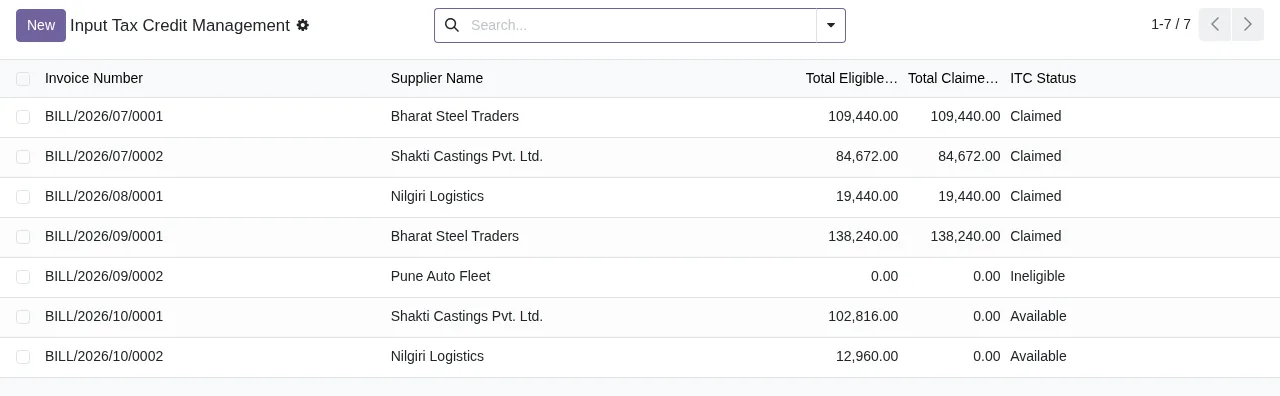
Claimed, Ineligible, Available), with the New button and the search bar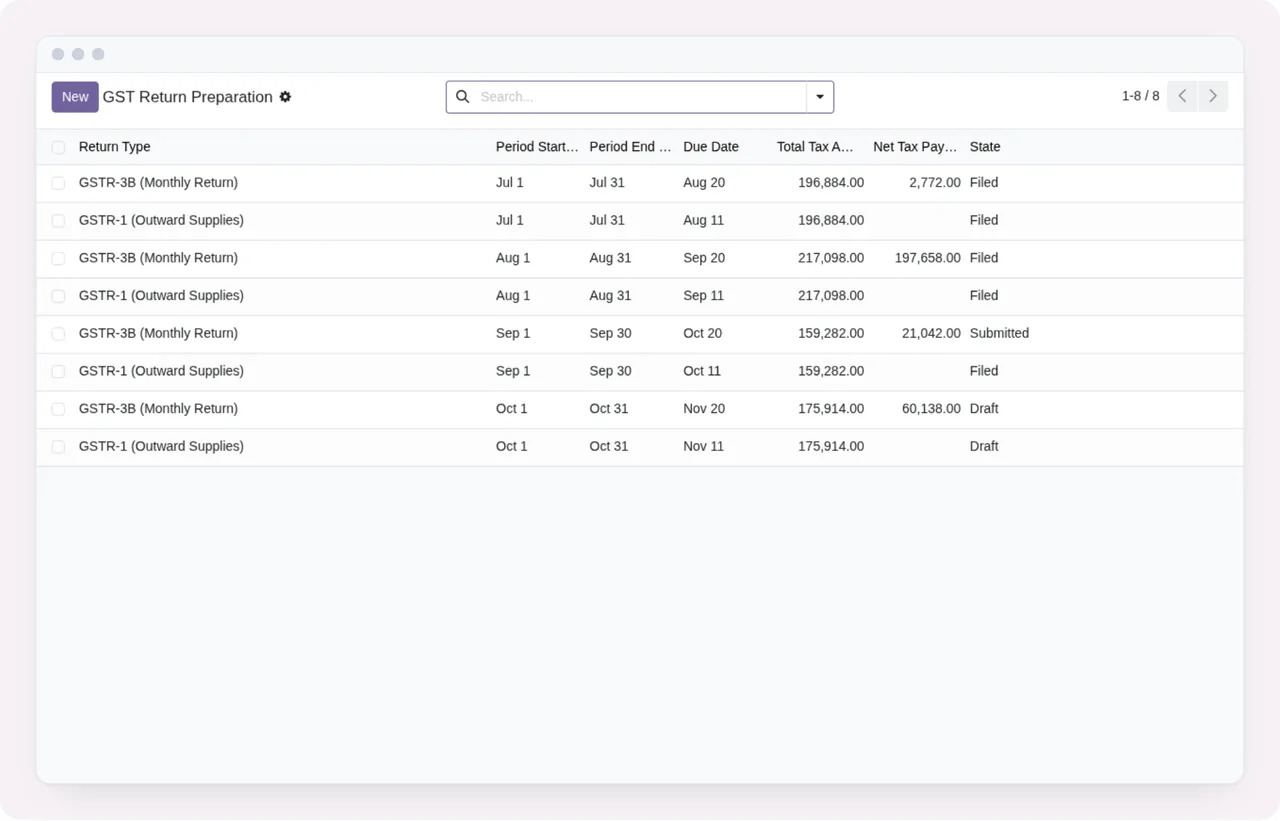
Filed, Submitted and DraftAlerts, audit and e-invoicing
Compliance Alerts- Menu at
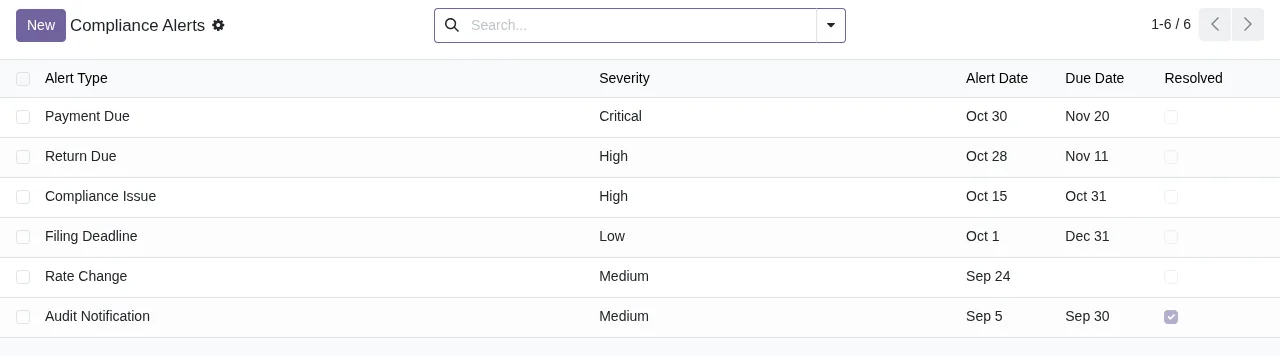
Invoicing › Compliance Alerts. The code has two models labelledGST Compliance Alert:compliance.alertandgst.compliance.alert.
Audit Support- Menu at
Invoicing › Audit Support. Among the module models aregst.audit.support(GST Audit Support) andgst.audit.document(GST Audit Document).
GST Audit Trail Log- Label of the model
gst.audit.trail.
e-Invoice Submission to GSTN IRIS- Label of the model
e.invoice.submission. Its label refers to submitting e-invoices to GSTN IRIS.
Training and data protection
Training- Menu at
Invoicing › Training. Among the module models are five for training:compliance.training.material(Compliance Training Material),compliance.training.quiz(Compliance Training Quiz),compliance.training.question(Compliance Training Question),compliance.training.answer(Compliance Training Answer) andcompliance.training.result(Compliance Training Result).
GST Data Security- Label of the model
gst.data.security.
GDPR Data Access RequestandGDPR Data Erasure Request- Labels of the models
gdpr.access.requestandgdpr.erasure.request.
Encryption Vault- Label of the model
encryption.vault.
What you see as a record moves along
What you can check at a glance are the status columns in the lists. In the input tax credit list shown in the screenshots, each supplier invoice carries an ITC status (Claimed, Ineligible or Available); in the return preparation list, each return shows as Filed, Submitted or Draft. In the alerts list, the Resolved column shows which ones are resolved.
Before assuming a workflow between statuses, try it in a test database on your Odoo version.
Versions, price and the local service
The module is published on Odoo Apps for Odoo 17, 18, 19 and 20, at €9 per Odoo version, one-off payment, excluding VAT. It is a module with a local FlexigoTech Cloud service, which costs €29/month or €290/year excluding VAT (Pro: €58/month or €580/year).
Without a subscription, or with the service suspended, whatever the subscription provides stops, but your data stays in your Odoo. With the subscription, the module for new Odoo versions is included if you bought it on flexigotech.com; if you buy it from the Odoo Apps listing, each Odoo version is bought there.
How FlexigoTech can help
FlexigoTech implements Odoo 17, 18, 19 and 20 and builds bespoke connectors and integrations. If you are adding India GST Compliance alongside your current invoicing, we can go through with you which menus you will use, which models need access rights for each team and what is missing in your case. You will find the module details on its flexigotech.com page.
Keep reading
Checked in the module's source code (version 20.0) and the linked sources
Sources
- Module source code: flexigo_india_gst_compliance_suite 20.0 (b766f923): views/compliance_alerts_views.xml
- Module source code: flexigo_india_gst_compliance_suite 20.0 (b766f923): views/gst_audit_support_views.xml
- Module source code: flexigo_india_gst_compliance_suite 20.0 (b766f923): views/gst_compliance_training_views.xml
- Module source code: flexigo_india_gst_compliance_suite 20.0 (b766f923): views/gst_dashboard_views.xml
- Module source code: flexigo_india_gst_compliance_suite 20.0 (b766f923): views/gst_filing_integration_views.xml
- Module source code: flexigo_india_gst_compliance_suite 20.0 (b766f923): views/gst_reporting_views.xml
- Module source code: flexigo_india_gst_compliance_suite 20.0 (b766f923): views/gst_return_preparation_views.xml
- Module source code: flexigo_india_gst_compliance_suite 20.0 (b766f923): views/input_tax_credit_management_views.xml
- Module source code: flexigo_india_gst_compliance_suite 20.0 (b766f923): views/tax_calculation_views.xml
- Module source code: flexigo_india_gst_compliance_suite 20.0 (b766f923): static/description/index.html
- Module source code: flexigo_india_gst_compliance_suite 20.0 (b766f923): models/audit_trail_log.py
- Module source code: flexigo_india_gst_compliance_suite 20.0 (b766f923): models/compliance_alerts.py
- Module source code: flexigo_india_gst_compliance_suite 20.0 (b766f923): models/gst_audit_support.py
- Module source code: flexigo_india_gst_compliance_suite 20.0 (b766f923): models/gst_compliance_alert.py
- Module source code: flexigo_india_gst_compliance_suite 20.0 (b766f923): models/gst_compliance_dashboard.py
- Module source code: flexigo_india_gst_compliance_suite 20.0 (b766f923): models/gst_compliance_training.py
- Module source code: flexigo_india_gst_compliance_suite 20.0 (b766f923): models/gst_dashboard.py
- Module source code: flexigo_india_gst_compliance_suite 20.0 (b766f923): models/gst_filing_integration.py
- Module source code: flexigo_india_gst_compliance_suite 20.0 (b766f923): models/gst_input_tax_credit.py
- Module source code: flexigo_india_gst_compliance_suite 20.0 (b766f923): models/gst_report.py
- Module source code: flexigo_india_gst_compliance_suite 20.0 (b766f923): models/gst_reporting.py
- Module source code: flexigo_india_gst_compliance_suite 20.0 (b766f923): models/gst_return_preparation.py
- Module source code: flexigo_india_gst_compliance_suite 20.0 (b766f923): models/gst_security.py
- Module source code: flexigo_india_gst_compliance_suite 20.0 (b766f923): models/gst_tax_calculation.py
- apps.odoo.com/apps/modules/20.0/flexigo_india_gst_compliance_suite
- apps.odoo.com/apps/modules/17.0/flexigo_india_gst_compliance_suite
- apps.odoo.com/apps/modules/18.0/flexigo_india_gst_compliance_suite
- apps.odoo.com/apps/modules/19.0/flexigo_india_gst_compliance_suite
- flexigotech.com/en/services.html
- flexigotech.com/precios.html