

 Español
 Català
 Deutsch
 Français
 Português
 Italiano
 Nederlands
 Polski
What the module adds to the customer invoice
Everything in this article happens on the customer invoice form. The questions follow the order in which you come across things: first the line, then where its amount comes from and, finally, what depends on the cloud service.
What does EPR contribution on invoices do on an invoice?
It moves the packaging contribution onto its own invoice line. The module listing sums it up as «Your packaging contribution as its own invoice line». That line is flagged by the epr_contribution field, labelled Packaging contribution line, and the contribution amount sits in the monetary field epr_contribution_amount, labelled Packaging contribution. On the invoice you see the product lines on one side and the contribution line on the other.
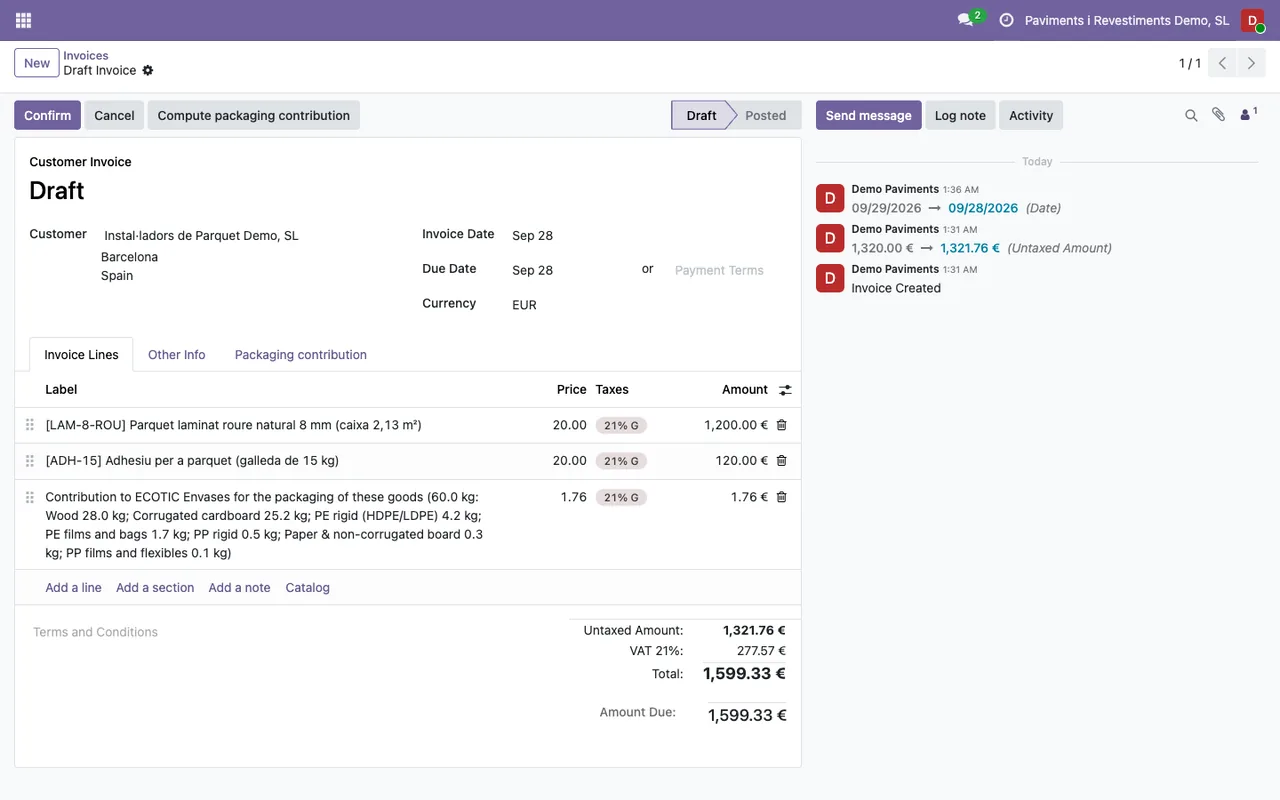
Where can I see what the line amount is made of?
In the text field epr_contribution_detail, labelled Contribution by product. According to its description, it records what each product adds to the contribution line and also what the shipment packaging of the deliveries adds. If someone asks about the amount on the line, the breakdown is in that field, on the invoice itself.
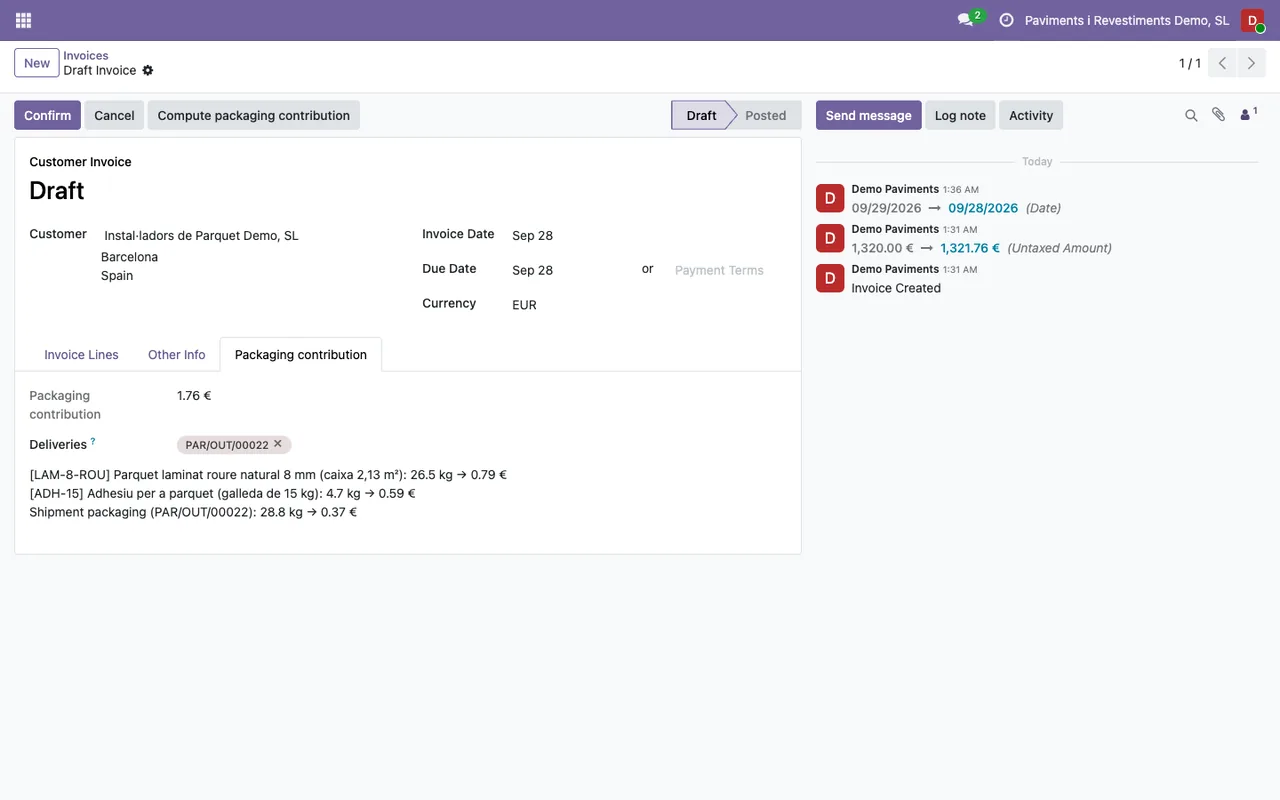
How do pallets, film and corners get included?
Through the deliveries. The epr_picking_ids field, labelled Deliveries, holds the deliveries whose shipment packaging (pallets, film, corners) is charged on that invoice. It is a Many2many field, so an invoice can have more than one delivery linked to it. That shipment packaging is the part of the Contribution by product breakdown that does not belong to the products.
Tariff, registration and credit notes
Which tariff is an invoice's contribution priced with?
The one stored in the epr_fee_schedule_id field, labelled Contribution tariff. The field description says it is the fee schedule the contribution of that invoice was priced with, and that its credit notes give back at the same rates. Put another way: a credit note for an invoice uses the tariff recorded on that invoice.
Can I show the contribution without charging it?
Yes. That is what the epr_contribution_note field is for, labelled Contribution shown as a note. When it is ticked, the contribution is written at the end of the invoice lines and not charged. Credit notes for that invoice do the same: they also show it as a note.
What is the Contribution registration field?
It is the epr_registration_id field, a Many2one link to the contribution registration the invoice carries. The animated walkthrough below ends on exactly that kind of registration form.
What runs on FlexigoTech Cloud and what stays in your Odoo
Which part of the module depends on FlexigoTech Cloud?
According to the listing, two things: calculating the EPR contribution of each invoice and keeping scheme fee schedules up to date. Both require a FlexigoTech Cloud subscription. The local service costs €29 a month or €290 a year excluding VAT (Pro: €58 a month or €580 a year).
What happens if I have no subscription or the service is suspended?
What the subscription provides stops, which for this module means the per-invoice contribution calculation and the tariff updates. Your data stays in your Odoo.
How FlexigoTech can help
EPR contribution on invoices is published on Odoo Apps for Odoo 17, 18, 19 and 20, at €18 per Odoo version, a one-off payment excluding VAT, according to each version's listing. If you buy it on flexigotech.com and have the subscription, the module for new Odoo versions is included; on the Odoo App Store, each Odoo version is bought there.
If you are rolling out Odoo or want the packaging contribution to reach another part of your invoicing process, FlexigoTech implements Odoo 17, 18, 19 and 20 and builds bespoke connectors and integrations. You will find more about the module on its page on flexigotech.com.
Keep reading
Checked in the module's source code (version 20.0) and the linked sources
Sources
- Module source code: flexigo_epr_invoice_contribution av20epr/20.0 (aff96651): static/description/index.html
- Module source code: flexigo_epr_invoice_contribution av20epr/20.0 (aff96651): models/account_move.py
- apps.odoo.com/apps/modules/20.0/flexigo_epr_invoice_contribution
- apps.odoo.com/apps/modules/17.0/flexigo_epr_invoice_contribution
- apps.odoo.com/apps/modules/18.0/flexigo_epr_invoice_contribution
- apps.odoo.com/apps/modules/19.0/flexigo_epr_invoice_contribution
- flexigotech.com/en/services.html
- flexigotech.com/precios.html