

 Español
 Català
 Deutsch
 Français
 Português
 Italiano
 Nederlands
 Polski
What it adds to the Odoo menu
Which menus appear when you install CPQ Guided Selling Assistant
Everything hangs off a root CPQ menu. At the top level you have CPQ › Configurations and CPQ › Templates. Below them sit three groups: CPQ › Configuration, CPQ › Tools and CPQ › Audit. We quote the names exactly as they appear in the module so you can find them straight away. The Odoo Apps listing introduces the app with the heading Guided quotes for complex, configurable products and has a How it works section worth reading before you install.
What is inside CPQ › Configuration
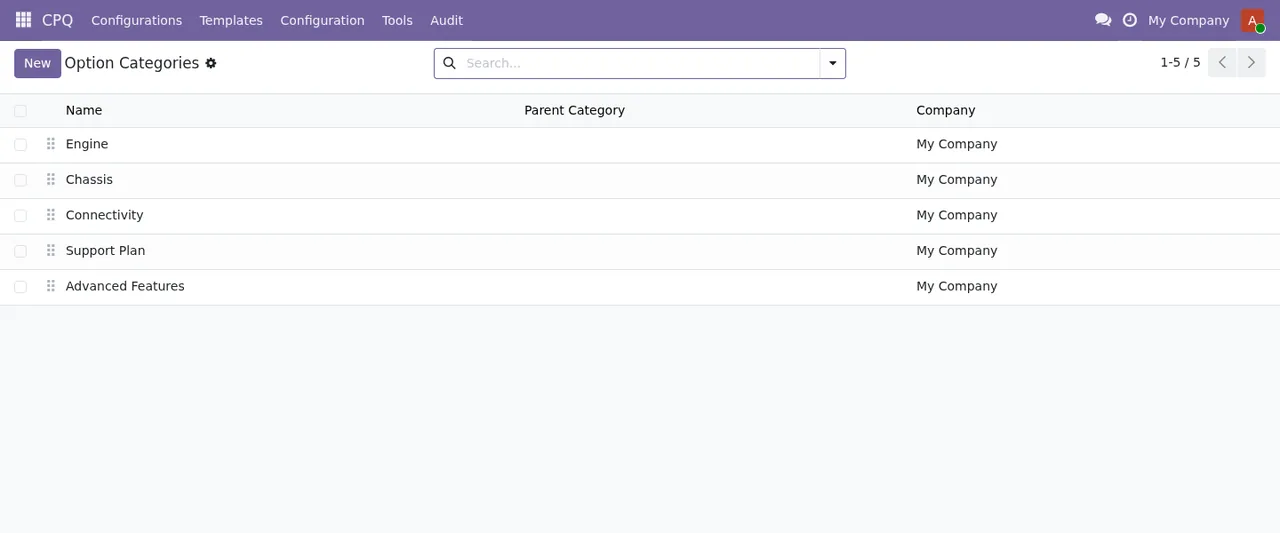
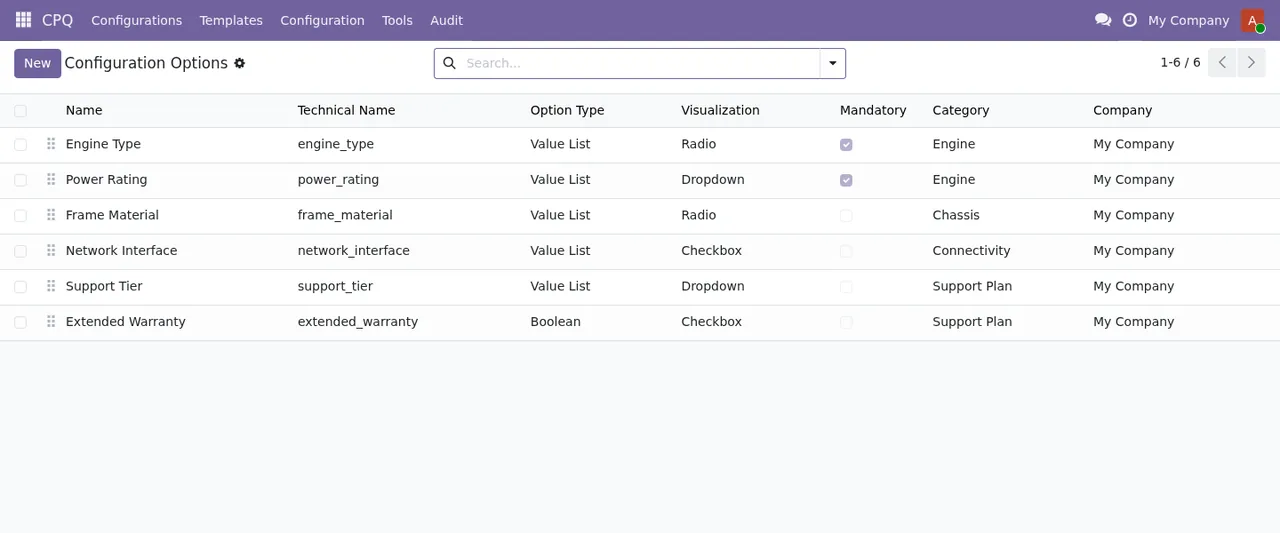
Four entries: CPQ › Configuration › Options, CPQ › Configuration › Option Categories, CPQ › Configuration › Rules and CPQ › Configuration › Price Rules. The screenshots show two of those lists. The option categories list has columns for name, parent category and company; the options list shows, for each record, name, technical name, option type, display, whether it is required, category and company.
What is in CPQ › Tools and CPQ › Audit
Under CPQ › Tools you will find CPQ › Tools › Import / Export and CPQ › Tools › Compare. CPQ › Audit has three entries: CPQ › Audit › Price Audit, CPQ › Audit › Performance Log and CPQ › Audit › Performance Summary. The last one is a list with rows per day and event type, as shown at the end of the animated walkthrough.
What runs in the background and what data it stores
Which scheduled tasks it installs and how often they run
The module defines six scheduled tasks, all of them active:
CPQ: Purge expired sessions, once a day.CPQ: Aggregate performance metrics, once a day.CPQ: Purge old price audit, once a day.CPQ: Daily notification digest, once a day.CPQ: Weekly notification digest, every 7 days.CPQ: Bulk assignment worker, every 5 minutes.
If you are checking your server load or the run history, these are the names to look for. The one that runs most often is CPQ: Bulk assignment worker; the rest are split between daily and weekly.
Which data models the module creates
The code defines its own models with the flexigo_cpq prefix. Grouped by what their names say:
- Options and rules:
flexigo_cpq.config.option(CPQ Configuration Option),flexigo_cpq.config.option.category(CPQ Configuration Option Category),flexigo_cpq.config.option.value(CPQ Configuration Option Value) andflexigo_cpq.config.rule(CPQ Configuration Rule). - Templates:
flexigo_cpq.config.template(CPQ Configuration Template) andflexigo_cpq.config.template.version(CPQ Configuration Template Version). - Sessions:
flexigo_cpq.config.session(CPQ Configuration Session),flexigo_cpq.config.session.line(CPQ Session Bundle Line) andflexigo_cpq.config.session.collaborator(CPQ Session Collaborator). - Notifications:
flexigo_cpq.notify.pref(CPQ Notification Preference) andflexigo_cpq.notify.queue(CPQ Notification Queue). - Performance:
flexigo_cpq.perf.log(CPQ Performance Log) andflexigo_cpq.perf.daily(CPQ Performance Daily Summary). - Bulk jobs:
flexigo_cpq.bulk.job(CPQ Bulk Assignment Job).
Knowing the technical names helps if you run exports, build custom reports or set permissions per model.
Which states a record goes through
A configuration session has its lines and its collaborators as separate models, and a template keeps its versions in another model. The states of each one, the order in which they are used, the fields to fill in and what to check in the first week are in getting CPQ Guided Selling Assistant up and running.
FlexigoTech Cloud service, versions and price
What FlexigoTech Cloud has to do with the module
It is a module with a FlexigoTech Cloud local service. The Odoo Apps listing itself flags this in a section headed Before you buy: some features of this app use a paid external service, and it also has its own Privacy policy. Without a subscription, or with the service suspended, whatever the subscription provides stops, and your data stays in your Odoo. The local service costs €29/month or €290/year excluding VAT (Pro: €58/month or €580/year).
Which Odoo versions it is published for and what it costs
It is published on Odoo Apps for Odoo 19 and 20, at €9 excluding VAT per Odoo version, one-off payment, on both. With the service subscription, the module for new Odoo versions is included if you bought it on flexigotech.com; if you buy it on the Odoo App Store, each Odoo version is bought there. If you are still weighing up whether it suits you, read what it covers and what you need before installing it.
How FlexigoTech can help
At FlexigoTech we implement Odoo and build bespoke connectors and integrations. If you want to link the configurator with other parts of your Odoo or with external systems, or you need a hand setting up options, categories and rules, get in touch. Purchase and service details are on the module page, and the listing is on Odoo Apps.
Keep reading
Checked in the module's source code (version 20.0) and the linked sources
Sources
- Module source code: flexigo_cpq_guided_selling_assistant_for_complex_quotes 20.0 (ed42681c): views/menus.xml
- Module source code: flexigo_cpq_guided_selling_assistant_for_complex_quotes 20.0 (ed42681c): data/ir_cron.xml
- Module source code: flexigo_cpq_guided_selling_assistant_for_complex_quotes 20.0 (ed42681c): static/description/index.html
- Module source code: flexigo_cpq_guided_selling_assistant_for_complex_quotes 20.0 (ed42681c): models/bulk_job.py
- Module source code: flexigo_cpq_guided_selling_assistant_for_complex_quotes 20.0 (ed42681c): models/config_option.py
- Module source code: flexigo_cpq_guided_selling_assistant_for_complex_quotes 20.0 (ed42681c): models/config_option_category.py
- Module source code: flexigo_cpq_guided_selling_assistant_for_complex_quotes 20.0 (ed42681c): models/config_option_value.py
- Module source code: flexigo_cpq_guided_selling_assistant_for_complex_quotes 20.0 (ed42681c): models/config_rule.py
- Module source code: flexigo_cpq_guided_selling_assistant_for_complex_quotes 20.0 (ed42681c): models/config_session.py
- Module source code: flexigo_cpq_guided_selling_assistant_for_complex_quotes 20.0 (ed42681c): models/config_session_collaborator.py
- Module source code: flexigo_cpq_guided_selling_assistant_for_complex_quotes 20.0 (ed42681c): models/config_session_line.py
- Module source code: flexigo_cpq_guided_selling_assistant_for_complex_quotes 20.0 (ed42681c): models/config_template.py
- Module source code: flexigo_cpq_guided_selling_assistant_for_complex_quotes 20.0 (ed42681c): models/notify_queue.py
- Module source code: flexigo_cpq_guided_selling_assistant_for_complex_quotes 20.0 (ed42681c): models/perf_log.py
- apps.odoo.com/apps/modules/20.0/flexigo_cpq_guided_selling_assistant_for_complex_quotes
- apps.odoo.com/apps/modules/19.0/flexigo_cpq_guided_selling_assistant_for_complex_quotes
- flexigotech.com/en/services.html
- flexigotech.com/precios.html