

 Español
 Català
 Deutsch
 Français
 Português
 Italiano
 Nederlands
 Polski
A GoCardless error: from GoCardless, from the connection or from your database?
Anyone searching for a GoCardless error has a warning on screen and one question: is GoCardless failing, is the connection failing, or is the database? The GoCardless connector for Odoo (versions 17, 18, 19 and 20) gives a different message depending on where the request stops: in the call to GoCardless, in the FlexigoTech connection service, or because of how the provider is set up in your database. The connector comes with the FlexigoTech Cloud subscription.
Comparison: what each path does and some errors it can give
| Path | When it shows | What it does | Some messages it can give |
|---|---|---|---|
Retry collection, on the transaction | Hidden when the Gocardless Can Retry field does not allow it; that field is not visible on any screen. The same in Odoo 17, 18, 19 and 20 | Asks GoCardless to repeat a failed collection, with a fixed key for that operation. If it works, it leaves the transaction pending with the notice Retry requested. GoCardless will confirm the new charge date. | This provider was connected to the GoCardless …. Disconnect it and connect again after changing its Live setting.; This provider is not connected to GoCardless any more: connect it again first.; GoCardless did not answer, so it is not known yet whether it took the request. |
Reinstate mandate (sandbox), in the payment token view | In Odoo 20 it is hidden when the provider is live or when Mandate Status (not visible on any screen) is not cancelled, failed or expired. In 17, 18 and 19 the condition uses the provider's state instead of its live setting: it is hidden if the provider is enabled | Asks GoCardless to reinstate the mandate instead of making the customer sign again. The mandate stays unusable until the bank confirms it, and a note is left on the customer: Reinstatement of the GoCardless mandate requested. It stays unusable until the bank confirms it. | This provider was connected to the GoCardless …. Disconnect it and connect again after changing its Live setting.; This provider is not connected to GoCardless any more: connect it again first.; Could not establish the connection to GoCardless. |
Update webhook address, on the provider | With Connection at its default value and Status set to connected; with the default values it is not shown. The same in 17, 18, 19 and 20 | Points the connection service's event forwarding at your Odoo's current address and confirms with GoCardless events are now delivered to …. | Could not reach the FlexigoTech connection service.; The FlexigoTech connection service sent an unreadable answer.; The connection service answered for another GoCardless account. |
Disconnect, on the provider | Same condition as the previous button | Revokes the connection in GoCardless and deletes the stored credentials here | Could not reach the FlexigoTech connection service.; The FlexigoTech connection service sent an unreadable answer. |
| Every call to GoCardless (no button of its own) | In any collection, retry or reinstatement | Checks that the database is not a copy, that the token's environment matches the Live setting, or the provider's «State» in 17, 18 and 19, and that a token exists. If GoCardless limits the request rate, it waits and tries again. If GoCardless had already created the resource on an earlier attempt, it adopts it rather than duplicating it | The environment, not-connected and connection messages from the rows above, and «GoCardless rejected the request.» with GoCardless's reason below it |
The first two rows share the environment message and the not-connected message, because they go through the same call. If GoCardless does not answer, they differ: the retry carries a fixed key, sends the request once more and then warns that GoCardless did not answer; the reinstatement warns that the connection could not be established. The two provider buttons talk to the FlexigoTech connection service and have their own warnings.
Wrong environment and disconnected provider
This provider was connected to the GoCardless …
It appears when retrying a collection or reinstating a mandate and the environment the token was connected with (test or live) no longer matches the Live setting. The warning says what to do: disconnect the provider and connect it again after changing Live. The call stops before anything is sent to GoCardless.
Odoo 17, 18 and 19 have no «Live» setting: there the provider's «State» field decides («Disabled», «Enabled» or «Test Mode»), and this message ends with «Disconnect it and connect again after changing its state.». In those versions, the warning in a copy of the database suggests connecting in «Test Mode» instead of with «Live» off.
This provider is not connected any more
It appears when the provider has no stored token, for instance after pressing Disconnect, which deletes the credentials from the database. The remedy is the one the warning gives: connect it again first.
A copy of the database
If the database is a copy of the one that connected the GoCardless account, the module does not use that connection and explains why in a warning. That warning says that in the copy you can paste an access token in the advanced mode (a sandbox one in a test copy) or connect with Live off, and that connecting the live account here would take it away from the original database. If the copy replaces the original, the warning says to use This database charges from now on with its live token.
When the connection service fails
The Update webhook address and Disconnect buttons talk to the FlexigoTech connection service. If it cannot be reached, the warning is Could not reach the FlexigoTech connection service.; if it answers with something unreadable, The FlexigoTech connection service sent an unreadable answer.. Updating the webhook has a third case: if the answer belongs to a different GoCardless account from the one stored, you get The connection service answered for another GoCardless account. and nothing new is saved.
Update webhook address is meant for a database that has moved to another domain and keeps its identifier; a copy, by contrast, has to connect again.
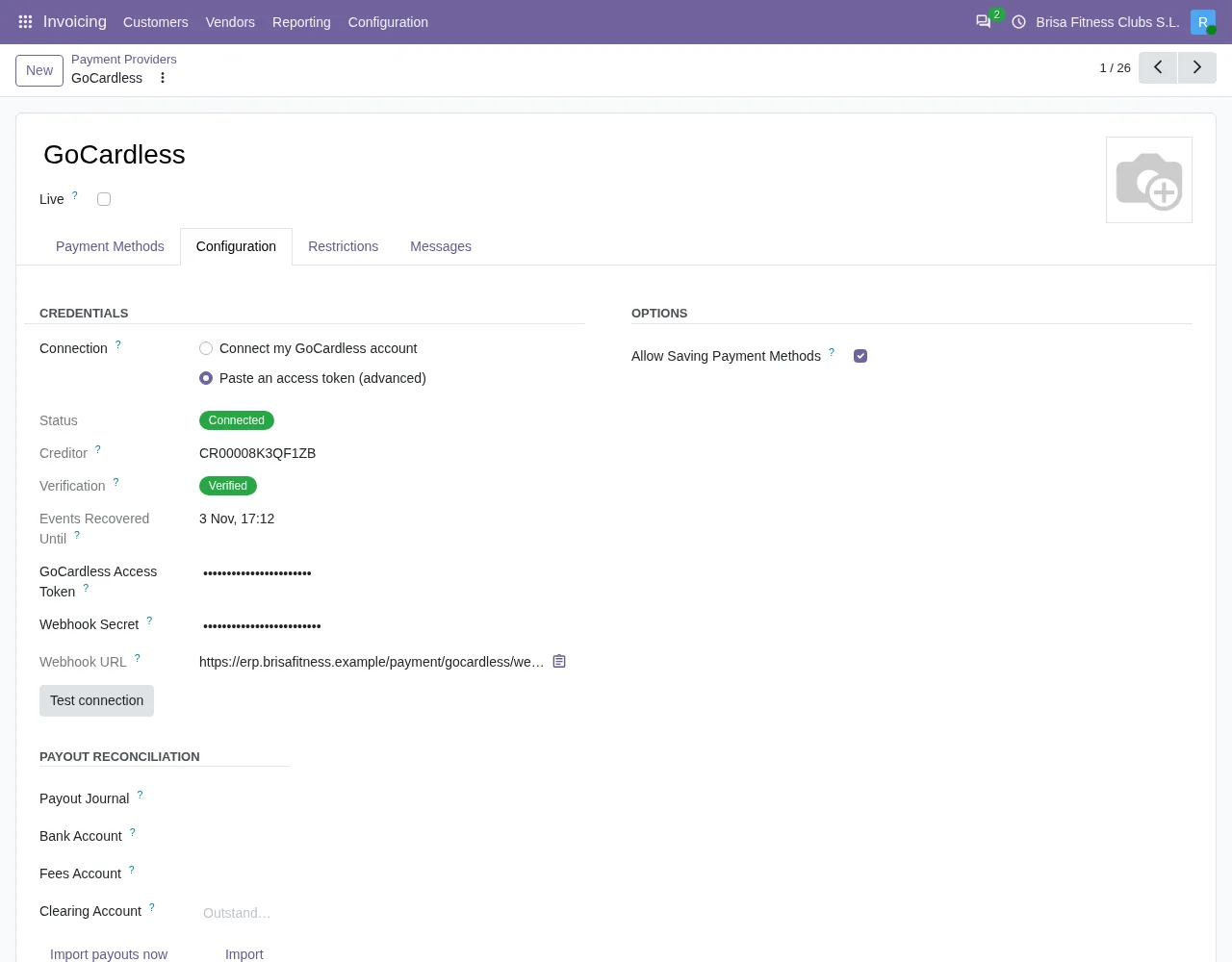
Configuration tab with Connect my GoCardless account, Paste an access token (advanced), status Connected, the webhook URL and the Test connection button.When GoCardless does not answer
Retrying a collection travels with a fixed key for that operation. That matters because a timeout does not prove that GoCardless did nothing. If there is no answer, the module sends the request once more with the same key; if GoCardless had already accepted it, it returns the existing resource and the module adopts it, instead of creating a duplicate collection. If there is still no answer, you see GoCardless did not answer, so it is not known yet whether it took the request.: the warning admits that it is not known whether the collection was registered.
If GoCardless limits the request rate, the module waits for the time it indicates and repeats the call, with a cap on the wait.
When GoCardless rejects the request
If GoCardless answers any call with an error, whether a collection, a retry or a reinstatement, the connector shows «GoCardless rejected the request.» and, below it, GoCardless's message: each error with the field or the reason that caused it and, at the end, the request identifier (request_id). That reason is what tells you what to fix.
When the module refuses to retry a collection
Besides connection errors, the Retry collection button has its own guards. The module refuses the retry if it is not a GoCardless collection, if it is a refund, if the collection is not failed, if Success+ is already going to retry it (doing it by hand as well would only add a fee), if the maximum number of retries GoCardless allows has been reached, or if the mandate is no longer usable. When GoCardless refuses the retry and the mandate turns out to be dead, the module archives it, records the reason on the transaction and shows a persistent notification: The customer's GoCardless mandate is …, so it cannot be charged. Ask the customer for a new mandate.
How FlexigoTech helps
If you use GoCardless today and want to see it inside your management system, we implement Odoo in versions 17, 18, 19 and 20 and build custom connectors and integrations. The GoCardless connector has its Odoo Apps listing and its page on flexigotech.com, where you can buy it.
If one of the messages above shows up, the button name and the text of the warning are enough to tell where along the path the request stopped.
Keep reading
Checked in the connector's source code (version 17.0, 18.0, 19.0 and 20.0) and the linked sources
Sources
- Module source code: flexigo_payment_gocardless 20.0 (6fe1a716): models/payment_provider.py
- Module source code: flexigo_payment_gocardless 20.0 (6fe1a716): views/payment_token_views.xml
- Module source code: flexigo_payment_gocardless 20.0 (6fe1a716): views/payment_transaction_views.xml
- Module source code: flexigo_payment_gocardless 20.0 (6fe1a716): views/payment_provider_views.xml
- flexigotech.com/en/services.html
- Module source code: flexigo_payment_gocardless 20.0 (6fe1a716): models/payment_token.py
- Module source code: flexigo_payment_gocardless 20.0 (6fe1a716): models/payment_transaction.py
- Module source code: flexigo_payment_gocardless 20.0 (6fe1a716): __manifest__.py
- Module source code: flexigo_payment_gocardless: models/payment_provider.py, line 397 in 17.0 (e0af273), 18.0 (9085180), 19.0 (4b06513) and 20.0 (94b33cf)
- Module source code: flexigo_payment_gocardless: i18n/flexigo_payment_gocardless.pot, line 521 in 17.0 (e0af273), line 521 in 18.0 (9085180), line 521 in 19.0 (4b06513) and line 523 in 20.0 (94b33cf)
- Module source code: flexigo_payment_gocardless: models/payment_transaction.py, line 281 in 17.0 (e0af273), line 281 in 18.0 (9085180), line 281 in 19.0 (4b06513) and line 292 in 20.0 (94b33cf)