

 Español
 Català
 Deutsch
 Français
 Português
 Italiano
 Nederlands
 Polski
Before you start: BambooHR is in charge
The connector starts from one rule: time off belongs to BambooHR. If someone in Odoo refuses, cancels or deletes a leave that came from BambooHR, it comes back on the next pass, and a conflict issue explains why.
Each system also keeps its own rules. BambooHR tells you to «Customize time-off policies to fit your team's needs: full-time, part-time, hourly, or salaried.» The connector copies requests and balances, but it does not rewrite accrual rules on either side.
Step 1: map the categories
Each BambooHR time off category is mapped to an Odoo time off type, and a person does the mapping. The connector never guesses that BambooHR's vacation is your Odoo vacation: a request from an unmapped category does not enter Odoo and leaves an issue that says so.
Step 2: choose the direction and the options
On the Functions tab of the connection, Time off requests can be Off, BambooHR to Odoo or Both ways. It starts as BambooHR to Odoo. On the Options tab there are four settings worth checking before the first load:
Approve time off in Odoo- Unticked at first. That way BambooHR approves or refuses its own time off, and Odoo does not let you do it on its screen. If you tick it and requests go
Both ways, your decision in Odoo is queued for BambooHR. Import pending time off- Unticked at first. Without it, a request still waiting for an answer in BambooHR does not enter Odoo.
Time off: days back- 90 at first.
Time off: days ahead- 365 at first.
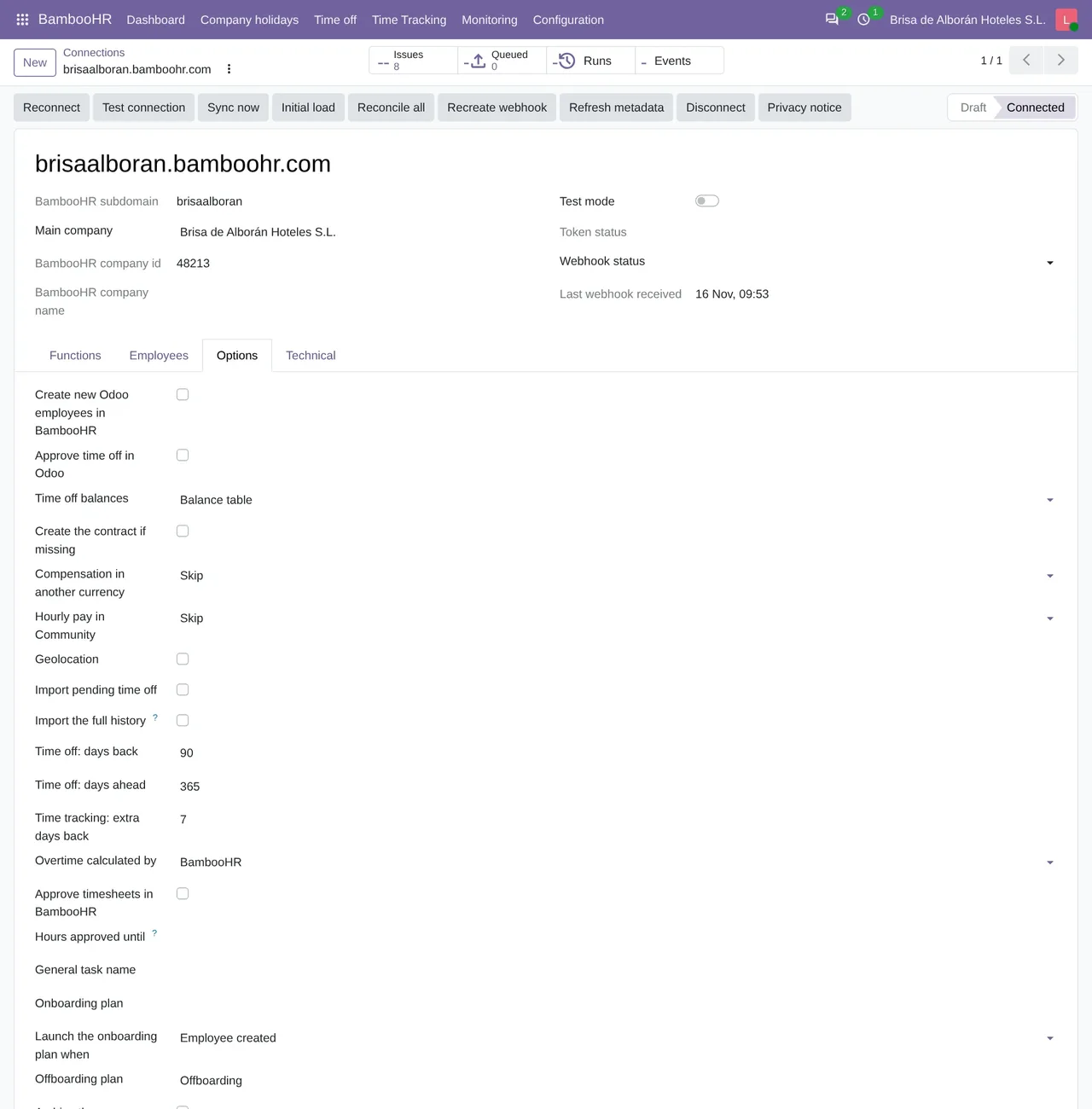
Approve time off in Odoo unticked, Time off balances on Balance table and the 90 and 365 day window.Step 3: decide where balances come from
Time off balances has two modes. Balance table is the default: the connector keeps BambooHR's balances in its own table, and the mapped time off type stops requiring an allocation in Odoo. With Allocations, the connector runs the Odoo allocations of the mapped types so that their balance is BambooHR's, and nobody can create, change or delete them by hand.
What happens every 15 minutes
The incremental sync runs every 15 minutes. It reads the whole date window at once, in every state, because the BambooHR API cannot filter by change date, and it only applies in Odoo what has changed.
When a request goes into Odoo, the connector splits it like this:
- Full days in a row become one Odoo leave, cut wherever the employee's working schedule changes.
- Each partial day becomes a one-day leave: a morning or afternoon half day, or by hours.
- A piece that ends up at 0 days, because it falls on a public holiday or a day off, is deleted and leaves an issue.
Company holidays
The Company holidays flow goes from BambooHR to Odoo at first, and it can also go from Odoo to BambooHR. Each BambooHR holiday becomes one Odoo public holiday per day. If it is for all employees with no exceptions, it applies to the whole company. If not, it is set on each employee it applies to. Two holidays on the same day are merged into one, because Odoo does not let them overlap.
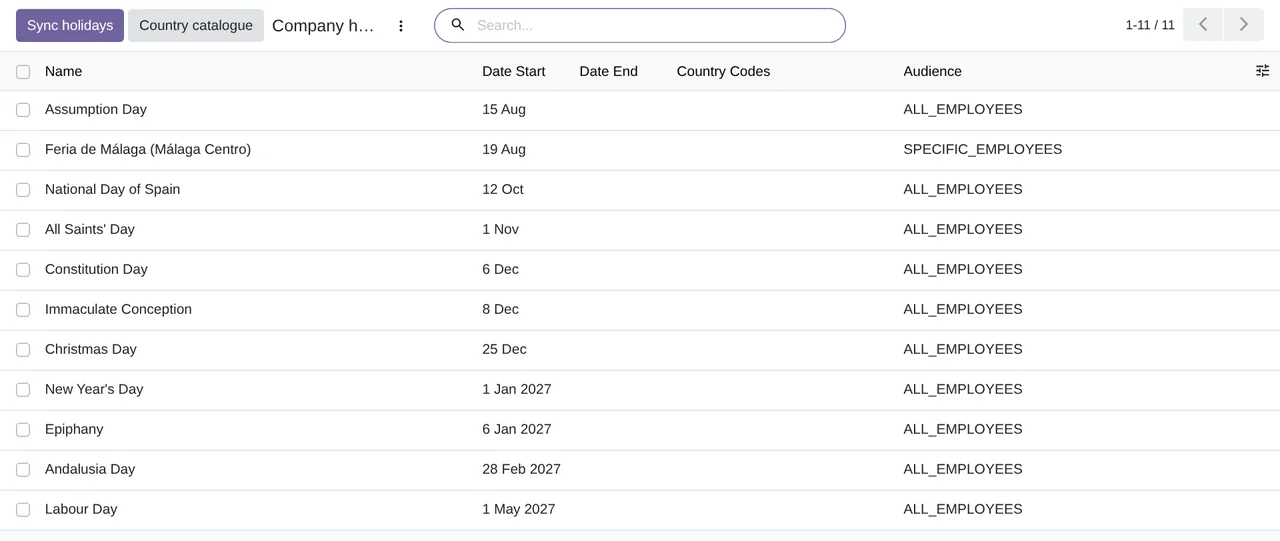
BambooHR › Company holidays: the company's holidays, with their date and who they apply to.Which API routes all this uses, and what the connector does with BambooHR's limits, is in the BambooHR API and Odoo.
Questions about BambooHR time off in Odoo
Can I approve time off from Odoo?
Yes, if you tick Approve time off in Odoo and requests go Both ways. Then what you approve or refuse in Odoo is sent to BambooHR. If not, requests are approved in BambooHR and reach Odoo already decided.
Has it been tested with a real BambooHR account?
Yes. In November 2026 time off was tested in both directions against a real BambooHR account, on Odoo 19 Enterprise.
How much does it cost?
The module licence costs €9 per Odoo version on Odoo Apps. It also needs FlexigoTech Cloud, Connector plan: Standard, €49/month or €490/year, or Pro, €98/month or €980/year, VAT excluded. You get a 14-day free trial. The price includes two months of help to get it running and, while you keep the subscription, updates and support, as our terms of sale version 2.2 say. The BambooHR connector page sums it up.
Does my time off data go through FlexigoTech Cloud?
No. Your Odoo calls BambooHR directly. FlexigoTech Cloud authorises the connection, renews the access and tells you if the sync fails.
Keep reading
Checked in the connector's source code (version 20.0) and the linked sources
Sources
- Module source code: flexigo_bamboohr 20.0 (b018498c): apps/holidays/hr_leave_sync.py:33
- Module source code: flexigo_bamboohr 20.0 (b018498c): apps/holidays/hr_leave_sync.py:2
- Module source code: flexigo_bamboohr 20.0 (b018498c): apps/holidays/hr_leave_sync.py:6
- Module source code: flexigo_bamboohr 20.0 (b018498c): apps/holidays/bamboohr_time_off.py:4
- Module source code: flexigo_bamboohr 20.0 (b018498c): apps/holidays/hr_leave_allocation.py:1
- Module source code: flexigo_bamboohr 20.0 (b018498c): models/bamboohr_connection.py:191
- Module source code: flexigo_bamboohr 20.0 (b018498c): models/bamboohr_connection.py:209
- Module source code: flexigo_bamboohr 20.0 (b018498c): apps/holidays/hr_leave.py:137
- Module source code: flexigo_bamboohr 20.0 (b018498c): models/bamboohr_connection.py:210
- Module source code: flexigo_bamboohr 20.0 (b018498c): models/bamboohr_connection.py:220
- Module source code: flexigo_bamboohr 20.0 (b018498c): apps/holidays/hr_leave_sync.py:238
- Module source code: flexigo_bamboohr 20.0 (b018498c): apps/holidays/hr_leave_sync.py:227
- Module source code: flexigo_bamboohr 20.0 (b018498c): apps/holidays/bamboohr_time_off.py:221
- Module source code: flexigo_bamboohr 20.0 (b018498c): models/bamboohr_connection.py:223
- Module source code: flexigo_bamboohr 20.0 (b018498c): models/bamboohr_connection.py:190
- Module source code: flexigo_bamboohr 20.0 (b018498c): models/bamboohr_holiday.py:1
- Module source code: flexigo_bamboohr 20.0 (b018498c): data/crons.xml
- Module source code: flexigo_bamboohr 20.0 (b018498c): static/description/index.html
- www.bamboohr.com/platform/time-and-attendance/time-off
- flexigotech.com/en/bamboohr-connector-odoo.html
- flexigotech.com/en/condiciones-contratacion.html