

 Español
 Català
 Deutsch
 Français
 Português
 Italiano
 Nederlands
 Polski
Before the first hire: which employees and which data
Employees to sync decides who enters Odoo. By default, active employees and those terminated since a date, which is 365 days ago. Personal data goes in blocks, and only Employee # starts ticked: personal contact, private address, passport or emergency contact do not leave until someone ticks them.
Before connecting, Odoo asks you to confirm that your employees know you are connecting the two systems. Then a BambooHR administrator approves the app.
The case: a new waiter on the Costa del Sol
A hotel chain uses BambooHR for people and Odoo for everything else. HR hires a waiter in BambooHR, in the Food & Beverage department, the Costa del Sol division and the job title of waiter. This is what happens in Odoo:
- On the next incremental sync, which runs every 15 minutes, the employee arrives in Odoo. The
Employees,Departments,Job titles,LocationsandManagerflows go from BambooHR to Odoo by default, and each can also go both ways. - The first time Food & Beverage appears, the connector looks for an Odoo department with that name in the employee's company and links it, or creates it. It does the same with the job title, the location and the division.
- If a value from a BambooHR list has no match in Odoo, the connector does not write it: the employee keeps the value they had in Odoo and an issue is raised, once per value. You sort it out in
Value maps. - If you have chosen an
Onboarding plan, Odoo starts it asLaunch the onboarding plan whensays: by default onEmployee created. The other choice isPacket completed.
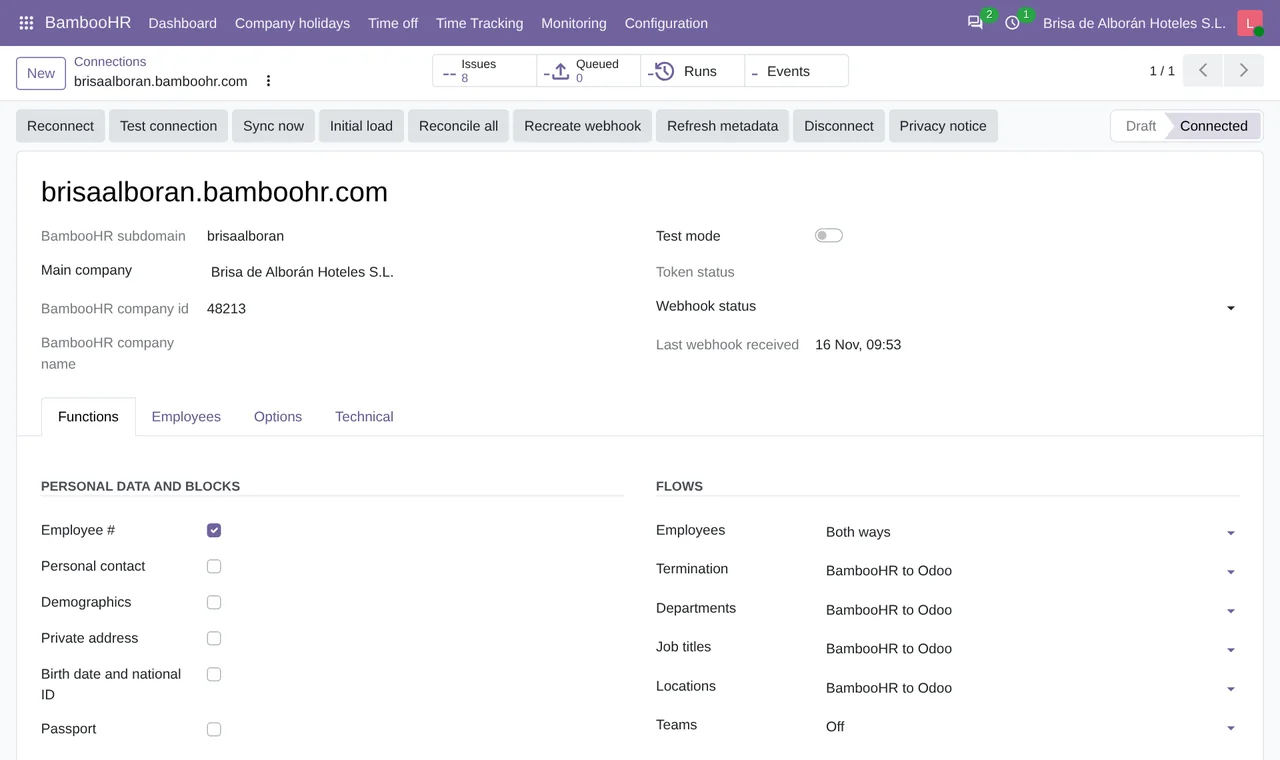
Functions tab of a test connection: employee number ticked, the other personal blocks unticked, Employees set to Both ways and Termination from BambooHR to Odoo.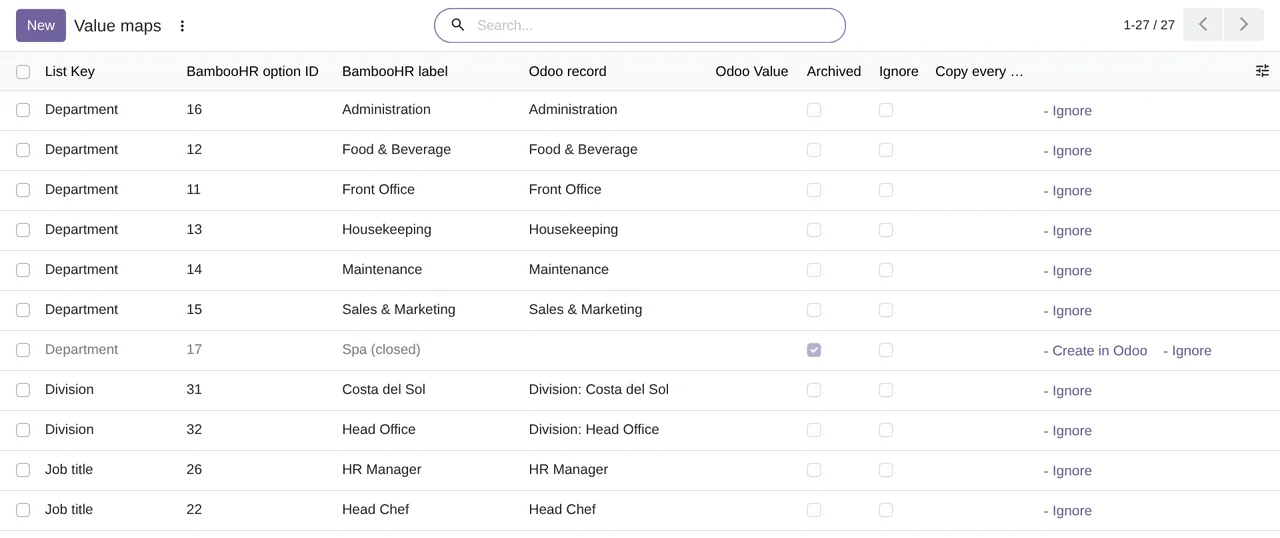
BambooHR › Configuration › Value maps: BambooHR departments, divisions and job titles with their Odoo record. Spa (closed) is archived and waits for you to create it in Odoo or ignore it.If the hire starts in Odoo
Create new Odoo employees in BambooHR starts unticked. Until you tick it, an employee created in Odoo stays in Odoo, and BambooHR remains the place where hires start.
The termination
When the waiter leaves and the termination is recorded in BambooHR, the Termination flow, which goes from BambooHR to Odoo by default, registers the departure in Odoo. The Offboarding plan is Odoo's own by default. Archive the user on termination starts unticked, so their Odoo user, if they have one, stays active until you decide otherwise.
If you set termination to both ways, only a departure registered in Odoo sends the termination to BambooHR. Archiving an employee in Odoo, a duplicate for instance, terminates nobody.
What does not travel
BambooHR's onboarding tasks and offer letters stay in BambooHR, because its API does not offer them. The Odoo onboarding plan is yours and you start it from Odoo.
What each employee brings in terms of pay, bonus or commission, and what they do not, is in BambooHR payroll and Odoo.
Questions about hires and terminations between BambooHR and Odoo
Has it been tested with a real BambooHR account?
Yes. In November 2026 the connection, employees and disconnection, among other things, were tested against a real BambooHR account, on Odoo 19 Enterprise.
What happens with a department that does not exist in Odoo?
The first time, the connector links the Odoo department with the same name or creates it. A value without a match is never written and leaves an issue.
How much does it cost?
The module licence costs €9 per Odoo version on Odoo Apps. It also needs FlexigoTech Cloud, Connector plan: Standard, €49/month or €490/year, or Pro, €98/month or €980/year, VAT excluded. You get a 14-day free trial. The price includes two months of help to get it running and, while you keep the subscription, updates and support, as our terms of sale version 2.2 say. The BambooHR connector page sums it up.
Keep reading
Checked in the connector's source code (version 20.0) and the linked sources
Sources
- Module source code: flexigo_bamboohr 20.0 (b018498c): models/bamboohr_connection.py:149
- Module source code: flexigo_bamboohr 20.0 (b018498c): models/bamboohr_connection.py:159
- Module source code: flexigo_bamboohr 20.0 (b018498c): models/bamboohr_connection.py:177
- Module source code: flexigo_bamboohr 20.0 (b018498c): models/bamboohr_connection.py:208
- Module source code: flexigo_bamboohr 20.0 (b018498c): models/bamboohr_connection.py:233
- Module source code: flexigo_bamboohr 20.0 (b018498c): models/bamboohr_connection.py:245
- Module source code: flexigo_bamboohr 20.0 (b018498c): models/hr_employee_departure.py:1
- Module source code: flexigo_bamboohr 20.0 (b018498c): models/bamboohr_value_map.py:1
- Module source code: flexigo_bamboohr 20.0 (b018498c): data/crons.xml
- Module source code: flexigo_bamboohr 20.0 (b018498c): static/description/index.html
- www.bamboohr.com/platform/onboarding/
- flexigotech.com/en/bamboohr-connector-odoo.html
- flexigotech.com/en/condiciones-contratacion.html