

 Español
 Català
 Deutsch
 Français
 Português
 Italiano
 Nederlands
 Polski
What the BambooHR API is
BambooHR puts it this way: «Our open API makes it easy to integrate other applications into BambooHR.» Each company has its own address. The documentation tells you to «replace {companyDomain} with the text that appears before .bamboohr.com in your company's BambooHR URL».
The connector builds every call as https://{subdomain}.bamboohr.com plus the route. It never uses another address that BambooHR hands back, and it checks the server after building the URL, so no call can go anywhere else.
No API key: OAuth
Many people search for how to generate an API key in BambooHR. With this connector you do not need one. BambooHR's documentation tells app makers to «Implement an OAuth flow in your application», and that is what the FlexigoTech app does:
- In
BambooHR › Configuration › Connect BambooHRyou type your subdomain. - You confirm that your employees know you are connecting the two systems.
- A BambooHR administrator approves the app on BambooHR's own screen.
FlexigoTech Cloud handles the tokens that BambooHR issues to our app and renews the access every hour. Your Odoo keeps that access in fields only administrators can read and calls BambooHR directly. Your employees, their time off and their hours do not go through FlexigoTech Cloud. If BambooHR answers with a 401, the connector refreshes the access once and repeats the call once.
Which API routes it calls
- Changed employees
- GET /api/v1/employees/changed with the since parameter: which employees changed since the last pass.
- Employee data
- POST /api/v2/datasets/employee/data, page by page.
- Time off
- /api/v1/time-off/requests, to read requests and, if you turn it on, to write them.
- Webhooks
- POST /api/v1/webhooks, to register the connector's webhook.
Every call carries Authorization: Bearer, Accept: application/json and its own X-Request-ID. It follows no redirects. It waits 10 seconds to connect and 60 to read, 120 for downloads.
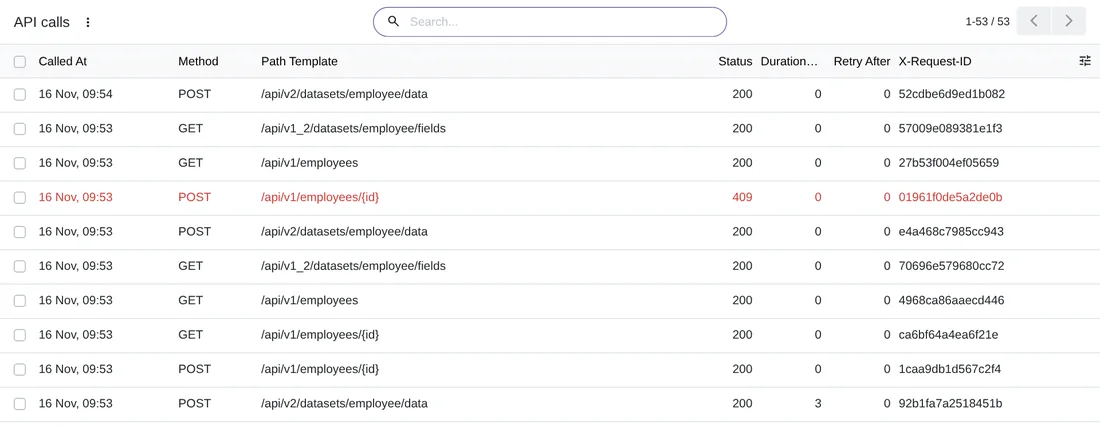
BambooHR › Monitoring › API calls: each call with its method, route, status and X-Request-ID. One of them ended in an error and shows in red.The limits: 429, Retry-After and errors
The connection has a Max requests per second setting, which starts at 5. That pace is shared by the connector's four kinds of work: the queue, the sync, the daily tasks and the weekly ones.
When BambooHR answers with a 429, the connector does this:
- With Retry-After, the whole connection waits as long as BambooHR says, between 1 and 3600 seconds, or 60 if it says nothing. Then it runs at half pace for 10 minutes.
- If the 429 comes without Retry-After when creating an employee (POST /api/v1/employees), it is the employee cap of your BambooHR account, and it is not retried.
- With a 500, a 502, a 503 or a network failure, it waits 1 minute, 5 minutes, 30 minutes, 2 hours and 6 hours. The sixth attempt counts as failed.
Every call leaves a row in API calls, with the method, the route template, the status, the request id, the milliseconds and the Retry-After. It never stores bodies, tokens or the query.
Webhooks: they only signal a change
The connector registers its own webhook in BambooHR. Deliveries arrive signed, and the receiver answers in under a second without writing anything on the connection. A delivery only starts a read: the API stays the source of truth, and the 15-minute poll keeps running even if a webhook fails. From each delivery it keeps the type, the time, the companyId, the employeeId and the changed fields, for 8 days.

BambooHR › Monitoring › Webhook events: two employee.updated deliveries, already processed, with the BambooHR employee ID.These are the scheduled actions that work with the API:
- The queue, every minute: webhook deliveries and what Odoo has to send to BambooHR.
- The incremental sync, every 15 minutes.
- The daily tasks, at 02:00 local time of each company.
- The reconciliation, once a week.
Time off goes through this same API, and how it reaches Odoo is in BambooHR time off in Odoo.
Questions about the BambooHR API and Odoo
Do I need a BambooHR API key?
No. The connection uses OAuth: you type your subdomain in Odoo and a BambooHR administrator approves the FlexigoTech app.
Does my data go through FlexigoTech Cloud?
No. Your Odoo calls the BambooHR API directly. FlexigoTech Cloud authorises the connection, renews the access, watches the sync and tells you when it fails.
How much does it cost?
The module licence costs €9 per Odoo version on Odoo Apps. It also needs FlexigoTech Cloud, Connector plan: Standard, €49/month or €490/year, or Pro, €98/month or €980/year, VAT excluded. You get a 14-day free trial. The price includes two months of help to get it running and, while you keep the subscription, updates and support, as our terms of sale version 2.2 say. The BambooHR connector page sums it up.
Which Odoo versions does it work on?
Odoo 17, 18, 19 and 20, on Odoo.sh or on your own server. It does not work on Odoo Online. Your BambooHR account and its fees are separate.
Keep reading
Checked in the connector's source code (version 20.0) and the linked sources
Sources
- Module source code: flexigo_bamboohr 20.0 (b018498c): models/bamboohr_client.py:5
- Module source code: flexigo_bamboohr 20.0 (b018498c): models/bamboohr_client.py:7
- Module source code: flexigo_bamboohr 20.0 (b018498c): models/bamboohr_client.py:11
- Module source code: flexigo_bamboohr 20.0 (b018498c): models/bamboohr_client.py:37
- Module source code: flexigo_bamboohr 20.0 (b018498c): models/bamboohr_client.py:96
- Module source code: flexigo_bamboohr 20.0 (b018498c): models/bamboohr_client.py:39
- Module source code: flexigo_bamboohr 20.0 (b018498c): models/bamboohr_client.py:260
- Module source code: flexigo_bamboohr 20.0 (b018498c): models/bamboohr_connection.py:248
- Module source code: flexigo_bamboohr 20.0 (b018498c): models/hr_employee_sync.py:278
- Module source code: flexigo_bamboohr 20.0 (b018498c): models/hr_employee_sync.py:491
- Module source code: flexigo_bamboohr 20.0 (b018498c): models/bamboohr_engine.py:512
- Module source code: flexigo_bamboohr 20.0 (b018498c): models/bamboohr_webhook_event.py:1
- Module source code: flexigo_bamboohr 20.0 (b018498c): models/bamboohr_webhook_event.py:30
- Module source code: flexigo_bamboohr 20.0 (b018498c): data/crons.xml
- Module source code: flexigo_bamboohr 20.0 (b018498c): views/bamboohr_menus.xml
- Module source code: flexigo_bamboohr 20.0 (b018498c): static/description/index.html
- documentation.bamboohr.com/docs/getting-started
- flexigotech.com/en/bamboohr-connector-odoo.html
- flexigotech.com/en/condiciones-contratacion.html