

 Español
 Català
 Deutsch
 Français
 Português
 Italiano
 Nederlands
 Polski
What Peppol needs from each customer in the B2Brouter connector
The connector adds two fields to the contact: Peppol Scheme (EAS) and Peppol Endpoint (B2Brouter). The first holds the EAS scheme and the second holds the identifier value. The Peppol route treats them as a pair: scheme plus value.
The help on the scheme field asks for the zero-padded EAS scheme code, for example 0208. It also warns that the scheme is validated against the cached schemes at send time.
- Open the customer's contact form.
- Check that it has a country and a VAT number.
- If the customer has given you their Peppol identifier, enter the scheme code in
Peppol Scheme (EAS).
- Enter the identifier value in
Peppol Endpoint (B2Brouter).
- Save the contact.
Checking whether the customer is in the Peppol directory
On the contact form, B2Brouter users see the Check reachability (Peppol) button. When you click it, the connector looks the recipient up in the Peppol directory. These are messages it can give you:
Recipient found in the Peppol directory.
Not found in the Peppol directory (nor the French Annuaire).
Set the country and VAT (or Peppol endpoint) first.This appears when the contact has no country or no VAT number. Fill it in and click the button again.
The identifier … is not valid for scheme … in country ….Where the dots are, the module puts the identifier, the scheme and the country. Check those details on the contact.
The recipient's Peppol Access Point publishes incomplete data (…). Contact the recipient.The brackets hold a code, and the message itself asks you to get in touch with the recipient.
When the check finishes, the connector writes the result to Reachable via Peppol?, with the date and the error if there is one. When there is a message, it also leaves a note in the contact's history. That state can be Unknown, Checking…, Reachable, Not reachable, Invalid identifier or an error state. The connector also ships the scheduled action B2Brouter: continue directory lookups, which runs every 5 minutes and is active from installation.
Sending the invoice through the B2Brouter Peppol route
When an invoice goes through the Peppol route, the connector needs the customer's Peppol endpoint (scheme and value) or their VAT number. If it has neither, the invoice does not go out and sending is blocked with this reason: The Peppol route needs a Peppol endpoint (scheme + value) or the customer's VAT. At send time, the contact's EAS scheme is also validated against the cached schemes.
- Before sending, open the customer and confirm they have a Peppol scheme and endpoint, or a VAT number.
- If you want to know beforehand whether the customer is in the Peppol directory, click
Check reachability (Peppol)on their contact form.
- Send the invoice through the Peppol route.
- If the blocking reason appears, complete the contact form and send it again.
Receiving vendor bills from B2Brouter
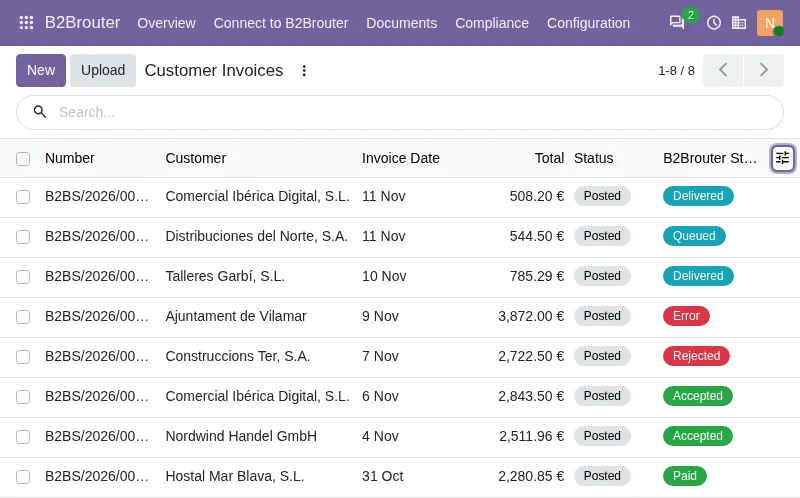
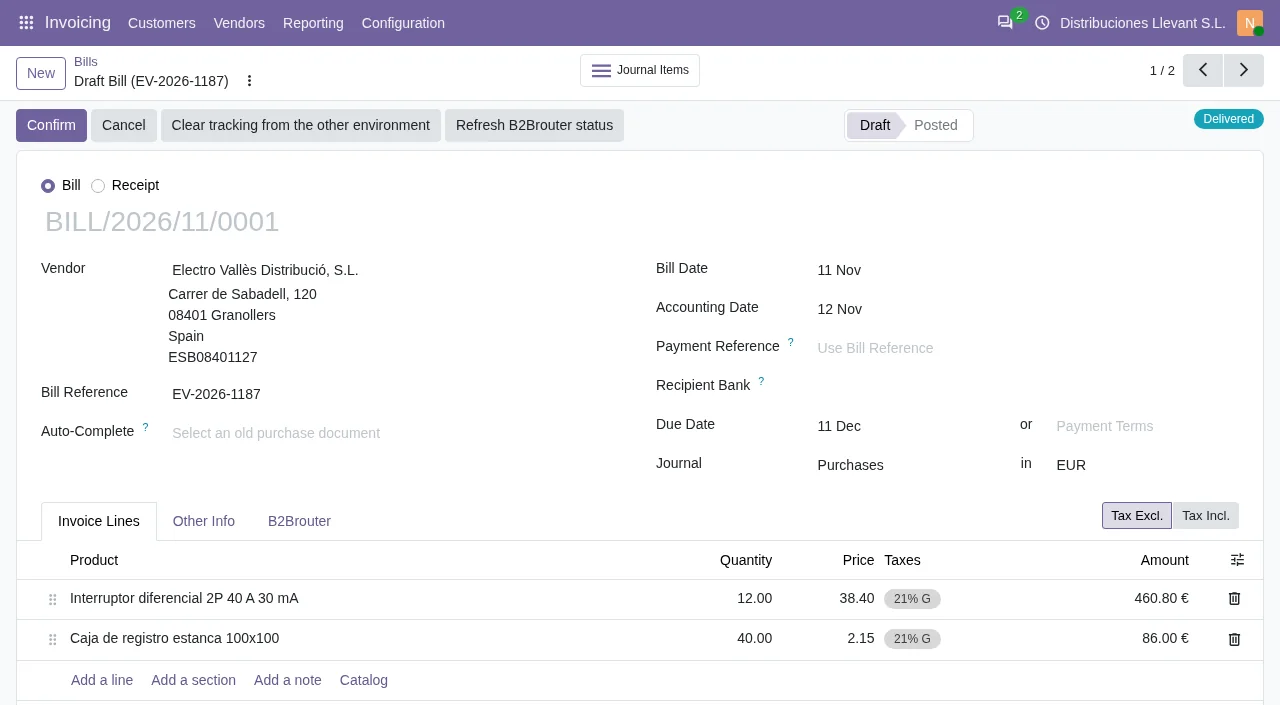
Invoices you receive through B2Brouter come into Odoo as draft vendor bills, and someone approves them in Odoo. The connector ships the scheduled action B2Brouter: poll received-invoice creation backlog, which runs every 15 minutes and is active from installation.
For webhooks, the connector has the menu B2Brouter › Documents › Webhook Events and the scheduled action B2Brouter: process webhook events, every 5 minutes. We cover the key and webhooks in B2Brouter API from Odoo: environments, keys, version and webhooks.
- Open the draft vendor bill that has arrived through B2Brouter.
- Review it.
- Approve it in Odoo once it is correct.
Questions about B2Brouter and Peppol in Odoo
What do I enter in the EAS scheme?
The zero-padded scheme code, such as 0208, according to the help on the Peppol Scheme (EAS) field. It is validated at send time against the cached schemes.
Can I send through Peppol with only the customer's VAT number?
The blocking reason asks for a Peppol endpoint (scheme and value) or the customer's VAT. With the VAT number, the Peppol route is not blocked for that reason.
What do I do if the recipient publishes incomplete data?
What the message says: contact the recipient. The brackets contain the code the module puts there.
Does it need the FlexigoTech Cloud subscription?
Yes. The connector needs the FlexigoTech Cloud subscription (Connector plan), and sending and receiving e-invoices with B2Brouter runs on FlexigoTech Cloud. See the B2Brouter Odoo Connector on Odoo Apps and buy it on the connector page at flexigotech.com.
Keep reading
Checked in the connector's source code (version 20.0)
Sources
- Module source code: b2brouter_connector 20.0 (dc5ea5d4): __manifest__.py
- Module source code: b2brouter_connector 20.0 (dc5ea5d4): models/res_partner.py
- Module source code: b2brouter_connector 20.0 (dc5ea5d4): views/res_partner_views.xml
- Module source code: b2brouter_connector 20.0 (dc5ea5d4): models/account_move.py
- Module source code: b2brouter_connector 20.0 (dc5ea5d4): data/ir_cron.xml
- Module source code: b2brouter_connector 20.0 (dc5ea5d4): static/description/index.html
- Module source code: b2brouter_connector 20.0 (dc5ea5d4): views/b2brouter_menus.xml