

 Español
 Català
 Deutsch
 Français
 Português
 Italiano
 Nederlands
 Polski
How the dashboard opens and where the figures come from
Where do I open the dashboard, and who can see it?
The records open from the Amazon menu. That part of the menu asks for the Viewer permission: without it, you do not see that part. The form is Dashboard.
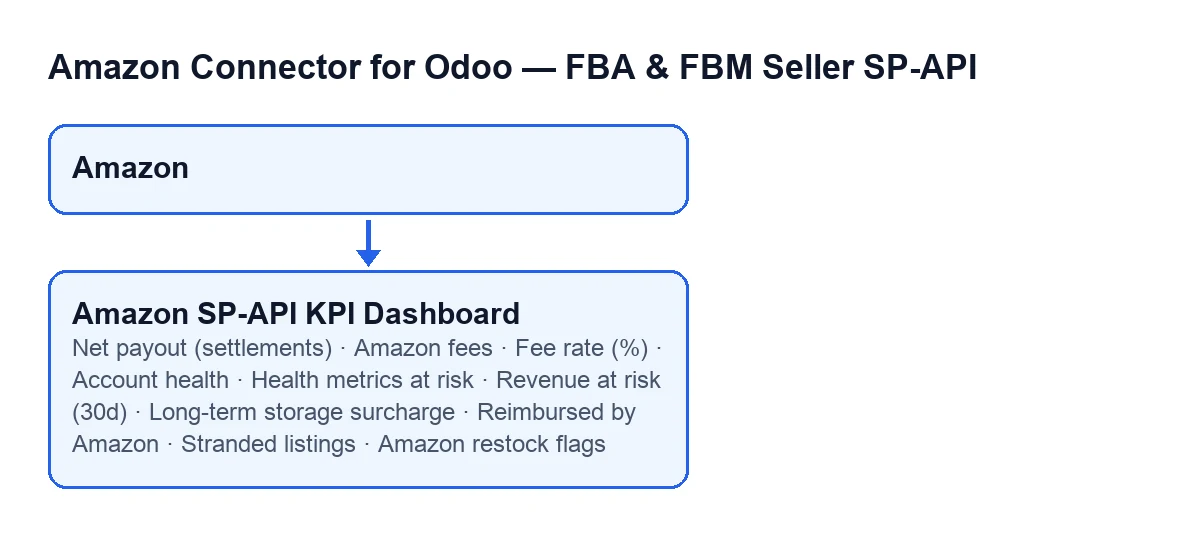
Amazon menu and the KPI dashboard form with its settlement, account health, catalogue, storage, reimbursement and restock fields; it is generated from the published code, not a screenshot of Odoo.Do I have to type anything into these fields?
No. The dashboard fields Net payout (settlements), Amazon fees, Fee rate (%) and those in the account health, catalogue, storage, reimbursement and restock blocks are read-only. The module's code writes them, not the user. So what you should ‘put in’ is not a value: what is useful is understanding what each figure measures, using its own help text, and knowing why some blocks of the form may not appear.
When do the settlement figures update?
The scheduled task Amazon SP-API - Refresh KPIs, which runs once a day and is active from the moment you install the module, fills in Net payout (settlements), Amazon fees and Fee rate (%). The Refresh KPIs button launches that same calculation.

The money figures
What is Net payout (settlements)?
Net payout (settlements) is the sum of Amazon settlement deposits in the period: according to its help text, what actually hits the bank. It is a monetary, read-only field on the Dashboard form. The fees and the percentage are read in separate fields.
Net payout (settlements) appears translated into Spanish, German, French, Italian and Portuguese.What goes into Amazon fees, and what does Fee rate (%) measure?
Amazon fees gathers, according to its help text, the referral, FBA, storage and service fees from settlements, and adds in brackets ‘negative = cost’. Fee rate (%) is, according to its help text, total fees plus advertising as a percentage of settlement sales. The percentage's help mentions advertising while the amount's help lists referral, FBA, storage and service fees, so it is worth reading each field against its own definition. Both fields are on the Dashboard form and are read-only.
The blocks that appear or hide
Why can't I see Account health or Health metrics at risk?
They sit in the Account Health (Amazon's own rating) group of the Dashboard form, and both are hidden while the Seller Performance sync is not switched on. Account health is, according to its help text, Amazon's own overall Account Health rating from the latest Seller Performance snapshot, the number Amazon can suspend you over. Health metrics at risk, according to its help text, counts the policy metrics whose Amazon status is not ‘Good’ in the latest snapshot, for example Order Defect Rate and Late Shipment Rate. Both are read-only.
What do Revenue at risk (30d), Long-term storage surcharge and Reimbursed by Amazon measure?
Each one lives in its own block and is hidden if its sync is not switched on:
Revenue at risk (30d)is in theSuppressed listings (revenue at risk)group, inside theCataloggroup of theDashboardform, and is hidden while the suppressed-listings sync is not switched on. According to its help text, it is the last-30-days revenue of the SKUs currently suppressed from Buy Box and search: what you stand to lose while they stay dark.Long-term storage surchargeis in theStorage feesgroup and is hidden while the storage-fees sync is not switched on. Its help text defines it as the aged-inventory surcharge in the period, the signal that your stock is rotting at Amazon.Reimbursed by Amazonis in theReimbursements (money Amazon paid back)group and is hidden while the FBA reimbursements sync is not switched on. According to its help text, it is the money Amazon actually paid back in the period for lost or damaged inventory, taken from the Reimbursements report.
All three are monetary and read-only.
And Stranded listings and Amazon restock flags?
They are under the AI and Restock group. Stranded listings is in the Stranded listings (no active offer) subgroup and is hidden while the stranded-inventory sync is not switched on; according to its help text it counts ASINs with real FBA stock but no active or buyable offer, from Amazon's Stranded Inventory report. Amazon restock flags is in the Restock subgroup and is hidden while the restock-recommendations sync is not switched on; according to its help text, these are the SKUs Amazon's own forecast flags for replenishment, and the help suggests comparing the number with the ‘SKUs at risk’ from this module's planner. Both are integers and read-only.
What you need to have it
What do I need to use the dashboard, and what does it cost?
The module is a one-off purchase per version and needs a FlexigoTech Cloud subscription on the Connector plan: €49 a month or €490 a year excluding VAT (the Pro plan is €98 a month or €980 a year), with up to 3 accounts of the platform on Connector and 10 on Pro. The connection goes through FlexigoTech Cloud, which stores the credentials encrypted, watches the synchronisation and emails you if it fails. Without a subscription, or with the service suspended, whatever the subscription provides stops, and your data stays in your Odoo. The module is published on Odoo Apps for 17.0, 18.0, 19.0 and 20.0. If you bought it on flexigotech.com, the module for newer Odoo versions is included with the subscription; on the Odoo App Store, each version is bought there. You can see the Odoo Apps listing and the module page.
If you set it up with help
FlexigoTech implements Odoo 17, 18, 19 and 20 and builds custom connectors and integrations.
Keep reading
Checked in the connector's source code (version 20.0) and the linked sources
Sources
- Module source code: flexigobe_amazon_seller_connector 20.0 (8576afa5): models/amazon_spapi_kpi_dashboard.py
- apps.odoo.com/apps/modules/20.0/flexigobe_amazon_seller_connector
- flexigotech.com/en/services.html
- flexigotech.com/precios.html