E-invoicing and compliance

DIAN POS equivalent document in Odoo: validate every ticket and avoid rejections

If you issue POS tickets in Colombia, your electronic equivalent documents have to meet the DIAN format and be reported. This module validates each document inside Odoo, catches the errors before you send, and prepares the report — no spreadsheets, no external tools, no double entry.
9 €One-time payment per Odoo versionOdoo 17.0Odoo 18.0Odoo 19.0
Colombia DIAN Electronic Equivalent POS Document Validator module cover for Odoo

FlexigoTech Cloud

Monitoring of this module with FlexigoTech Cloud

This app works fully inside your Odoo. FlexigoTech Cloud, an external service of FlexigoTech (Flexibles y Accesorios Gobe, S.L., Spain) that runs on our servers, outside your Odoo, adds monitoring for this module. Every day it checks the official sources we follow for this module and alerts you when they change. It also gives you a calendar of their official deadlines and watches the health of the module in your database.

Price

  • Module: 9 €.
  • The module is bought separately, with a one-off payment, at the same price on the Odoo App Store and on flexigotech.com. With the subscription, the module for new Odoo versions is included if you bought it on flexigotech.com; on the Odoo App Store, each Odoo version is bought there. If you have a partner discount, it applies only to subscriptions of single modules, never to packs or to the module price.
  • The subscription is separate and is billed by FlexigoTech, not by Odoo: 29 € a month or 290 € a year.
  • Pro, with the first response within 4 working hours and a video call if needed: 58 € a month or 580 € a year.
  • Per production database, VAT excluded. The staging and test copies of that database are included.
  • You see the final amount, with taxes, on the payment screen before confirming.
  • You can try each module for 14 days from your Odoo, at no cost and without giving a card: the 14 days count from the first synchronisation, up to 30 days from when you start the trial, and there is one trial per account and module. If you have not subscribed when it ends, the service stops and nothing is charged.
  • You pay in advance, every month or every year. The subscription renews automatically at the end of each period until you cancel it, in two clicks and without talking to anyone, from your account at app.flexigotech.com or from your Odoo. Cancellation takes effect at the end of the period you have already paid; there is no pro rata, the part of the period you do not use is not refunded, unless the law requires it, and there is no penalty.

How to activate it

Your database connects from your Odoo, in Settings → FlexigoTech Cloud, with the free FlexigoTech Cloud base module; then you subscribe there or in your account.

An administrator first reads and accepts the list of data below: nothing is sent before that. Then you can start the trial or subscribe; you accept the subscription terms there, and payment is made outside Odoo.

You need Odoo.sh or your own server: Odoo Online does not accept third-party modules.

You accept the Subscription Terms when you start the trial in your Odoo or when you subscribe.

What the subscription includes

  • If you bought the module on flexigotech.com: the new versions we publish, including for new Odoo versions, at no extra cost, and their download from your account (not during the trial).
  • The monitoring of the official sources of the module, with its alerts and the calendar of their deadlines, and of the health of the module in your database.
  • Support: whoever buys a module always gets help to configure it and fixes for its bugs, with or without a subscription. The subscription adds times for the first response, in Barcelona working days and hours (Standard, 1 working day; Pro, 4 working hours, and a video call if needed). Resolving each case takes the time it needs.
  • The service on the staging and test copies of your database.

What it does not include

  • The customisation of the module or custom development.
  • Migrations: we give you the module for each new Odoo version, but we do not take care of migrating your database to that version.
  • Configuring the module for you (the setup).
  • Importing historical data.
  • Support for modules that are not ours.
  • Third-party costs: you contract and pay for your account on each platform, Odoo and your hosting yourself.

What your Odoo sends to FlexigoTech Cloud

  • The identifier (uuid) of the database, its address (URL) and the Odoo version.
  • The FlexigoTech modules installed, with their version, and whether the database is a neutralized copy (staging or test).
  • The company name, and the email of the person who accepts, with the date and version of the text accepted.
  • A request for its service permit every 6 hours, and the health of the module: counters and errors (type and code), without the content of your records.
  • Its requests for the alerts and the calendar of this module, with the date of the last alert received: the database identifies itself and sends nothing else.

What happens if you do not pay

If a payment fails, you have a 7-day grace period with the service. On day 7 the service is suspended; if you pay before day 21, it comes back at once. On day 21, if it is still unpaid, the subscription ends and a later payment does not reactivate it: to come back, you take out a new one.

Without a subscription, or with the service suspended, what the subscription gives stops: the cloud, the module for other Odoo versions and its download, and the subscription's support, with its response times. What the purchase of the module includes does not change: you always have help to configure it and fixes for its bugs and, if you bought it on flexigotech.com, the download of that Odoo version with its updates. The installed module stays in your Odoo with the version you have, and all your data stay there: we never delete anything in your Odoo and we do not block Odoo.

Without the service, the alerts, the calendar and the monitoring of the module stop. The module itself keeps working in your Odoo as before, with your data, settings and reports.

Configuration help and bug fixes are always provided to buyers, with or without the subscription.

What it does

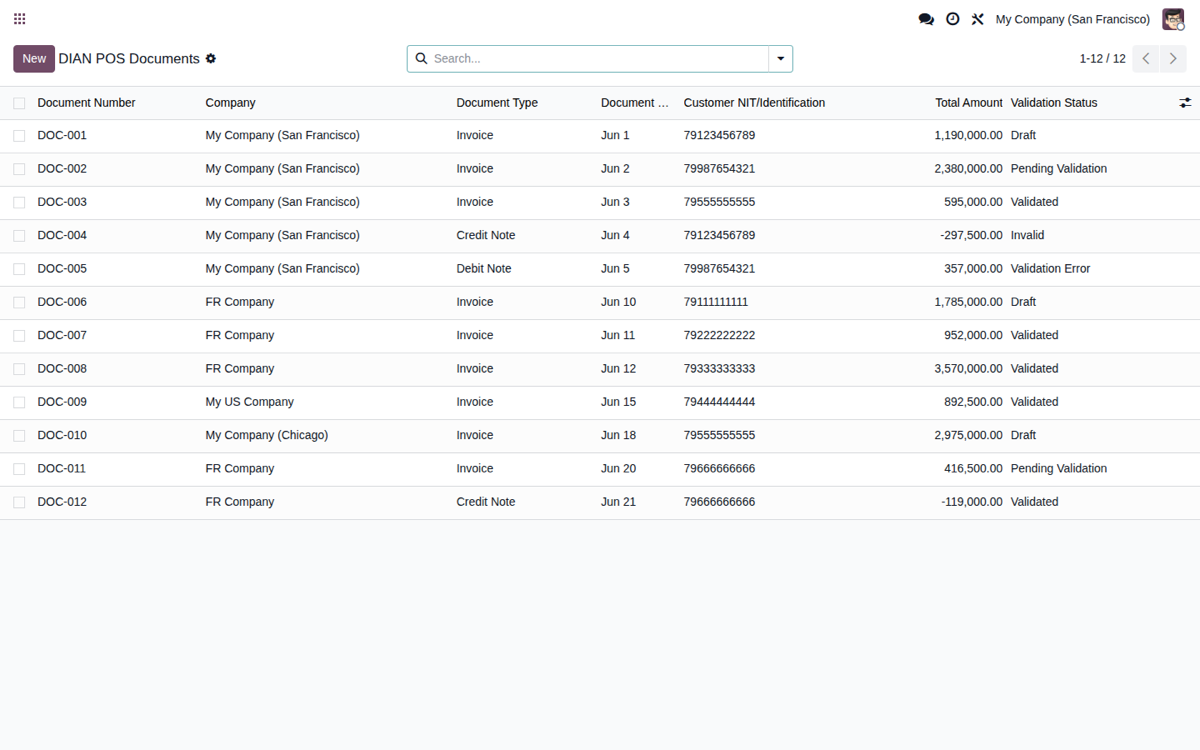
Validation and reporting for Colombia DIAN electronic equivalent POS documents

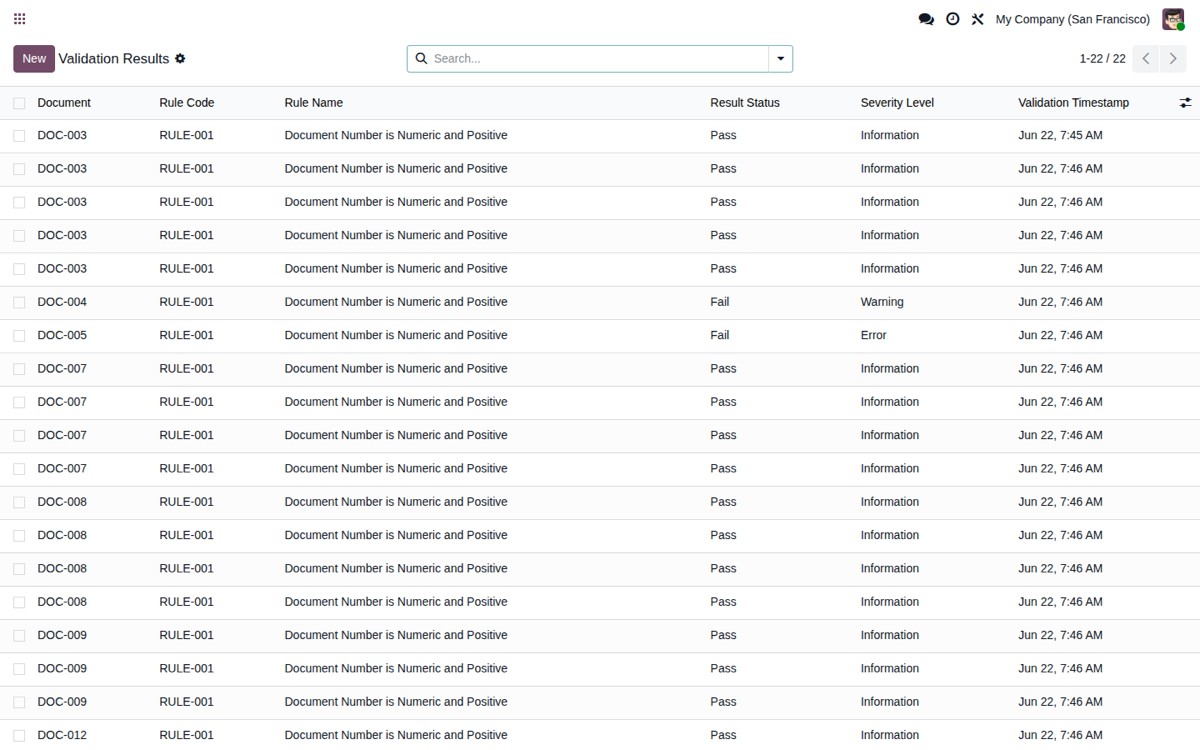
  • 10 DIAN validation rules in real timeApplies 10 DIAN rules to each electronic POS equivalent document: number format, valid dates, customer NIT, tax and total math, sequence gaps, fiscal year, and complete required fields.
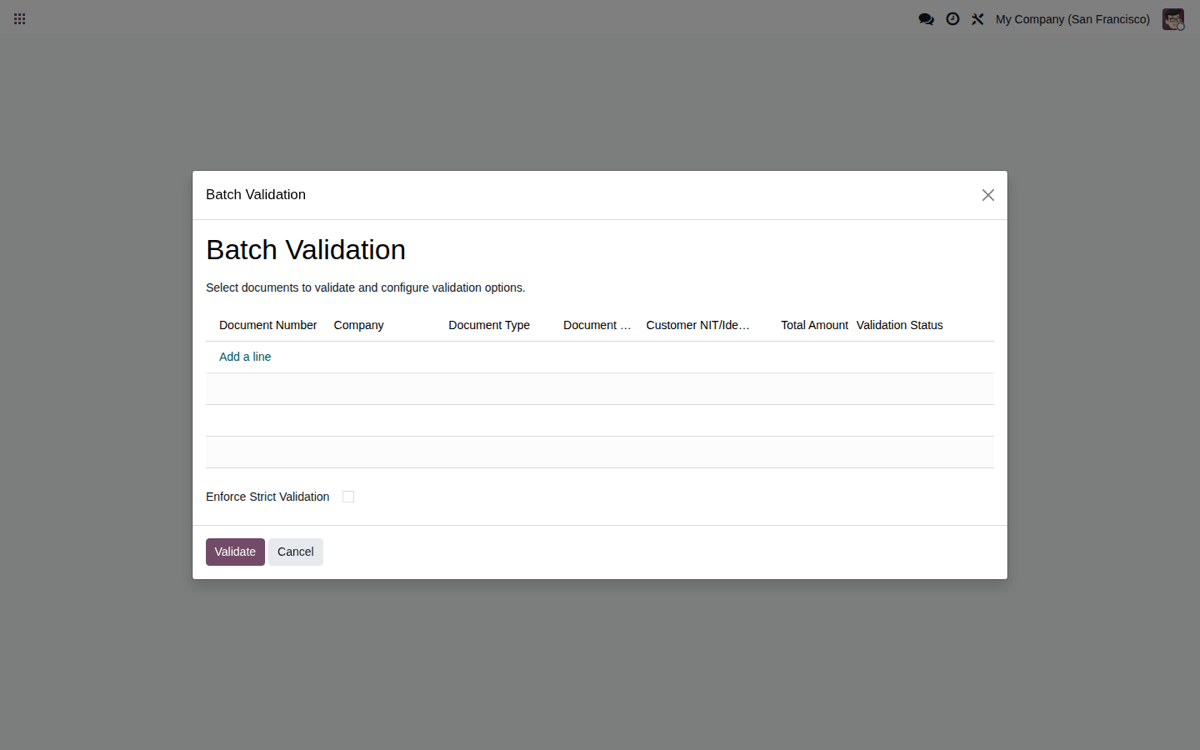
  • Error detection before you sendFlags problematic documents so you fix them inside Odoo before transmitting, one by one or in batches. The bulk validation wizard checks your documents in seconds, with a clear pass/fail summary.
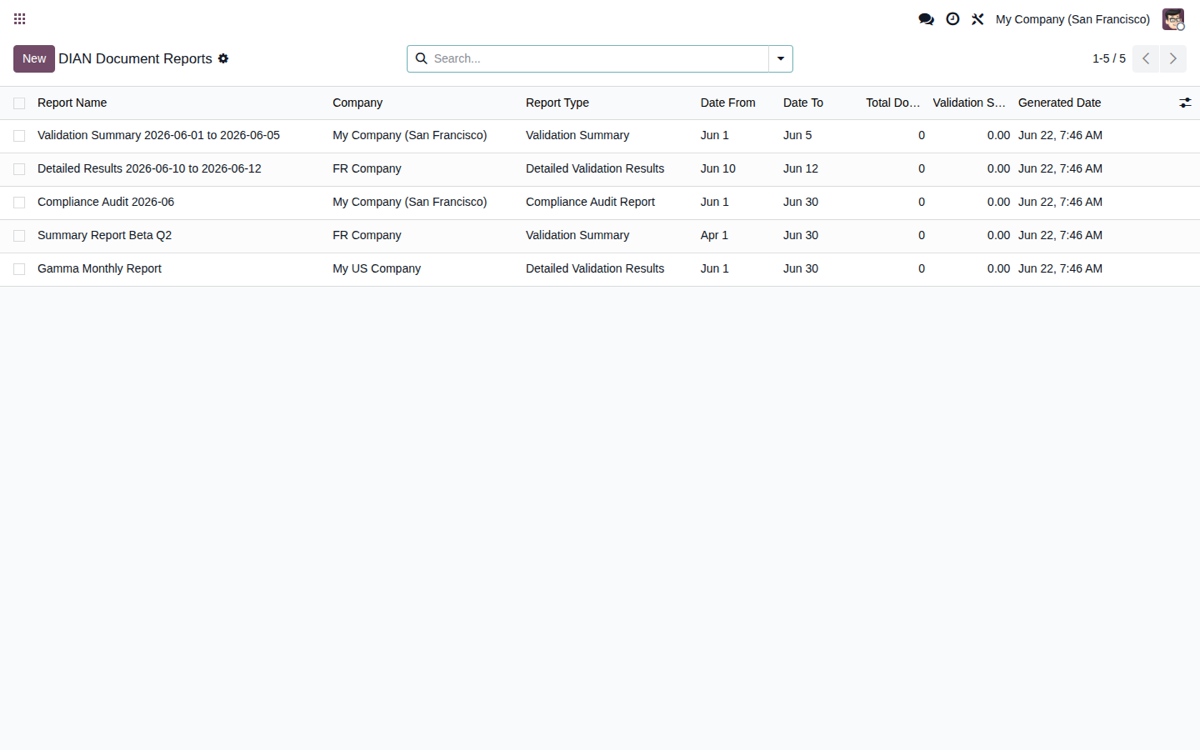
  • Structured report for the DIANGenerates validation summaries, detailed results, and compliance audit reports for the period, exportable to PDF or CSV: an audit trail ready to review and use in a DIAN inspection.
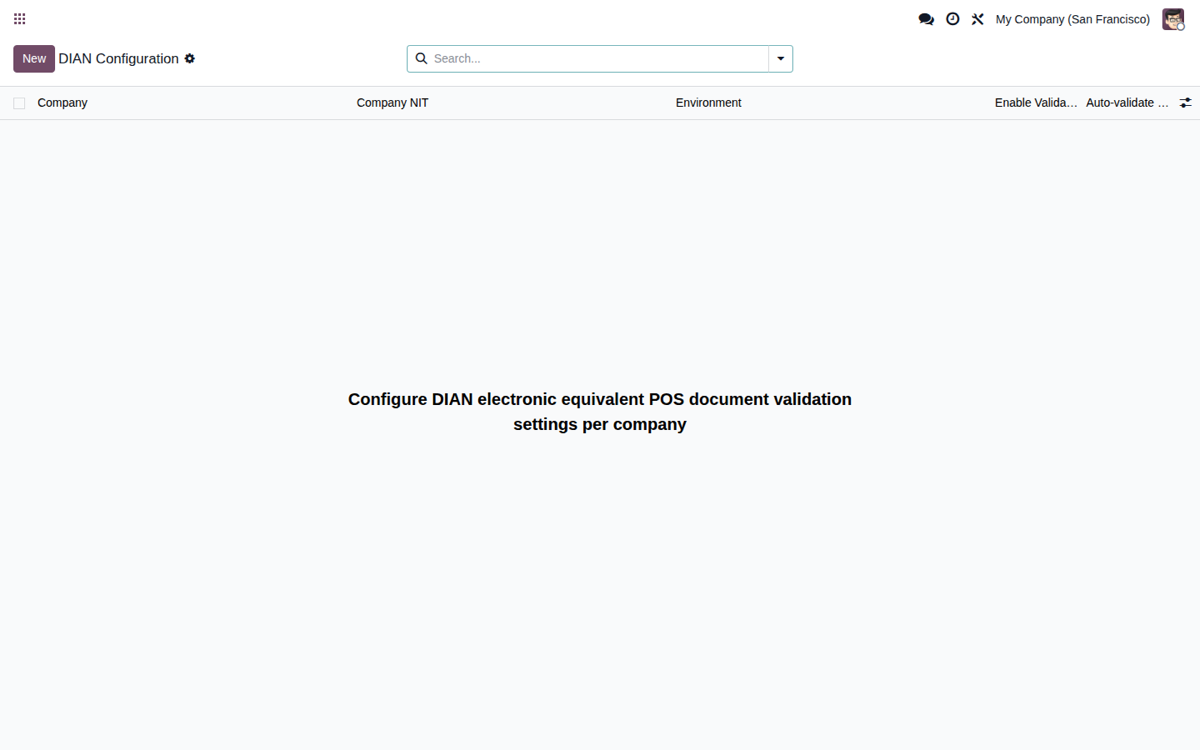
  • All inside your Odoo, no external platformValidate your POS equivalent documents right inside Odoo (Accounting → DIAN Configuration), with switchable rules, per-company setup, and an optional link to the POS order. No separate SaaS, no double entry — one single system.
  • €9, one-time payment per Odoo versionA one-time payment per Odoo version, on the Odoo App Store or flexigotech.com. No cost per POS ticket and no surprises tied to your sales volume.
  • Source code includedYou get the module source, so you can install it, audit it, and adapt it to your own point-of-sale flow. Nothing is hidden behind a black-box service.

At a glance

Odoo versionsOdoo 17.0 · 18.0 · 19.0With the subscription, new Odoo versions are included if you buy it on flexigotech.com.
Price9 €One-time payment per Odoo version
LicenseOPL-1 · source code included
SupportDirect from the engineer who built it

Frequently asked questions

It is the cash-register (POS) ticket in its electronic version, regulated by Colombia's DIAN. When you sell at the point of sale and do not issue an electronic sales invoice, the POS equivalent document must meet a defined format and be reported to the DIAN. This Odoo module validates those documents inside your ERP and prepares the report.

Yes. The module runs on Odoo Community and Enterprise, versions 17, 18 and 19. It lives inside Accounting as DIAN Configuration, with no separate SaaS platform or middleware to maintain. You buy the license once and get the source code, so you can install and adapt it on your own Odoo.

The module validates your POS equivalent documents and generates a structured report inside Odoo for you to review. The official transmission to the DIAN and the legal obligation to invoice remain the taxpayer's responsibility. The module leaves the data clean and consistent, but it does not assume your legal liability.

It applies 10 DIAN rules to each POS equivalent document: number format, valid dates, customer NIT, tax and total calculations, sequence gaps, fiscal year, and complete required fields. The goal is to catch rejections before you send to the DIAN, not after, when fixing them costs time and rework.

It is €9, a one-time payment per Odoo version, with the source code included, and there are no per-ticket fees. FlexigoTech Cloud is a separate subscription, explained on this page. You can buy the license on the Odoo App Store, and if you need it, ask us to help configure it for your point-of-sale operation in Colombia.

Questions before buying? Talk to the engineer.

We tell you whether the module fits your Odoo and your operations before you pay anything. No middlemen.