

 Español
 Català
 Deutsch
 Nederlands
What Plytix is, in Plytix's own words
Plytix describes itself as a product content platform with PIM, DAM and AI. Its website, read on 16-11-2026, sums it up as «Store and manage all your product data in one place». In other words, all your product data in a single place.
It is for anyone who maintains a catalogue with variants, attributes and images and has to publish it on several channels. Plytix puts it another way: «Send your product information to all your channels». With Odoo, the split we set out on the connector listing is this: Odoo handles operations and Plytix handles product content.
How Plytix works: PIM, DAM, feeds and channels
Plytix is built from separate pieces. These are the ones its website names (read on 16-11-2026) and the ones the Odoo connector brings over:
- PIM
- Where you store and manage product data.
- DAM
- The library of images and videos, kept next to the data: «Keep your images and videos right next to your product data». The connector brings the images and documents stored in the DAM into the Odoo product form.
- Product feeds
- Catalogue outputs prepared for each channel: «Build compliant, channel-ready product feeds at scale».
- Channels
- The destinations Plytix sends your product information to.
- SKU
- The identifier the connector uses to match Plytix products, variants and sub-variants with those in Odoo. When the SKU does not identify the record, the connector does not create a match.
- Attributes and families
- The structure of the catalogue in Plytix. They reach Odoo together with the attribute values.
- Categories and relationships
- The catalogue categories and the relationships between products. They reach Odoo as well.
Plytix with Odoo: what the connector brings in, what it sends back and where you see it
From Plytix to Odoo come products and variants, attributes and families, categories and relationships, and images and assets. You can bring in the full catalogue or only the records changed since the previous run. The link of each product keeps a copy of every value, including values you did not map.
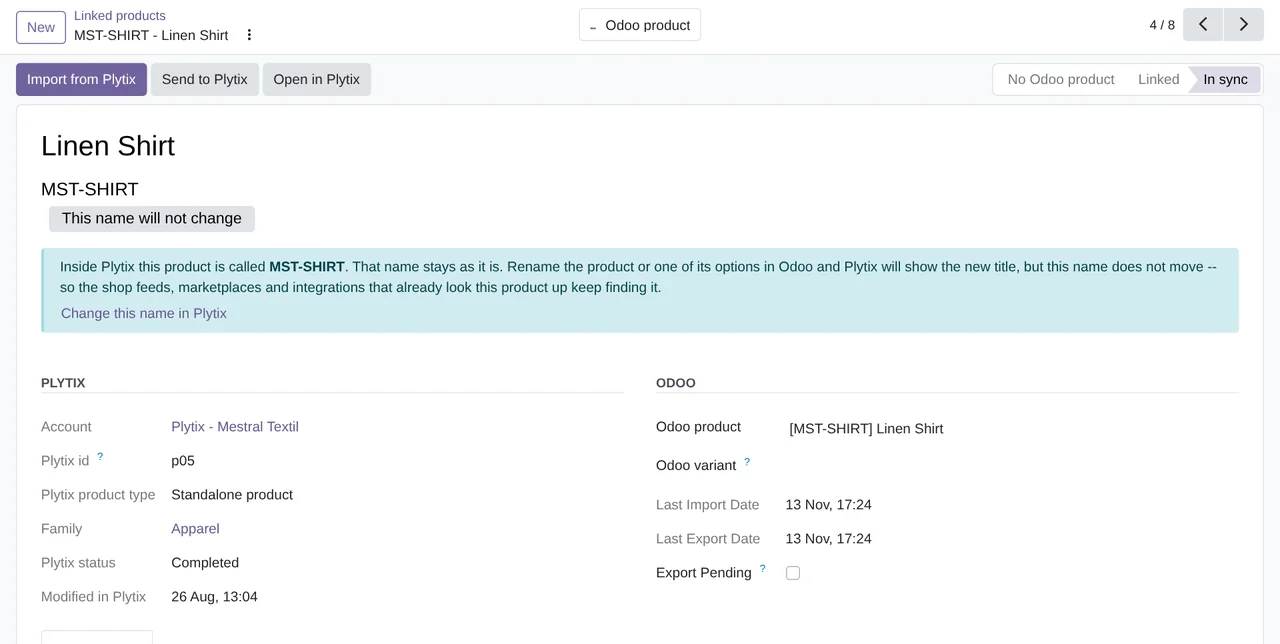
From Odoo to Plytix go the products created in Odoo with their variants, the internal reference as Plytix SKU, the product name to the Label field, the barcode to GTIN and the archived status. A sync runs manually, or automatically when products change. For the status, the module offers these options: Only when the product is archived or restored, On every export and Never -- Plytix owns the status. Which side owns each field is covered in Plytix PIM with Odoo.
Everything sits under the Plytix menu:
Plytix › Products › Linked products,Import from PlytixandMatch by SKU.
Plytix › Structure › Attribute mappings, alongsideAttributes,Product families,CategoriesandRelationships.
Plytix › Configuration › Plytix accounts, where the connection shows asNot connected,ConnectedorConnection error.
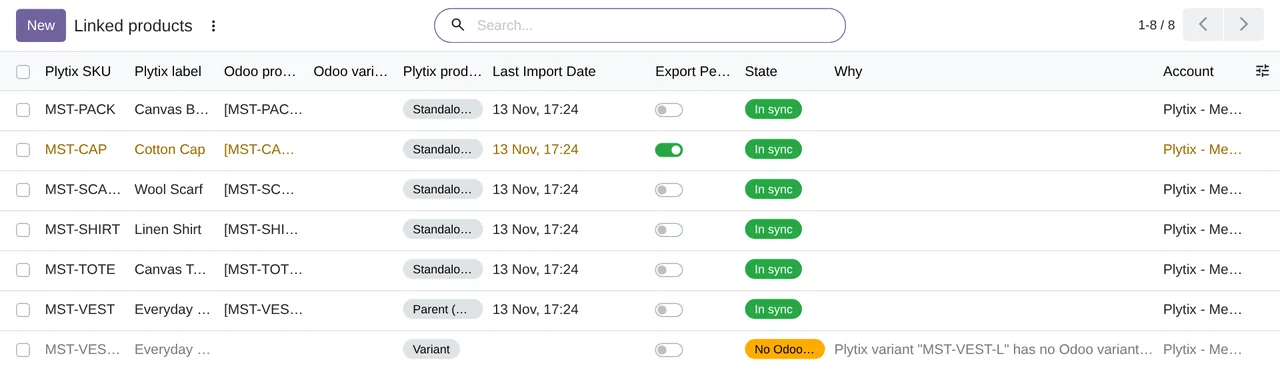
Plytix › Products › Linked products: what comes from Plytix and whether it is up to date, in Odoo 20.The connector installs these scheduled actions:
Plytix: import changed products, every 6 hours; disabled on installation.
Plytix: export changed products, every 12 hours; also disabled on installation.
Plytix: clean up old log lines, every week; active on installation.
What you need to use Plytix with Odoo
- A Plytix account with API access and an
API key. In Plytix you create it under Account, then API, then API Keys, and only Owners and Admins can create one.
- Odoo 17, 18, 19 or 20 on Odoo.sh or on your own server, not on Odoo Online.
- The Odoo Sales and eCommerce apps, which the module depends on.
- The FlexigoTech Cloud subscription, Connector plan. The connection with Plytix goes through the cloud, on servers in Germany, where your key and password are stored encrypted. Product images are downloaded straight from the Plytix file server. How the key is handled is explained in Plytix API from Odoo.
Frequently asked questions about Plytix and Odoo
What else does the connector need, apart from the Plytix account?
The FlexigoTech Cloud subscription, Connector plan: the connection with Plytix goes through it. You will find the connector on Odoo Apps and on the Plytix connector page.
Does Plytix know about this connector?
Yes. Plytix presents it on its Odoo connection page (plytix.com/connection/odoo) with the line «Built and supported by FlexiGoTech».
Does it respect the Plytix API limits?
Yes. In the account you choose your Plytix plan and the connector slows down before reaching its limits. If Plytix says the limit has been reached, it waits for as long as Plytix asks, without marking anything as failed. What each plan includes is covered in Plytix pricing.
What happens to my data if I cancel the subscription?
Syncing with Plytix stops: nothing is imported or sent. Whatever has already been imported stays in Odoo and can still be consulted.
Keep reading
Checked in the connector's source code (version 20.0) and the linked sources
Sources
- www.plytix.com/
- flexigotech.com/conector-plytix-odoo.html
- Module source code: flexigobe_plytix_connector 20.0 (40f61773): __manifest__.py
- Module source code: flexigobe_plytix_connector 20.0 (40f61773): static/description/index.html
- Module source code: flexigobe_plytix_connector 20.0 (40f61773): views/plytix_menus.xml
- Module source code: flexigobe_plytix_connector 20.0 (40f61773): data/plytix_cron_data.xml
- Module source code: flexigobe_plytix_connector 20.0 (40f61773): models/plytix_account.py