

 Español
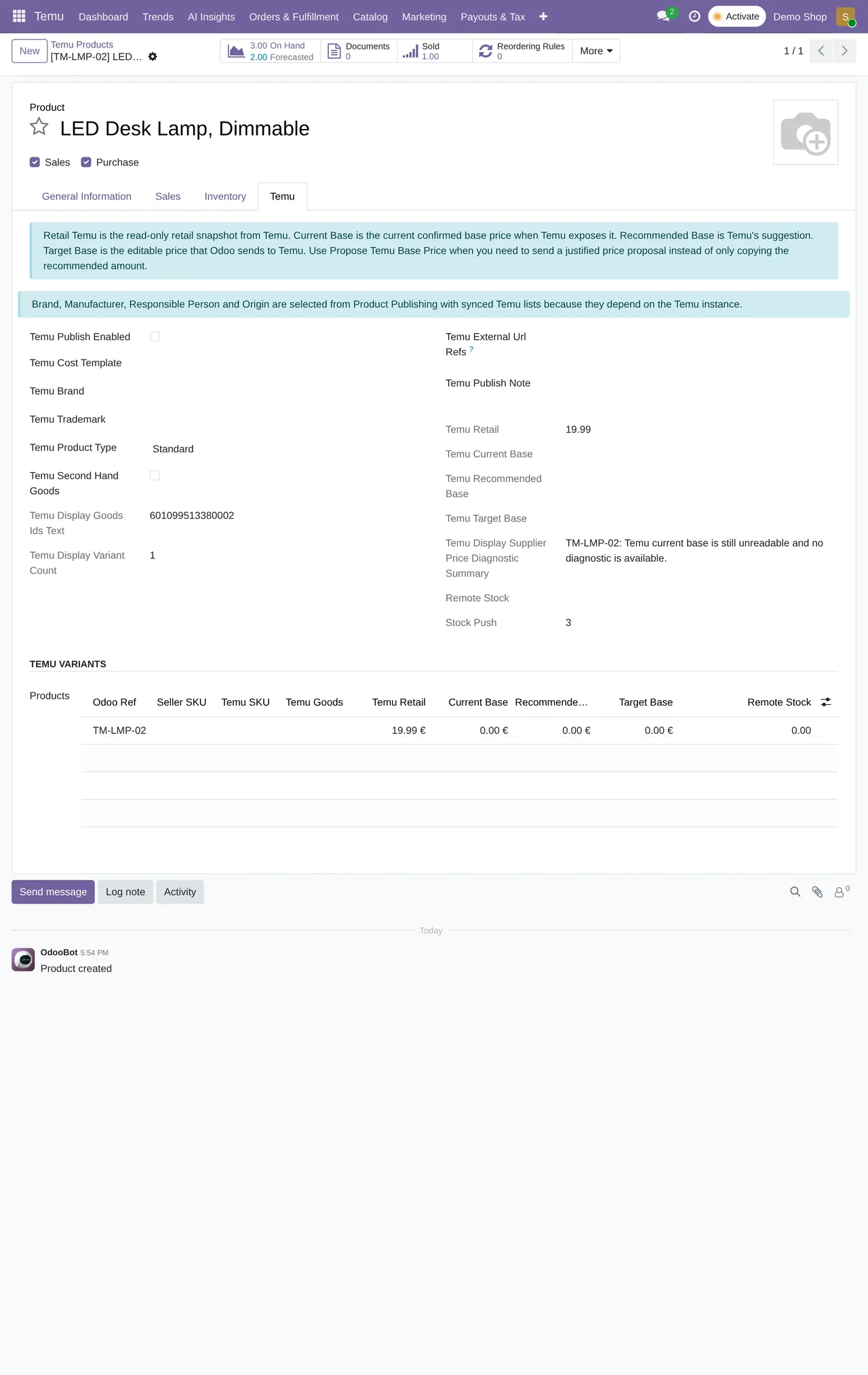
Before you change anything, get the four prices on the product's Temu tab straight. They look alike and they are not the same thing:
- Temu Retail
- The selling price on Temu, as the connector brings it in. Read only.
- Current Base
- The confirmed base price, when Temu provides it.
- Recommended Base
- Temu's suggestion.
- Target Base
- The price you want, which Odoo sends to Temu. The only one you edit.
Create the proposal step by step
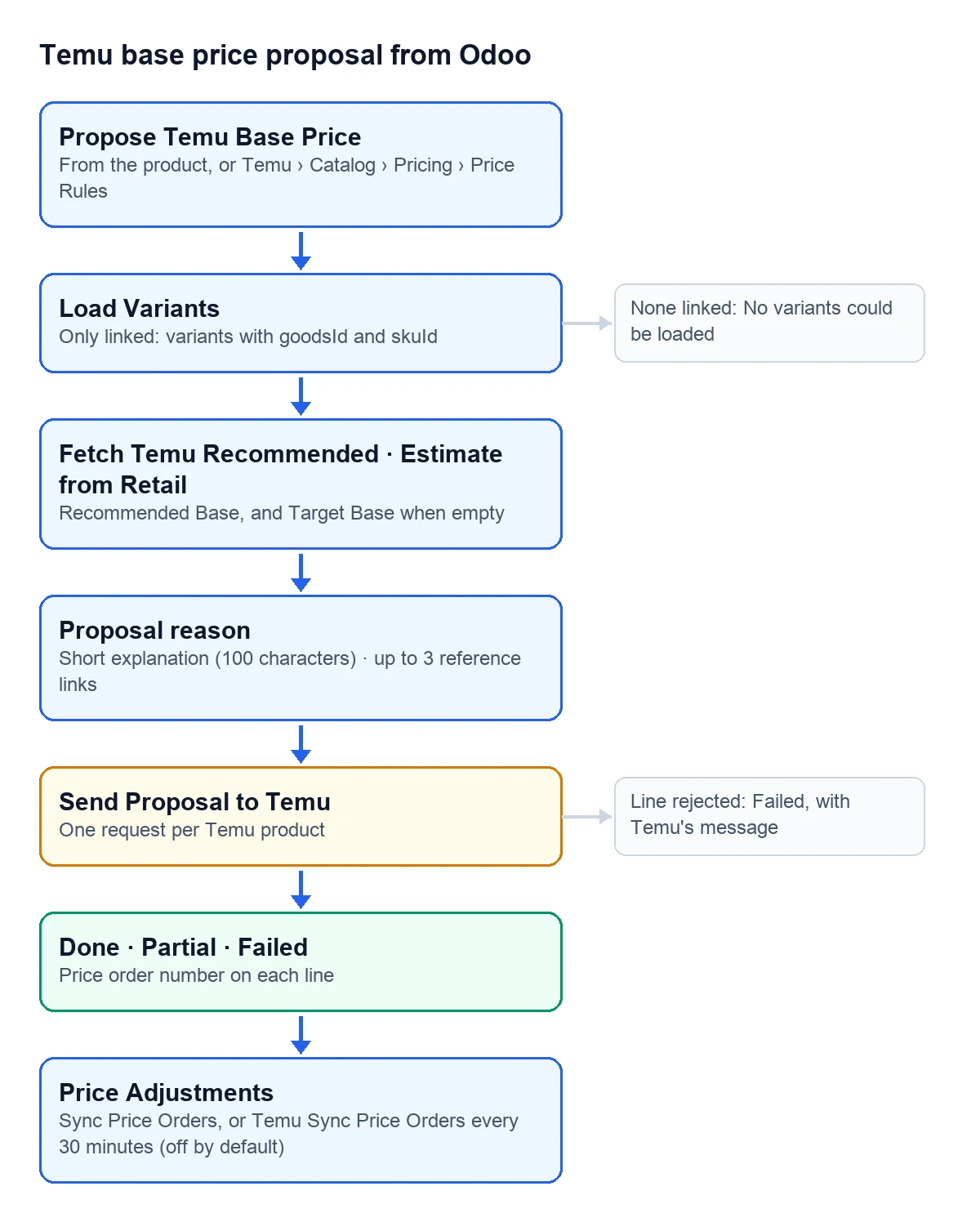
- Open the product and click "Propose Temu Base Price". A wizard opens and creates the proposal with its lines when you click "Create Proposal". You can also create it under Temu › Catalog › Pricing › Price Rules, pick the product template and click "Load Variants".
- Check the lines. With "Only linked" ticked, which is how it comes, only variants linked to Temu, with their goodsId and skuId, are loaded. If there are none, Odoo tells you:
No variants could be loaded. Ensure variants are linked to Temu (goodsId + skuId), or disable 'Only linked'. - Set the price. "Fetch Temu Recommended" asks Temu for its recommended price for the ticked lines and puts it in Recommended Base, and in Target Base too when that was empty. "Copy Recommended" copies it into Target Base when you already had something there.
- If you would rather start from the selling price, click "Estimate from Retail": Temu returns an estimated base price for each line. For that, the product needs its Temu link with the category and the cost template.
- If copying the recommended price is not enough, back your price: choose a reason under "Proposal reason" and, if you like, add a short explanation and reference links.
- Untick the variants you don't want to change and click "Send Proposal to Temu".
The reasons you can give
| Reason in Odoo | What you are claiming |
|---|---|
| Multi-piece or bundled product | It is a bundle or a product made of several pieces |
| Licensed or protected IP | It carries a licence or protected intellectual property |
| Unique materials, style or manufacturing | Its own materials, style or manufacturing |
| Special dimensions | It has special dimensions |
| High production cost | It is expensive to make |
| Currently priced below comparable offers | It is cheaper today than comparable offers |
| Other business justification | Anything else; here the explanation is required |
The short explanation takes up to 100 characters. Reference links, up to 3, one per line, starting with http:// or https://. Without a reason, Odoo accepts neither an explanation nor links, so choose the reason first. What Temu will receive is shown in "Reason sent to Temu": the reason and your explanation together. If you choose no reason, the "Fallback reason" goes instead, which comes set to "Price optimization from Odoo".
What comes back from Temu
Odoo sends one request per Temu product, with all of its ticked variants. Before that it checks that every line has a goodsId and a skuId and that Target Base is above zero; if one is zero, it stops with All selected lines require a positive target price.
- Each line sent ends up as Success or Failed, with Temu's message and the number of its price order.
- The ones you unticked are marked Skipped, with the note "Skipped by user selection."
- The proposal ends as Done if Temu accepts every line, Partial if it accepts some and Failed if it accepts none. In that last case the record sums it up with
Temu rejected all SKU price updates. - When a line goes through, its Target Base is saved on the product as the Temu supplier price.
The "Replace open Temu recommendation" box comes ticked and is sent with the proposal.
Follow the price orders
Temu › Catalog › Pricing › Price Adjustments lists Temu's price orders: the number, the product, the status as Temu gives it, the reason and, when Temu turns it down, the rejection description, along with the current, suggested and target prices. They are refreshed with "Sync Price Orders", on the proposal or on the store form.
The "Temu Sync Price Orders" task does the same every 30 minutes, but it comes switched off. Turn it on if you want the list to keep itself up to date instead of relying on someone remembering the button.
Can I propose prices for several variants at once?
Yes. "Load Variants" brings in every active variant of the template and, when you send, Odoo groups the lines by Temu product. Untick the ones you don't want to change.
What if Temu returns no recommended price?
"Fetch Temu Recommended" stops with Temu returned no recommended prices for the selected linked lines. Type your Target Base by hand and back it with a reason.
What if a variant is not linked to Temu?
With "Only linked" ticked, it stays out of the proposal. If you untick it to load the variant anyway, sending stops with Some lines are missing Temu goodsId/skuId. Ensure product links are synchronized before submitting prices. Link it first.
Keep reading
Checked in the connector's source code (version 17.0, 18.0, 19.0 and 20.0)
Sources
- Module source code: flexigobe_temu_connector · 17.0 9e038a9 · 18.0 c1fe2e4 · 19.0 1f20ced · 20.0 47d68eb: views/menu_views.xml, views/product_template_views.xml, models/product_template.py, wizard/temu_price_update_wizard.py y su vista
- Module source code: flexigobe_temu_connector · 17.0 9e038a9 · 18.0 c1fe2e4 · 19.0 1f20ced · 20.0 47d68eb: views/product_template_views.xml
- Module source code: flexigobe_temu_connector · 17.0 9e038a9 · 18.0 c1fe2e4 · 19.0 1f20ced · 20.0 47d68eb: models/temu_price_update.py, models/temu_price_payload_builder.py, views/temu_price_views.xml
- Module source code: flexigobe_temu_connector · 17.0 9e038a9 · 18.0 c1fe2e4 · 19.0 1f20ced · 20.0 47d68eb: models/temu_price_update.py (TEMU_PRICE_PROPOSAL_REASON_SELECTION, _validate_temu_price_proposal, _build_temu_price_reason)
- Module source code: flexigobe_temu_connector · 17.0 9e038a9 · 18.0 c1fe2e4 · 19.0 1f20ced · 20.0 47d68eb: models/temu_price_update.py (action_submit_price_changes), models/temu_price_payload_builder.py
- Module source code: flexigobe_temu_connector · 17.0 9e038a9 · 18.0 c1fe2e4 · 19.0 1f20ced · 20.0 47d68eb: data/ir_cron_data.xml, models/temu_price_order.py, views/temu_price_views.xml