

 Español
 Català
 Deutsch
 Français
 Português
 Italiano
 Nederlands
 Polski
The problems the module sets out to tackle
The module's README opens with the problems it sees in a data migration. In short:
- Data chaos: raw staging records left unvalidated and trial balances left unreconciled.
- Audit gaps: the migration's lineage disappears and the evidence needed to roll it back is lost.
- Repeated work: every migration connector re-implements models, security and workflows.
- Regulatory risk: according to the README, weak controls lead to audit findings and compliance fines.
Treat this list as a first filter. If you recognise any of these points in the migration ahead of you, the criteria below will help you decide. If none of them worries you, another way of loading your data may be enough.
What it covers, according to its documentation
The README lists what the module provides out of the box:
- Migration project lifecycle state transitions.
- Staging record validation.
- Mapping set versioning.
- Reconciliation variance computation.
- Multi-company isolation.
- Security groups and ACLs.
Once installed, a Migration menu appears in Odoo with submenus that include Projects, Mappings and Runs. The README places Go-Live as a step that belongs to the Migration Manager.
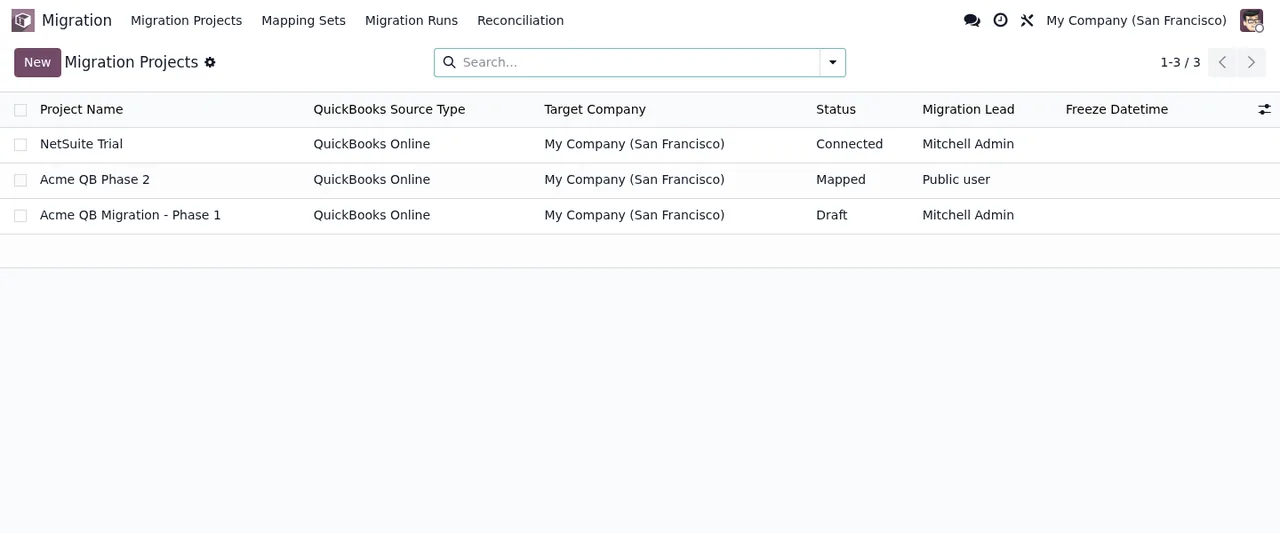
Migration › Migration Projects list, showing three projects with QuickBooks as source type, their state, owner and freeze date.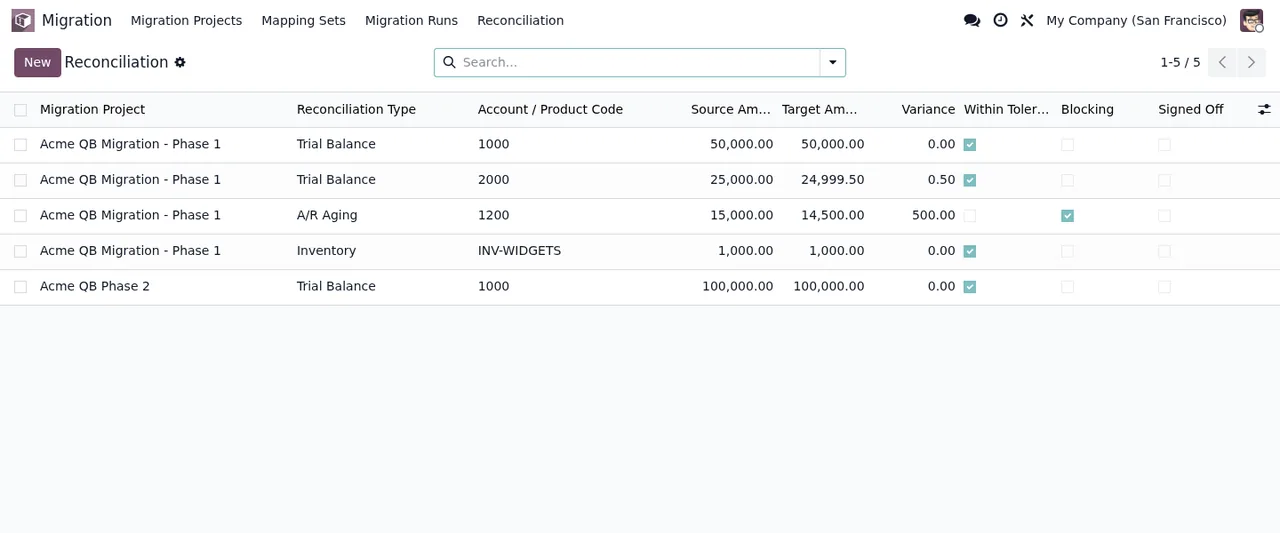
Migration › Reconciliation: each row shows project, reconciliation type, account code, source and target amounts, the variance and the tolerance, blocking and sign-off checkboxes.Criteria for deciding whether it fits
The Odoo Apps listing says who it is aimed at: Migration Managers, who manage the project lifecycle and sign-offs; accounting teams, who reconcile and validate the data transfer; compliance and audit, to track lineage and enforce controls; system integrators, who extend the base for their connectors; and finance controllers, who review reconciliation before go-live. Match that against your situation in this table.
| If this happens in your migration | What the module offers |
|---|---|
| You load data into staging and want to validate it before moving it on | The README mentions staging record validation |
| You need to match the trial balance between the old system and Odoo | The README mentions reconciliation variance computation and the listing targets accounting teams who reconcile and validate |
| The mappings between source and Odoo change during the project | The README mentions mapping set versioning |
| You want to follow the project through states up to go-live | The README mentions lifecycle state transitions and places Go-Live with the Migration Manager |
| Audit asks you for the migration's lineage | The listing targets compliance and audit to track lineage and enforce controls |
| You run several companies in Odoo | The README mentions multi-company isolation |
| You want to control who can access the migration | The README mentions security groups and ACLs |
| You are an integrator and every connector makes you rebuild models and security | The listing presents it as a base that integrators extend for their connectors |
| You would rather not depend on outside services | The README states that no external SaaS is required |
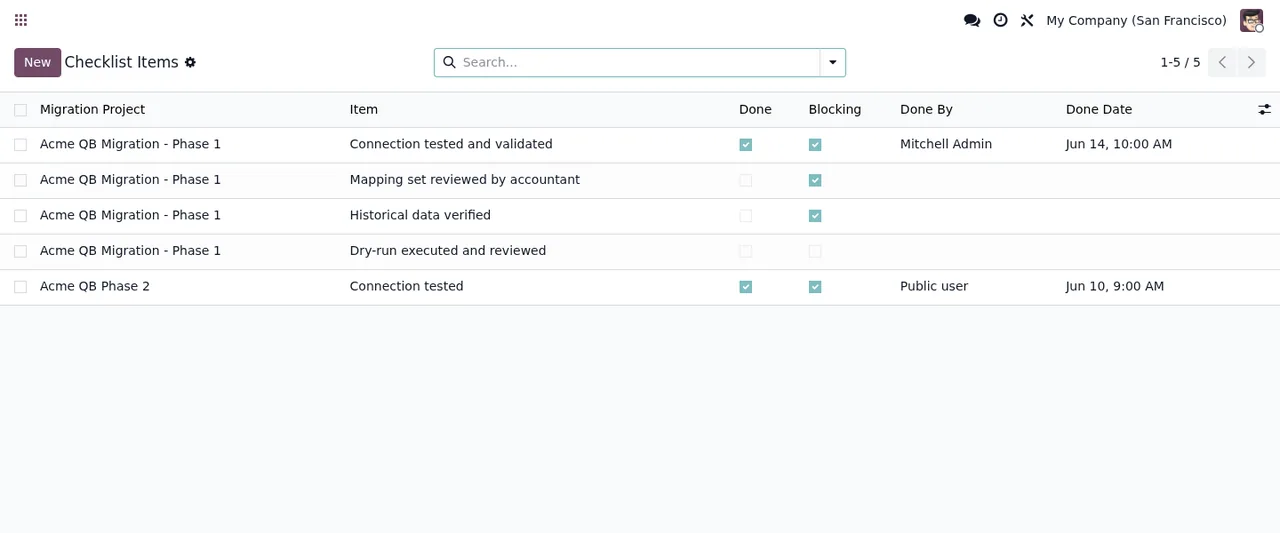
Checklist Items list with five records: migration project, item, the Done and Blocking checkboxes, who completed it and the date.When to think twice
- If you do not use Odoo accounting: the README lists
accountamong its dependencies, alongsidebaseandmail. Bear that in mind before installing. - If what you need is a connector for your source system: the listing aims the module at integrators who extend the base for their connectors. Work out from the start who will build or supply the connector for your source.
- If your migration is small and one person handles it: consider whether project tracking, states and reconciliation add anything compared with a direct import.
What to have ready before installing
- Odoo version and edition: the README for version 20 states Odoo 20, Community or Enterprise. The other published versions are covered further down.
- Dependencies:
base,mailandaccount. - No external SaaS: according to the README, you do not need to sign up for any separate service.
- Who runs the project: decide who will act as
Migration Manager, who according to the listing manages the project lifecycle and sign-offs, and who in accounting will review the reconciliation.
Installation, according to the README: add the module from Odoo Apps or to your addons path, then in Odoo go to Apps → Update Apps List, search for FlexigoTech Migration Base and click Install. What to fill in afterwards is covered in the module set-up guide.
Checklist Items, then Reconciliation and finally Migration Runs, with the Is Dry-Run checkbox.Which Odoo version and what it costs
The module is published on Odoo Apps for 17.0, 18.0, 19.0 and 20.0, and the Odoo Apps listing shows it as free, excluding VAT, on all four versions. If you are on 17, 18 or 19, download it from the listing for your version on Odoo Apps.
If you still have questions before deciding, the README points to the module documentation on flexigotech.com, to comercial@flexigobe.com for bug reports and to a 2-minute overview video on the Odoo Apps listing.
How FlexigoTech can help
At FlexigoTech we implement Odoo 17, 18, 19 and 20 and build bespoke connectors and integrations. If the module suits you as a base but you need to read your source system or adapt the process to your business, we can build that with you on top of it. To see which menus it adds and what a record goes through, carry on with how it works under the bonnet.
Keep reading
Checked in the module's source code (version 20.0) and the linked sources
Sources
- Module source code: flexigo_migration_base 20.0 (075d1af0): README.rst
- Module source code: flexigo_migration_base 20.0 (075d1af0): static/description/index.html
- apps.odoo.com/apps/modules/20.0/flexigo_migration_base
- apps.odoo.com/apps/modules/17.0/flexigo_migration_base
- apps.odoo.com/apps/modules/18.0/flexigo_migration_base
- apps.odoo.com/apps/modules/19.0/flexigo_migration_base
- flexigotech.com/en/services.html