

 Español
 Català
 Deutsch
 Français
 Português
 Italiano
 Nederlands
 Polski
The four menus in the Migration app
The module adds its own app with four menu entries:
Migration › Migration Projects: the migration projects.Migration › Mapping Sets: the mapping sets.Migration › Migration Runs: the runs.Migration › Reconciliation: the reconciliations.
The module's Odoo Apps listing groups its capabilities under these headings: Governed Project Lifecycle, Staging & Lineage, Reconciliation & Audit, Versioned Mappings, Multi-Company Isolation and GDPR & Compliance. What follows is what sits behind those names, based on the models the module defines, with their technical names and descriptions as they appear in the code.
What the module stores behind each menu
The migration project
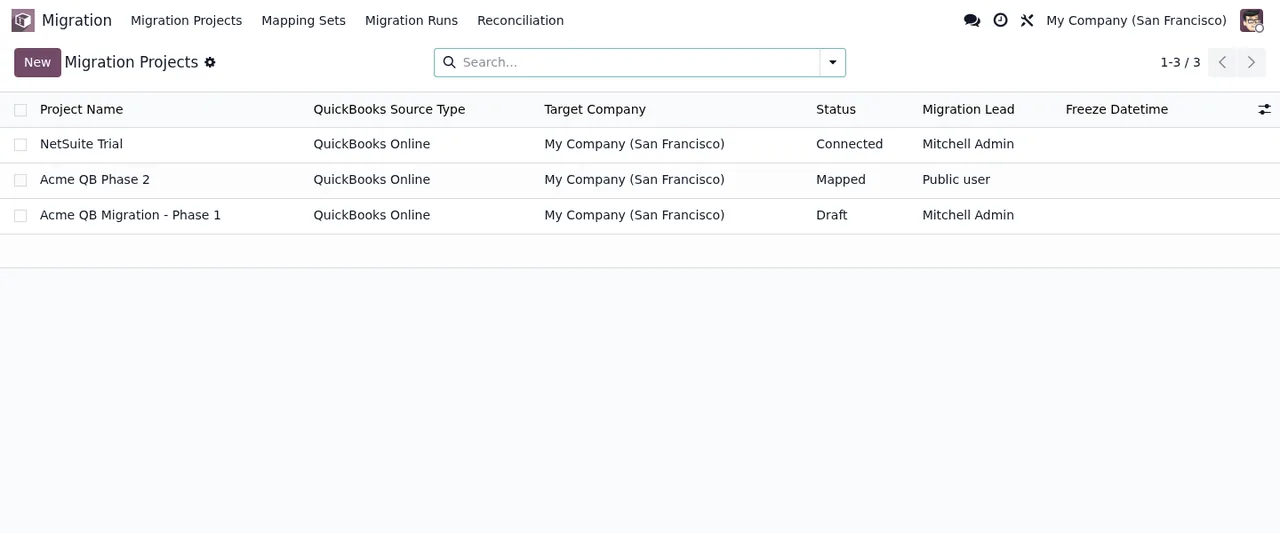
The project is the migration.project model (Migration Project). In the Migration › Migration Projects list each row shows the name, the source type (QuickBooks in the screenshot), the target company, the state, the person responsible and the freeze date. You create new projects from that same list with the New button.
Go/No-Go checklist
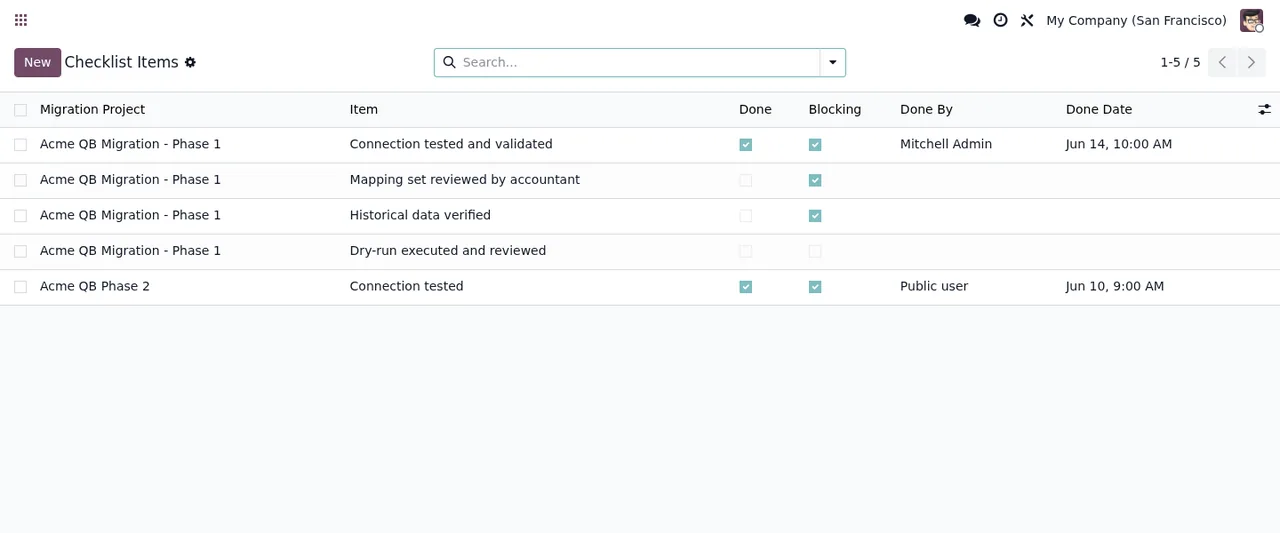
The module has a model for checklist items: migration.checklist.item, described as Go/No-Go Checklist Item. Its list shows the migration project, the item, the Done and Blocking tick boxes, who did it and the date. Each point on the list is therefore recorded with its tick boxes, the person and the day.
Field and value mappings
The mapping set is migration.mapping.set (Migration Mapping Set). The module also defines two kinds of mapping: field mapping (migration.mapping.field, Field Mapping (source field → target field)) and value mapping (migration.mapping.value, a lookup table for enumerated values). For QuickBooks there is a dedicated model, migration.dimension.map, which maps the Class and Location dimensions.
Staging, lineage and validation
The module includes a generic staging record (migration.staging.record), a mixin for tracking source lineage (migration.mixin, Migration Mixin for source lineage tracking) and validation results per record or per object (migration.validation.result). It also defines a connection profile marked as abstract (migration.connection, Migration Connection Profile (Abstract, FR-009)).
Runs, reconciliation and archive
Each run is a record in migration.run, described as Migration Run (immutable log). Reconciliation (migration.reconciliation) covers the TB/AR-AP/inventory tie-out. And migration.archive is a read-only historical archive (Migration Historical Archive (read-only)).
Separate files versus Migration Base
The table sets two ways of handling the same task side by side: in documents outside Odoo, or with what the module keeps inside Odoo. The right-hand column only lists the module's menus, models and columns.
| Task | In documents outside Odoo | With Migration Base |
|---|---|---|
| Organising the migration | Folders and emails | Project in Migration › Migration Projects with state, owner and freeze date |
| Deciding whether to go live | Separate minutes or email | Go/No-Go checklist with Done, Blocking, who and date |
| Translating fields and values | Spreadsheet formulas | Migration › Mapping Sets with field mapping and lookup tables for enumerated values |
| Tracking where a record came from | Manual notes | Source lineage mixin and staging records |
| Reviewing results | Visual check | Validation results per record or per object |
| History of loads | Manual log | Migration › Migration Runs, with runs kept as an immutable log |
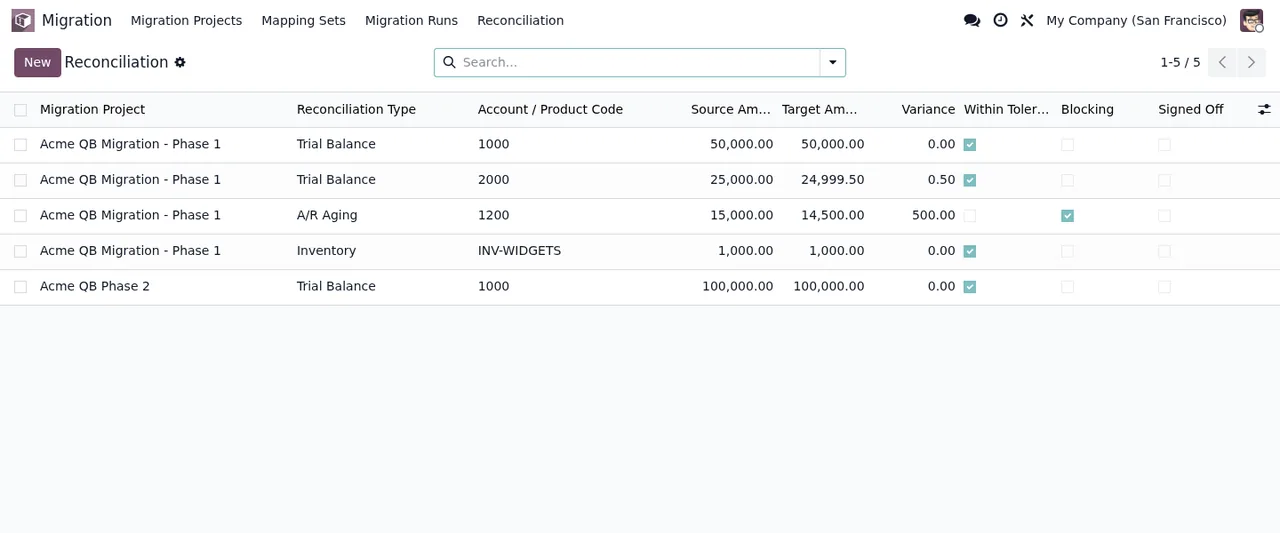
| Tying out balances and stock | Comparing reports | Migration › Reconciliation with source and target amounts, variance, tolerance, blocking and sign-off |
| Looking up old data | Saved exports | Read-only historical archive |
How to read this comparison
The right-hand column does not say the migration runs itself: it says where each piece is kept inside Odoo. The differences come down to three places.
First, the checklist: each item has the Done and Blocking tick boxes and records who did it and the date. Second, the mappings: they are Odoo records grouped into mapping sets, and the listing presents them under Versioned Mappings. Third, reconciliation: each row shows the source amount, the target amount and the variance alongside the tolerance, blocking and sign-off tick boxes.
If you run several companies in Odoo, the project list has a target company column and the listing includes a Multi-Company Isolation section.
Odoo versions and price
The module is published on Odoo Apps for Odoo 17, 18, 19 and 20, and according to the listing for each version it is free on all of them (one-off payment per version, excluding VAT). You can download it from the Odoo Apps listing.
How FlexigoTech can help
FlexigoTech implements Odoo 17, 18, 19 and 20 and builds bespoke connectors and integrations. If your source system needs a specific connector, or you want help setting up the mappings and reconciliation for your project, we can do it with you.
Keep reading
Checked in the module's source code (version 20.0) and the linked sources
Sources
- Module source code: flexigo_migration_base 20.0 (075d1af0): views/migration_menu.xml
- Module source code: flexigo_migration_base 20.0 (075d1af0): static/description/index.html
- Module source code: flexigo_migration_base 20.0 (075d1af0): models/migration_archive.py
- Module source code: flexigo_migration_base 20.0 (075d1af0): models/migration_checklist.py
- Module source code: flexigo_migration_base 20.0 (075d1af0): models/migration_connection.py
- Module source code: flexigo_migration_base 20.0 (075d1af0): models/migration_dimension_map.py
- Module source code: flexigo_migration_base 20.0 (075d1af0): models/migration_mapping.py
- Module source code: flexigo_migration_base 20.0 (075d1af0): models/migration_mixin.py
- Module source code: flexigo_migration_base 20.0 (075d1af0): models/migration_project.py
- Module source code: flexigo_migration_base 20.0 (075d1af0): models/migration_reconciliation.py
- Module source code: flexigo_migration_base 20.0 (075d1af0): models/migration_run.py
- Module source code: flexigo_migration_base 20.0 (075d1af0): models/migration_staging_record.py
- Module source code: flexigo_migration_base 20.0 (075d1af0): models/migration_validation.py
- apps.odoo.com/apps/modules/20.0/flexigo_migration_base
- apps.odoo.com/apps/modules/17.0/flexigo_migration_base
- apps.odoo.com/apps/modules/18.0/flexigo_migration_base
- apps.odoo.com/apps/modules/19.0/flexigo_migration_base
- flexigotech.com/en/services.html