

 Español
 Català
 Deutsch
 Français
 Português
 Italiano
 Nederlands
 Polski
What you see once it is installed: the Marketplaces menu
The Odoo Apps listing introduces the module under the heading Sell on Allegro, Bol, Kaufland and Octopia and has a section, How it works, on how it operates. Inside Odoo, everything the module adds sits under a new top-level menu, Marketplaces.
The first level holds Marketplaces › Dashboard, Marketplaces › Listings, Marketplaces › Orders, Marketplaces › Returns, Marketplaces › Performance and Marketplaces › Payouts. Listings opens into All Listings and Listing Errors; Orders into Marketplace Orders and Cancellations (Flagged).
Glossary: listings and their status
Dashboard- First entry in the module's menu, under
Marketplaces › Dashboard.
All Listings- List of marketplace listings, under
Marketplaces › Listings › All Listings. Each row shows the product, the connection, the offer, the status and the price.
Active- Listing status shown in the status column of
All Listings. It is also the filter applied to the list in the screenshot below.
Unpublish- Link shown on each row of
All Listingswith theActivefilter.
Listing Errors- Second sub-menu of
Listings, underMarketplaces › Listings › Listing Errors. The wording of each warning and what to do about it are in the article on the connector's error messages.

All Listings with the Active filter: each listing with its product, its connection, the Active status, the price and the Unpublish link. At the top, the module's bar with Dashboard, Listings, Orders, Returns and more.Glossary: orders, cancellations and returns
Marketplace Orders- List of marketplace orders, under
Marketplaces › Orders › Marketplace Orders. It shows date, customer, marketplace, order ID, salesperson, total and invoice status.
Nothing to Invoice- Invoice status shown by the orders in the
Marketplace Ordersscreenshot.
Cancellations (Flagged)- Second sub-menu of
Orders, underMarketplaces › Orders › Cancellations (Flagged).
Returns- Returns section, under
Marketplaces › Returns.
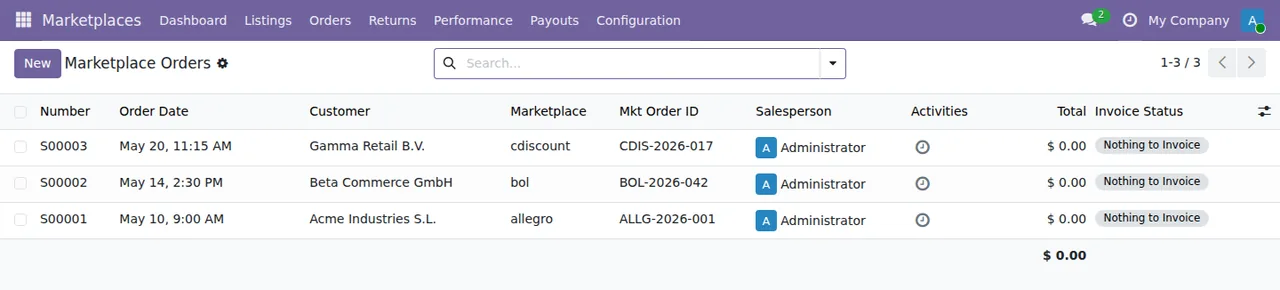
Marketplace Orders with three orders, each with its marketplace, its order ID, its salesperson and the invoice status Nothing to Invoice.Glossary: performance, payouts and connections
Performance- Performance section, under
Marketplaces › Performance.
Payouts- Payouts section, under
Marketplaces › Payouts.
Settlements- List of settlements within the
Marketplacesmenu. Each row shows period, total payout, currency, reconciliations and import method.
Connected- Status shown in the list of marketplace connections. With that filter you see, for each connection, the company, the seller account, the status and the API errors.

Settlements with rows for Bol.com NL, Kaufland DE and Allegro PL: period, total payout, currency, reconciliations and import method.
Marketplace Orders, All Listings with Active, Settlements and the connections list with Connected for Allegro PL, Bol.com NL, Cdiscount FR and Kaufland DE.The scheduled actions, most frequent first
All of these actions are listed as active and their names start with Marketplace:.
Every 5 minutes
Marketplace: Push Inventory to Marketplaces: pushes inventory to the marketplaces.Marketplace: Pull Orders from Marketplaces: pulls orders from the marketplaces.Marketplace: Connection Health Watchdog: keeps watch on connection health.
Between 15 and 60 minutes
Marketplace: Revert Expired Listing Promotions: every 15 minutes, reverts expired listing promotions.Marketplace: Pull Returns from Marketplaces: every 30 minutes, pulls returns.Marketplace: Re-register Webhooks: every 60 minutes, registers the webhooks again.
Once a day
Marketplace: Pull KPI Snapshots: pulls KPI snapshots.Marketplace: Purge Old API Logs: purges old API logs.Marketplace: Purge Old Sync Jobs: purges old sync jobs.
Every 7 days
Marketplace: Pull Weekly Settlements: pulls the weekly settlements.
The models underneath
If you develop on top of the module or look at its data at a technical level, these are some of the models the code defines:
mkt.connection:Marketplace Connection.mkt.api.log:Marketplace API Log.mkt.attribute.mapping:Marketplace Attribute Mapping.mkt.carrier.mapping:Marketplace Carrier Mapping.mkt.category.mapping:Marketplace Category Mapping.mkt.gpsr.safety.warning:GPSR Safety Warning.mkt.company.guard: described in the code asMarketplace: record rules checked again after a write.
The API log model and the attribute, carrier and category mapping models inherit from mkt.company.guard.
The service behind the connection
The connection to the marketplaces goes through FlexigoTech Cloud: it stores the credentials encrypted, monitors the sync and emails you if it fails. If the platform changes its API, both the module and the service are adapted. Without a subscription, or with the service suspended, whatever the subscription provides stops; your data stays in your Odoo.
That is why the listing includes a section headed Before you buy: this app uses a paid external service, alongside its Privacy policy. Read both before you buy.
Versions and what it costs
The module is published on Odoo Apps for Odoo 17, 18, 19 and 20, and according to each version's listing it costs €9 excluding VAT, as a one-off payment per Odoo version, on all four. That payment is not the whole cost: in every version the manifest states «Needs FlexigoTech Cloud subscription (from 49 EUR/month, VAT excl.)», and the Connector plan costs €49/month or €490/year excluding VAT for up to 3 platform accounts (Pro: €98/month or €980/year, up to 10 accounts).
You will find it on its Odoo Apps listing. Which settings to fill in and what to check in the first week are covered in setting up EU Marketplace Connector.
How FlexigoTech can help
FlexigoTech implements Odoo 17, 18, 19 and 20 and builds bespoke connectors and integrations. If you would like help implementing Odoo with this connector, or you need a bespoke integration around your marketplace sales, we can look at it with you.
Keep reading
Checked in the connector's source code (version 20.0) and the linked sources
Sources
- Module source code: flexigo_multimarketplace 20.0 (2270b5c0): views/menu_views.xml
- Module source code: flexigo_multimarketplace 20.0 (2270b5c0): data/mkt_cron.xml
- Module source code: flexigo_multimarketplace 20.0 (2270b5c0): static/description/index.html
- Module source code: flexigo_multimarketplace 20.0 (2270b5c0): models/mkt_api_log.py
- Module source code: flexigo_multimarketplace 20.0 (2270b5c0): models/mkt_attribute_mapping.py
- Module source code: flexigo_multimarketplace 20.0 (2270b5c0): models/mkt_carrier_mapping.py
- Module source code: flexigo_multimarketplace 20.0 (2270b5c0): models/mkt_category_mapping.py
- Module source code: flexigo_multimarketplace 20.0 (2270b5c0): models/mkt_company_guard.py
- Module source code: flexigo_multimarketplace 20.0 (2270b5c0): models/mkt_connection.py
- Module source code: flexigo_multimarketplace 20.0 (2270b5c0): models/mkt_gpsr_safety_warning.py
- apps.odoo.com/apps/modules/20.0/flexigo_multimarketplace
- apps.odoo.com/apps/modules/17.0/flexigo_multimarketplace
- apps.odoo.com/apps/modules/18.0/flexigo_multimarketplace
- apps.odoo.com/apps/modules/19.0/flexigo_multimarketplace
- flexigotech.com/en/services.html
- flexigotech.com/precios.html