

 Español
 Català
 Deutsch
 Français
 Português
 Italiano
 Nederlands
 Polski
The Deel token Odoo needs
Deel has three tokens: the organization token, which stands for the whole organization; the personal token, which stands for one user; and the worker token, which stands for one EOR employee. The connector works with the organization token, which is the default under Auth Method: Organization token. According to Deel's help center, a personal token expires if the person who created it leaves the company, while an organization token is not tied to anyone and does not expire, although it cannot sign contracts. To create one you have to be an Org Admin or IT Developer Admin in Deel.
Step by step in Deel's Developer Center
- Open the Developer Center. Deel's authentication guide gets there through More and then Developer; its webhooks guide, through the profile icon, Settings and Developer Center; and its help center, through Apps & Integrations.
- Open the Access Tokens tab and click Generate new token.
- Pick the Organization token type.
- Tick the scopes in the table below and decide which sensitive data the token can reach.
- Click Generate and copy the token right away: Deel warns that you cannot see it again afterwards.
Deel issues separate keys for its sandbox and for production, and asks you not to mix them. In Odoo, the connection's Environment field offers Production and Sandbox (tests), which is a Deel demo organization (demo.deel.com) with no real money. The token has to belong to the environment you pick.
Which scopes to tick
Deel names its scopes resource:read and resource:write, and its reference gives the scope each call needs. These are, among others, the calls the connector makes and the scope of each one according to Deel's reference on 18-11-2026:
| What for | Call | Scope |
|---|---|---|
Test connection | GET /organizations | organizations:read |
| Legal entities | GET /legal-entities | organizations:read, accounting:read |
| Contracts and people | GET /contracts, GET /people | contracts:read, people:read |
| Invoices, Deel fees and their PDFs | GET /invoices, GET /invoices/deel, GET /invoices/{id}/download | accounting:read |
| Payments and their breakdown | GET /payments, GET /payments/{payment_id}/breakdown | accounting:read |
| Payroll cycles and cost centers | GET /legal-entities/{legal_entity_id}/payroll-events, GET /legal-entities/{legal_entity_id}/cost-centers | legal-entity:read |
| Gross-to-net report of each cycle | GET /reports/payroll/cycles/{cycle_id}/gross-to-net | payslips:read |
| Registering and removing the webhook | POST /webhooks, DELETE /webhooks/{id} | webhooks:write |
| Sending cost centers to Deel | POST /legal-entities/{legal_entity_id}/cost-centers/synchronize | legal-entity:write |
The last two rows write to Deel. The webhook is only registered when an admin clicks Register webhook, and cost centers only travel to Deel if you choose to have Odoo lead them; the default is that they go from Deel to Odoo. The help text of the token field asks for read scopes. With only those, according to its reference, Deel will refuse to register the webhook and, if you choose to have Odoo lead cost centers, to take them too. Deel's authentication guide gives two possible answers for a token that lacks a scope: 403 or 401. On a 403, the sync every 30 minutes keeps reading everything else. On a 401, the connector takes it as a refused token and, if Odoo leads cost centers, every run stops there, before contracts, invoices, payments and payroll; in that case the token also needs legal-entity:write. If Deel changes the scope of a call, its reference wins.
Where it goes in Odoo
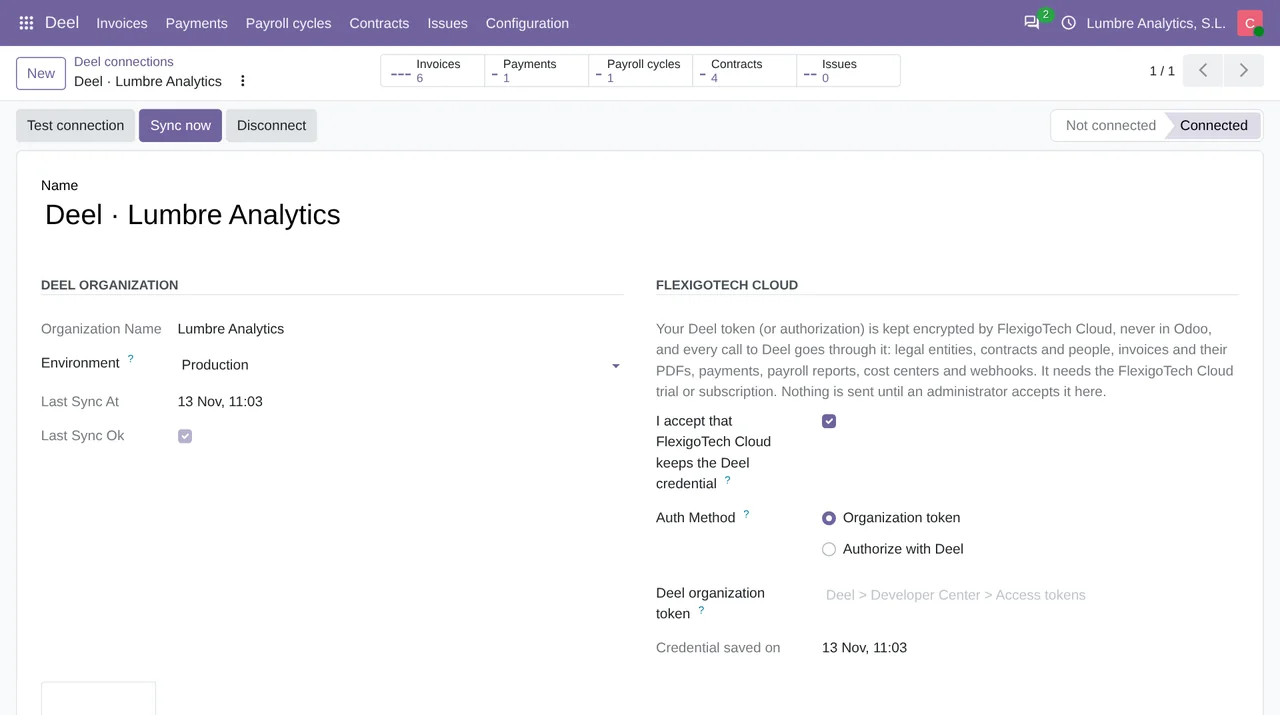
In the Deel connection, an admin:
- ticks
I accept that FlexigoTech Cloud keeps the Deel credential, because until then the token field cannot be filled in and nothing is sent; - leaves
Organization tokenunderAuth Methodand picks theEnvironment; - pastes the token into
Deel organization tokenand saves.
On save, the connector sends the token to FlexigoTech Cloud, which has to be on trial or subscribed, and records the date under Credential saved on. The field shows up empty again, on purpose: it is write-only and Odoo does not keep the token. Only an admin can save it. After that, Test connection asks Deel for the organization and its legal entities and answers with the name and how many there are.
If you change the Environment or the Auth Method of a saved connection, the saved credential stops counting: the connection goes back to Not connected, you paste the token again and the old entry is deleted from FlexigoTech Cloud.
Where the token goes
According to the module itself, FlexigoTech Cloud keeps the token encrypted, one entry per connection, and puts it on each call to Deel as an Authorization: Bearer header, which is how Deel says to use it. Calls to Deel do not leave your Odoo directly; the only thing going the other way is the webhook notices, which Deel sends to your Odoo and which are covered in Deel webhooks with Odoo. Disconnect deletes the token from FlexigoTech Cloud and, while the service is active, the webhook from Deel, and leaves everything already synced alone.
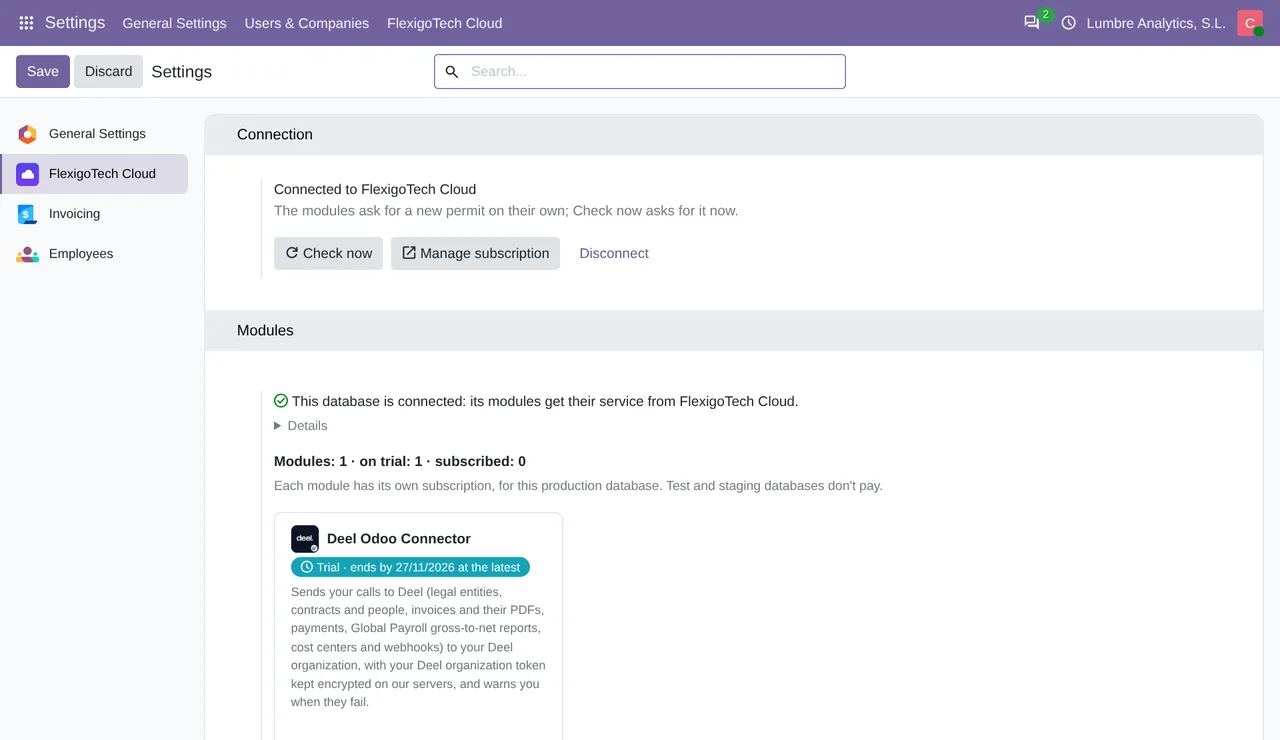
Deel recommends keeping credentials in a secure vault and never in code, rotating tokens every quarter or when someone leaves the team, and deleting the ones nobody uses. With the connector, rotating means creating the new token in Deel, pasting it into the same field, saving, and deleting the old one in Deel.
Authorize with Deel, today
The other Auth Method option, Authorize with Deel, connects without copying a token: a Deel admin approves the FlexigoTech app. As long as FlexigoTech Cloud does not have that app for the chosen environment, the connector answers "Authorize with Deel is not available yet for this Deel environment. Use an organization token meanwhile: nothing was sent to Deel."
Limits and errors
Deel allows 5 requests per second per organization, across all its tokens, in a rolling 1-second window, and its sandbox has the same limits. Above that it answers 429 and, according to its documentation, sends no headers that warn you first. If another program reads the same organization, it shares those 5 with the connector. The sync leaves at least 0.25 seconds between one call and the next; on a 429 it waits (one second, unless the answer asks for another wait, and never more than 5), retries up to 3 times and, if it still fails, leaves it for the next run.
| Deel's answer | Cause, according to Deel | What the connector does |
|---|---|---|
| 401 | Token invalid or expired, no Authorization header, or missing the required scopes | Sets the connection to Deel refused the token and asks for a new one |
| 403 | The token lacks the scope for that call | Does not treat the token as bad: it shows the reason Deel gives |
| 429 | More than 5 requests per second in the organization | Waits and retries |
A note in the connector's code adds another 403, "Error 1010": Deel's Cloudflare blocking the Python-urllib User-Agent, which is why the connector always sends its own. To see why Deel refused a call, the Request logs in the Developer Center keep 15 days of requests made with the organization's tokens, rejected ones included, with the reason.
What was tested
The connector works on Odoo 17, 18, 19 and 20, on your own server or on Odoo.sh, and not on Odoo Online. It was tested end to end against a Deel demo organization (demo.deel.com), through FlexigoTech Cloud: the connection, legal entities, a contract with its person and vendor, webhooks and a second sync without duplicates. Invoices, payments and payroll cycles were tested with answers modelled on Deel's API reference, because that organization had none yet. What comes in afterwards as a vendor bill is in the Deel invoice guide, and the comparison with Deel's own integrations, in Deel integrations. The connector is explained in full on its page and published on Odoo Apps.
Keep reading
Checked in the connector's source code (version 20.0) and the linked sources
Sources
- developer.deel.com/api/authentication
- help.letsdeel.com/hc/en-gb/articles/8801712601233-How-To-Use-Deel-API
- developer.deel.com/api/webhooks/no-code
- help.letsdeel.com/hc/en-gb/articles/10660690287761-How-To-Create-And-Manage-Webhooks-Notif
- developer.deel.com/api/sandbox
- Module source code: flexigo_deel_connector 20.0 (18442307): models/deel_account.py
- Module source code: flexigo_deel_connector 20.0 (18442307): models/deel_cost_center.py
- Module source code: flexigo_deel_connector 20.0 (18442307): models/deel_legal_entity.py
- Module source code: flexigo_deel_connector 20.0 (18442307): models/deel_contract.py
- Module source code: flexigo_deel_connector 20.0 (18442307): models/deel_payment.py
- Module source code: flexigo_deel_connector 20.0 (18442307): models/deel_payroll.py
- developer.deel.com/api/rate-limits
- developer.deel.com/api/endpoints/organizations/get-organizations
- developer.deel.com/api/endpoints/legal-entities/get-legal-entities
- developer.deel.com/api/endpoints/contracts/get-contracts
- developer.deel.com/api/hris-endpoints/people/get-people
- developer.deel.com/api/reference/endpoints/accounting/retrieve-deel-invoices-v-2026-01-01
- developer.deel.com/api/reference/endpoints/accounting/get-billing-invoice-download-link-v-
- developer.deel.com/api/reference/endpoints/accounting/retrieve-payment-receipts-v-2027-01-
- developer.deel.com/api/reference/endpoints/accounting/retrieve-a-payment-breakdown-v-2026-
- developer.deel.com/api/reference/endpoints/list-cycles/list-payroll-cycles-v-2026-01-01
- developer.deel.com/api/reference/endpoints/reports/gets-g-2-n-report-data-for-a-given-payr
- developer.deel.com/api/endpoints/cost-centers/get-legal-entity-cost-centers
- developer.deel.com/api/reference/endpoints/cost-centers/sync-cost-centers-for-legal-entity
- developer.deel.com/api/endpoints/webhooks/create-webhook
- developer.deel.com/api/endpoints/webhooks/delete-webhook
- developer.deel.com/api/reference/endpoints/accounting/retrieve-invoices-v-2026-01-01
- Module source code: flexigo_deel_connector 20.0 (18442307): models/deel_invoice.py
- Module source code: flexigo_deel_connector 20.0 (18442307): data/deel_cron.xml
- apps.odoo.com/apps/modules/20.0/flexigo_deel_connector
- Module source code: flexigo_deel_connector 20.0 (18442307): views/deel_account_views.xml