

 Español
 Català
 Deutsch
 Français
 Português
 Italiano
 Nederlands
 Polski
What the task does on each run
In Odoo 20.0, on each run, the task looks for the Amazon accounts that are active and have stranded inventory sync enabled and, account by account, asks Amazon for the stranded inventory report, checks it until it is ready and, if it is, downloads the document and imports its rows. When the report is resolved (imported, cancelled, fatally failed, not finished in time or without a document), it stores the date of that run and a summary of the result on the account.

Details you don't see on the form
Only active accounts with the sync switched on are picked up
The search asks for two things at once: the account must be active and it must have stranded inventory sync enabled. If either is missing, the account is left out of the search and the task does not process it.
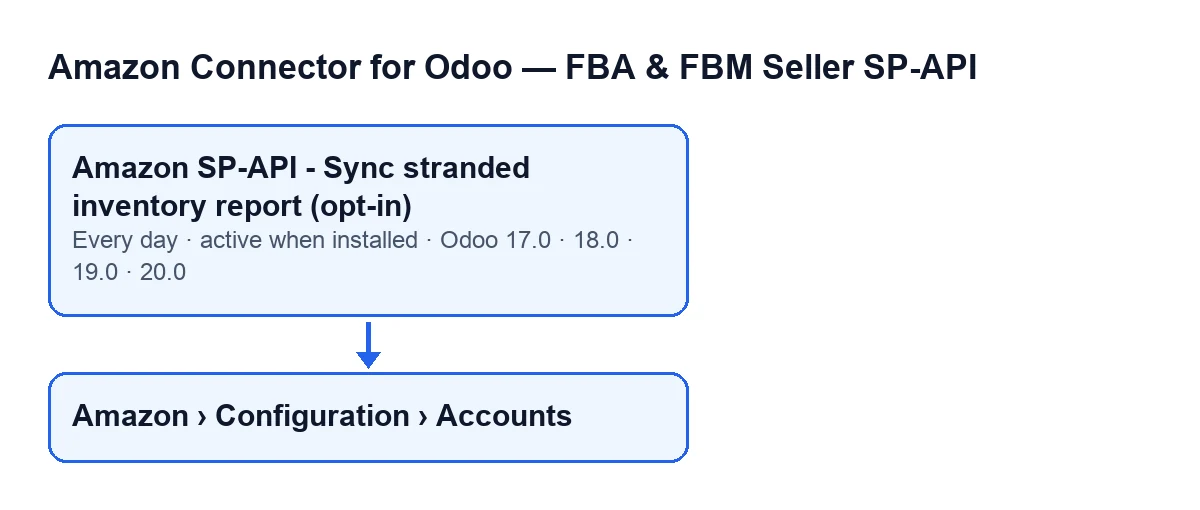
It runs once a day and is active on install
The task runs once a day and is active from installation. It exists in the 17.0, 18.0, 19.0 and 20.0 branches. In Odoo 17.0 it is also set to repeat without end. An active task is not enough on its own: what decides whether an account is included is the condition in the previous point.
It waits for the report with pauses inside the run itself
After requesting the report, the task checks it several times. It stops asking as soon as Amazon reports it as finished, cancelled or fatally failed; otherwise it pauses and asks again (the last check is not followed by a pause). If the account has no number of attempts, the code uses twelve; if it has no waiting time in seconds, it uses ten; in both cases the minimum is one. Because accounts are processed one after another, those pauses happen inside the same run.
A report that does not finish well imports nothing
The code covers several outcomes in which an account's run ends without importing rows: Amazon cancels the report or marks it as fatally failed; the attempts run out before the report is ready; or the report arrives finished but without a document identifier. In those cases the summary records what happened (for example, that Amazon did not generate a usable report or that the wait ran out), it is stored along with the date, and the task moves on to the next account.
Each account is processed separately
Each account is processed inside its own error-catching block, and the method that syncs an account has one of its own as well: if something raises an exception inside that method, a line with the error is added to the summary. If an exception does escape from an account's processing, the task writes a warning to the server log with the account name and the error, then moves on to the next one. At the end, the task finishes normally. That is why it helps to give accounts recognisable names: the Name field is shown on the Accounts form, Identity tab, Account group, and also in the Accounts list.
When it runs by itself, it does not post the summary to the account's message thread
The task flags the run so that the summary is not posted as a message on the account. That does not mean it leaves no result: when the report is resolved, the date of the last run and the summary text are stored on the account, up to a maximum of five thousand characters.
The summary counts rows, and each run has a ceiling
When the report is downloaded and imported, the summary includes the account, the origin of the run, the report ID, its status and the row counters: rows in the report, processed, created, updated, skipped and with errors. Each run imports at most a set number of rows: if the account has no value, the code uses ten thousand, and the minimum is one.
What to check if it does nothing
- The task and its name. It is called
Amazon SP-API - Sync stranded inventory report (opt-in)in English. It is active on install; if it shows as deactivated on your database, it does not run. - The account's two conditions. The list of accounts opens from the menu
Amazon › Configuration › Accounts. TheAmazonstep needs theViewerpermission;ConfigurationandAccountsneedManager. If you lack one, you do not see that step. In theAccountslist you can see theActivefield; on the account form,FBA Reports (opt-in)tab,Stranded Inventory (stock with no active offer)group, is theSync FBA Stranded Inventory report (opt-in)checkbox. - The server log. If an account's processing raised an exception that was not caught inside, the warning carries its name and the error.
- The data stored on the account. If the account was included in the run and the report was resolved in one of the ways described, the date and summary are updated. In the summary, look at the skipped and with-error row counters.
Versions and subscription
The module is published on Odoo Apps for 17.0, 18.0, 19.0 and 20.0, and is a one-off payment per version; the price for each is on its listing. It also needs a FlexigoTech Cloud subscription, Connector plan: €49/month or €490/year excluding VAT (the Pro plan is €98/month or €980/year). If you buy on flexigotech.com, the module for newer Odoo versions is included with the subscription; on the Odoo App Store, each version is bought there.
How FlexigoTech can help
FlexigoTech implements Odoo 17, 18, 19 and 20 and builds connectors and bespoke integrations. If you want to review how your Amazon account is set up in Odoo, there is more detail about the module on its page.
Keep reading
Checked in the connector's source code (version 17.0 and 20.0) and the linked sources
Sources
- Module source code: flexigobe_amazon_seller_connector 20.0 (8576afa5): data/ir_cron_data.xml
- Module source code: flexigobe_amazon_seller_connector 17.0 (165f66af): data/ir_cron_data.xml
- Module source code: flexigobe_amazon_seller_connector 20.0 (8576afa5): models/amazon_spapi_account.py
- apps.odoo.com/apps/modules/20.0/flexigobe_amazon_seller_connector
- flexigotech.com/en/services.html
- flexigotech.com/precios.html