

 Español
The rule text, as it appears in the validator report (KoSIT writes it in German), is: “Das Element "Buyer reference" (BT-10) muss übermittelt werden.” In English: the Buyer reference element must be transmitted. In the XRechnung 3.0.2 Schematron (KoSIT release v2.6.0) its severity is fatal: it is not a warning, the invoice fails.
What it checks and what it does not
The rule only looks at whether the field exists and is not empty. It does not check that the value makes sense: any text satisfies it. In UBL it is the cbc:BuyerReference element, in the document header.
Peppol BIS, the format used in Belgium or the Netherlands, is more relaxed: either the buyer reference or the order reference is enough, as its rule PEPPOL-EN16931-R003 says: “A buyer reference or purchase order reference MUST be provided.” That is why an invoice that travels fine over Peppol can hit BR-DE-15 once you turn it into an XRechnung for a German customer.
Where Odoo takes BT-10 from
The XRechnung export that ships with Odoo (no third-party modules) fills the field like this:
| Version | Value of BT-10 | If there is none |
|---|---|---|
| Odoo 17 | The Reference field of the customer company. If its Peppol e-address (EAS) is 0204, its Peppol Endpoint. | Writes “N/A”. |
| Odoo 18 and 19 | The Reference field of the contact or, if empty, of its company. With EAS 0204, the Peppol Endpoint. | Writes “N/A”. |
| Odoo 20 | The same, but scheme and identifier are called Routing ID and Routing Endpoint. With Routing ID 0204, the Routing Endpoint. | Writes “N/A”. |
With Odoo's XRechnung, BR-DE-15 never fires, because the field is never empty. But “N/A” only meets the letter of the rule. It is not the reference your customer expects, and if you invoice a public body it is not their Leitweg-ID. Before sending, open the XML or the preview and check what BT-10 holds.
When the customer is a public body
0204 is the Leitweg-ID scheme in the list of electronic address schemes. If you set that scheme on the public body's contact and its Leitweg-ID as identifier, Odoo copies it into BT-10 so you do not type it on every invoice. For a private company, the usual value is the reference they ask for, often their purchase order or supplier number: it goes in the Reference field of their contact.
With our XRechnung and ZUGFeRD module
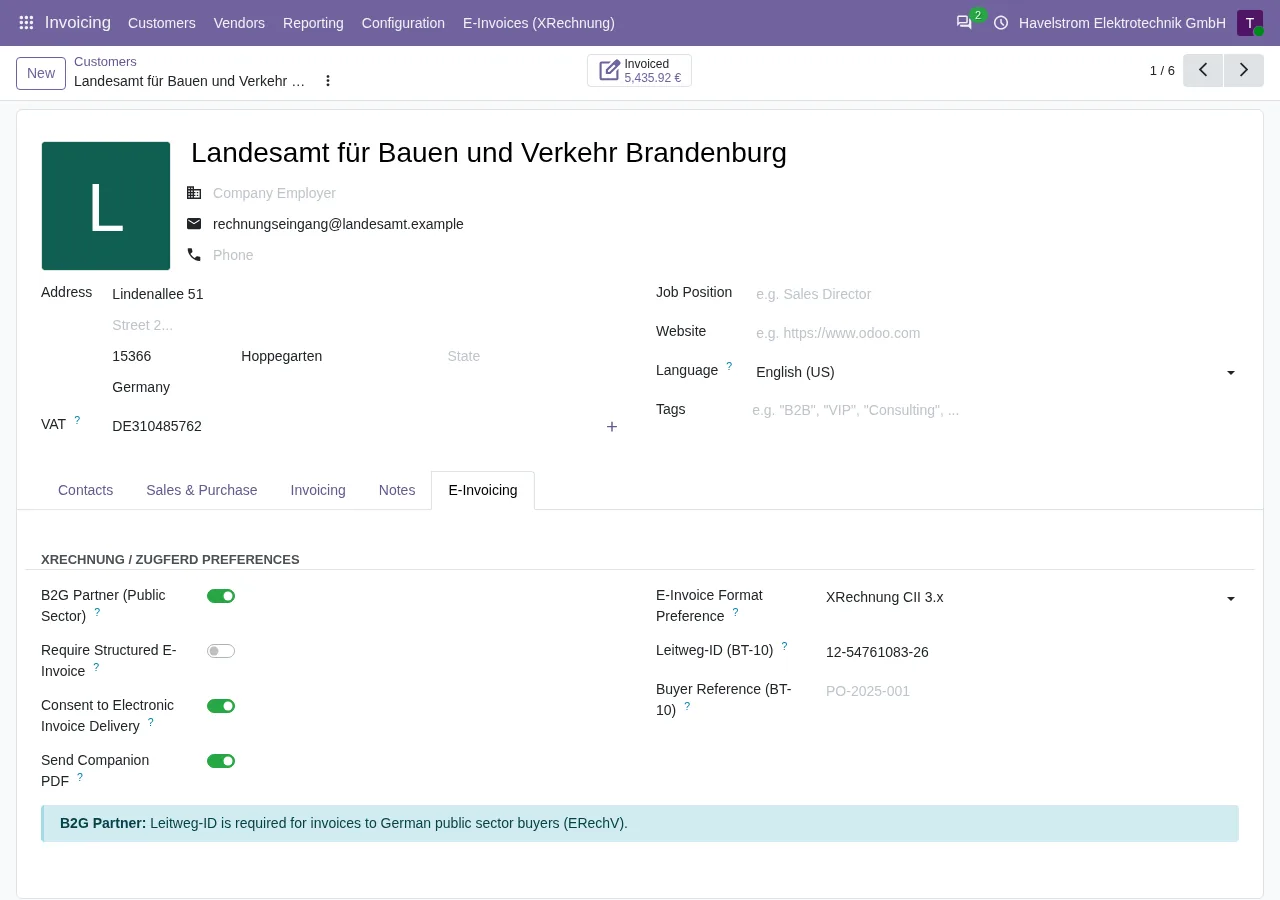
The module adds its own E-Invoicing tab to the customer form, with two fields for this: Leitweg-ID (BT-10), used when the customer is flagged as a public body (B2G Partner), and Buyer Reference (BT-10) for everyone else. If you flag the customer as a public body and the Leitweg-ID is missing, the module does not generate the invoice: it stops with “B2G partner requires a Leitweg-ID (BT-10).”. If it is not one and the Buyer Reference is empty, the XML goes out without BuyerReference, with no filler like “N/A”, and that is where BR-DE-15 shows up.
On Odoo 18, 19 and 20 you see it before anything is sent: with the FlexigoTech Cloud subscription, each XRechnung you generate is validated against the KoSIT rules and the failures stay on the invoice, under Validation Errors, one line per rule. An invoice with BR-DE-15 is not marked Ready to send. The version published for Odoo 17 generates the XRechnung but does not validate it.
How to fix it
- If the customer is a German public body, ask for its Leitweg-ID and put it on the contact: in the Leitweg-ID field of the E-Invoicing tab with our module, or as electronic address with scheme 0204 in Odoo.
- If it is a company, ask which reference they want to see and store it on the contact (Buyer Reference with the module, Reference in Odoo).
- Generate the XRechnung again: the one already sent does not change, and if it was rejected you send the corrected one.
- Check BT-10 in the result before sending it.
Keep reading
Checked in the module's source code (version 17.0 and 20.0) and the linked sources
Sources
- Module source code: flexigo_germany_xrechnung 20.0 (446f2f68): models/account_move.py
- github.com/odoo/odoo/blob/6f00fdadb875342de2d14a179f25431f93cd63c9/addons/account_edi_ubl_
- github.com/odoo/odoo/blob/2982b5f44af03fae6a9888f20632c1cc19f623ba/addons/account_edi_ubl_
- github.com/odoo/odoo/blob/4d2d4b5895db70596863df941d9a1f0beeb117f8/addons/account_edi_ubl_
- github.com/odoo/odoo/blob/2fec20391a8a61ea3a3bf15e9f24d59dba910a8d/addons/account_edi_ubl_
- github.com/odoo/odoo/blob/6f00fdadb875342de2d14a179f25431f93cd63c9/addons/account_edi_ubl_
- github.com/odoo/odoo/blob/2982b5f44af03fae6a9888f20632c1cc19f623ba/addons/account_edi_ubl_
- github.com/odoo/odoo/blob/4d2d4b5895db70596863df941d9a1f0beeb117f8/addons/account_edi_ubl_
- github.com/odoo/odoo/blob/2fec20391a8a61ea3a3bf15e9f24d59dba910a8d/addons/account_edi_ubl_
- github.com/odoo/odoo/blob/6f00fdadb875342de2d14a179f25431f93cd63c9/addons/account_edi_ubl_
- github.com/odoo/odoo/blob/2982b5f44af03fae6a9888f20632c1cc19f623ba/addons/account_edi_ubl_
- github.com/odoo/odoo/blob/4d2d4b5895db70596863df941d9a1f0beeb117f8/addons/account_edi_ubl_
- github.com/odoo/odoo/blob/2fec20391a8a61ea3a3bf15e9f24d59dba910a8d/addons/account_edi_ubl_
- github.com/odoo/odoo/blob/6f00fdadb875342de2d14a179f25431f93cd63c9/addons/account_edi_ubl_
- github.com/odoo/odoo/blob/2fec20391a8a61ea3a3bf15e9f24d59dba910a8d/addons/account_edi_ubl_
- Module source code: flexigo_germany_xrechnung 20.0 (446f2f68): lib/generators/ubl_generator.py
- Module source code: flexigo_germany_xrechnung 20.0 (446f2f68): models/xrechnung_cloud.py
- Module source code: flexigo_germany_xrechnung 17.0 (ad05de8f): __manifest__.py
- github.com/itplr-kosit/xrechnung-schematron/releases/tag/v2.6.0
- docs.peppol.eu/poacc/billing/3.0/rules/ubl-peppol/PEPPOL-EN16931-R003/