

 Español
 Català
Why it brings down the whole submission
The AEAT validation document distinguishes three kinds of checks: structural, syntactic and business rules. Structural checks verify that the XML follows the schema, with its mandatory tags, and when they fail the whole message is rejected. That rejection comes back as a SOAP fault and no invoice of the request is registered, not even the correct ones.
The official list says so in Spanish: El XML no cumple el esquema. Falta informar campo obligatorio., «the XML does not comply with the schema, a mandatory field is missing». It is in the first section, the codes that reject the whole submission.
What the module does so it never gets there
A single malformed record would drag every other record of the same submission down with it. To avoid that, the module validates each record against the official AEAT schema before sending it. It carries a copy of that schema, the SuministroLR.xsd file with its dependencies, and the path is this:
- When the invoice is posted Its invoicing record is created, and it does not change afterwards.
- On the next queue run Each pending record is turned into XML and validated against the schema.
- If a record does not comply It is marked as rejected in Odoo with the schema message, with no AEAT code, and it does not go out.
- The rest Goes to the AEAT in the same request, without the bad record.
That way a defective record does not take down the good invoices travelling with it.
How you will see it in Odoo
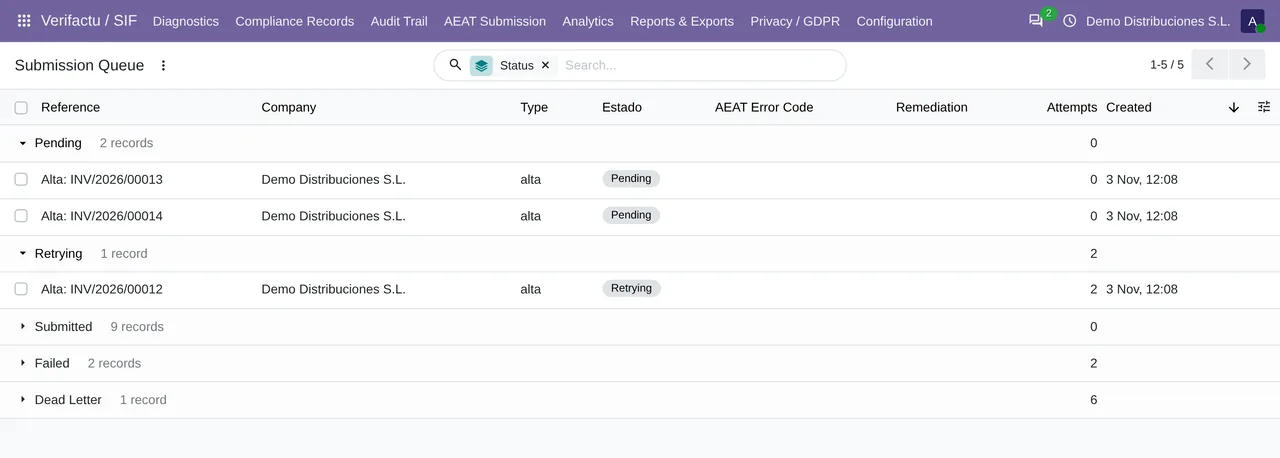
In the submission queue, the stopped record shows in Failed with the validator's message as its last error, instead of a four-digit code. That message names the element that is missing or out of place, which is exactly what you need to know where it comes from. In the list of invoicing records its status is «Rechazado AEAT», rejected by the AEAT, even though the AEAT never saw it.
Even before the schema, there is data without which the module will not build the XML at all, and it tells you with its own message:
Company … has no NIF for Veri*Factu.when the company has no tax ID.Record … has no tax breakdown (Desglose) to declare.when the record has no tax breakdown.
If the 4102 comes from the AEAT
If the answer with 4102 comes from the AEAT itself, the record passed the local validation and the AEAT rejected it with its own schema. The reasonable explanation is that the AEAT schema and the module's copy no longer match. In that case resending is pointless: write to comercial@flexigobe.com with the full answer, the Raw Response field of the queue, so we can review the schema copy.
Can I fix the data and retry?
It depends on where the data lives. The header is built on every submission from the company data at that moment: if the fault was in the name, fix it and use Retry Selected in AEAT Errors. If it was in the tax ID, fixing it is not enough, because the tax ID also went into each invoice's hash at posting and the resend comes back with 2000. If the data is in the invoice's record, a retry sends the same thing and fails again. In those two cases, write to us.
Is the invoice lost?
No. The record stays in Odoo, chained, and the queue processes pending work every 1 minute as soon as the problem is solved.
Keep reading
Checked in the module's source code (version 20.0) and the linked sources
Sources
- www.agenciatributaria.es/static_files/AEAT_Desarrolladores/EEDD/IVA/VERI-FACTU/Validacione
- Module source code: flexigo_spain_verifactu 20.0 (aa2ea3d2): models/verifactu_aeat_client.py
- Module source code: flexigo_spain_verifactu 20.0 (aa2ea3d2): data/verifactu_crons.xml
- Module source code: flexigo_spain_verifactu 20.0 (aa2ea3d2): models/verifactu_cola_envio.py
- Module source code: flexigo_spain_verifactu 20.0 (aa2ea3d2): models/verifactu_registro.py
- prewww2.aeat.es/static_files/common/internet/dep/aplicaciones/es/aeat/tikeV1.0/cont/ws/err
- Module source code: flexigo_spain_verifactu 20.0 (aa2ea3d2): models/verifactu_cadena.py