

 Español
 Català
 Deutsch
 Français
 Português
 Italiano
 Nederlands
 Polski
This message belongs to a single action in Temu Connector for Odoo: enrolling a product in a Temu sales campaign. Here is when the published code raises it, what it means and what to do so the enrolment can go ahead.
When it appears and what triggers it
Where and when does the message appear?
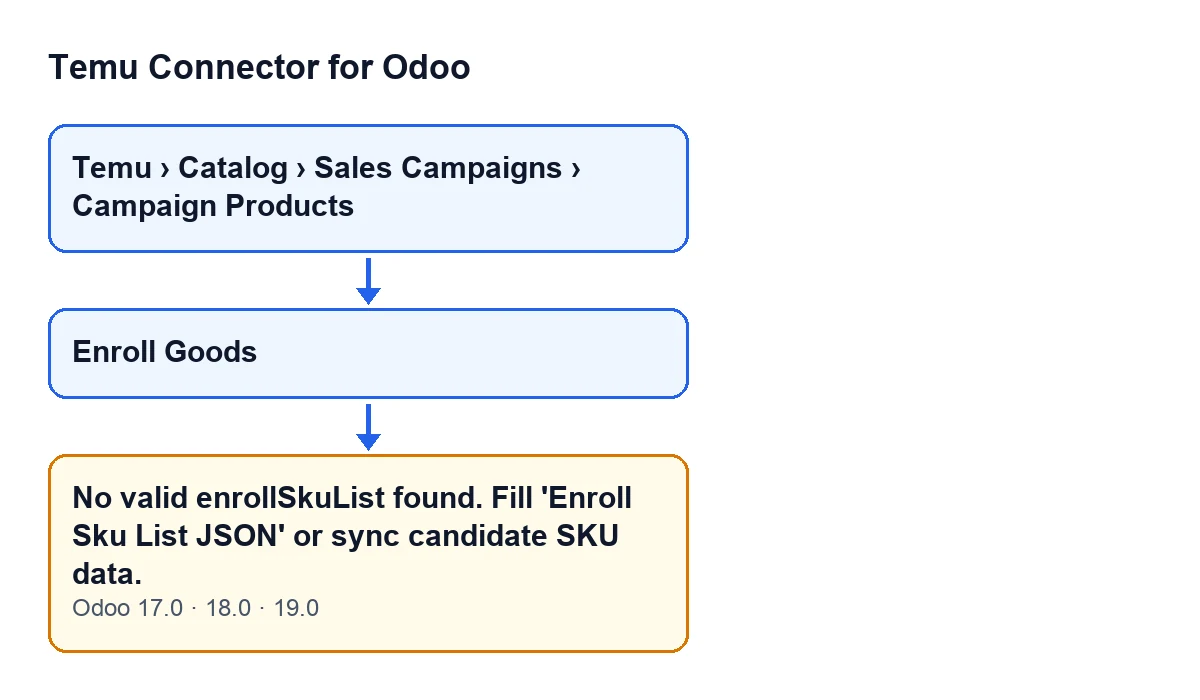
It appears when you press the Enroll Goods button on the form of a campaign product (Promotion Goods). Those forms open from the menu Temu › Catalog › Sales Campaigns › Campaign Products. It is an error that stops the action: nothing that the action was about to change is saved.
What exact condition triggers it?
The list of SKUs to enrol ends up empty. The module looks for it in this order. First it reads the Enroll Sku List Json field (SKU Payloads tab of the form): if it holds a list, the module uses it; if it is empty or not a list, the module treats it as empty. Then, with the list still empty, it builds one from the SKU data stored on the campaign product's form. If the list is still empty after that, it raises the message.
What does the module discard when it builds the list from that SKU data?
It skips every entry that is not an element with fields, that has no SKU identifier (skuId or sku_id), or that does not give a price above zero. For the price it looks, in this order, at activitySupplierPrice, recommendActivitySupplierPrice and price, and keeps the first one that gives a value above zero. The entries that pass are kept with their skuId and their activitySupplierPrice.
Does the quantity to enrol matter?
No. The module works out the quantity separately, before it checks the list: it takes the desired quantity of the activity and, if that is empty, the recommended one; failing that, the activity quantity, and if there is none, one. It rounds the result to a whole number. The check behind the message only depends on there being at least one valid SKU entry.
Which Odoo versions have it?
The message is in the published code of Odoo 17, 18 and 19, and in those three versions the Enroll Goods button is always visible. The way the SKU list is searched and filtered, as described here, is that of the Odoo 19 code.

What it means and how to fix it
What does it mean, and has anything been sent to Temu?
It means the module has no SKU with a valid identifier and price to enrol. The check runs before the call to Temu, so when the message appears the enrolment is not sent.
How do I fix it?
The message itself points the way: fill in the Enroll Sku List Json field, on the SKU Payloads tab of the form, or sync the candidate SKU data. If you fill in Enroll Sku List Json with a list that has at least one element, the module uses it and no longer looks at the other SKU data; this check only requires the list not to be empty. When the module builds the list itself, it leaves each element with skuId and activitySupplierPrice, so that is a good model if you write the list by hand. If you prefer to sync the candidates, do so and press Enroll Goods again.
What if I sync and the message still appears?
Then the module still finds no entry with a SKU identifier and a price above zero in the price keys described above. Review that data, or fill in the list by hand in Enroll Sku List Json, as explained in the previous answer.
What happens when the check does pass?
The module prepares the enrolment with the product identifier, the quantity, the SKU list and a trace code (the one the record already has, or a new one), sends it to Temu and saves the outcome of the operation on the record. If that call fails, it saves the error and raises it again: that is no longer this message.
Can I press the button again after fixing it?
Yes. Because the message stops the action before anything is sent to Temu, once you have filled in the list or synced the candidates you can press Enroll Goods again on the same record.
How FlexigoTech can help
If you are implementing Odoo and want to connect Temu, FlexigoTech implements Odoo 17, 18, 19 and 20 and builds custom connectors and integrations. Temu Connector for Odoo is a one-off payment per Odoo version (the price of each is on its Odoo Apps page) and needs a FlexigoTech Cloud subscription, Connector plan: €49 a month or €490 a year, excluding VAT. It is published for Odoo 17, 18, 19 and 20; you can find more on the module page.
Keep reading
Checked in the connector's source code (version 19.0) and the linked sources
Sources
- Module source code: flexigobe_temu_connector 19.0 (455b3f0f): models/temu_promotion.py
- Module source code: flexigobe_temu_connector 19.0 (455b3f0f): views/temu_promotion_views.xml
- apps.odoo.com/apps/modules/19.0/flexigobe_temu_connector
- flexigotech.com/precios.html
- flexigotech.com/en/services.html