

 Español
 Català
 Deutsch
 Français
 Português
 Italiano
 Nederlands
 Polski
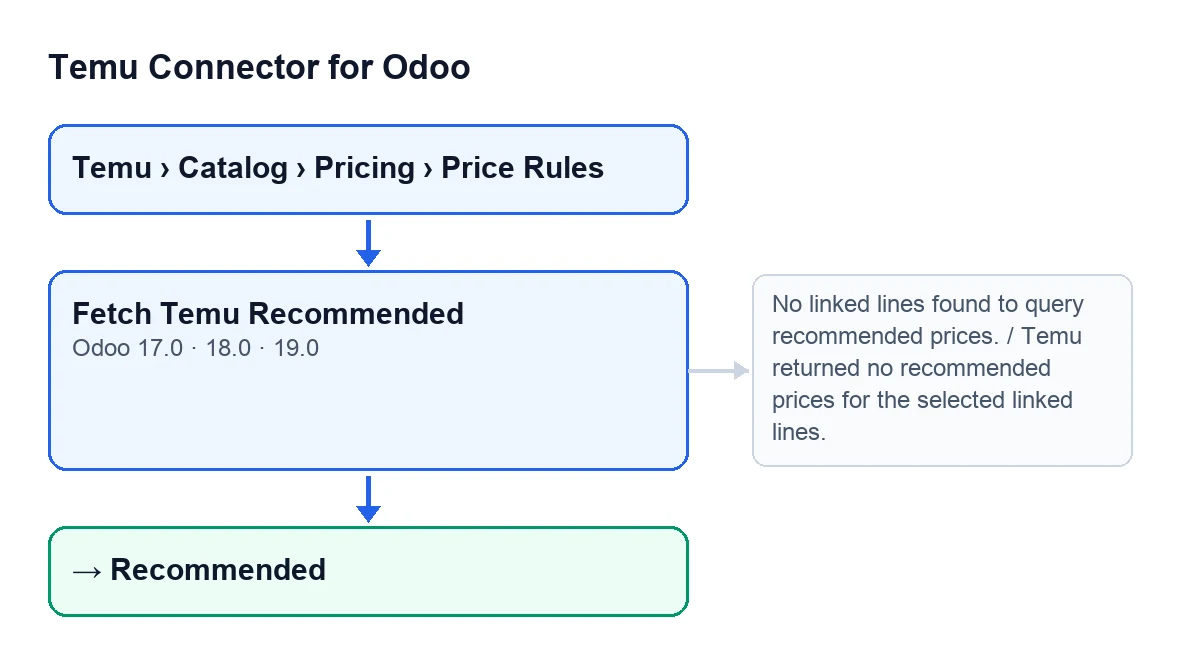
The record that holds the button opens from the menu Temu › Catalog › Pricing › Price Rules, under Base Price Proposals. The Fetch Temu Recommended button is on that screen in versions 17.0, 18.0 and 19.0, and it is always visible: it does not depend on the state of the record.
Recommended state.Before you press: what the button will read
The button works with what is already on the record.
- Open the record from
Temu › Catalog › Pricing › Price Rules.
- Look at the
Instancefield, in theScopegroup of the record. It also appears in theBase Price Proposalslist. It is the instance the button sends the query to.
- Check that there are lines in the
Selected Variantsgroup. TheLinefield also appears on theRecommendation Inputstab. The button only queries the lines that the module considers applicable and linked to a Temu product and variant; it ignores the rest.
- Look at the
Temu Request Settingsgroup. It holdsLanguage(defaulten) andRecommended Price Type, with the optionsLow traffic(10) andRestricted traffic(20, the default). If the language is empty the button usesen; if the type is empty it uses 20.
- Bear in mind that
Recommended Price Typeis hidden when the proposal's source mode is manual; with the default values it is visible.
- Check that your FlexigoTech Cloud subscription is active: the module is a one-off purchase per Odoo version and needs the Connector plan (€49 a month or €490 a year, excluding VAT). The price for each version is on the Odoo Apps listing.

What the button does, in order
In Odoo 19.0, the button follows this path when you press Fetch Temu Recommended. If anything fails midway, the action stops and the Recommended state is not saved.
- First it picks the applicable, linked lines. If there are none, it stops with
No linked lines found to query recommended prices. - It gathers the Temu product identifiers without repeats and sends them in batches of up to 100.
- For each batch it asks Temu for the recommended prices, using the price type and language on the record. The query may try alternative Temu API methods, and the instance stores the name of the method that worked if it differs from the one it had.
- From the response it reads, for each product and variant, the recommended supply price. Only amounts greater than zero count.
- It then goes through the lines. If Temu returned an amount for the product and variant of a line, it stores it as that line's recommended price. If the line's target price is empty or zero, it gets the same amount; if it already had one, it is left alone.
- Lines for which Temu returns no amount greater than zero stay as they were. That is not an error as long as at least one line receives a price.
- If no line has received a price, it stops with
Temu returned no recommended prices for the selected linked lines. - If all goes well, the record moves to the
Recommendedstate, stores Temu's response and the processing date, and clears the error log.
What has changed when it finishes
When at least one line receives a price, two things change. On each line with an amount, the recommended price is updated and, only if the target price was empty or zero, the target price too. On the record, the state (Recommended), the stored Temu response, the processing date and the error log all change; the error log ends up empty.
If the button gives an error
- With
No linked lines found to query recommended prices.: the button found no applicable, linked line. Check that there are lines inSelected Variants: the button only queries the ones the module considers applicable and linked to a Temu product and variant.
- With
Temu returned no recommended prices for the selected linked lines.: the query finished, but no line received an amount greater than zero. CheckInstance,LanguageandRecommended Price Type, which are the values the button uses for the query, and press again.
- If the call to Temu itself fails, the action also stops and the record does not change state. To see what the module adds to Odoo products, you can read what Temu Connector for Odoo adds to Products.
After you press
- Check that the record is in the
Recommendedstate.
- Review the lines: any that did not receive an amount from Temu stay as they were.
- If you press again, the button queries Temu again (it is always visible). The recommended price of lines with an amount is updated, but the target price is only filled in if it is still empty or zero.
Fetch Temu Recommended.A note on scheduled tasks
The button is not the only thing that calls the recommended price query: another method of the module also calls it, and that method is reached from the scheduled task Temu Sync Products (every 30 minutes, active on install), without anyone pressing anything.
How FlexigoTech can help
The connection goes through FlexigoTech Cloud: it stores the credentials encrypted, monitors the synchronisation and emails you if it fails. If you need to implement Odoo 17, 18, 19 or 20 with Temu, or a bespoke integration, see the module page.
The module is published on Odoo Apps for 17.0, 18.0, 19.0 and 20.0.
Keep reading
Checked in the connector's source code (version 19.0) and the linked sources
Sources
- Module source code: flexigobe_temu_connector 19.0 (455b3f0f): views/temu_price_views.xml
- Module source code: flexigobe_temu_connector 19.0 (455b3f0f): models/temu_price_update.py
- apps.odoo.com/apps/modules/19.0/flexigobe_temu_connector
- flexigotech.com/precios.html
- flexigotech.com/en/services.html