

 Español
 Català
 Deutsch
 Français
 Português
 Italiano
 Nederlands
 Polski
When the message appears
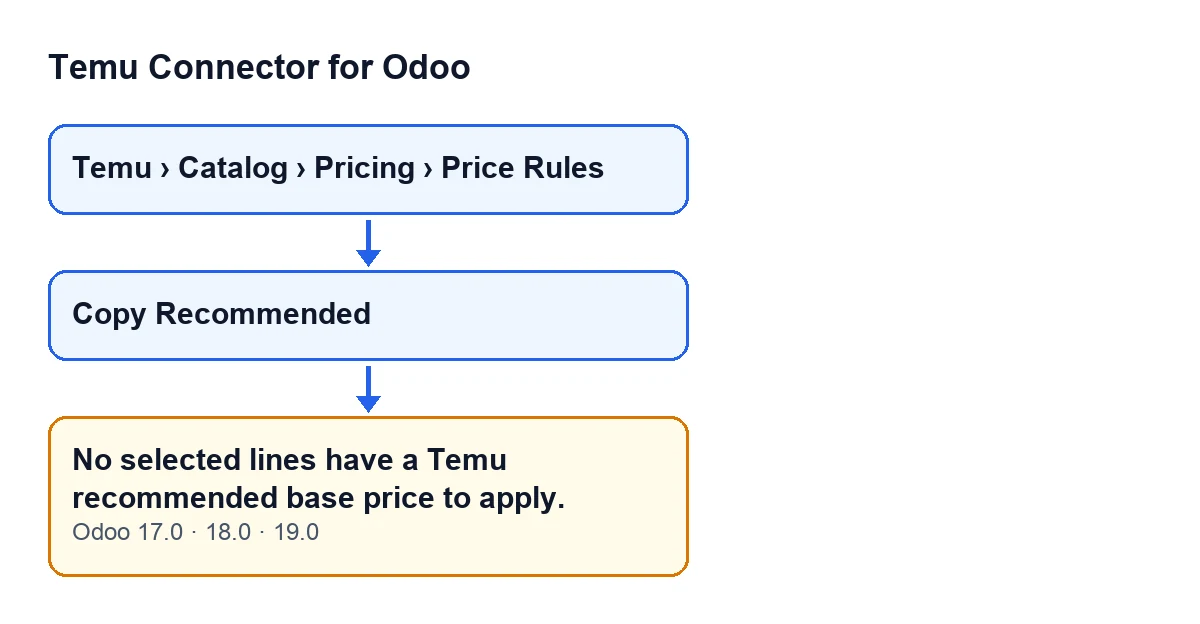
It appears when you press the Copy Recommended button on a record opened from the menu Temu › Catalog › Pricing › Price Rules. That button is always visible in Odoo 17, 18 and 19, and the message is in the published code of all three versions.
The full text is No selected lines have a Temu recommended base price to apply. and it stops the action: nothing the button was about to change is saved.

What it means
The Copy Recommended button copies the Temu recommended base price into the lines of the record. The message tells you the module found no line to apply it to: none meets, all at once, the conditions the code asks for.
That is the check that stops the action before anything is copied. So when you see this message, the clue is in the lines of the record, not in the button.
The exact condition in the code
When you press the button, the module goes through the lines of the record and keeps only the applicable ones. A line is applicable when it meets all three conditions at once:
- it is marked to be applied;
- it has a Temu recommended base price;
- that price is greater than zero.
The message is raised when, after that filter, the list of applicable lines is empty. If any line is left, the module copies the recommended price into each one as the line's target price and the action ends.
The check runs before the copy: if you get the message, no price has been copied.
Two consequences follow directly:
- A line with a recommended price that is not marked to be applied does not count.
- A marked line with no recommended price, or with the price at zero, does not count either.
How to fix it, step by step
- Open the record from the menu
Temu › Catalog › Pricing › Price Rules. - Decide which lines you want to update. The button only takes into account the lines marked to be applied.
- Check that the record has at least one line that meets the three conditions in the previous section. A line with no Temu recommended price, or with the price at zero, is discarded even if it is marked.
- Press
Copy Recommended. - If the message appears again, no line meets all three conditions yet: go back to steps two and three.
- If the button runs without an error, the action has finished: the module has written the recommended price as the target price of each applicable line.
Specific questions about this error
Do I lose anything when the message appears?
Nothing the action was about to change is saved: the message stops the button before any price is copied. What you had on the record stays as it was.
Does a line with a recommended price but not marked count?
No. For the button, a line is applicable only if it is marked to be applied and also has a recommended price above zero. If it is the only line with a price, you get this same message.
What about a marked line whose recommended price is zero?
It is discarded, because the condition requires a price greater than zero. If every marked line is like that, the message appears.
Can I press the button at any time?
The Copy Recommended button is always visible in the view, in Odoo 17, 18 and 19. Being visible does not mean there is something to copy: the condition on the lines decides that.
Does the behaviour change between Odoo versions?
The message is in the published code of branches 17, 18 and 19, and the button is always visible in all three. The module is published on Odoo Apps for 17, 18, 19 and 20.
Where do I go to learn about another button in the module?
How FlexigoTech can help
FlexigoTech implements Odoo 17, 18, 19 and 20 and builds custom connectors and integrations. Temu Connector for Odoo goes through FlexigoTech Cloud, which stores the credentials encrypted, monitors synchronisation and sends an email if it fails. To see the module or to get it running with some help, there is the module page and the listing on Odoo Apps.
Keep reading
Checked in the connector's source code (version 19.0) and the linked sources
Sources
- Module source code: flexigobe_temu_connector 19.0 (455b3f0f): models/temu_price_update.py
- Module source code: flexigobe_temu_connector 19.0 (455b3f0f): views/temu_price_views.xml
- apps.odoo.com/apps/modules/19.0/flexigobe_temu_connector
- flexigotech.com/en/services.html
- flexigotech.com/precios.html