

 Español
 Català
 Deutsch
 Français
 Português
 Italiano
 Nederlands
 Polski
Where the button is and when you see it
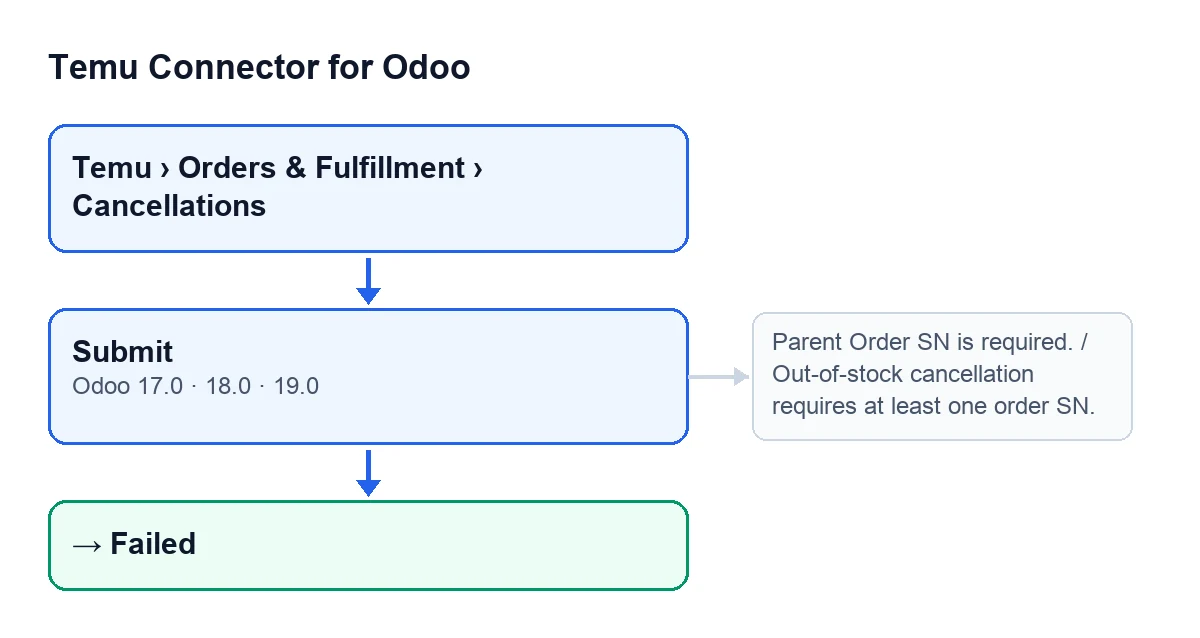
Cancellation records open from the menu Temu › Orders & Fulfillment › Cancellations. Inside the record, with Odoo in English, the button is called Submit; with Odoo in Spanish it is called Submit. It is present in Odoo branches 17, 18 and 19.
The button is hidden when the record is no longer in its initial state, or when the request is of the remote type. With the defaults of a new record (request of the appeal type, initial state) the button is visible.
Submit, and in English Submit.
The case: Casa Brisa and an order without stock
Example Illustrative case: the company and its figures are made up to explain the flow.
Casa Brisa is an invented shop that sells kitchenware on Temu and runs out of stock of one item in an order. It opens Temu › Orders & Fulfillment › Cancellations, goes into the cancellation record for that order and sees the Submit button. What happens next depends on what the record contains.
Before you press: what the module fills in
The first step does not depend on the button. If the record is linked to a Temu order, when it is created the module completes Instance, Parent Order Sn and the list of order numbers (Order Sn List Csv) from that order, where those are empty. When you save the record it does a similar pass: it sets the Parent Order Sn if it is missing and, if the list is empty, fills it with the order's number.
In Casa Brisa's case the record is born linked to the order, so the parent order and the list arrive already filled in. A record not linked to any order would not receive that data from an order.
What the button checks, in order
When you press Submit, the module does this:
- It repeats the pass over the order data you have just read about, in case anything is still empty.
- If the
Parent Order Snis still empty, it stops withParent Order SN is required. - If the request is an out-of-stock one and the list of order numbers is empty, it stops with
Out-of-stock cancellation requires at least one order SN.The list comes from the data already stored or, failing that, from theOrder Sn List Csvfield, which is read by splitting on commas or line breaks and ignoring blanks. - If the request is an appeal, the module requires a written reason and that every proof link starts with http:// or https://. If either is missing, it stops with an error.
- If everything is in order, it sends the request to Temu through the record's
Instance.
When the parent order check or the out-of-stock list check fails, the record stays in its initial state and nothing is sent to Temu. Casa Brisa, with its linked record, passes them.
What is sent and what changes on the record
The path depends on the request type.
Appeal
The request carries the cancellation type, the parent order and the reason with its proof links. The type comes from the Appeal Cancel Type field, which is on the record, is hidden when the request is not an appeal and offers Suspected Batch Refund and Incorrect Address. Its default is Incorrect Address, so it is worth checking before you send.
If Temu's response includes an application number, the record moves to the submitted state; if it does not, it stays pending. In either case the module stores the request and the response, notes the date and time of the request, clears the last error and keeps the list of order numbers.
Out of stock
The request carries the parent order and the list of order numbers. If Temu's response signals a positive result, the record is left pending; otherwise it is left in Failed. The module also stores the failure reasons and the per-order results that Temu returns, along with the request, the response, the date and time of the request and the list of orders.
One detail is worth knowing: for this type, if Temu does not give a positive result, the record ends up in Failed and the button still finishes with its submitted notice. So after pressing, look at the record's state rather than relying on the notice alone.
The closing notice and what happens when something fails
If the send finishes without an error, a success notification appears with the text Temu cancellation request has been submitted., which does not stay fixed on screen.
If something fails inside the sending block (the reason and link checks on an appeal, the call to Temu or any other error), the module writes the Failed state with the error text and raises that error again, so you see it on screen. The parent order check and the out-of-stock list check come earlier, outside that block: they only stop the action.
Because the button is hidden once the record is no longer in its initial state, and sending leaves the record in another state, the button stops showing on that record after it has been sent.
What to take from the case
- Check
Parent Order SnandOrder Sn List Csvbefore pressing; for an appeal, have the reason written and proof links starting with http:// or https://. - For an appeal, look at
Appeal Cancel Type: it defaults toIncorrect Address. - After sending, read the record's state: for out-of-stock, the success notice is not enough.
Cost and help
Temu Connector for Odoo is a one-off purchase per version and the connection goes through FlexigoTech Cloud, on the Connector plan: €49 a month or €490 a year, excluding VAT. Purchase details are on the module page. FlexigoTech implements Odoo 17, 18, 19 and 20 and builds custom connectors and integrations if your cancellation flow needs something more.
Keep reading
Checked in the connector's source code (version 19.0) and the linked sources
Sources
- Module source code: flexigobe_temu_connector 19.0 (455b3f0f): views/temu_order_cancellation_views.xml
- Module source code: flexigobe_temu_connector 19.0 (455b3f0f): models/temu_order_cancellation.py
- flexigotech.com/precios.html
- flexigotech.com/en/services.html