

 Español
 Català
 Deutsch
 Français
 Português
 Italiano
 Nederlands
 Polski
What you need before you start
You need a Storecove account and its API key. Storecove offers a free 30-day sandbox for testing. Storecove's fees are not included in the connector. In Odoo you need the connector and the FlexigoTech Cloud subscription.
FlexigoTech Cloud keeps the API key, encrypted. It only receives it after an administrator gives consent on that account.
The sign-up steps in Odoo
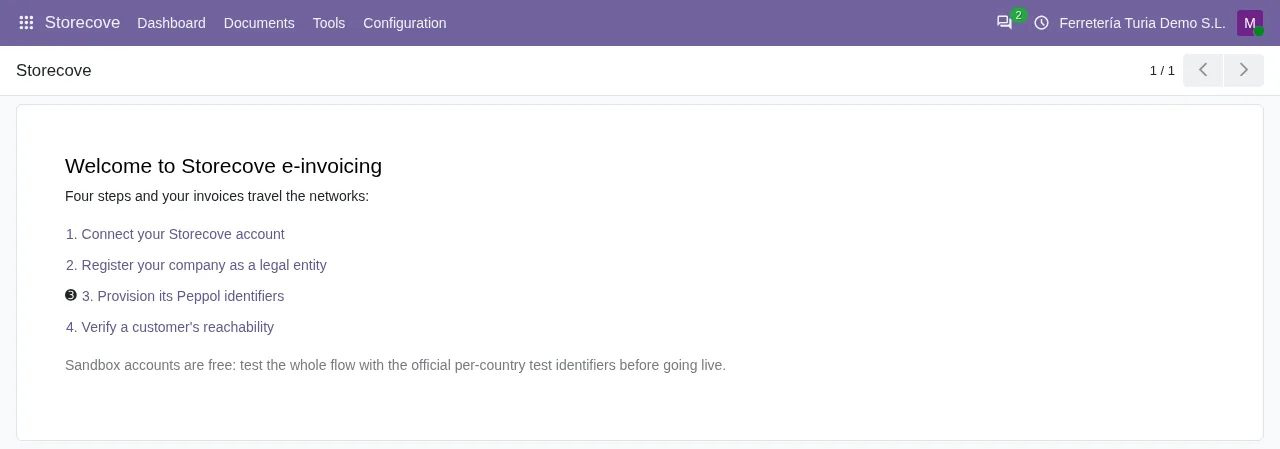
The connector dashboard takes you through these steps: Connect your account, Register a legal entity, Provision an identifier, Verify a customer and Ready.
- Under
Storecove › Configuration › Accountsyou create the account, paste the key and clickTest Connection. - Under
Storecove › Configuration › Legal Entitiesyou register your company. Storecove asks for the name, the first address line, city, zip code and country. Without them there is no registration. - You give the entity its Peppol identifier. The connector comes with a catalog of schemes from more than 50 countries, with test identifiers for the sandbox. You see them under
Storecove › Configuration › Identifier Schemes. - On the customer form you set the customer's identifier and check that they can be reached. You can also do it from
Storecove › Tools › Check Partner Reachability.
Sending an invoice over Peppol
With everything ready, you post the customer invoice and click Send via Storecove. Storecove converts the document to the right format, such as Peppol BIS, XRechnung or FatturaPA, and delivers it on the right network. The connector sends the invoice queue every 5 minutes.
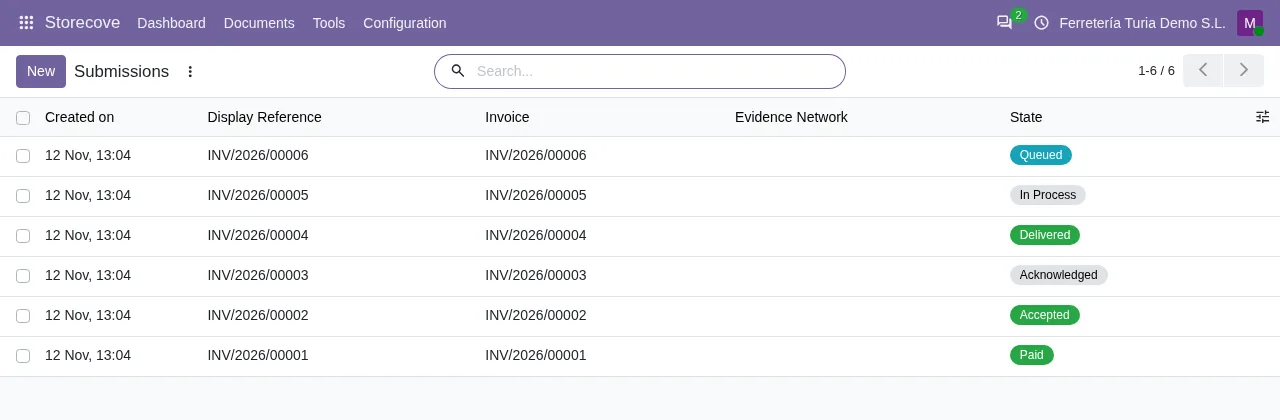
Each submission goes through states that the connector records in Odoo: sent, cleared by the tax authority, delivered, acknowledged, accepted, rejected and paid. You can also download the transmission evidence, with the network, the access point that received it and the message identifiers.
If the customer has no reachable identifier, the connector does not send and tells you how to continue. You can give them a Storecove identifier or switch on the Email Fallback, on the customer and on the account.
Some countries ask for more. For a customer in Germany, the invoice needs at least one payment means. Set a bank account on the invoice before sending it.
Receiving vendor bills
Invoices sent to you arrive as draft vendor bills, with the original document attached. Someone on your team reviews and approves them in Odoo. You see them under Storecove › Documents › Received Documents.
The connector collects what arrives every 5 minutes. You do not need to open anything on your network to receive. You can also tell the supplier whether you accept or reject the invoice.
What the connector does not let you do
An identifier that is already live on the network cannot simply be deleted. It has to be de-provisioned first. If your country has no known scheme, the connector warns you when you assign the identifier.
These checks prevent two common Peppol problems: invoices with no destination and registrations left hanging on the network.
Can I test Peppol without sending real invoices?
Yes. With Storecove's free 30-day sandbox and the test identifiers in the connector's catalog.
Which formats does Storecove send besides Peppol BIS?
According to the connector's README, Storecove converts to XRechnung, FatturaPA, KSeF, FACeB2B, Finvoice, InvoiceNow or MyInvois, among others.
How often do received invoices come in?
The connector polls the Storecove queue every 5 minutes.
Do I need the FlexigoTech Cloud subscription?
Yes. The connector needs it to work. It is on Odoo Apps for Odoo 17, 18, 19 and 20, and the details are on the connector page.
Keep reading
Checked in the connector's source code (version 20.0)
Sources
- Module source code: flexigobe_storecove_connector 20.0 (a76bb9d4): __manifest__.py
- Module source code: flexigobe_storecove_connector 20.0 (a76bb9d4): static/description/index.html
- Module source code: flexigobe_storecove_connector 20.0 (a76bb9d4): README.md
- Module source code: flexigobe_storecove_connector 20.0 (a76bb9d4): data/storecove_cron_data.xml
- Module source code: flexigobe_storecove_connector 20.0 (a76bb9d4): models/storecove_dashboard.py
- Module source code: flexigobe_storecove_connector 20.0 (a76bb9d4): models/storecove_account.py
- Module source code: flexigobe_storecove_connector 20.0 (a76bb9d4): models/res_partner.py
- Module source code: flexigobe_storecove_connector 20.0 (a76bb9d4): models/storecove_invoice_builder.py
- Module source code: flexigobe_storecove_connector 20.0 (a76bb9d4): models/storecove_legal_entity.py
- Module source code: flexigobe_storecove_connector 20.0 (a76bb9d4): views/menu.xml