

 Español
 Català
 Deutsch
 Français
 Português
 Italiano
 Nederlands
 Polski
The method detail below is that of the Odoo 20 code. The button is in the 17, 18, 19 and 20 branches, with the same visibility condition.
Where it is and when you see it
Where is the Devolver Stock button and when does it appear?
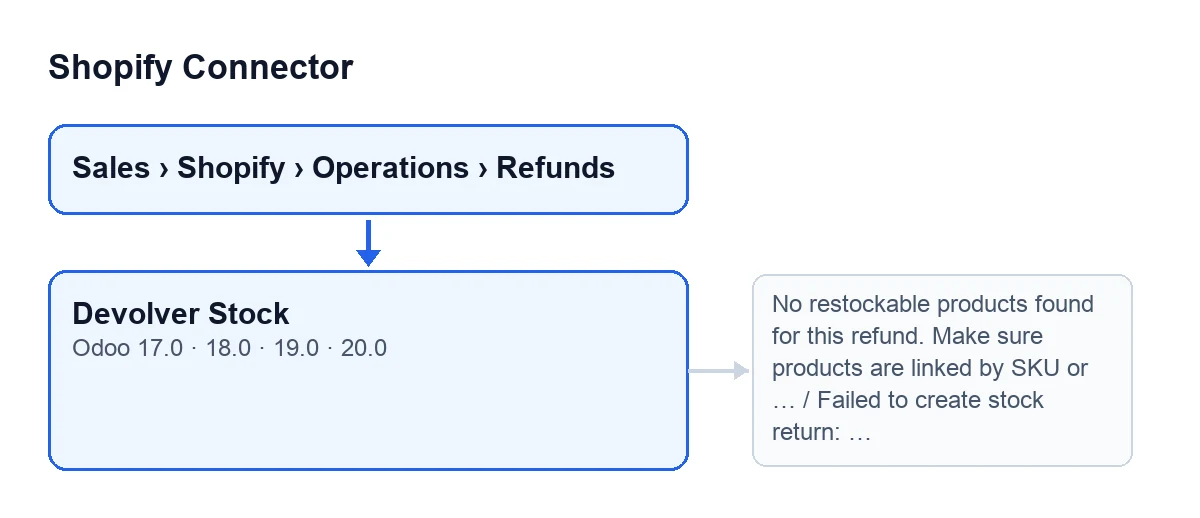
It is on the Shopify Refunds form, which opens from Sales › Shopify › Operations › Refunds. The view shows it only when the Stock Return field is pending, in review or failed; with any other value it hides it. With the default values you do not see it, because that field starts on a value that is none of those. With Odoo in Spanish the button is called Devolver Stock; the second diagram shows how it is labelled in other languages.
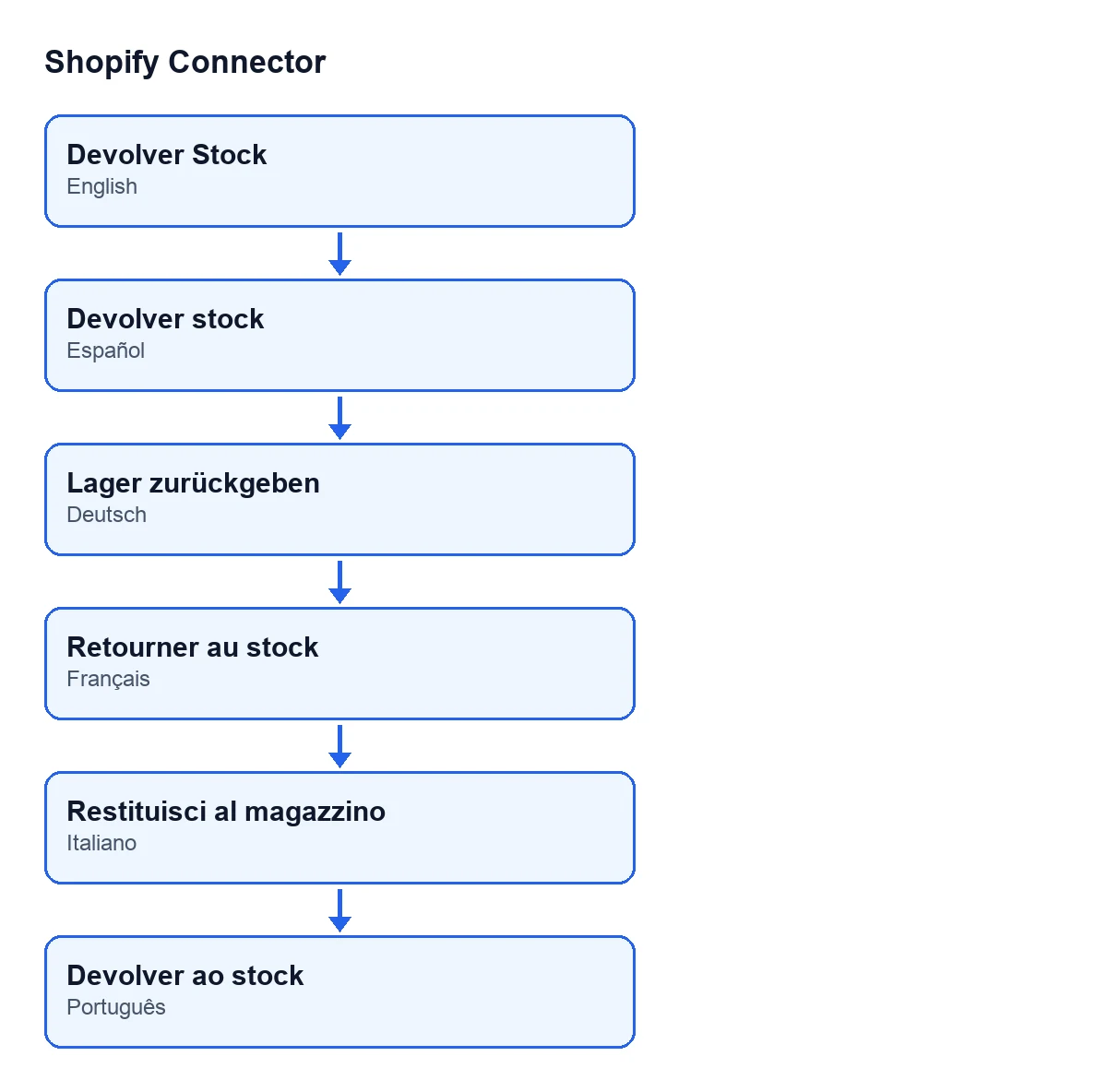
Devolver Stock, in German Lager zurückgeben, in French Retourner au stock, in Italian Restituisci al magazzino and in Portuguese Devolver ao stock.What happens if the stock return was already done?
The method looks at this before anything else. If the field was failed but the return transfer was already done, it sets the field to done and clears the error text. If it was already done and there is a Return Transfer, it opens that transfer; if there is none, it does nothing more.

What it checks and what it creates
How does it decide which products to return?
It reads the refund's restock lines, that is, what Shopify put back in stock. It discards lines with a quantity of zero or less. For each one it looks for the product first by Shopify variant ID and, failing that, by SKU. Lines that do not resolve are left out of the return and leave a warning in the log. If no product is left, the method stops with the message shown further down.
What does it do if the refund has a sale order with validated deliveries?
On the form, the Sale Order field sits in the Amounts group. The code looks for that order's outgoing deliveries that are already done. If there are any, it works out what is left to return for each product: what Shopify put back across all the refunds of that order, less what the returns that were not cancelled have already brought back (Odoo's own returns too), and never more than was delivered. The split goes from the oldest delivery to the newest, never beyond what each one shipped less what has already come back from it.
It creates one validated return per affected delivery, so there can be several. When the delivery has the move for that product, the return is linked to it as one of Odoo's own returns, so the delivery counts it as returned.
If nothing is left to return, it creates no transfer: it marks the stock return as done, clears the error, leaves the note Shopify refund …: nothing left to return from this delivery, Odoo already returned it. on the deliveries that shipped those products and opens the first of them.
And if there is no order or no validated delivery?
Then it creates a manual incoming transfer, from the customers location to the warehouse's stock location. The warehouse is the one set on the Shopify instance or, if there is none, the first one it finds for the instance's company. It uses an incoming operation type of that warehouse, gives each move the description Return: … with the product name, confirms the transfer, reserves it, sets the requested quantity as done and validates it.
What changes when it finishes successfully?
The stock return is set to done, the error text is cleared and the Return Transfer field, in the Amounts group of the form, points to the first transfer created. That field is hidden while empty and the button fills it in, not the user. All the transfers carry Shopify Refund … with the refund's name as their origin (the Name field, Shopify group).
The button leaves notes on the transfers: on each return, Stock returned from Shopify refund …. Transfer: … and, if it comes from a delivery, on that delivery, Shopify refund …: returned in …. At the end the first return transfer opens.
Errors and what to do
What do I do about No restockable products found for this refund. Make sure products are linked by SKU or Shopify variant ID.?
The button gives this message when, after reading the lines, no product is left: lines with a quantity of zero or less, or products that neither the variant ID nor the SKU can find. It appears before anything is created and does not change the Stock Return field. Check that the refund's products are linked in Odoo by SKU or by Shopify variant ID, as the message asks, and press the button again.
What does Failed to create stock return: … mean?
It appears when something fails while the method looks for deliveries or creates and validates the transfers. After the colon comes the text of the original error, and that text is what tells you what to fix. Before showing it, the method sets Stock Return to failed and stores the error text. Since the view condition includes the failed value, the button stays visible once the cause is fixed.
What does it cost and what do I need to use it?
Shopify Connector costs €9 per Odoo version, for 17, 18, 19 and 20, as a one-off payment excluding VAT (see the Odoo Apps listing). It also needs the FlexigoTech Cloud subscription: the Connector plan costs €49/month or €490/year excluding VAT, with up to 3 accounts on the platform. If you want the returns flow to fit your warehouses, FlexigoTech implements Odoo and builds custom connectors and integrations.
Keep reading
Checked in the connector's source code (version 20.0) and the linked sources
Sources
- Module source code: flexigobe_shopify_connector 20.0 (c7078cd8): views/shopify_refund_views.xml
- Module source code: flexigobe_shopify_connector 20.0 (c7078cd8): models/shopify_refund.py
- apps.odoo.com/apps/modules/20.0/flexigobe_shopify_connector
- apps.odoo.com/apps/modules/17.0/flexigobe_shopify_connector
- apps.odoo.com/apps/modules/18.0/flexigobe_shopify_connector
- apps.odoo.com/apps/modules/19.0/flexigobe_shopify_connector
- flexigotech.com/en/services.html
- flexigotech.com/precios.html