

 Español
 Català
 Deutsch
 Français
 Português
 Italiano
 Nederlands
 Polski
What changes when Temu runs inside Odoo
Once Temu Connector for Odoo is installed, Odoo gains its own Temu menu. Inside it you find Dashboard, Orders & Fulfillment, Catalog, Payouts & Tax, Compliance, Settings and Technical. What you check today in the Temu seller centre, or copy into a spreadsheet, now has a place in those menus.
The module sums up what it covers like this: orders and fulfilment, listings and stock, price proposals and campaigns, returns, tax invoices and estimated payouts. Under Catalog, besides Products and Listings, you get SKU Mappings, Category Mappings, a Pricing submenu with Price Rules and Price Adjustments, and Sales Campaigns with Campaigns and Campaign Products.
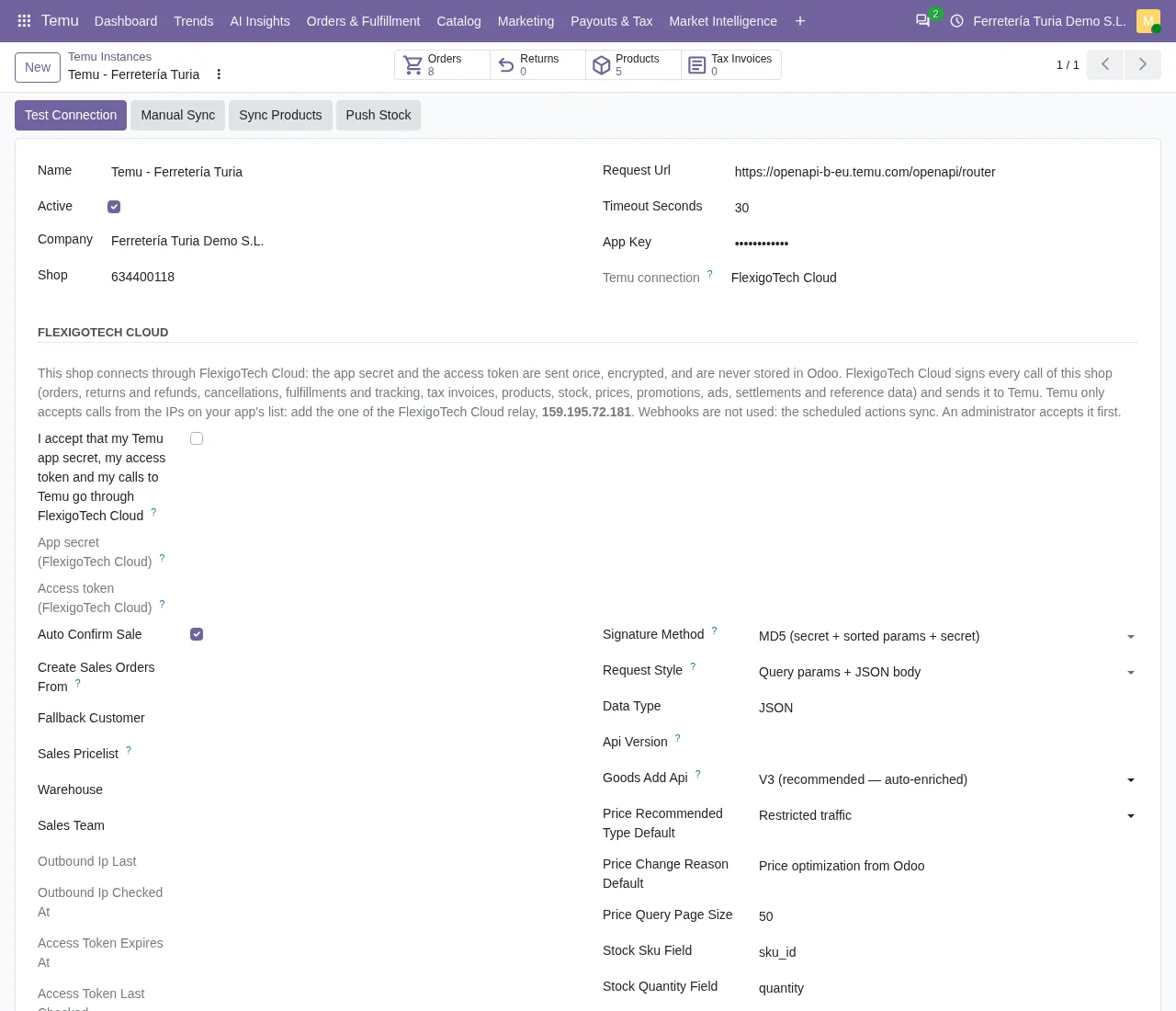
The other difference is how the data arrives. The shop form in Odoo states it plainly: Webhooks are not used: the scheduled actions sync. The syncing is done by scheduled actions that switch on when the module is installed, each with its own frequency. And because Temu only accepts calls from the IPs on your app's list, the one thing you add on your side is the FlexigoTech Cloud IP.

Temu Seller Center versus Odoo, row by row
Today you check every row of this table in the Temu seller centre or keep it in your spreadsheet. With the connector, this is where it lives in Odoo and the module's scheduled action or neighbouring menu that goes with it:
| What you manage | Where it is in Odoo | Module scheduled action or nearby menu |
|---|---|---|
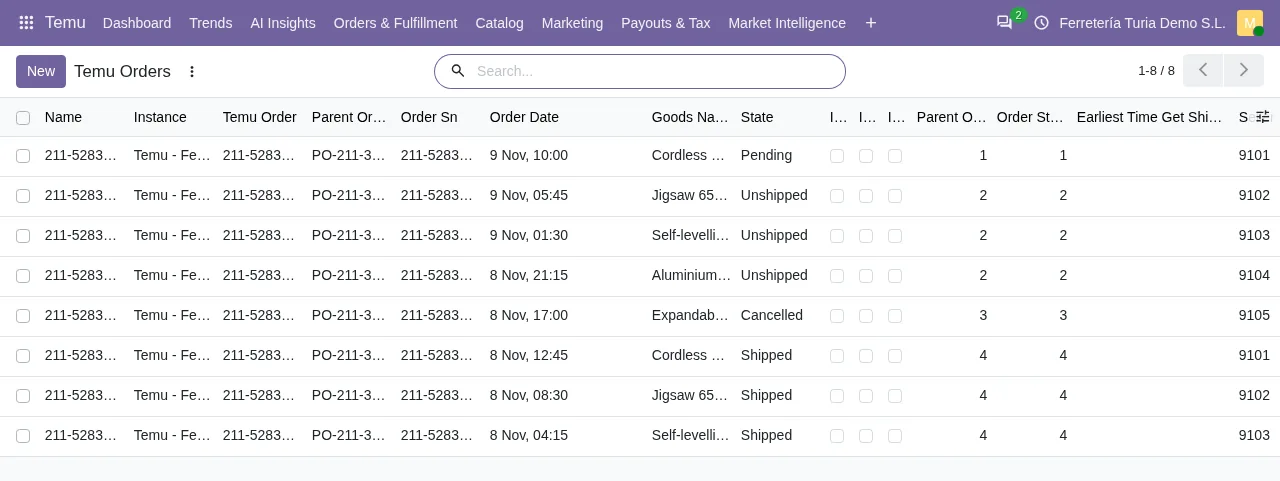
| Orders | Temu › Orders & Fulfillment › Orders | Temu Sync Orders, every 15 minutes |
| Shipments | Temu › Orders & Fulfillment › Fulfillment | In the same menu as Cancellations |
| Listings and stock | Temu › Catalog › Products and Listings | Temu Sync Products, every 30 minutes, and Temu Push Stock, every 5 minutes |
| Returns | Temu › Orders & Fulfillment › Returns | Temu Sync Returns, every 30 minutes |
| Payouts | Temu › Payouts & Tax › Settlements | Temu Build Estimated Settlements, every day |
| Tax | Temu › Payouts & Tax › Tax Reports and VAT (info) | Tax invoices: Temu Sync Tax Invoices, every 60 minutes |
Read from top to bottom, the table shows what stops being a separate check: orders sync every quarter of an hour, stock is pushed to Temu every few minutes and estimated settlements are built once a day. Cancellations have their own entry, Cancellations, under Orders & Fulfillment, just as shipments have theirs under Fulfillment.
Alongside those, the module switches on other scheduled actions at installation: Temu Sync Reference Cache every 5 minutes, Temu Backfill Missing Amounts every 10 minutes, Temu Cleanup Sensitive Payloads every day and Temu AI Weekly Digest every week.
What you need before you start: a Temu seller account and the connection
On the Temu side, you need your seller account. Temu explains that you can register “in four simple steps” and that it accepts business types including “Corporation, Partnership, and Sole Proprietorship”. The sign-up form starts by asking where you sell from (“Which country do you sell from ?”). If you already sell on Temu, this step is done.
On the Odoo side, you need:
- Odoo 17, 18, 19 or 20 up and running, which is what the implementation covers.
- The connector installed on your Odoo version.
- The FlexigoTech Cloud subscription on the Connector plan, which the module asks for in its description.
- Access to the IP list of your Temu app, to add the FlexigoTech Cloud one.
The shop form in Odoo, with the connection through FlexigoTech Cloud, reminds you with this text: Temu only accepts calls from the IPs on your app's list: add the one of the FlexigoTech Cloud. Store accounts have their own menu at Temu › Settings › Store Accounts.
Your first month with Temu in Odoo, in order
This is the order in which everything is set up:
- Odoo implementation. First, Odoo needs to be installed and configured for your business. FlexigoTech implements Odoo 17, 18, 19 and 20, so you can start with an Odoo implementation and include the connector in the same project.
- Connect the shop. You install the connector and take out the FlexigoTech Cloud Connector plan; store accounts have their own menu under
Store Accounts. You also add the FlexigoTech Cloud IP to your Temu app's list, as the shop form asks. - First orders. The
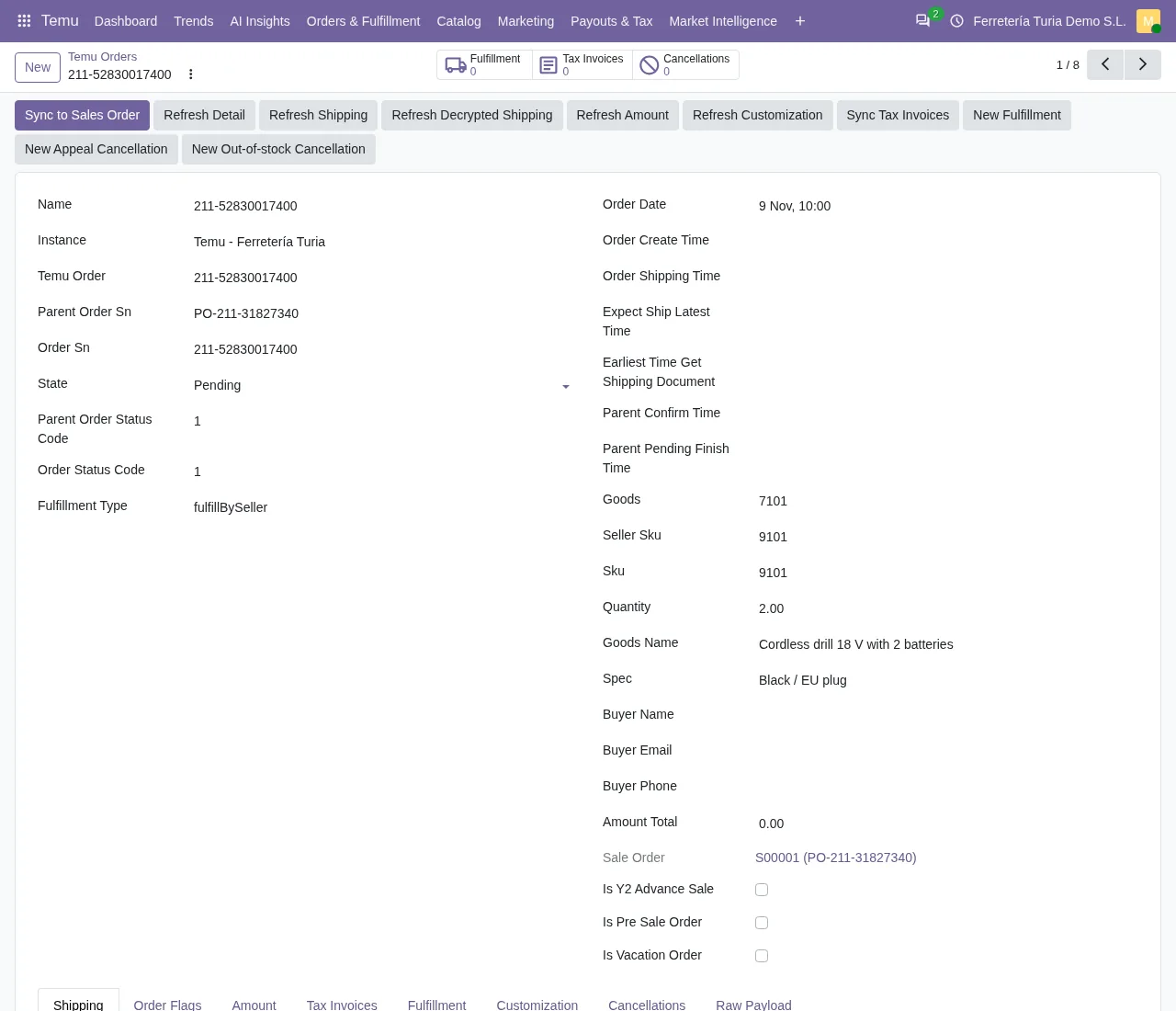
Temu Sync Ordersaction runs every 15 minutes and orders appear underTemu › Orders & Fulfillment › Orders. Shipments have their menu underFulfillment, and returns are synced byTemu Sync Returnsevery 30 minutes. - Stock kept current.
Temu Push Stockruns every 5 minutes from the moment the module is installed. - First payout.
Temu Build Estimated Settlementsruns every day and the settlements show underTemu › Payouts & Tax › Settlements. Temu's tax reports have their menu underTax Reports. Tax invoices, for their part, are synced byTemu Sync Tax Invoicesevery 60 minutes.
Once you work in Odoo day to day, the guide for Odoo users who want to start selling on Temu covers what the connector does with prices and campaigns.
What it costs to run Temu in Odoo
Temu, on its EU seller centre, says: “Temu does not charge any registration fees.” and “You can register as a Temu seller for free.” That same page does not publish sales commissions (checked on 10-11-2026).
On the Odoo side there are three items:
- The connector: of €9 excluding VAT per Odoo version, for 17, 18, 19 and 20, on Odoo Apps. It also needs a FlexigoTech Cloud subscription, Connector plan. The subscription comes with a free trial, no card required.
- The FlexigoTech Cloud subscription, which the module needs: the Connector plan costs €49 a month or €490 a year excluding VAT, with up to 3 platform accounts; Pro costs €98 a month or €980 a year excluding VAT, with up to 10.
- The Odoo implementation, if you are not on Odoo yet.
You can see the module and buy it on the Temu connector for Odoo page. At FlexigoTech we implement Odoo and build connectors and bespoke integrations, so the implementation and the Temu connection can go together.
Temu Seller Center and Odoo: frequently asked questions
Do I need to set up webhooks in Temu?
No. The shop form says so: Webhooks are not used: the scheduled actions sync. The connector's scheduled actions switch on when you install it.
What do I need to change in my Temu account to connect?
Add the FlexigoTech Cloud IP to your app's IP list, because Temu only accepts calls from the IPs on that list.
Will I see in Odoo what Temu pays me?
You will see the estimated settlements, built every day by Temu Build Estimated Settlements, under Settlements, and Temu's tax reports under Tax Reports.
How many Temu shops can I connect?
The Connector plan includes up to 3 platform accounts; Pro, up to 10.
Which Odoo versions is the connector available for?
On Odoo Apps it is published for Odoo 17, 18, 19 and 20.
Keep reading
Checked in the connector's source code (version 20.0) and the linked sources
Sources
- seller-eu.temu.com/
- Module source code: flexigobe_temu_connector (a3395b64): views/temu_instance_views.xml
- apps.odoo.com/apps/modules/17.0/flexigobe_temu_connector
- apps.odoo.com/apps/modules/18.0/flexigobe_temu_connector
- apps.odoo.com/apps/modules/19.0/flexigobe_temu_connector
- apps.odoo.com/apps/modules/20.0/flexigobe_temu_connector
- Module source code: flexigobe_temu_connector 20.0 (a3395b64): __manifest__.py
- Module source code: flexigobe_temu_connector 20.0 (a3395b64): views/menu_views.xml
- Module source code: flexigobe_temu_connector 20.0 (a3395b64): data/ir_cron_data.xml
- flexigotech.com/en/services.html
- flexigotech.com/en/precios.html