

 Español
 Català
 Deutsch
 Français
 Português
 Italiano
 Nederlands
 Polski
Invoices in Odoo, collections in GoCardless
If you use GoCardless, or are about to, the split the connector proposes is simple: Odoo keeps your invoices and GoCardless collects them. The connector extends Odoo's payment transactions, so GoCardless collections appear in the same list as any other payment transaction.
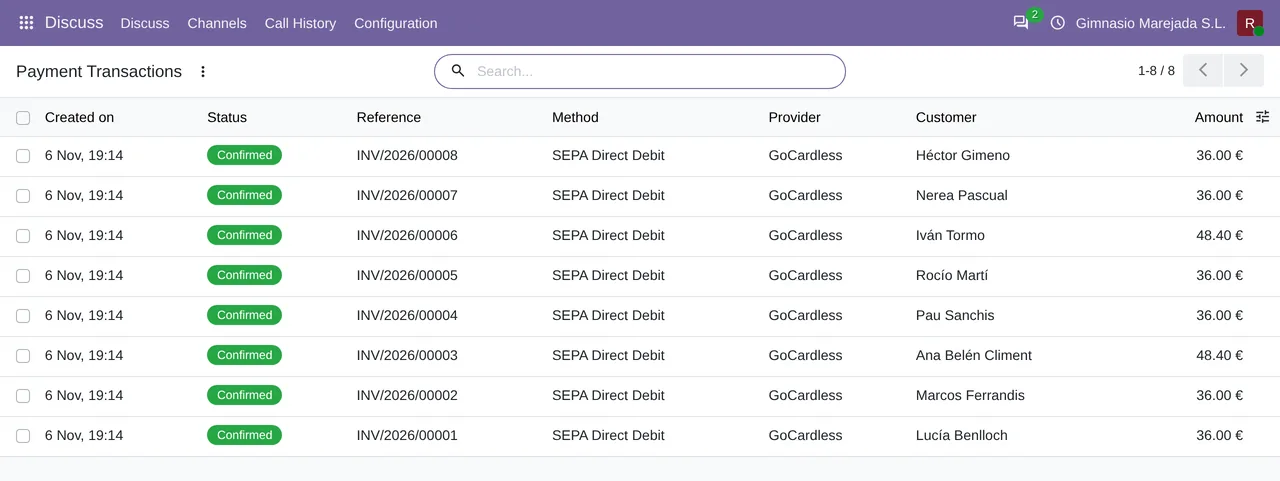
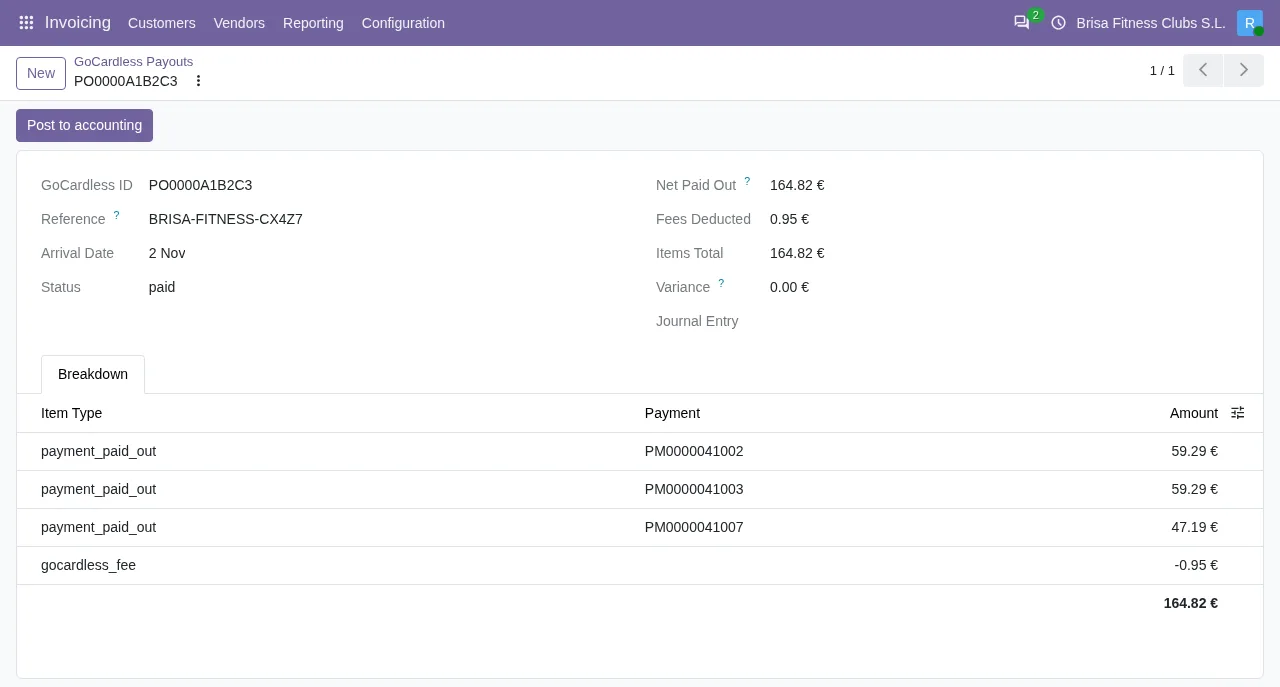
That leaves the other side: the money reaches the bank in payouts. The connector separates collections, fees and, when there are any, refunds and chargebacks within each payout. To take a payout into the accounts it adds a button, Post to accounting, on the payout form.
When the button shows and what happens when you click it
The module keeps this step manual on purpose: posting to the general ledger is the merchant's accountant's call, not something a connector should do behind their back. What follows is the behaviour of the Odoo 20 code; the condition that hides the button is the same in Odoo 17, 18, 19 and 20.
| Situation | Post to accounting button | Result |
|---|---|---|
| The payout is paid, balances and has no entry | Shown | Builds an entry from the breakdown, posts it and stores it in the Journal Entry field. Then it tries to reconcile the collections. |
Journal Entry already has an entry | Hidden | The view hides it as soon as the field has a value. |
The payout's Status is not paid | Hidden | The view hides it until the payout is paid. |
The payout does not balance (Is Balanced field) | Hidden | The view hides it while it does not balance. |
| Someone who is not an accountant clicks it | Shown if the conditions above are met | Only accountants can post GoCardless payouts. appears and no entry is created. |
The reading is straightforward: the button is only offered when there is something correct to post, and whoever clicks it has to be an accountant. When the button is missing, the cause is one of those three fields.
What entry it builds
The entry is built from the payout's breakdown, not from the net figure. The code explains why: crediting net plus fees as if it were all collections looks balanced, but it goes wrong as soon as a payout contains a refund or a chargeback, because the clearing account keeps a permanent residual and the refund never reaches the books.
| Entry line | When it appears | Side and account |
|---|---|---|
GoCardless payout … | In every payout entry | Debit, bank account, for the amount paid out |
GoCardless fees | If net fees are positive | Debit, fees account |
GoCardless fees refunded | If net fees are negative | Credit, fees account |
Refunds and chargebacks | If the payout has refunds or chargebacks | Debit, clearing account |
GoCardless collections settled | In every payout entry | Credit, clearing account, for the collections |
Two details in the code prevent mismatches:
- The module classifies items by type, not by sign. GoCardless returns its fees as positive fee items when a payment fails or is charged back; counting them as collections would overstate fee expense and leave a credit on the clearing account that no payment could ever reconcile.
- If the payout arrives in a currency other than the company's, each line is converted to the company currency at the rate of the arrival date (or today's date if there is no arrival date). Because each line is rounded on its own, the collections line absorbs any difference of a cent so that Odoo accepts the entry; the original foreign-currency amounts stay exact.
The entry's reference is GoCardless payout … followed by the GoCardless identifier.
After posting: reconciling the collections
Once posted, the module tries to reconcile the payments Odoo had booked for the collections in that payout. Each payment debits its outstanding receipts account and the payout credits the clearing account for the same money. When they are the same account, which is the default, matching them is what moves the payment from in payment to paid.
If something does not fit, the module does not guess:
- If a payment sits on an account other than the clearing account, the module logs it on the server and leaves it for manual reconciliation.
- If the clearing account does not allow reconciliation, it logs that too and reconciles nothing.
- Only the credit for the collections is reconciled. The debit for refunds and chargebacks is left out, because it would match against the payout's own credit and leave payments open.
How FlexigoTech can help
If you do not use Odoo yet, the hard part is not the button: it is having invoices, collections and accounting in one place. FlexigoTech implements Odoo 17, 18, 19 and 20 and builds connectors and bespoke integrations; you can start with the implementation and add the connector afterwards. The Odoo Apps listing and the module page show the GoCardless connector.
Keep reading
Checked in the connector's source code (version 20.0) and the linked sources
Sources
- Module source code: flexigo_payment_gocardless 20.0 (6fe1a716): static/description/index.html
- Module source code: flexigo_payment_gocardless 20.0 (6fe1a716): models/payment_transaction.py
- Module source code: flexigo_payment_gocardless 20.0 (6fe1a716): models/gocardless_payout.py
- Module source code: flexigo_payment_gocardless 20.0 (6fe1a716): views/gocardless_payout_views.xml
- flexigotech.com/en/services.html