

 Español
 Català
 Português

When you validate a picking with a carrier, Odoo automates four things: the API call, the PDF label attached to the picking, the tracking number in carrier_tracking_ref, and the email or SMS to the customer with that number. It does not automate the physical pickup or the truth of the weight and packages. Here is the flow, with the Odoo model of each step and the code of our Correos Express connectors and MRW, which we use in our own warehouse. Without Odoo behind it, the same thing is covered in integrating a carrier's API into your own website.
Key idea: the costly failure is not the label that doesn't print, but the one that doesn't print and nobody notices. A serious connector tells a data error (it shows it and doesn't retry) apart from a carrier error (it queues it, retries with increasing wait times and writes it to the chatter).
What you need first
- Contract and credentials for the right environment. Correos Express separates test (
www.test.cexpr.es) and production (www.cexpr.es); MRW uses the Sagec web service with franchise, subscriber, department, user and password. Both come with a connection test button (action_cex_test_connectionandaction_mrw_test_connection) so you can verify it before the first real shipment. - Normalized address. Name, street, city, five-digit postal code in Spain and a phone number of at least nine digits, for both sender and recipient: the literal list in
_cex_validate_shipment_inputs. - Weight and packages on the picking. The modules read the packages (
package_level_ids/package_ids) or, if there are none, one package withshipping_weightorweight. Zero weight doesn't go out. - Operation type with “Imprimir etiqueta”. In Odoo 19 the automatic call on validation only happens with
print_labelenabled. It is the most common cause of “I validated and nothing happened”.
The flow step by step, with the Odoo model at each step
- Validate (
stock.picking._action_done). Odoo 19 calls_send_confirmation_email, whichstock_deliveryoverrides: with a carrierrate_and_ship, no tracking yet and an operation type that prints labels, it runssend_to_shipper()before composing the email. - Call the API (
delivery.carrier.send_shipping). Odoo dispatches tocex_send_shippingormrw_send_shipping: JSON againstapiRestGrabacionEnviok8s/jsonin Correos Express, SOAPTransmEnvioagainstsagec.mrw.esin MRW. If a shipment number already existed, the existing one is returned. - Save the label (
ir.attachment). The PDF is attached to the picking asEtiqueta_CEX_<número>.pdforEtiqueta_MRW_<número>.pdfand posted in the chatter. With several packages, Correos Express returns several, with suffix_01,_02… - Write the tracking (
carrier_tracking_ref).send_to_shippertakestracking_numberfrom the response, writes it to the standard field and posts “Paquete enviado al transportista … con número de rastreo …”. The modules also store their own number. - Notify the customer (
mail.template/sms.template).stocksends “Shipping: Send by Email” if the company has email confirmation enabled, andstock_smssends the SMS. Both include the tracking only ifcarrier_tracking_refis already filled in.
Validate before calling: what is checked and what the carrier returns if not
The carrier does validate, but late and with messages meant for its own staff. The modules check in Odoo first and only call if there are no errors; if there are, a single UserError with all of them. If the carrier still rejects it, the response is classified by keywords and translated into a sentence for the operator; the administrator sees the technical detail.
| Check in Odoo | If the carrier rejects it anyway | What the operator sees |
|---|---|---|
| Address, city, 5-digit postal code (ES), phone ≥ 9 digits | Response containing “dirección”, “código postal”, “teléfono”, “destinatario”, “población” or “país” | “CEX detectó errores de dirección/CP/teléfono en remitente o destinatario” |
| Weight greater than zero, at least one package, maximum 99 (CEX) | Response containing “peso”, “kilos”, “bulto”, “volumen”, “alto”, “largo”, “ancho” | “CEX rechazó peso o datos de bultos” / “MRW rechaza el peso del envío para el servicio seleccionado” |
| Service consistent with destination: international (90/91) not for Spain, PAQ Empresa (92) only to businesses | Service code not contracted or not valid | MRW retries with the alternative codes from the preset and the catalog; if none works, the administrator sees “Servicios probados” in the error |
| Customer and requester codes present | “unauthorized”, “forbidden”, “credenciales” | “CEX rechazó las credenciales del transportista”. It is not retried: it is not transient |
Retries: a silent failure is worse than a visible one
A 503 in the middle of order preparation is not unusual. Leaving the picking half done is the worst response; swallowing the error is the second worst. The modules do a third thing: decide whether the failure is transient and retry with increasing wait times.
- Transient in Correos Express means HTTP 408, 409, 423, 425, 429, 500, 502, 503 or 504, or a message containing “timeout”, “vuelva a intentarlo”, “service unavailable” or “error interno”; MRW uses a shorter list: 408, 429, 500, 502, 503 and 504. Anything else is a data error: it is flagged and shown.
- On the picking you will find
cex_retry_pending,cex_retry_count,cex_retry_next_attempt,cex_last_error_messageandcex_last_attempt_at(in MRW, prefixmrw_), and in the chatter “CEX temporalmente no disponible. Reintento automático #1 programado para …”. - A cron every 5 minutes picks up pending shipments with no shipment number whose retry time has come, 50 at a time, and runs them through the same code as the first attempt.
- Wait times: 5, 15, 30, 60, 120 and 240 minutes in Correos Express; 5, 15, 30, 60, 180 and 360 in MRW. Six attempts by default, configurable. When they run out: “Se alcanzó el máximo de reintentos automáticos”: that is where a person is needed.
- Who finds out: the operator, in the error and in the chatter. Odoo 19 adds its own safety net: if in a batch one picking has already been processed at the carrier, the next error does not roll back the batch; it becomes a warning activity.
The snippet that sets the wait time, in the Correos Express module:
# flexigobe_correos_express/models/delivery_carrier.py (v19.0.3.0.19)
CEX_RETRY_BACKOFF_MINUTES = [5, 15, 30, 60, 120, 240]

def _cex_retry_delay_minutes(self, attempt_no):
    self.ensure_one()
    idx = max(int(attempt_no or 1) - 1, 0)
    if idx >= len(CEX_RETRY_BACKOFF_MINUTES):
        idx = len(CEX_RETRY_BACKOFF_MINUTES) - 1
    return CEX_RETRY_BACKOFF_MINUTES[idx]
The customer email: when it fires and what it contains
It fires on validation, not when the picking is created. The standard template (“Shipping: Send by Email”, in Inventory → Settings → Confirmación de correo electrónico) says “Nos alegra informarle de que su pedido ha sido enviado” and, if there is carrier_tracking_ref, adds the reference with a link to carrier_tracking_url; the stock_sms SMS adds the order number (object.origin) and the reference as plain text, without a link. Since stock_delivery calls send_to_shipper before super()._send_confirmation_email(), the tracking already exists when the email is composed. If the shipment ended up in the retry queue, the email goes out without tracking.
Each module builds the link: https://s.correosexpress.com/SeguimientoSinCP/search?n=<tracking> in Correos Express and https://www.mrw.es/seguimiento_envios/MRW_historico_nacional.asp?enviament=<número> in MRW. Tracking without a link means there is no reference yet.
Case: our two own modules and how they differ
They share the same architecture and are maintained for Odoo 19, 18 and 17. The APIs differ, and it shows in the label, the cancellation and what they don't do.
| Aspect | Correos Express (v19.0.3.0.19) | MRW (v19 · 1.0.1) |
|---|---|---|
| Protocol | REST JSON: shipment creation, label, tracking, pickups, PUDO, stop delivery | SOAP Sagec: TransmEnvio, TransmEnvioInternacional, GetEtiquetaEnvio, CancelarEnvio |
| Label | PDF, ZPL or EPL; one attachment per package | PDF or ZPL via SOAP; if the binary doesn't arrive, it is downloaded from the URL that MRW returns |
| Multi-package | List of packages with weight and dimensions, maximum 99 | One BultoRequest per package and NumeroBultos |
| Tracking | Cron every 30 minutes that writes status, description and date on the picking | Button that opens MRW tracking; no periodic synchronization |
| Cancellation | “Parar entrega” via API; if the contract doesn't allow it, it is left as manual and notifies in the chatter | CancelarEnvio; if MRW says it no longer exists, it syncs the local status instead of failing |
| Pickups | Create, modify, cancel and query; PUDO point search | Only the pickup date, within the shipment request |
| Cash on delivery | No: reembolso is sent empty | No: Reembolso is fixed to “N” |
Neither handles cash on delivery today, and we get asked a lot. More in Correos Express in Odoo and MRW in Odoo; if you are still choosing, which carrier fits an eCommerce in Odoo.
How to check that it works
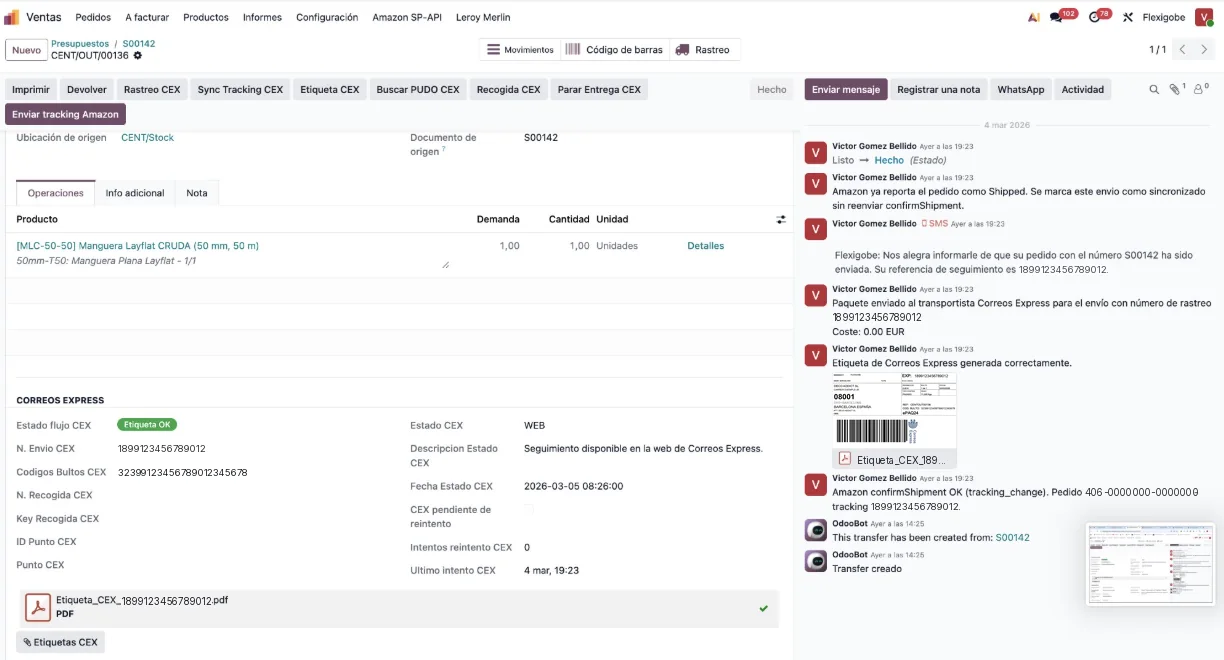
Not with the sandbox: with a real validated picking and these four pieces of evidence, the ones in the screenshots.
- A
Etiqueta_CEX_…pdforEtiqueta_MRW_…pdfattachment with a readable barcode. MRW's checks the header of the binary (%PDF-,^XA,<?xml,<html) and, if it is not a printable label, doesn't save it: it says so in the chatter. carrier_tracking_reffilled in and “Etiqueta OK” with the shipment number.- In the chatter: “Paquete enviado al transportista…”, “Etiqueta … generada correctamente” with the PDF, and the SMS or email to the customer if enabled.
- Retry fields at zero. If not, the shipment has not reached the carrier even though the picking is validated.
With a carrier that has no published module, same flow and a different adapter: within the logistics service in Odoo and, for consultancies, as engineering for consultancies. The rule of our services is the same: the label comes out of the picking, the tracking returns to the picking and nobody copies anything.
Frequently asked questions
Is the label generated when the order is created or when the picking is validated?
On validation: _action_done triggers send_to_shipper if there is a carrier with full integration, there is no tracking and the operation type has “Imprimir etiqueta”. The modules add a button to launch it manually.
Why did the customer email go out without a tracking number?
Because carrier_tracking_ref was empty when it was composed: the carrier failed and the shipment ended up in the queue, or the operation type doesn't call the carrier on validation. The chatter tells you which.
Can a shipment be cancelled from Odoo?
With caveats: MRW calls CancelarEnvio; Correos Express uses “Parar entrega” and, if the contract doesn't have it, records the cancellation as manual. It is logged in the chatter.
Useful links within FlexigoTech
What we do about this
Is your warehouse still printing labels from the carrier's portal?
Tell us which carrier you use, which Odoo version you have and how many pickings go out per day. We'll tell you what already exists, what needs configuring and what would need to be built. Write to comercial@flexigobe.com or call +34 616 809 504.