
 Español
 Català
 Deutsch
 Français
 Português
 Italiano
 Nederlands
 Polski



WhatsApp Cart Alerts for Odoo
Every abandoned cart in your Odoo shop is logged and gets a WhatsApp reminder with your approved template, only if the customer gave permission.
€49/month14 days free, no card
Yearly and Pro
- Standard€49/month · €490/year
- Pro€98/month · €980/year
Reply within 1 working day; with Pro, 4 hours. FlexigoTech Cloud pricing
After you buy
- You pay for the license (€9 + VAT) and get an email with the link to download the module.
- You install it in your Odoo, on Odoo.sh or your own server.
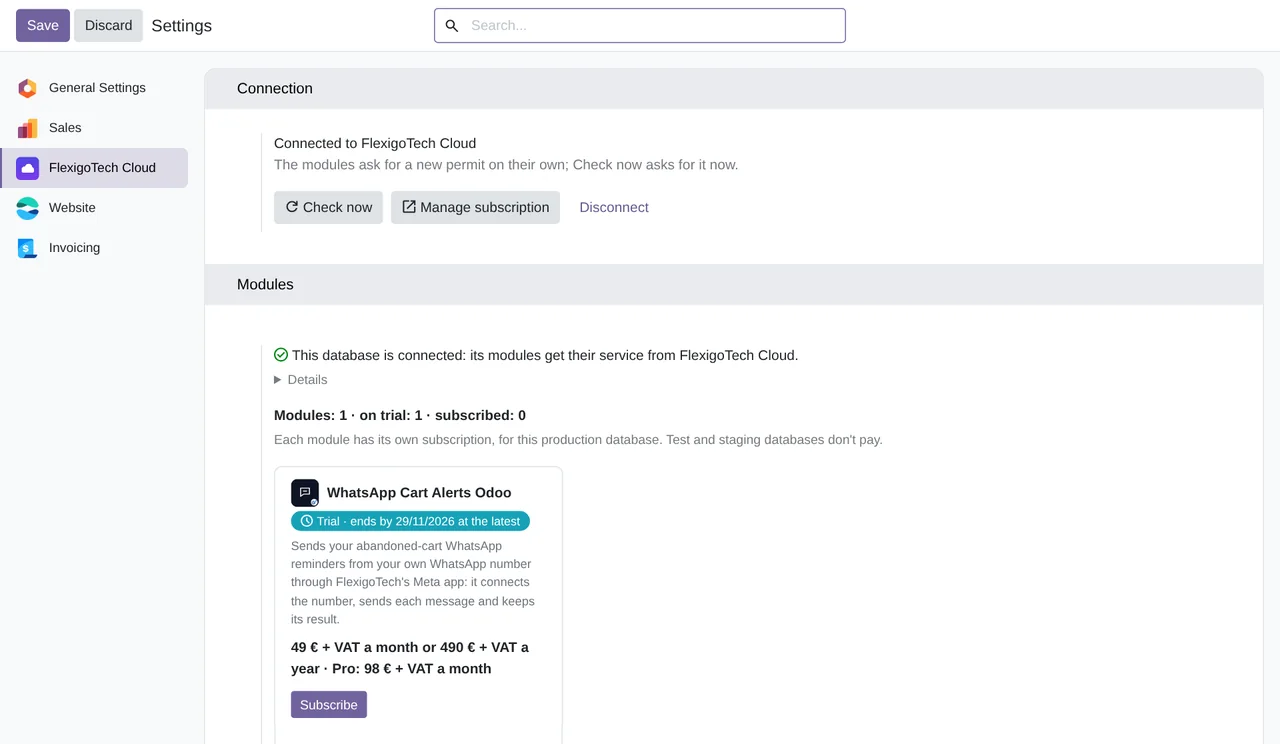
- In Settings → FlexigoTech Cloud you accept the data list and press «Try free for 14 days». The trial doesn't ask for a card.
- To continue, you press «Subscribe», create your account on app.flexigotech.com and pay for the plan by card.
Every purchase includes 2 months of support: we help you install it, set it up and get it working, by email and video call.
- Tested on Odoo 17, 18, 19 and 20
- Odoo Learning Partner
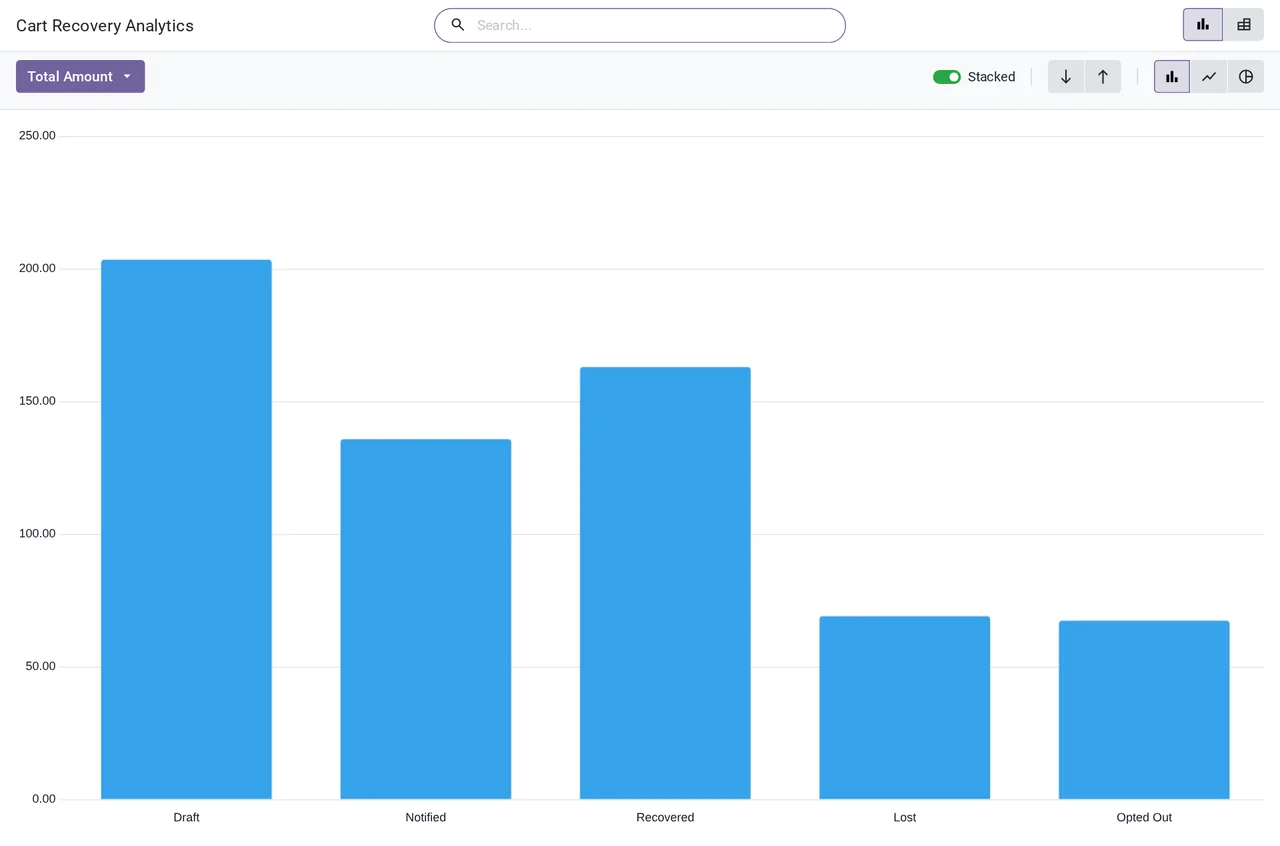
 Your abandoned carts, by stateReal Odoo screenshot
Get started in 3 steps
- Install the moduleFrom Odoo Apps, on Odoo.sh or your own server. In Apps, remove the filter from the search bar: it is not an application.
- Start the trialIn Settings › FlexigoTech Cloud, an administrator accepts the data list and starts the 14-day trial, no card needed.
- Connect your numberIn Website › Configuration › Settings, click “Connect WhatsApp number”, follow Meta's window and click “Refresh”.
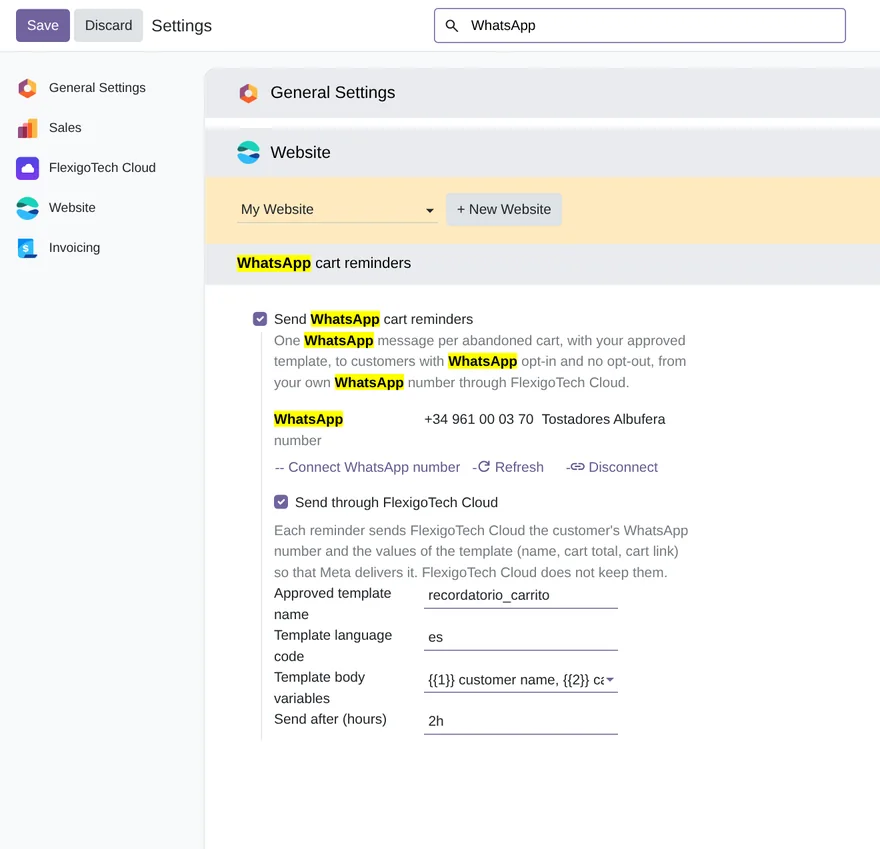
Pick the template and switch sending on Enter your approved template's name and language, its variables and the waiting hours, and tick both boxes.
What you need Odoo 17, 18, 19 or 20 with Website and eCommerce, on Odoo.sh or your own server (not Odoo Online). Your WhatsApp Business account at Meta, with your number and an approved template.
What it does
- Every abandoned cart, loggedEvery hour, website quotations with a known customer, once the hours you choose have passed.
- One WhatsApp reminderWith your approved template and, if you like, the name, the total and the cart link.
- Only to those who said yesNothing to anyone who did not accept WhatsApp or opted out.
- The state of every cartNotified, recovered, lost or opted out, with its analysis.
- The Meta key, outside OdooEncrypted in FlexigoTech Cloud, where every message goes out.
How it works

Goes out from Odoo
- The customer's WhatsApp number
- Your template and its language
- Name, total and cart link, if you use them
FlexigoTech Cloud
Comes from Meta
- The message ID when Meta accepts it
- The error code and text if Meta refuses it

FlexigoTech Cloud keeps your WhatsApp number's key encrypted and passes every reminder from Odoo to Meta's WhatsApp API. The key is not stored in your Odoo, and the cloud does not keep the customer's number or the message values.
Where you see it in Odoo
- Website › WhatsApp Abandoned Cartscarts by state and their analysis
- Website › Configuration › Settingsthe connected number, the template and when it is sent
- Contacts, WhatsApp tabeach customer's permission, number and opt-out
Inside Odoo
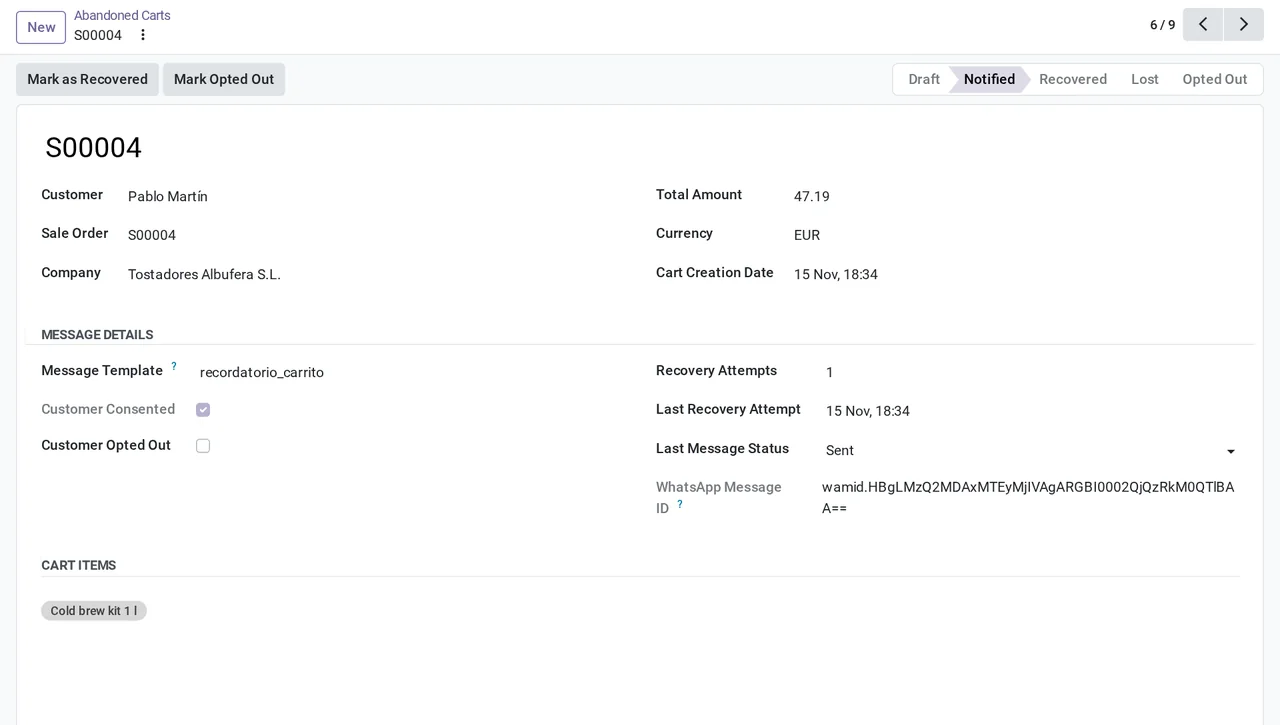
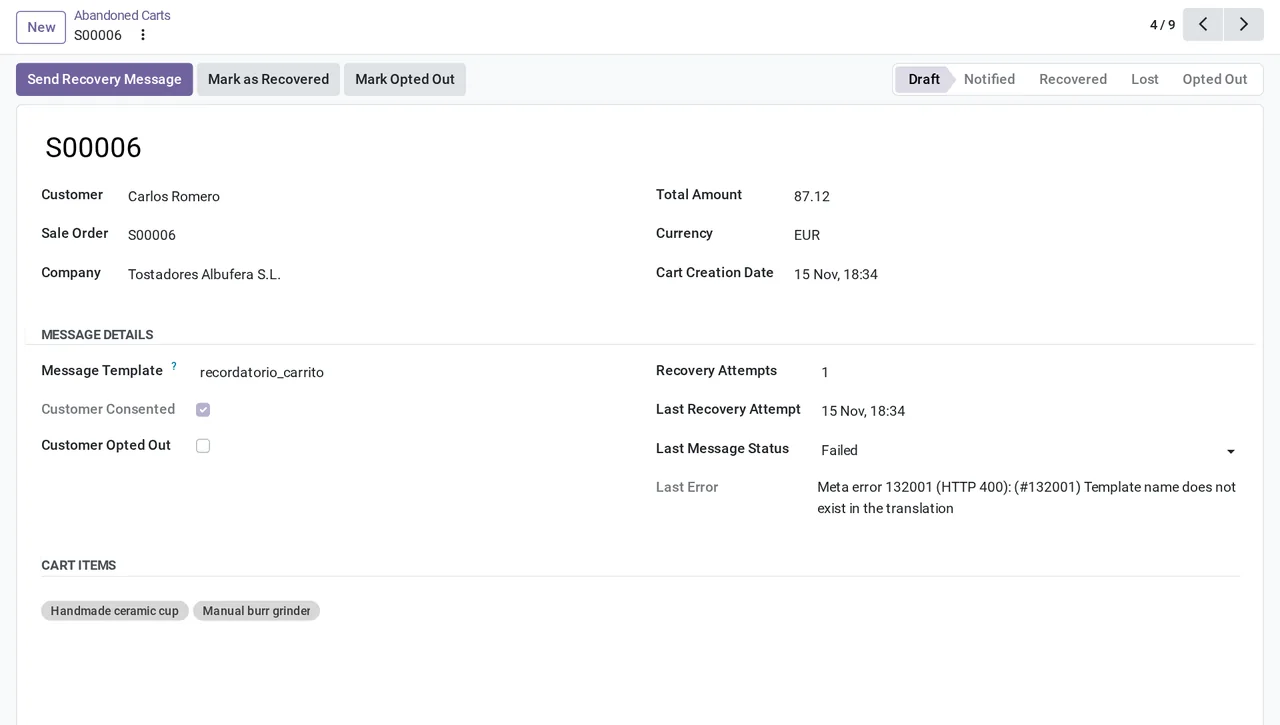
Real Odoo screenshots.

Price
Standard
€49a month + VAT
€490 a year + VAT 2 months free
- The connection runs on our servers
- We alert you if sync fails
- First response 1 working day
- Video call included for the first 2 months
Pro
€98a month + VAT
€980 a year + VAT 2 months free
- Everything in Standard
- First response 4 working hours
- Video call if needed
- + €9 for the module license, per Odoo version
- 14 days free, no card
- Cancel in two clicks
- Every purchase includes 2 months of support: we help you install it, set it up and get it working, by email and video call. While you're subscribed, support for the service stays included. Still integrating or testing? Extend your free trial.
If you cancel What the subscription gives stops. Your data stays in your Odoo.
- Support with response timesMonday to Friday, 9:00 to 18:00 (Barcelona), except public holidays.
- Maintenance and improvementsOdoo 17-20, on Odoo.sh or your own server
- We handle changes to their APIIf the platform changes its API, we adapt the module and the service.
- Servers in GermanyWe store your credentials encrypted
- Tested On Odoo 17, 18, 19 and 20. Meta's WhatsApp API: simulated for now, following its official documentation and with Meta's test number. No message has reached a real customer yet.
- 3,452 lines of code · 15-11-2026
- 69 automated tests · 15-11-2026
- No reviews yet · leave yours
Frequently asked questions
Do I need a WhatsApp Business account?
Yes. Your number, your WhatsApp Business account at Meta and your templates are yours. Templates are created and approved in Meta's WhatsApp Manager.
How much does Meta charge?
Meta charges your account for every template message it delivers, according to the template category and the country code of the number. A cart reminder is a marketing template. That cost is separate from the subscription.
Does it already send messages to real customers?
Not yet. The connection with Meta is simulated for now: the module was tested with a simulator built from Meta's official documentation and with Meta's test number. The test with a real number is still to come.
Who does it write to?
Only customers with WhatsApp Opt-In ticked on their contact, not opted out and with a number in international format (+ and country code). One message per cart. The shop has no box to ask for permission: it is ticked on the contact.
What if I use Odoo Enterprise?
Odoo Enterprise 20 has its own WhatsApp cart reminder, with its WhatsApp app and a Meta app of your own. In Enterprise 17, 18 and 19, WhatsApp-eCommerce only writes when the order is confirmed. This module works on Community and Enterprise, with no Meta app of your own.
Does it work without FlexigoTech Cloud?
No. Every message goes out through FlexigoTech Cloud. Without the trial or the subscription, the module neither logs carts nor sends anything.
What happens after you press «Buy now»?
1. You pay for the license (€9 + VAT) and get an email with the link to download the module. 2. You install it in your Odoo, on Odoo.sh or your own server. 3. In Settings → FlexigoTech Cloud you accept the data list and press «Try free for 14 days». The trial doesn't ask for a card. 4. To continue, you press «Subscribe», create your account on app.flexigotech.com and pay for the plan by card.
Does it work on Odoo Online?
No: Odoo Online does not allow third-party modules. It is for Odoo 17, 18, 19 and 20, on Odoo.sh or on your own server.
Who installs it?
You do: you buy it on flexigotech.com or on Odoo Apps and install it in your Odoo. We help you install it and set it up, by email and video call, during the 2 months of included support. Custom development and data migration are quoted separately.
What support is included?
Every purchase includes 2 months of support: we help you install it, set it up and get it working, by email and video call. While you're subscribed, support for the service stays included.
What if something fails?
We monitor the connection and email you if something fails. And support has response times: first response within 1 working day; with Pro, within 4 working hours.
What about my data? And if I cancel?
The connection goes through FlexigoTech Cloud, on our servers in Germany, with your credentials encrypted. You cancel in two clicks: if you don't subscribe when the trial ends, the service stops and nothing is charged. Your data stays in your Odoo, and you can always view and export it.
Using WhatsApp but not Odoo yet?
We set up Odoo, connect it to WhatsApp and stay on.
From €2,450 + VAT
Start with OdooMore about the WhatsApp connector
What it does
Odoo module for Odoo 17, 18, 19 and 20, Community and Enterprise, for the abandoned carts of your online shop. Every hour it logs the unfinished carts of known customers and sends each one a WhatsApp reminder from your number, with your approved template, only if the customer gave permission. Every message goes through FlexigoTech Cloud, which keeps your number's key encrypted. The connection with Meta is simulated for now: no message has reached a real customer yet.
- Abandoned carts, logged on their ownAn Odoo task runs every hour and logs the online shop quotations that are still in draft, with products and a known customer, once the hours you choose have passed since the cart was created (1 by default). It only counts carts created since you switched sending on, and each order is logged once.
- One WhatsApp reminderEvery cart with permission gets one message with your approved template, in the language you set in the settings. Its variables can carry the customer's name, the cart total with its currency and a link to the cart. One message per cart.
- Only to those who said yesThe contact has a WhatsApp tab with WhatsApp Opt-In, the WhatsApp number and WhatsApp Opt-Out with its date. Without permission, with the opt-out or without a number in international format (+ and country code), Odoo sends nothing. Marking a cart as opted out also opts the contact out.
- Every cart with its stateDraft, Notified, Recovered, Lost or Opted Out. A confirmed order becomes Recovered and a cancelled one Lost, whether it was notified or not. If Meta accepts the message, the cart becomes Notified, with the state Sent and the message ID; if Meta refuses it, the cart goes back to Draft with Meta's error.
- Lists and analysis by stateIn Website › WhatsApp Abandoned Carts you have the abandoned, notified, recovered and lost carts, and an analysis with the amount in each state, as a chart or a pivot table.
- Your number, connected from OdooIn the website settings, “Connect WhatsApp number” opens Meta's sign-up window from FlexigoTech Cloud, and “Refresh” brings back the number and its name. The number's key is stored encrypted in the cloud: Odoo stores no Meta key and never calls Meta.
- Safe in copies of your databaseIn a neutralized copy sending is switched off, and in a database with another identifier or another name the module neither sends nor connects the number: it says so in the settings. Uninstalling it disconnects the number in the cloud.
What it does not do
- It has not sent real messages yetThe connection with Meta is simulated for now: it was tested with a simulator built from Meta's official documentation and with Meta's test number. The test with a real number is still to come.
- It does not read deliveries, reads or repliesSent means that Meta accepted the message, not that it was delivered. Replies and opt-outs that the customer asks for on WhatsApp do not reach Odoo: the opt-out is ticked in Odoo.
- One reminder and one templateIt sends one message per cart, with one template and one language for the whole company. No coupons, minimum amounts or excluded products.
- It does not ask for permission in the shopThe shop has no permission box: WhatsApp Opt-In is ticked on the contact. And the number must carry the country code: Odoo does not add it.
- Your WhatsApp account and Meta's charges are not includedYou need your WhatsApp Business account at Meta, with your number and your approved templates. Meta charges your account for every template message it delivers, separately from the subscription.
- It does not work on Odoo OnlineIt needs Odoo.sh or your own server.
What it looks like inside Odoo
Real screens of the module installed on Odoo 20, with the data of a made-up coffee roaster in Valencia with an online shop.
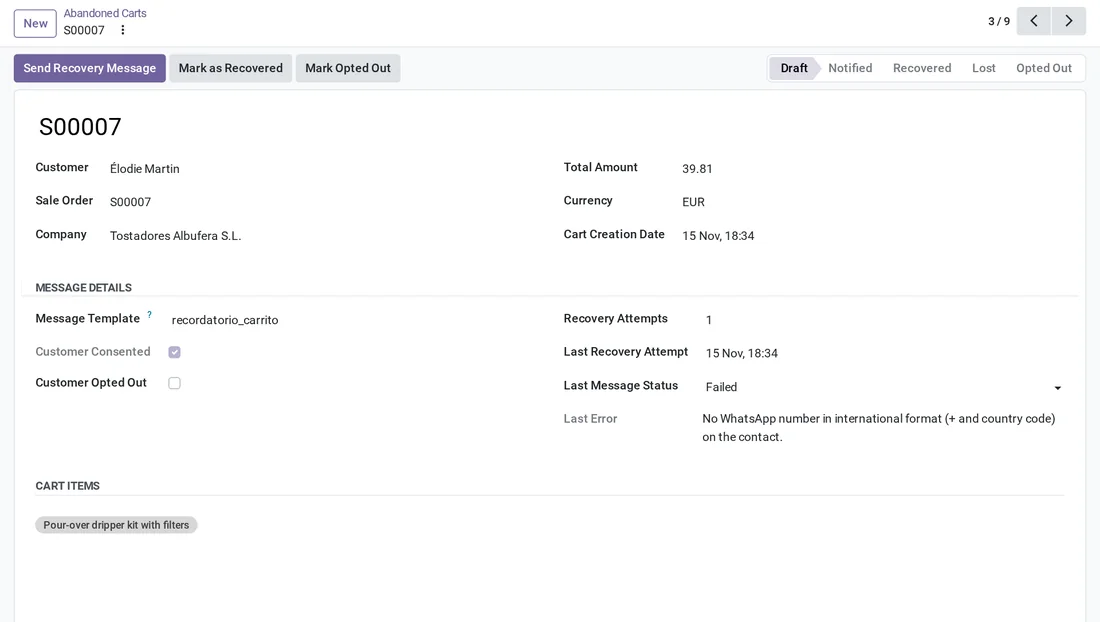
A number with no country code
Élodie Martin's contact has no number in international format: the cart stays in Draft, with Failed and the reason in Last Error.
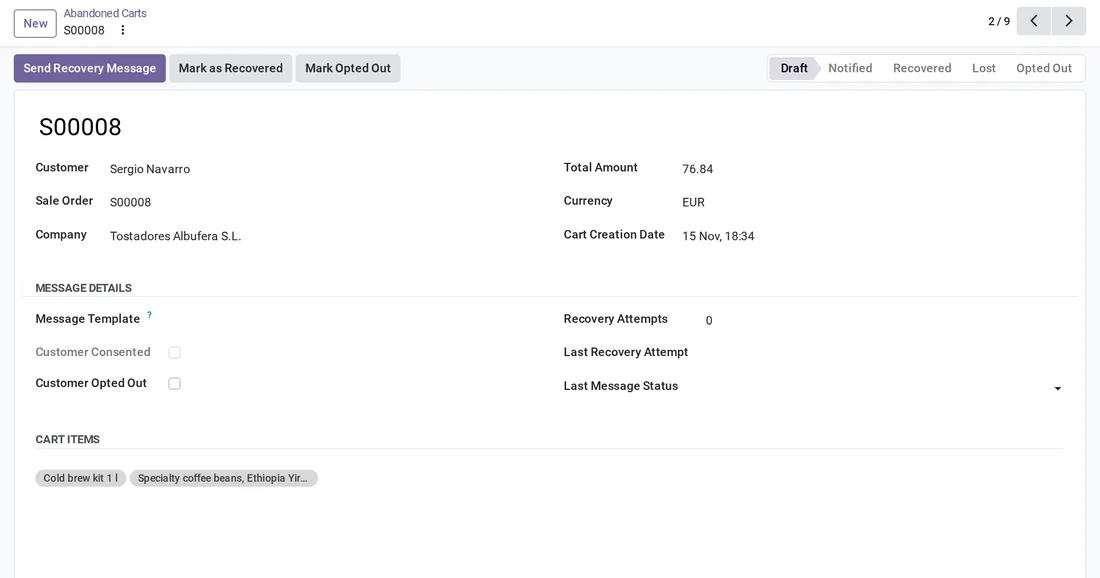
A customer with no permission
Sergio Navarro did not accept WhatsApp: his cart is logged, but Odoo does not write to him and the attempts stay at 0.
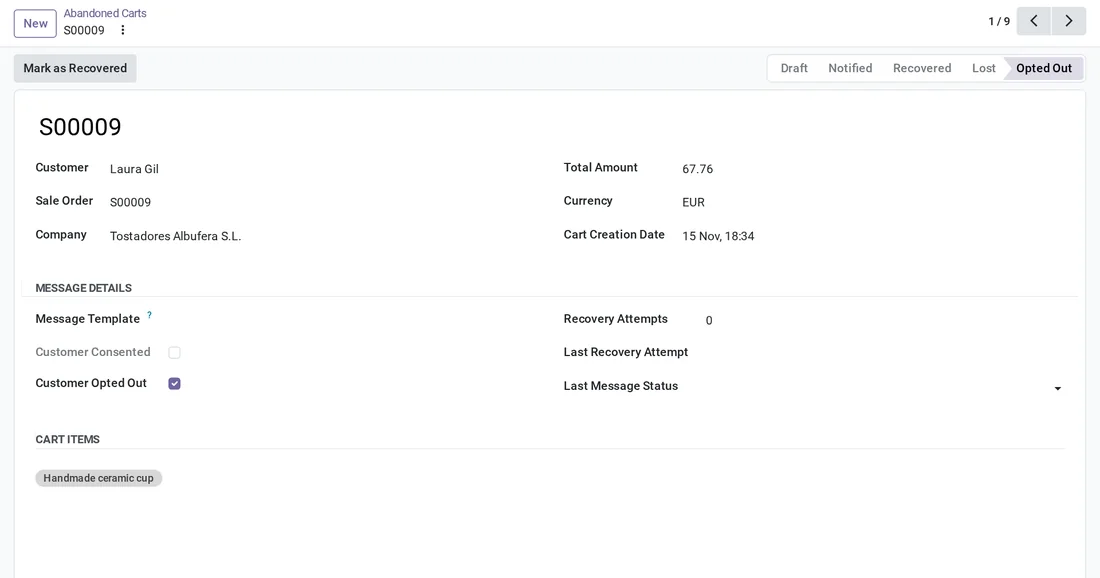
A customer who opted out
Laura Gil had opted out: her cart becomes Opted Out and she gets nothing.
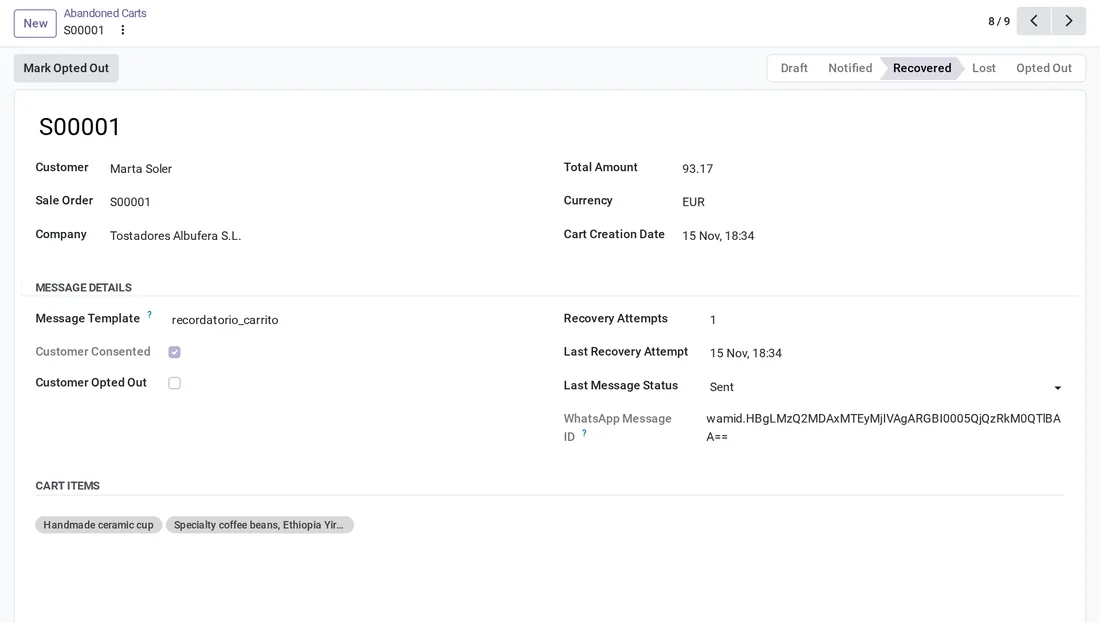
A recovered cart
Marta Soler's order was confirmed: the cart becomes Recovered, with its last message Sent.
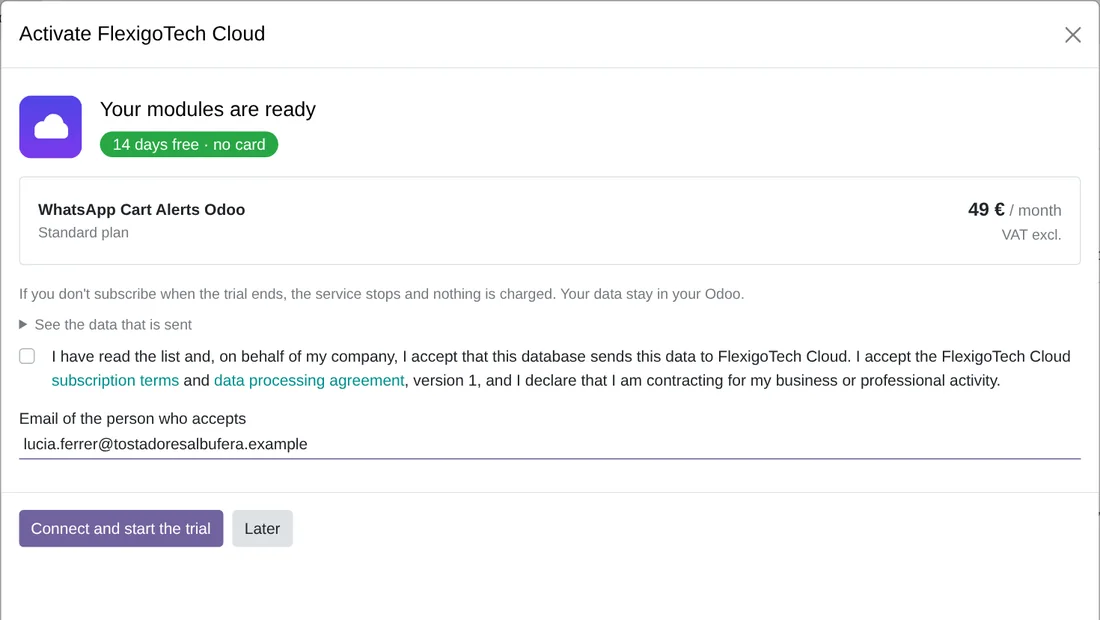
The FlexigoTech Cloud trial
After installing, an administrator reads the data list, accepts it and starts the 14-day trial, with no card.
Technical sheet
Questions before you buy? Talk to the engineer.
We tell you whether the module fits your Odoo and your WhatsApp Business account before you pay anything. No middlemen.
Related
WhatsApp and Meta are trademarks of their owner. FlexigoTech publishes this connector on its own, with no endorsement or sponsorship from the trademark owner.