

 Español
 Deutsch
Module for Odoo 17 · 18 · 19
Connect Tesco Marketplace to Odoo: the operator profile for the Mirakl connector
Ships the host, defaults, auto-detection and tracking flow for Tesco already configured: install, paste your API key and start importing orders. Requires the FlexigoTech Mirakl connector (sold separately).
Mirakl Connector: Requires the Mirakl Connector installed (sold separately).

What it does
- Pre-configured hostThe operator connection URL (tescouk-prod.mirakl.net) comes preloaded: pick Tesco on the Mirakl instance and never type an endpoint.
- Marketplace defaultsOrders, returns and auto-acceptance with the Tesco Marketplace (UK) flow settings already set.
- Operator auto-detectionThe connector recognises the Tesco host and platform name and applies the right profile, with no crossed connections when you run several operators.
- Tracking from the deliveryReuses the Mirakl connector's advanced shipment flow: validate the delivery and the tracking number and carrier reach Tesco the way its API expects.
How the module works
Real screenshots of every screen, with what each one does.
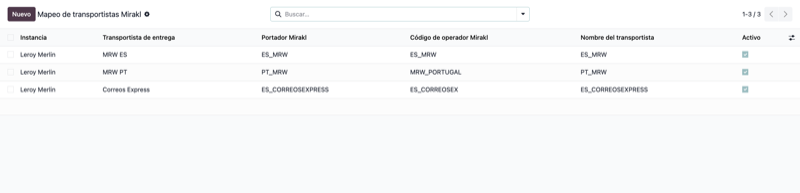
Carrier mapping
Match your Odoo carriers to Mirakl codes so tracking reaches Tesco exactly as its API expects.
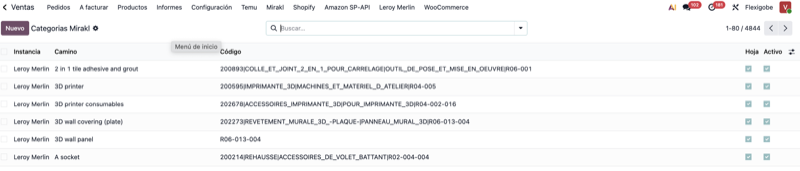
Marketplace categories
Map your catalog to the Mirakl category tree to list products on Tesco without classification rejections.
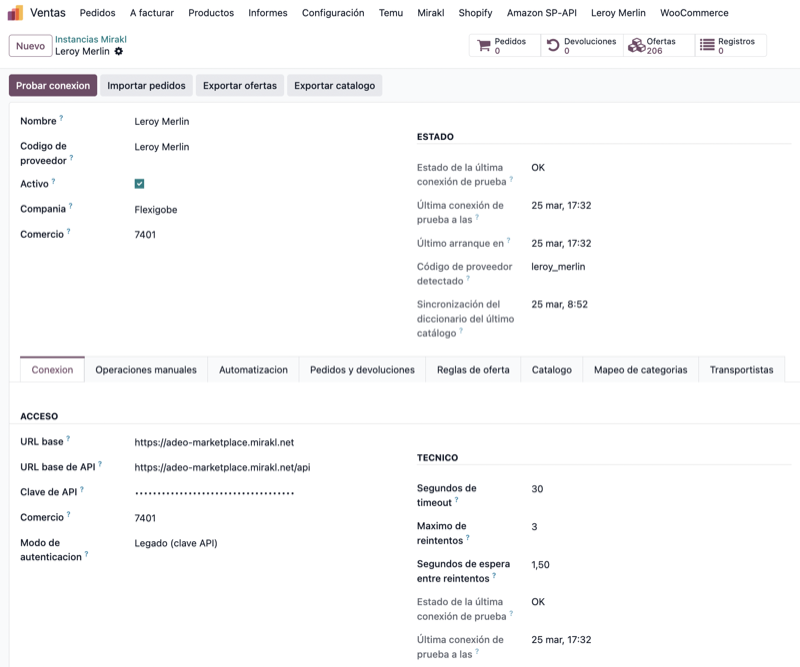
Connection and instance
Base and API URLs come preset for Tesco: paste your API key, hit Test Connection and validate the link.
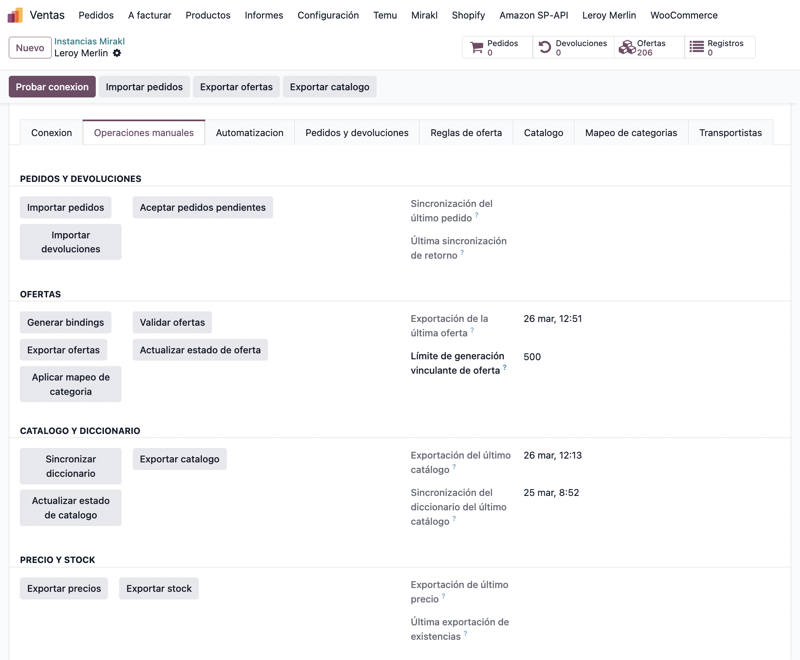
Manual operations
Import orders and returns and export offers, catalog, prices and stock to Tesco in one click, all from Odoo.
Your Mirakl connector already sells anywhere. This profile takes the pain out of setting up Tesco
Wiring up a Mirakl operator by hand means digging out the right host, typing the API URL without a single typo, and second-guessing the order, returns and auto-acceptance settings. This profile ships all of that ready for Tesco Marketplace (tescouk-prod.mirakl.net). Install it, choose Tesco, paste your API key and you are already pulling in orders.
What the Tesco Marketplace Odoo connector does
Tesco host preloaded
The operator host (tescouk-prod.mirakl.net) comes loaded out of the box. No hunting for the right URL, no risk of a typo silently breaking the connection.
Tesco marketplace defaults
The order, returns and auto-acceptance settings are already tuned to the Tesco Marketplace flow, so they are correct from the very first minute.
Host autodetection
The profile automatically recognises the Tesco host when you create the marketplace instance, so you never end up with crossed settings when you run several Mirakl operators side by side.
Advanced tracking flow
Includes the advanced shipment-tracking flow so tracking numbers and the carrier reach Tesco in exactly the format its API expects, keeping your fulfilment metrics clean.
Odoo 17, 18 and 19
Compatible with all three series, on both Community and Enterprise. You install the build that matches your Odoo version and it behaves the same.
Built on the Mirakl connector
This is a profile, not a standalone app: it layers the Tesco configuration on top of the generic Mirakl connector, which is the part that imports orders and settlements and publishes products, prices and stock.
How it works
Install the Mirakl connector (sold separately) and this Tesco profile.
Create a marketplace and pick Tesco. The connection URL (tescouk-prod.mirakl.net) is already filled in.
Paste your Tesco API key and hit Test Connection to validate the link.
Import orders and settlements and publish products, prices and stock, all from inside Odoo.
Requirements
- The generic Mirakl connector installed (sold separately). This profile does not run on its own.
- An active Tesco Marketplace seller account with its Mirakl API key.
- Odoo 17.0, 18.0 or 19.0, Community or Enterprise.
One-time price, source code included
A single payment, no subscriptions and no recurring fees. The full source code is included under the OPL-1 licence, and you receive the module built for Odoo 17, 18 or 19 with an invoice and automatic delivery.
Frequently asked questions
Does the Tesco Marketplace Odoo connector work on its own?
No. It is a marketplace provider profile for the Mirakl connector, which it depends on. You need the generic Mirakl connector installed first; this profile is what turns it into a ready-to-use Tesco integration.
What do I need to connect Tesco to Odoo?
A Tesco Marketplace seller account and its Mirakl API key, plus the generic Mirakl connector installed in your Odoo. Paste the key, run Test Connection and you are live. If your host differs from the preloaded one, you can edit it by hand.
Does it work with Odoo Community?
Yes. It is a native Odoo module that runs on Odoo 17.0, 18.0 and 19.0, on both Community and Enterprise. You receive the module packaged for your exact Odoo version.
What does it save me versus setting Tesco up by hand?
The operator host, the default order and return values, host autodetection and the advanced tracking flow all come tuned for Tesco. You cut the whole setup down to pasting your API key, and skip the mis-pointed connections a manual config invites.
Is it a one-time payment and is the source code included?
Yes. It is a single 150 EUR payment under the OPL-1 licence, with the full source code included and no subscriptions or recurring fees. You get an invoice and automatic delivery of the module for your Odoo version.
Which Odoo versions does it work with?
Odoo 17.0, 18.0 and 19.0, on both Community and Enterprise.