
 Español
 Català
 Deutsch
 Français
 Português
 Italiano
 Nederlands
 Polski

Klaviyo connector for Odoo
Sync Odoo with Klaviyo: your contacts with their consent, the catalogue with stock and prices, and the orders and events of your apps.
€49/month14 days free, no card
Yearly and Pro
- Standard€49/month · €490/year
- Pro€98/month · €980/year
Reply within 1 working day; with Pro, 4 hours. FlexigoTech Cloud pricing
After you buy
- You pay for the license (€9 + VAT) and get an email with the link to download the module.
- You install it in your Odoo, on Odoo.sh or your own server.
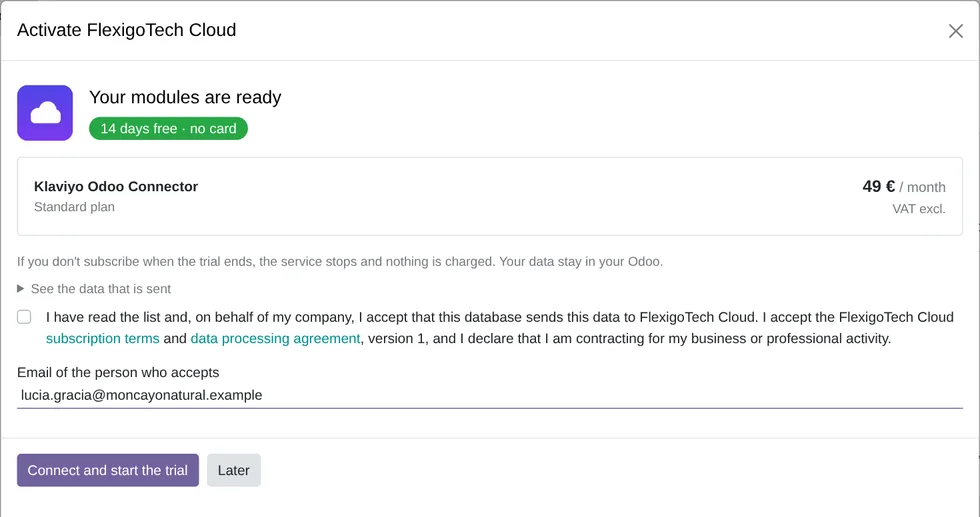
- In Settings → FlexigoTech Cloud you accept the data list and press «Try free for 14 days». The trial doesn't ask for a card.
- To continue, you press «Subscribe», create your account on app.flexigotech.com and pay for the plan by card.
Every purchase includes 2 months of support: we help you install it, set it up and get it working, by email and video call.
- Tested on Odoo 17, 18, 19 and 20
- Odoo Learning Partner
 What goes to KlaviyoReal Odoo screenshot
Get started in 3 steps
- Install the moduleFrom Odoo Apps, on Odoo.sh or your own server.
- Start the trialIn Settings › FlexigoTech Cloud, an administrator accepts the data list and starts the 14-day trial, no card needed.
- Connect KlaviyoIn Klaviyo › Configuration › Set up, accept going through FlexigoTech Cloud, click «Connect with Klaviyo» and grant access on Klaviyo's screen.
Choose what is sent The wizard suggests your lists, all contacts and the last two years of history. When you click «Start», the first load runs by itself.
What you need Your own Klaviyo account; Klaviyo's fees are not included. Odoo 17, 18, 19 or 20 on Odoo.sh or your own server, on a public https address; not Odoo Online.
What it does
- Contacts with their consentEmail and SMS, in step both ways.
- Catalogue with stock and pricesEvery product, brought up to date every day.
- Orders and events from your appsSales, POS, online store, loyalty and more.
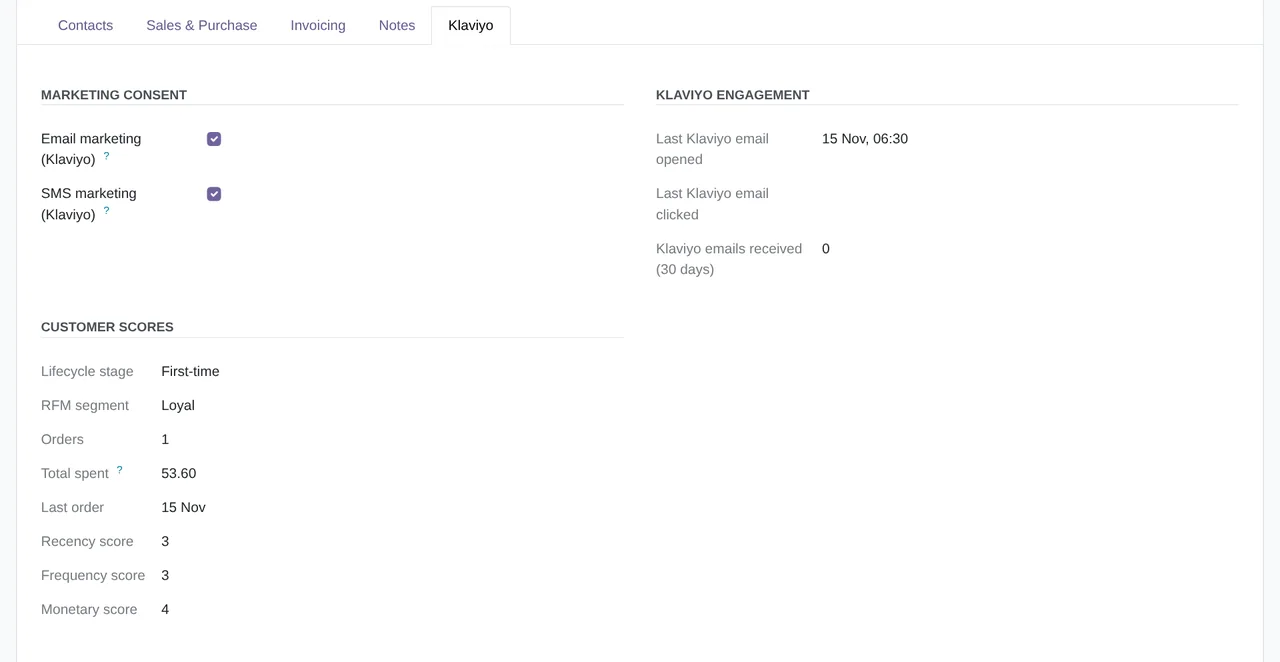
- Scores for every customerRFM and lifecycle stage, on their profile.
How it works

From Odoo
- Contacts with their email and SMS consent
- The catalogue, with prices and stock
- Orders, refunds and deliveries as events
- RFM scores and lifecycle stage
From Klaviyo
- Email and SMS subscribes and unsubscribes
- Opens, clicks and emails received by each contact
- Your Klaviyo lists, to choose where each contact goes

FlexigoTech Cloud
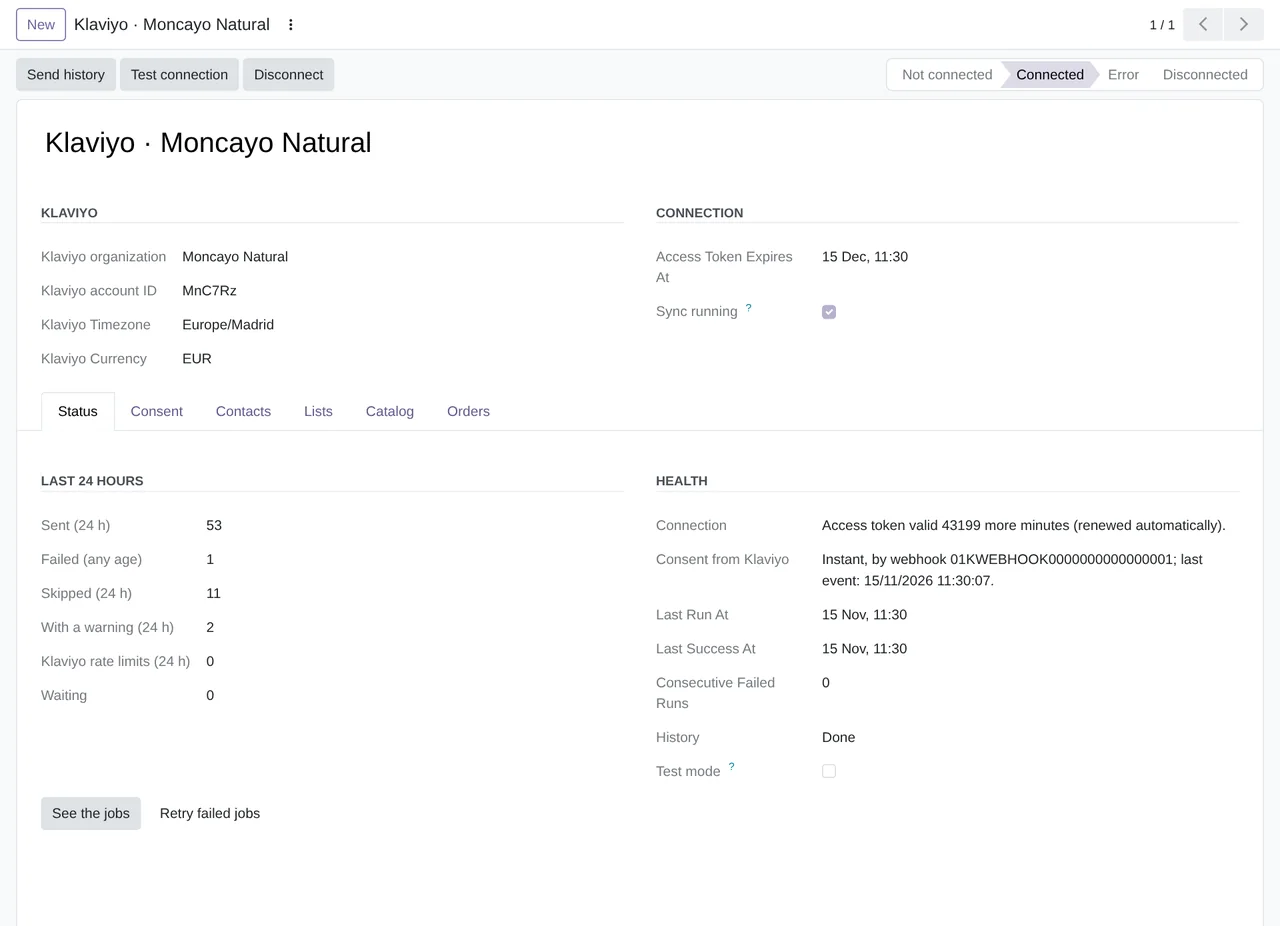
FlexigoTech Cloud connects your Klaviyo account from Klaviyo's consent screen, renews its access, watches the sync and emails you if it fails. Your Odoo sends the contacts, the catalog, the orders and the events to Klaviyo.
Where you see it in Odoo
- Klaviyo menuthe account, jobs, sync passes and what was received from Klaviyo
 Contactsthe Klaviyo tab: consent, engagement and scores
- Sales, POS and eCommerceorders go to Klaviyo as events
- Email Marketingyour mailing lists, as Klaviyo lists
Inside Odoo
Real Odoo screenshots.
Price
Standard
€49a month + VAT
€490 a year + VAT 2 months free
- The connection and the events go through our servers
- We alert you if sync fails
- First response 1 working day
- Video call included for the first 2 months
- Accounts per connector Up to 3
Pro
€98a month + VAT
€980 a year + VAT 2 months free
- Everything in Standard
- First response 4 working hours
- Video call if needed
- Accounts per connector Up to 10
- + €9 for the module license, per Odoo version
- 14 days free, no card
- Cancel in two clicks
- Every purchase includes 2 months of support: we help you install it, set it up and get it working, by email and video call. While you're subscribed, support for the service stays included. Still integrating or testing? Extend your free trial.
If you cancel What the subscription gives stops. Your data stays in your Odoo.
- Support with response timesMonday to Friday, 9:00 to 18:00 (Barcelona), except public holidays.
- Maintenance and improvementsOdoo 17-20, on Odoo.sh or your own server
- We handle changes to their APIIf the platform changes its API, we adapt the module and the service.
- Servers in GermanyYour token stays in your Odoo
- Tested On Odoo 17, 18, 19 and 20. Klaviyo's live API: connection, profiles, events and webhooks tested live (September 2026) and 45 tests against Klaviyo passing on Odoo 17, 18, 19 and 20 (November 2026).
- 13,587 lines of code · 14-11-2026
- 1,357 automated tests · 14-11-2026
- No reviews yet · leave yours
Frequently asked questions
Does it send campaigns from Odoo?
No. Klaviyo sends the campaigns and flows, with the contacts, catalogue and events it gets from Odoo.
What happens when a contact unsubscribes?
The unsubscribe reaches Odoo, by webhook or at the next check (every 15 minutes), and is kept on the contact. An unsubscribe made in Odoo also reaches Klaviyo.
Is an order from my online store sent twice?
No. An editable rule (sales team, tag, source prefix or website) leaves out the orders that already reach Klaviyo from your store.
Can I erase a contact from Klaviyo?
Yes. The «Erase from Klaviyo (GDPR)» action on the contact asks Klaviyo to erase its profile, and the contact is never sent again.
Do I need Odoo Enterprise?
No. It works on Community and Enterprise. Helpdesk, Appointments and Subscriptions are Enterprise apps: their parts only switch on if you have them.
Does it work without FlexigoTech Cloud?
No. The connection with Klaviyo and the renewal of its access go through FlexigoTech Cloud.
What happens after you press «Buy now»?
1. You pay for the license (€9 + VAT) and get an email with the link to download the module. 2. You install it in your Odoo, on Odoo.sh or your own server. 3. In Settings → FlexigoTech Cloud you accept the data list and press «Try free for 14 days». The trial doesn't ask for a card. 4. To continue, you press «Subscribe», create your account on app.flexigotech.com and pay for the plan by card.
Does it work on Odoo Online?
No: Odoo Online does not allow third-party modules. It is for Odoo 17, 18, 19 and 20, on Odoo.sh or on your own server.
Who installs it?
You do: you buy it on flexigotech.com or on Odoo Apps and install it in your Odoo. We help you install it and set it up, by email and video call, during the 2 months of included support. Custom development and data migration are quoted separately.
What support is included?
Every purchase includes 2 months of support: we help you install it, set it up and get it working, by email and video call. While you're subscribed, support for the service stays included.
What if something fails?
We monitor the connection and email you if something fails. And support has response times: first response within 1 working day; with Pro, within 4 working hours.
What about my data? And if I cancel?
Your Odoo calls Klaviyo directly, with the token that stays in your Odoo. Our broker, on our servers in Germany, makes the connection and forwards the Klaviyo events to you. You cancel in two clicks: if you don't subscribe when the trial ends, the service stops and nothing is charged. Your data stays in your Odoo, and you can always view and export it.
Using Klaviyo but not Odoo yet?
We set up Odoo, connect it to Klaviyo and stay on.
From €2,450 + VAT
Start with OdooMore about the Klaviyo connector
What it does
Klaviyo connector for Odoo 17, 18, 19 and 20, on Community and Enterprise. It sends your contacts with their consent, your catalog and the orders and events of your apps to Klaviyo, and brings unsubscribes, opens and clicks back into Odoo. FlexigoTech Cloud connects your Klaviyo account and renews its access, with the trial or the subscription.
- Contacts with their consentEvery contact that matches your rules goes to Klaviyo as a profile, with the Odoo fields you map to each property. Email and SMS consent stays in step both ways: subscribes, unsubscribes, suppressions and spam complaints in Klaviyo reach Odoo by webhook or in a check every 15 minutes, and an unsubscribe made in Odoo reaches Klaviyo.
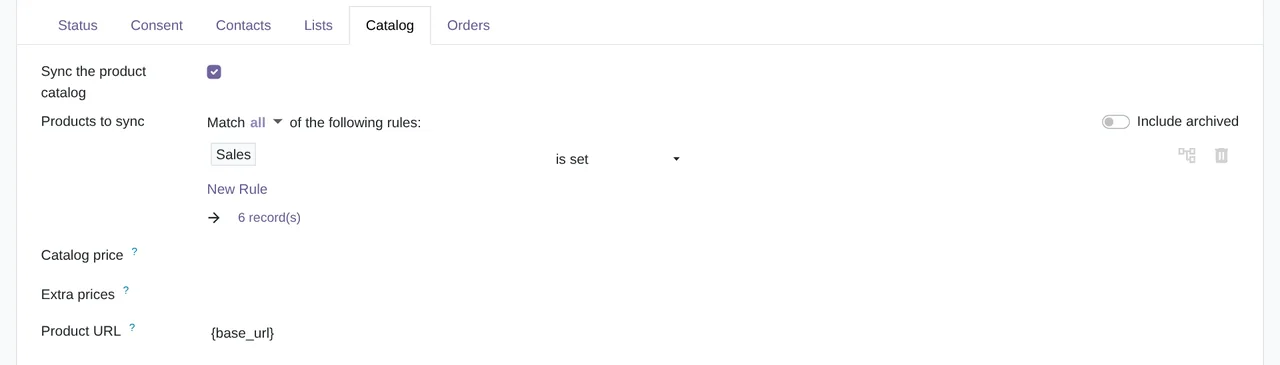
- Your catalog in KlaviyoEvery product goes to the Klaviyo catalog with its variants, its price and its stock, and a daily job brings stock and prices up to date. With eCommerce, the public product URL, its image and its website categories go too.
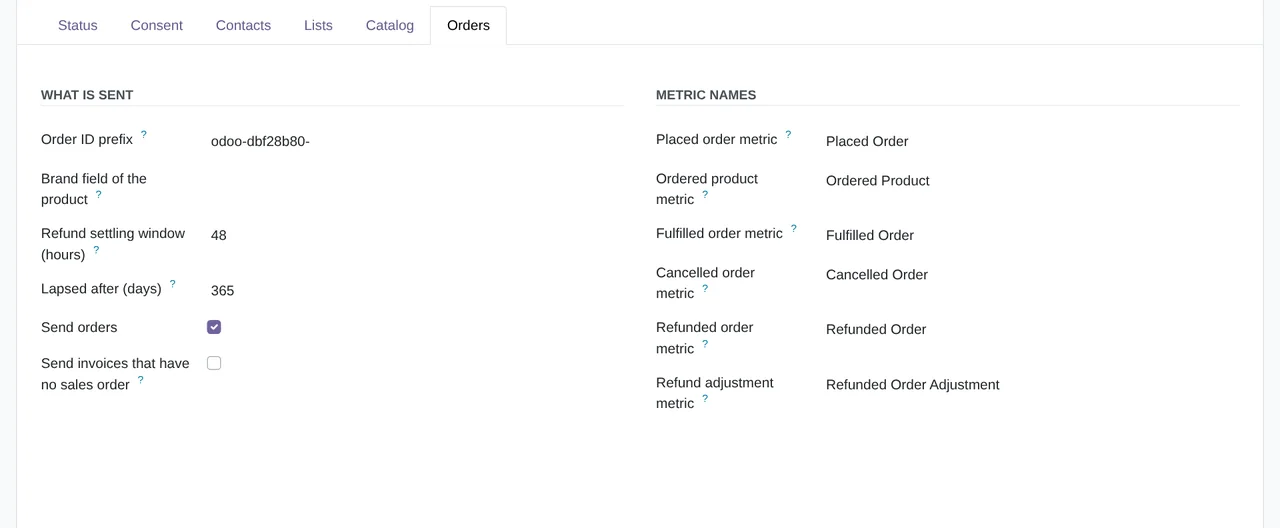
- Orders and events from your appsA confirmed sales order sends Placed Order and Ordered Product; a cancelled one, Cancelled Order; and a credit note, Refunded Order. Paid POS orders with a customer, validated deliveries with their tracking number, repairs, Helpdesk tickets, appointments and subscriptions send their own events.
- No orders sent twiceIf your online store already sends its orders to Klaviyo, a rule you can edit (by sales team, tag, source prefix or website) leaves them out. Generic walk-in POS customers are never sent.
- Scores for every customerEvery night Odoo scores each customer on the recency, frequency and amount of their orders (RFM), gives them a lifecycle stage, and you can send it to Klaviyo as profile properties. With Loyalty, their tier and points go too; with Subscriptions, their status, monthly recurring revenue and next invoice.
- Klaviyo tracking on your websiteWith eCommerce, the Klaviyo script goes on your website and records Active on Site, Viewed Product, Added to Cart and Started Checkout, under your cookie rules. At checkout, your own consent box keeps the evidence on the contact.
- Mailing lists and GDPRWith Email Marketing, the Odoo lists you choose go to Klaviyo with their subscribes and unsubscribes, and every night a check makes sure both sides still match. For the GDPR, the Erase from Klaviyo (GDPR) action on a contact asks Klaviyo to erase its profile, and the contact is never sent again.
- A guided setup and a queue you can followThe setup wizard proposes your lists, all your contacts and the last two years of history, and the first load runs by itself. After that, every change waits in a queue that Odoo works through every minute. In Klaviyo › Jobs you see the state of each send and the reason Klaviyo gave when one fails; network failures and temporary Klaviyo errors are retried on their own.
What it does not do
- It does not send campaigns or flowsCampaigns, flows and segments are built in Klaviyo. Odoo gives it the data.
- It is not real timeChanges go out through a queue that Odoo works through every minute, catalog stock and prices are updated once a day and, without a webhook, consent is checked every 15 minutes.
- It does not run on Odoo OnlineIt needs Odoo.sh or your own server, on a public https address: when you connect, Klaviyo sends you back to your Odoo.
- It does not include the Klaviyo accountYou need your own Klaviyo account. Its plan and its fees are between you and Klaviyo.
What it looks like inside Odoo
Real screens of the module installed on Odoo 20, with the data of a made-up natural cosmetics store in Zaragoza.
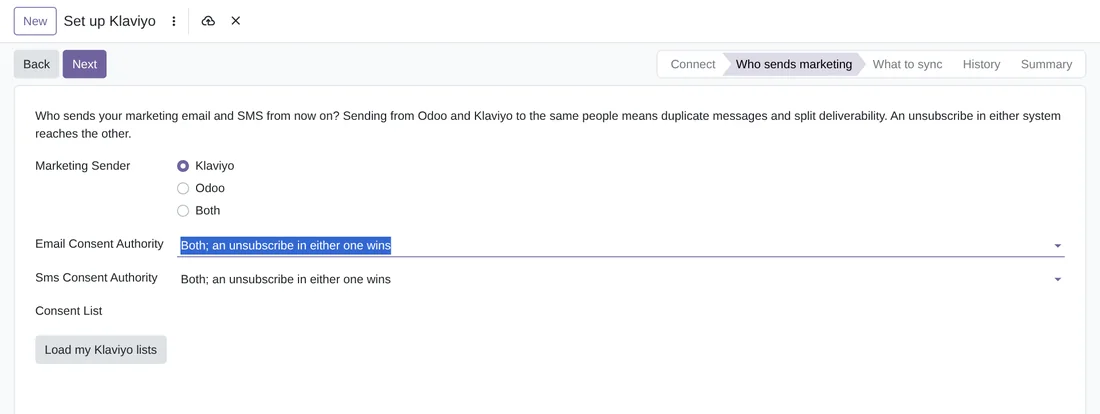
Who sends marketing
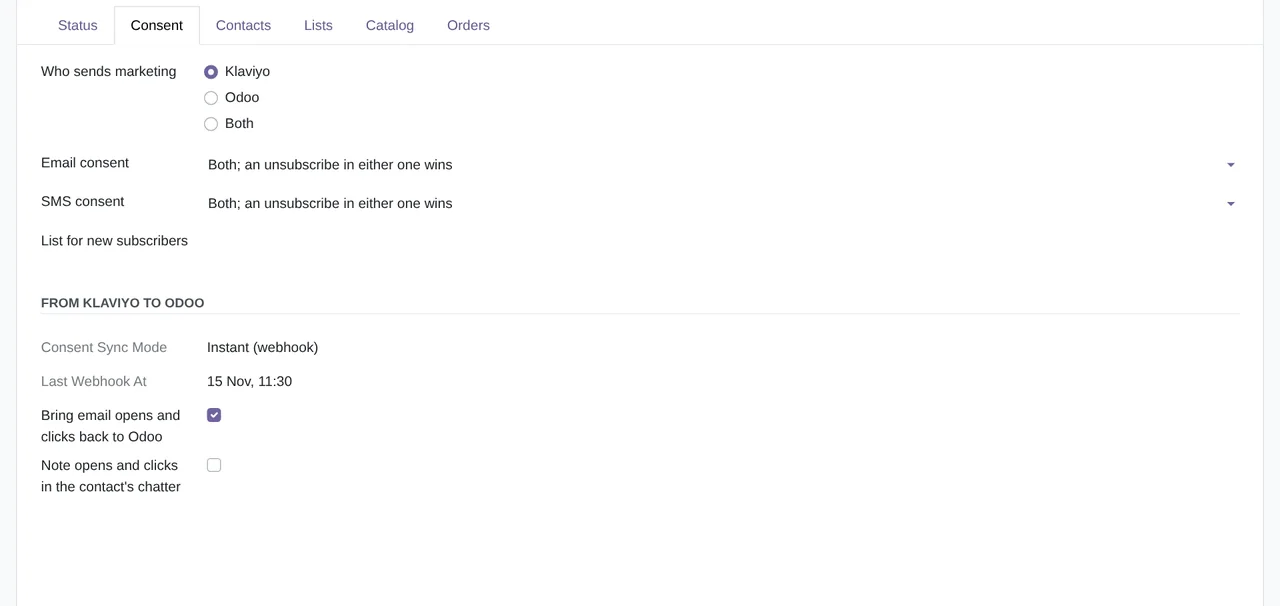
The wizard asks who sends marketing emails and SMS (Klaviyo, Odoo or both) and who decides the consent of each channel. By default, an unsubscribe in either one wins.
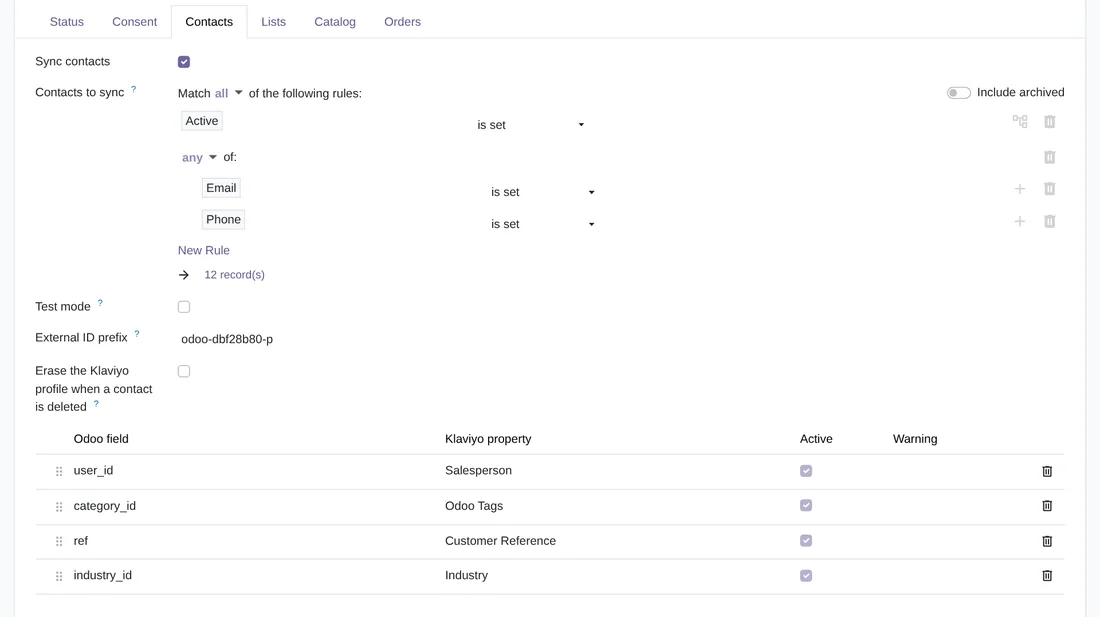
Which contacts go to Klaviyo, and with what data
The Contacts tab of the account: the rules that pick the contacts (here, the active ones with an email or a phone), the test mode, the external ID prefix and which Odoo field goes to each Klaviyo property.
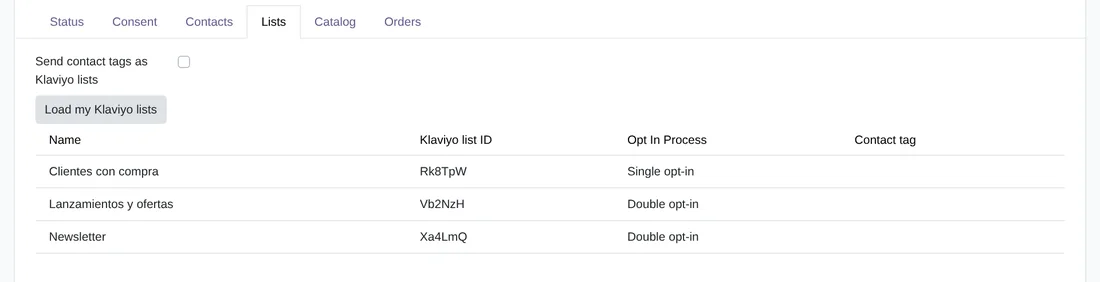
Your Klaviyo lists, in Odoo
The Lists tab: Load my Klaviyo lists brings each list with its ID and its opt-in process, single or double. Contact tags can go as lists too.

Every pass, with its counts
Sync passes: each time the queue works, Odoo records when it started and ended, how many jobs it processed, how many failed, how many were skipped and how many Klaviyo's rate limit held back.
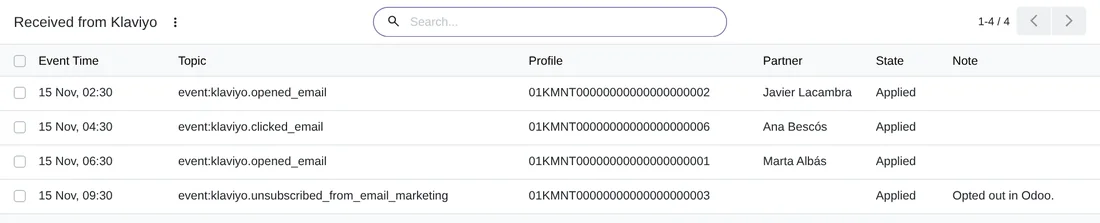
What comes back from Klaviyo
Received from Klaviyo: every notice that arrives from Klaviyo, here opens, clicks and an unsubscribe, with the contact it was applied to.
Technical sheet
Questions before you buy? Talk to the engineer.
We tell you whether the connector fits your Odoo and your Klaviyo account before you pay anything. No middlemen.
Related
Klaviyo is a trademark of its owner. FlexigoTech publishes this connector on its own, without endorsement or sponsorship by the trademark owner.