
 Español
 Català
 Deutsch
 Français
 Português
 Italiano
 Nederlands
 Polski


Dokobit connector for Odoo
Send quotations, invoices and orders to sign with Smart-ID, Mobile-ID or an ID card, and the signed file comes back to Odoo on its own.
€49/month14 days free, no card
Yearly and Pro
- Standard€49/month · €490/year
- Pro€98/month · €980/year
Reply within 1 working day; with Pro, 4 hours. FlexigoTech Cloud pricing
After you buy
- You pay for the license (€9 + VAT) and get an email with the link to download the module.
- You install it in your Odoo, on Odoo.sh or your own server.
- In Settings → FlexigoTech Cloud you accept the data list and press «Try free for 14 days». The trial doesn't ask for a card.
- To continue, you press «Subscribe», create your account on app.flexigotech.com and pay for the plan by card.
Every purchase includes 2 months of support: we help you install it, set it up and get it working, by email and video call.
- Tested on Odoo 17, 18, 19 and 20
- Odoo Learning Partner
 All your signingsReal Odoo screenshot
Get started in 3 steps
- Install the moduleFrom Odoo Apps, on Odoo.sh or on your own server.
- Start the trialIn Settings › FlexigoTech Cloud, an administrator accepts the data list and starts the 14-day trial. No card.
- Add your Dokobit accountIn Dokobit › Configuration › Accounts: pick sandbox or production, tick the consent, enter the access tokens, save and press Test Connection.
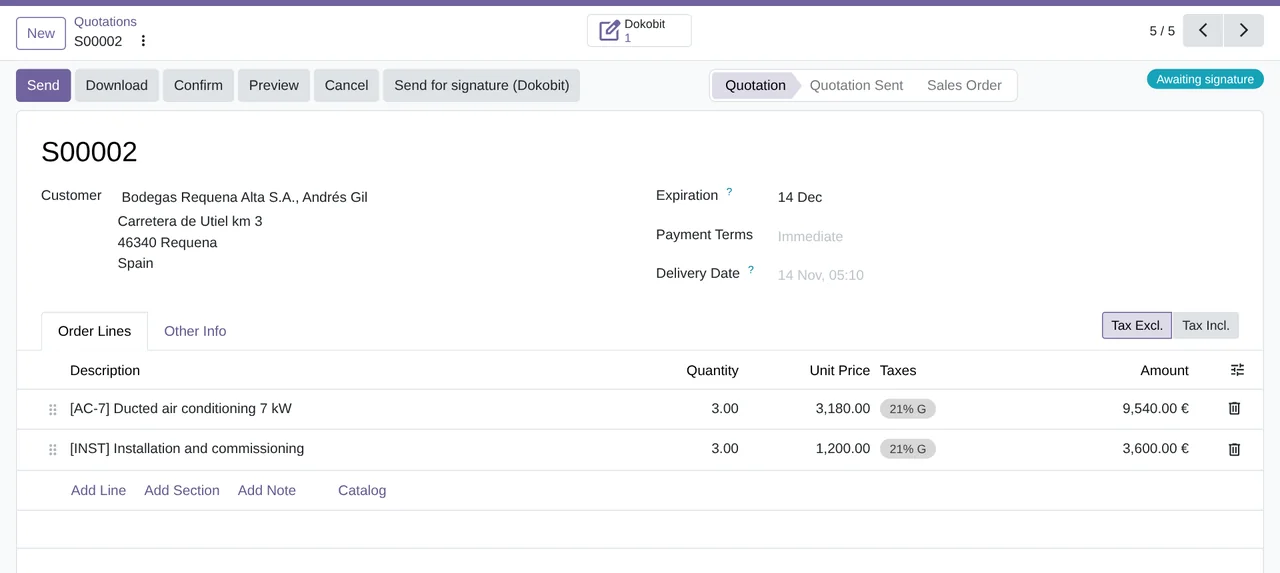
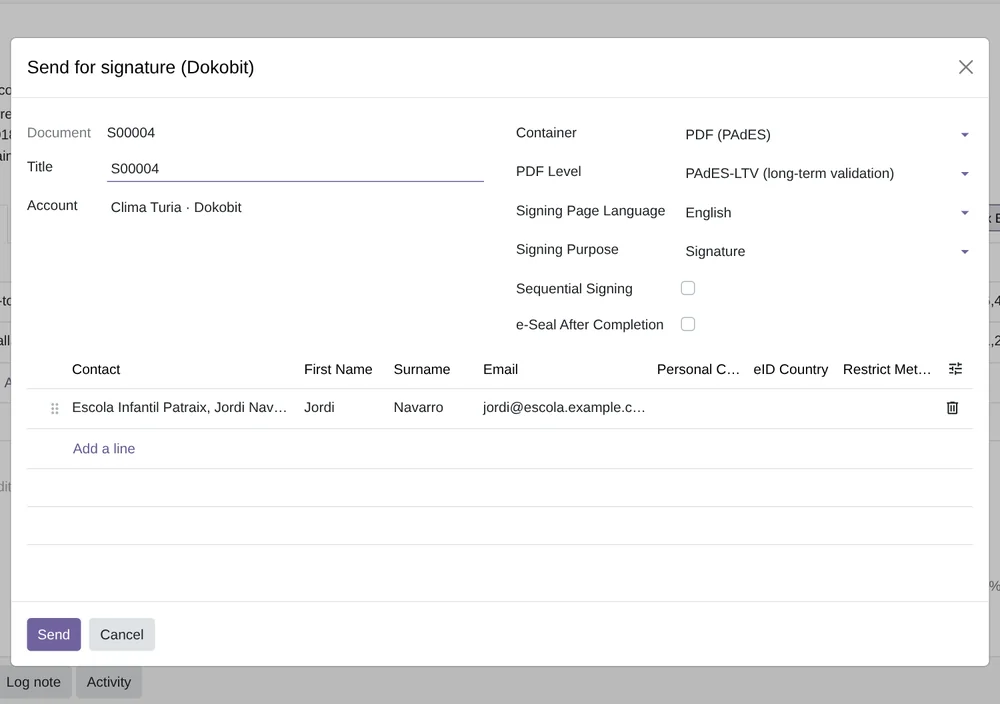
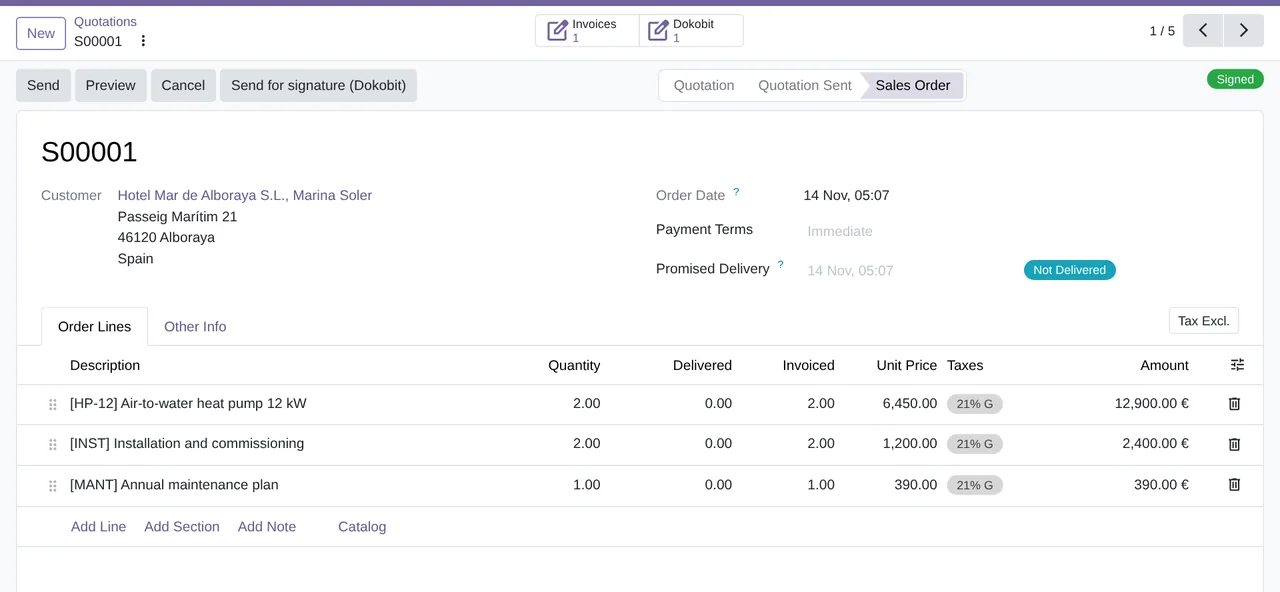
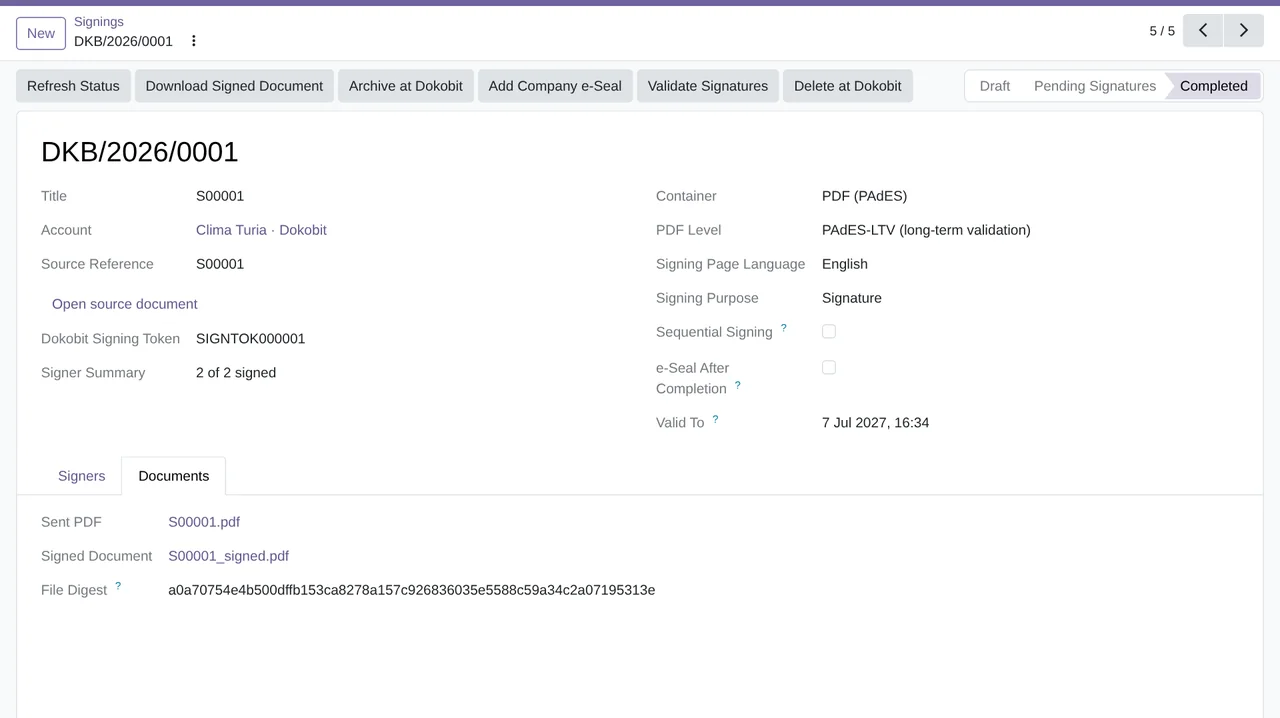
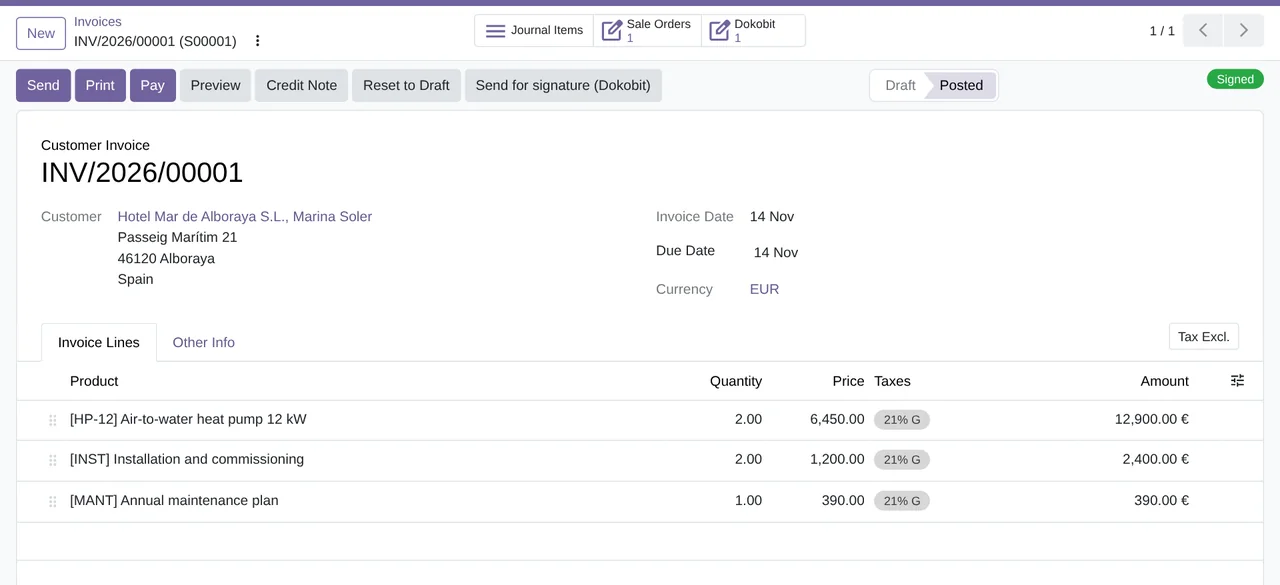
Send for signature Use Send for signature (Dokobit) on a quotation, an invoice, a purchase order or a PDF. The record shows the signing status, and the signed file comes back to it.
What you need Your Dokobit account and its access tokens; Dokobit's fees are separate. Odoo 17, 18, 19 or 20 on Odoo.sh or your own server, not Odoo Online.
What it does
- Sign from the documentA button on sales, invoices and purchases.
- Every signer in sightWho has signed and who is missing.
- The signed file stays in OdooWith its SHA-256 digest checked.
- Check who someone isWith the contact's eID.
How it works

Leaves Odoo
- Quotation, invoice or PDF
- Signers and their order
- Signing language
FlexigoTech Cloud
Comes back from Dokobit
- Each signer's state
- The signed file
- Verified identities
- Validations

FlexigoTech Cloud keeps your tokens encrypted and relays each request.
Where you see it in Odoo
 Salesquotations and orders
 Invoicinginvoices
 Purchaseorders
 Contactsidentity
- Dokobit menusignings and validations
Inside Odoo
Real Odoo screenshots.
Price
Standard
€49a month + VAT
€490 a year + VAT 2 months free
- The connection runs on our servers
- We alert you if sync fails
- First response 1 working day
- Video call included for the first 2 months
- Accounts per connector Up to 3
Pro
€98a month + VAT
€980 a year + VAT 2 months free
- Everything in Standard
- First response 4 working hours
- Video call if needed
- Accounts per connector Up to 10
- + €9 for the module license, per Odoo version
- 14 days free, no card
- Cancel in two clicks
- Every purchase includes 2 months of support: we help you install it, set it up and get it working, by email and video call. While you're subscribed, support for the service stays included. Still integrating or testing? Extend your free trial.
If you cancel What the subscription gives stops. Your data stays in your Odoo.
- Support with response timesMonday to Friday, 9:00 to 18:00 (Barcelona), except public holidays.
- Maintenance and improvementsOdoo 17-20, on Odoo.sh or your own server
- We handle changes to their APIIf the platform changes its API, we adapt the module and the service.
- Servers in GermanyWe store your credentials encrypted
- Tested On Odoo 17, 18, 19 and 20. Dokobit's API: simulator built from its documentation; a live account is pending.
- 5,975 lines of code · 14-11-2026
- More than 170 tests passing on each version (Odoo 17 to 20) · 12-11-2026
- No reviews yet · leave yours
Frequently asked questions
What do I need to get started?
Your Dokobit account with its access tokens; Odoo 17, 18, 19 or 20 on Odoo.sh or your own server; and the FlexigoTech Cloud subscription, with a 14-day trial and no card.
Does it work without FlexigoTech Cloud?
No. Every call to Dokobit goes through FlexigoTech Cloud, which keeps your access tokens. Without the trial or the subscription, the connector does not talk to Dokobit.
Do signers need Odoo?
No. Odoo emails each signer, from your company's address, their link to Dokobit's signing page, and they sign there with their eID. Which eIDs each person can use depends on Dokobit and on their country.
What happens if I stop the subscription?
Sending for signature, tracking, validation and identity checks stop. Signings, signed files, validations and identity checks stay in Odoo to look up and export.
Can I validate signed documents that others send me?
Yes. Validate any signed PDF, ASiC-E, BDOC, EDOC or ADOC file with Dokobit's qualified validation service: who signed, when, with which certificate, and whether the signature is valid.
What happens after you press «Buy now»?
1. You pay for the license (€9 + VAT) and get an email with the link to download the module. 2. You install it in your Odoo, on Odoo.sh or your own server. 3. In Settings → FlexigoTech Cloud you accept the data list and press «Try free for 14 days». The trial doesn't ask for a card. 4. To continue, you press «Subscribe», create your account on app.flexigotech.com and pay for the plan by card.
Does it work on Odoo Online?
No: Odoo Online does not allow third-party modules. It is for Odoo 17, 18, 19 and 20, on Odoo.sh or on your own server.
Who installs it?
You do: you buy it on flexigotech.com or on Odoo Apps and install it in your Odoo. We help you install it and set it up, by email and video call, during the 2 months of included support. Custom development and data migration are quoted separately.
What support is included?
Every purchase includes 2 months of support: we help you install it, set it up and get it working, by email and video call. While you're subscribed, support for the service stays included.
What if something fails?
We monitor the connection and email you if something fails. And support has response times: first response within 1 working day; with Pro, within 4 working hours.
Where is my data?
In your Odoo: it stays there, and you can always view and export it. The connection goes through FlexigoTech Cloud, on our servers in Germany, with your credentials encrypted.
Using Dokobit but not Odoo yet?
We set up Odoo, connect it to Dokobit and stay on.
From €2,450 + VAT
Start with OdooMore about the Dokobit connector
What it does
Dokobit connector for Odoo 17, 18, 19 and 20, Community and Enterprise. It sends quotations, invoices, purchase orders and any PDF for signature with Dokobit's eIDs, follows each signer and keeps the signed document in Odoo, with its digest checked. Every call to Dokobit goes through FlexigoTech Cloud, which keeps your access tokens encrypted.
- Sign with an eID, from the documentQuotations, invoices and purchase orders get the “Send for signature (Dokobit)” button, and the quotation and purchase order lists send several at once. Each signer signs on Dokobit's page with Smart-ID, Mobile-ID, an ID card, eParaksts or Auðkenni, depending on their country. That page comes in English, Lithuanian, Latvian, Estonian, Russian or Icelandic.
- Every signer in sightOdoo emails each signer their invitation from your company's address, one at a time if the signing is sequential, and shows who has signed and who is still missing. Dokobit's notifications keep it up to date, and a check every 15 minutes picks up anything that does not arrive.
- The signed file, in OdooWhen the last person signs, Odoo downloads the signed document, checks its SHA-256 digest against the one Dokobit reports and attaches it to the quotation, invoice or order before Dokobit deletes it after 30 days. You can ask Dokobit to archive it for the long term or to add your company e-seal, with the certificate Dokobit provides.
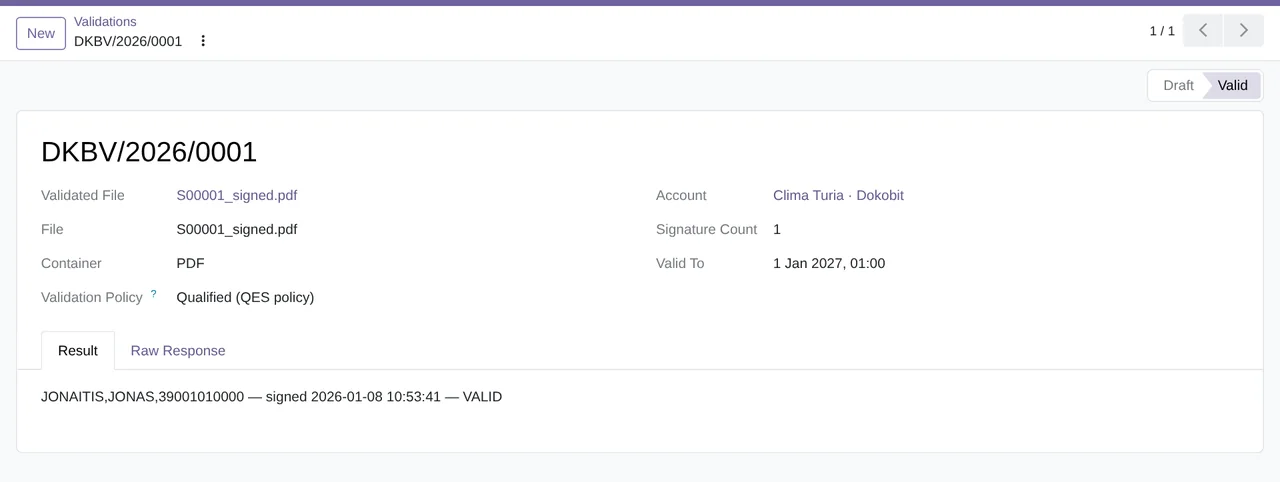
- Validate what you receive signedCheck any signed PDF, ASiC-E, BDOC, EDOC or ADOC file with Dokobit's qualified validation service: who signed, when, with which certificate and whether the signature is valid. From the signing itself, from a vendor bill or from an attachment.
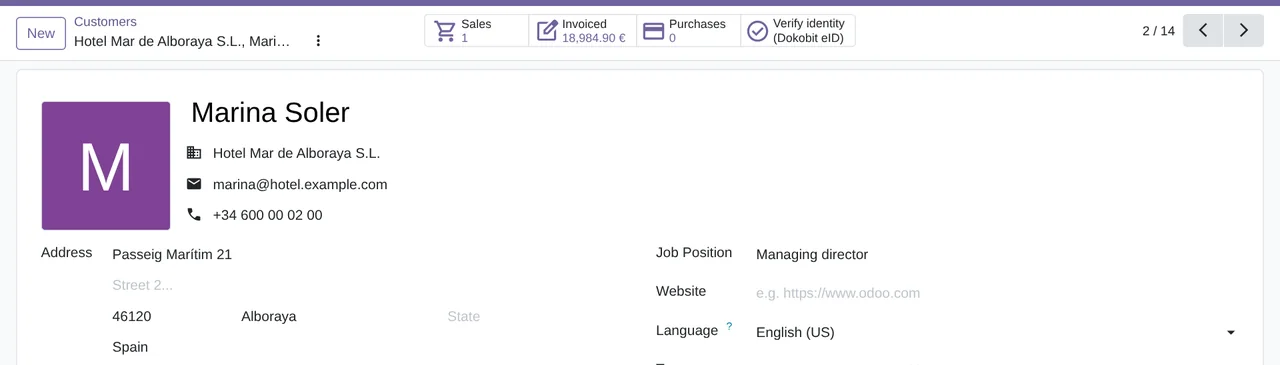
- Check who a contact isFrom the contact form, “Verify identity (Dokobit eID)” opens a verification: the person identifies with their eID on Dokobit's page, and Odoo keeps the verified name, personal code and country, and whether the name matches the contact's.
- The account, under controlSeveral accounts per company, in sandbox or production, with a connection test that creates no signing and a kill switch that stops all of its calls. And qualified timestamps for your PDFs, from the attachment itself.
What it looks like inside Odoo
Real screens of the module installed on Odoo 20, with the data of a made-up installer from Valencia.
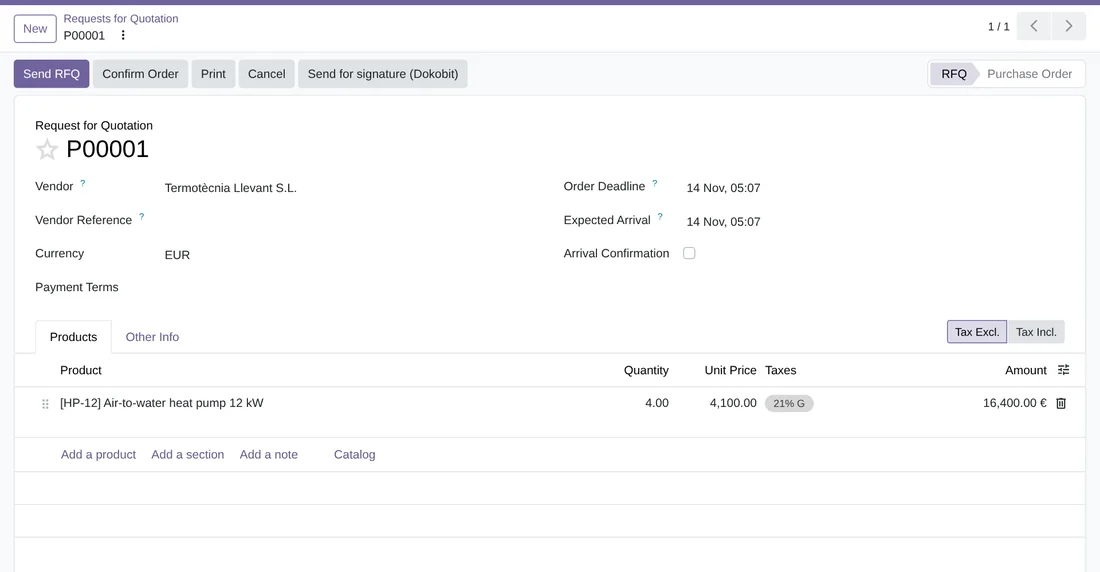
A purchase order, out for signature
In the purchase order header, “Send for signature (Dokobit)”. The wizard takes the order's PDF and suggests the vendor as the signer.
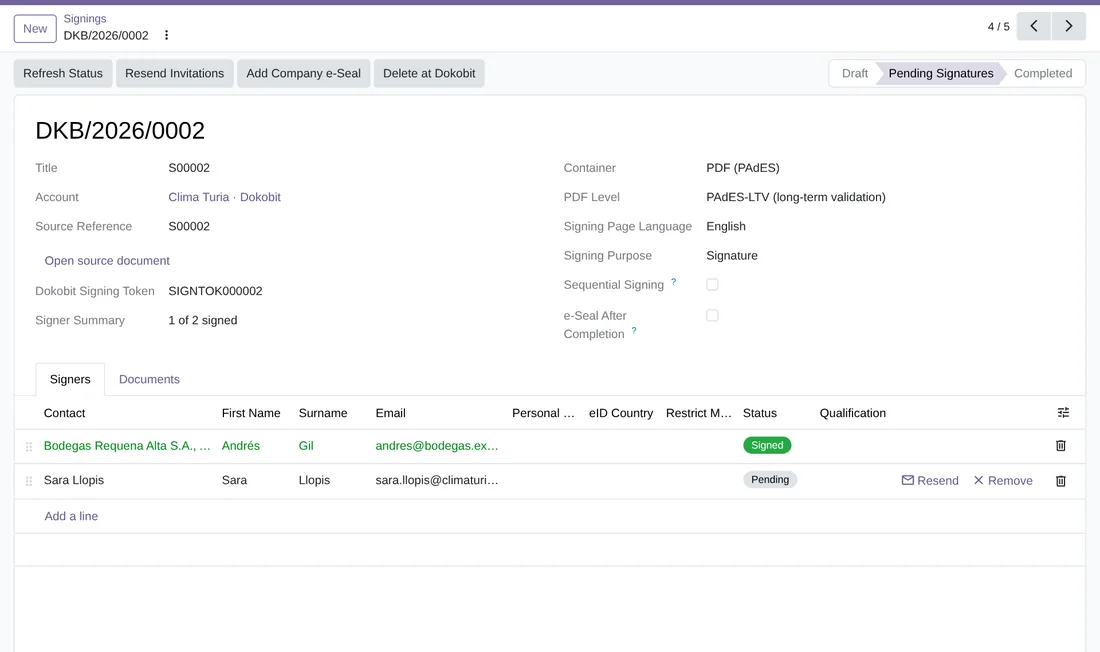
A signing halfway through
Andrés Gil has signed and Sara Llopis is pending, with “Resend” and “Remove” on her line. The signing stays in “Pending Signatures” until the last person signs.
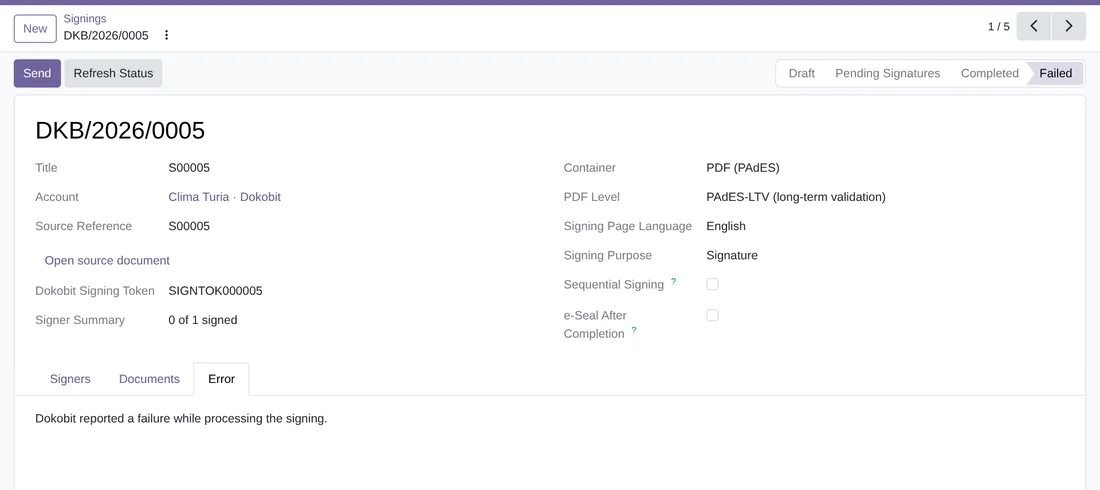
When something fails
The signing moves to “Failed” and its “Error” tab says why. From the same signing you press “Send” again.
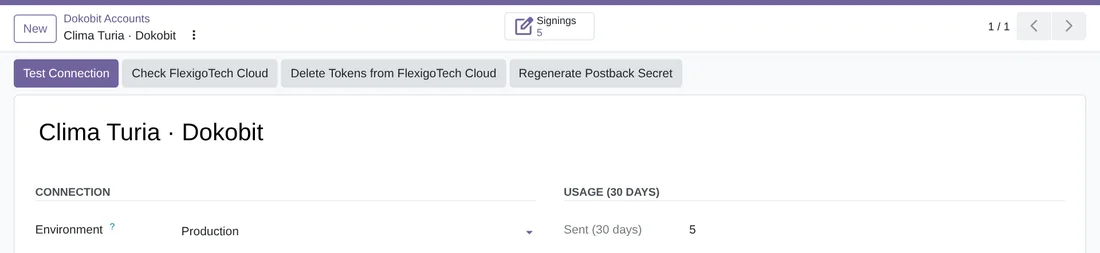
The Dokobit account
Each account, in sandbox or production, with “Test Connection”, “Check FlexigoTech Cloud” and “Delete Tokens from FlexigoTech Cloud” at the top, and what was sent in the last 30 days.
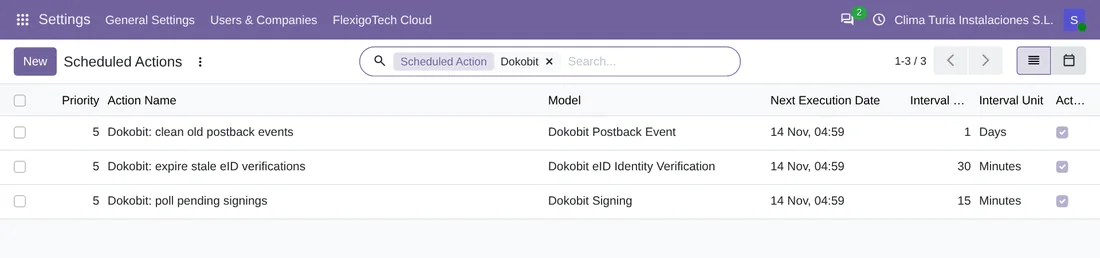
What happens on its own
Three scheduled actions: the check of pending signings every 15 minutes, the one for expired eID verifications every 30 minutes and the daily clean-up of Dokobit notifications already processed.
At a glance
Keep exploring
Questions before buying? Talk to the engineer.
We tell you whether the connector fits your Odoo and your Dokobit account before you pay anything. No middlemen.
Related
Dokobit is a trademark of its owner. FlexigoTech publishes this connector on its own, with no endorsement or sponsorship from the trademark owner.