

 Español
 Català
 Deutsch
 Français
What Zoho Books is and who it is for
Going by its own description, Zoho Books is where a business manages its finances, gets ready for tax and automates business workflows, with several departments working collectively. Zoho Books is where invoices and credit notes to your customers are issued.
Its website warns that there is a global version and asks you to check local compliance before using it: «You are viewing the global version of Zoho Books. Please evaluate for local compliance before use.» (read on 16 November 2026).
If you are still deciding whether to invoice from Odoo or from Zoho Books, the comparison of how each one charges and how they work together is in Odoo vs Zoho Books.
How Zoho Books works: organisation, invoices and credit notes
These are the parts of Zoho Books that come into play when you connect it to Odoo:
- Zoho Books organisation
- The one you connect to Odoo, from
Zoho Books›Connect New Account. - Invoice
- Zoho Books issues it. Sent invoices are the ones that reach Odoo, with their Zoho number.
- Credit note
- Zoho Books issues it too. In Odoo, each credit note becomes its corrective invoice.
- Webhook
- You can register it for the account in Zoho Books. Each notice brings its invoice into Odoo.
- VERI*FACTU
- Zoho Books says on its website, read on 16 November 2026: «Zoho Books is now VERI*FACTU compliant in Spain.»
With the connector, Zoho Books issues the invoice and registers it with VERI*FACTU, and Odoo does not repeat that. The connector posts it in the Zoho Books journal with its Zoho number. If a VERI*FACTU of Odoo is active in the company, Zoho documents wait unposted, with the reason in the log, until you switch it off.
RDL 15/2025 requires businesses that file Spanish Corporate Income Tax to have their invoicing system adapted before 1 January 2027, and everyone else before 1 July 2027. On 5 October 2026, the Spanish Treasury (Hacienda) announced that it plans to postpone those obligations until October 2028.
Zoho Books with Odoo: what the connector brings in and how often
Only read requests go from Odoo to Zoho Books. The connector asks Zoho for read permissions on invoices, credit notes and settings, and writes nothing to your Zoho Books.
From Zoho Books to Odoo come sent invoices, with their number, and credit notes, as corrective invoices. They bring the customer, the lines, the taxes and the due date. Everything goes into its own journal, with nothing renumbered. The connector does not issue invoices: Zoho Books issues them and Odoo only books them.
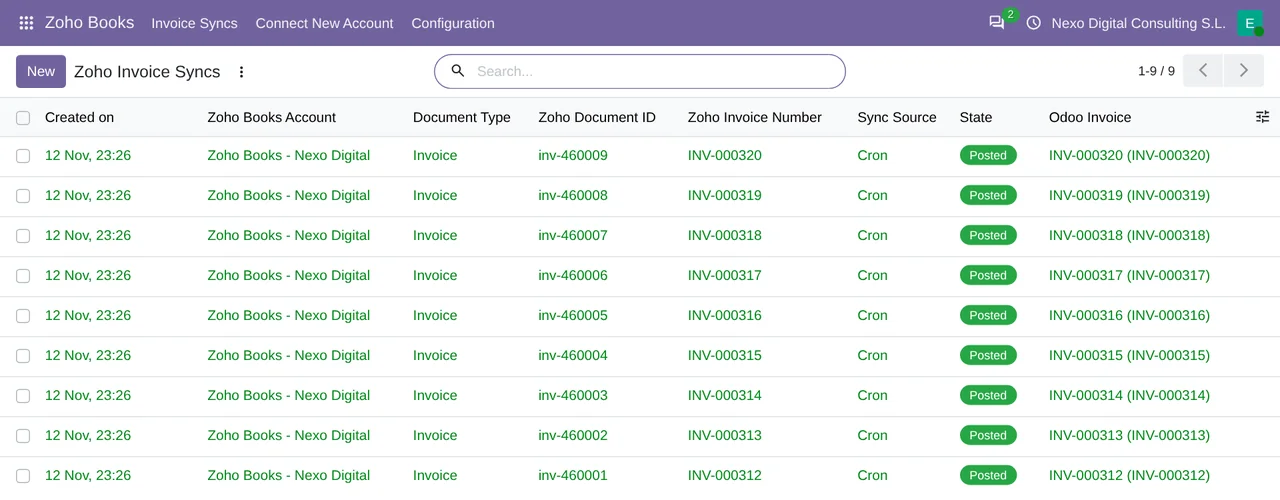
In Odoo, the connector adds the Zoho Books menu. This is what you find:
Invoice Syncs- An entry in the
Zoho Booksmenu. Connect New Account- An entry in the
Zoho Booksmenu. Accounts- Under
Zoho Books›Configuration›Accounts. Sync Log- Under
Zoho Books›Configuration›Sync Log. - States
- The connector uses
Pending,Mapped,Posted,BlockedandError. Zoho Books: sync invoices (resilience net)- A scheduled task that asks Zoho Books for the invoices every 15 minutes. It is active as soon as the module is installed.
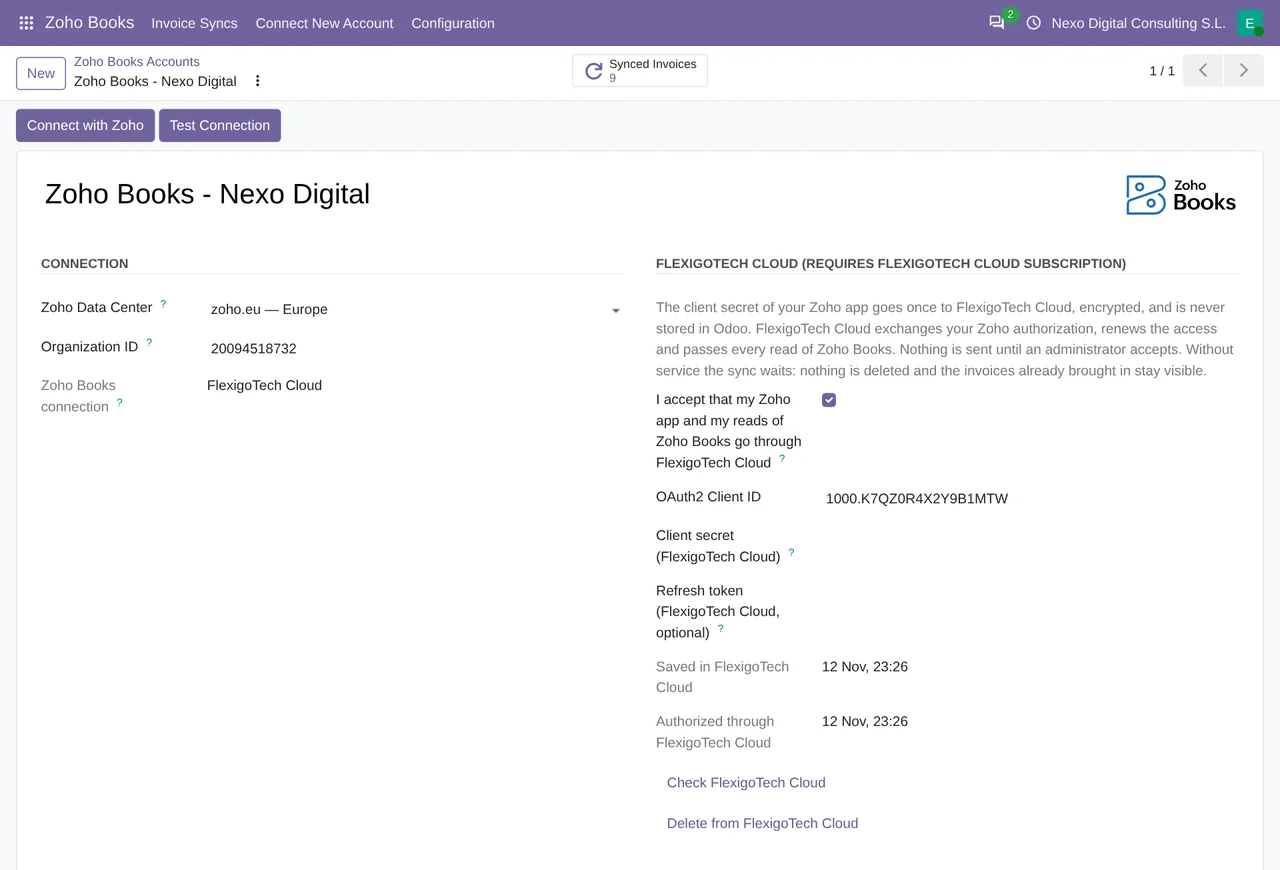
What you need to use Zoho Books with Odoo
- Your Zoho Books organisation, which you connect from
Zoho Books›Connect New Account. The organisation and the data centre are explained in Zoho Books API in Odoo. - The Invoicing app of Odoo Community, which works in both Community and Enterprise.
- The Zoho Books Odoo Connector and the FlexigoTech Cloud subscription (Connector plan).
You contract and pay for your Zoho Books account, Odoo and your hosting yourself. What each Zoho Books plan costs is in Zoho Books pricing.
Questions about Zoho Books and the Odoo connector
Does the connector change anything in my Zoho Books?
No. It asks Zoho only for read permissions on invoices, credit notes and settings. Whatever is in your Zoho Books stays the same.
Does the connector need the FlexigoTech Cloud subscription?
Yes, the Connector plan. FlexigoTech Cloud is where your Zoho Books invoices and credit notes are brought into Odoo. You will find the module on Odoo Apps and everything about the connector on its page at flexigotech.com.
Do I need Odoo Enterprise?
No. It uses the Invoicing app of Odoo Community, so it works in both Community and Enterprise.
What happens to a line whose product is not in Odoo?
A line without a matching product comes in as a generic service line by tax rate.
Keep reading
Checked in the connector's source code (version 20.0) and the linked sources
Sources
- www.zoho.com/fr/books/
- www.zoho.com/es-xl/books/
- www.zoho.com/books/
- flexigotech.com/conector-zoho-books-odoo.html
- Module source code: flexigobe_zoho_verifactu_connector 20.0 (95aec443): __manifest__.py
- Module source code: flexigobe_zoho_verifactu_connector 20.0 (95aec443): static/description/index.html
- Module source code: flexigobe_zoho_verifactu_connector 20.0 (95aec443): views/menus.xml
- Module source code: flexigobe_zoho_verifactu_connector 20.0 (95aec443): data/ir_cron.xml
- Module source code: flexigobe_zoho_verifactu_connector 20.0 (95aec443): models/zoho_books_invoice_sync.py
- sede.agenciatributaria.gob.es/Sede/iva/sistemas-informaticos-facturacion-verifactu/nota-in
- www.hacienda.gob.es/sgt/gabsehacienda/nota-informativa-verifactu.pdf