

 Español
 Català
 Deutsch
 Français
 Português
 Italiano
 Nederlands
 Polski
What the Zoho Books API asks for: data centre, organisation and app
The connector reads the Zoho Books API v3. According to the help on the Zoho Data Center field, Zoho Books is region-sharded and you pick the data centre. According to the help on Organization ID, Zoho Books is multi-org and every API call is scoped to one organisation.
You also need your Zoho app, whose client secret FlexigoTech Cloud keeps. Accounts live under Zoho Books › Configuration › Accounts, and the Zoho Books menu also has Connect New Account. Each organisation is connected only once per database.
How the Zoho Books API connects through FlexigoTech Cloud
The account you create connects through FlexigoTech Cloud (the Zoho Books connection field): the connector needs the FlexigoTech Cloud subscription, Connector plan. The account carries the checkbox I accept that my Zoho app and my reads of Zoho Books go through FlexigoTech Cloud.
- New account It sends the client secret of its Zoho app to FlexigoTech Cloud once, and FlexigoTech Cloud keeps it encrypted.
- Authorisation FlexigoTech Cloud exchanges the
Connect with Zohoauthorisation.
- Day to day FlexigoTech Cloud renews the access and passes every read of Zoho Books. Once FlexigoTech Cloud holds them, Odoo keeps no copy of the secret or the tokens.
Where invoices come in: scheduled action and webhook
The scheduled action Zoho Books: sync invoices (resilience net) runs every 15 minutes and is active on install. It asks the API for sent invoices by their last modified time. The other path is a public webhook: the Webhook Secret is a random secret embedded in its URL.
- Issue Zoho Books issues the invoice or credit note; Odoo only books it.
- Arrival The document comes in through the webhook or is picked up by the scheduled action.
- Processing The connector fetches it from Zoho again and processes it with a single method, idempotently, locking its row so the scheduled action and the webhook do not clash.
- Posting The connector checks that the number Odoo gives the entry is the Zoho one.
How they land in Odoo and why they are not registered twice
A Zoho invoice comes in as a customer invoice, and a credit note as a customer credit note. The entry's number and reference are Zoho's. Only the entries the sync brings in are posted to the Zoho Books journal.
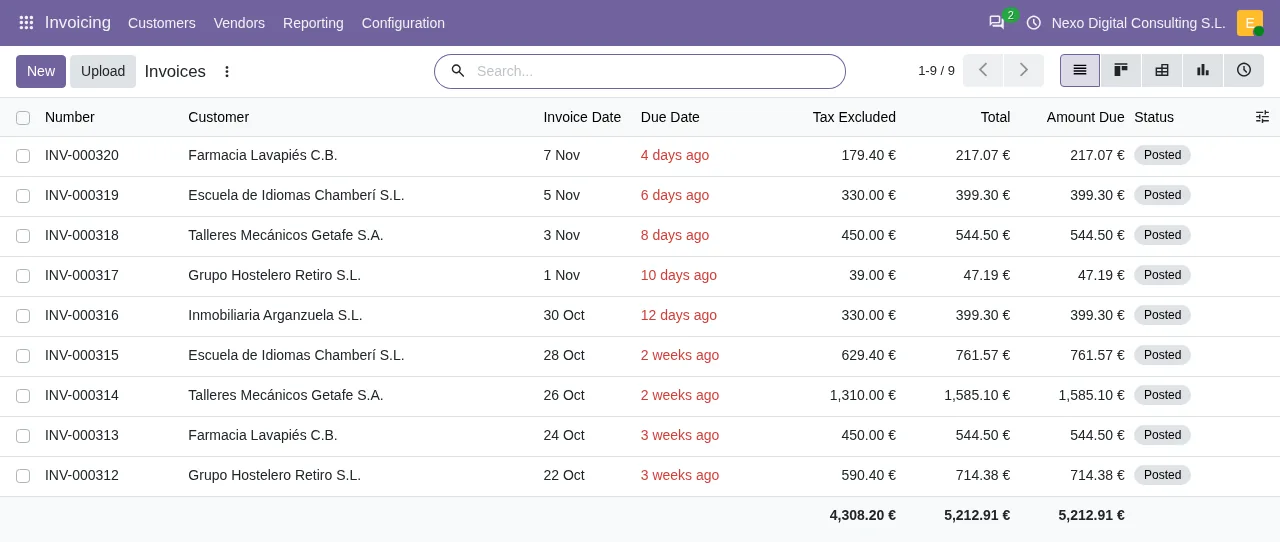
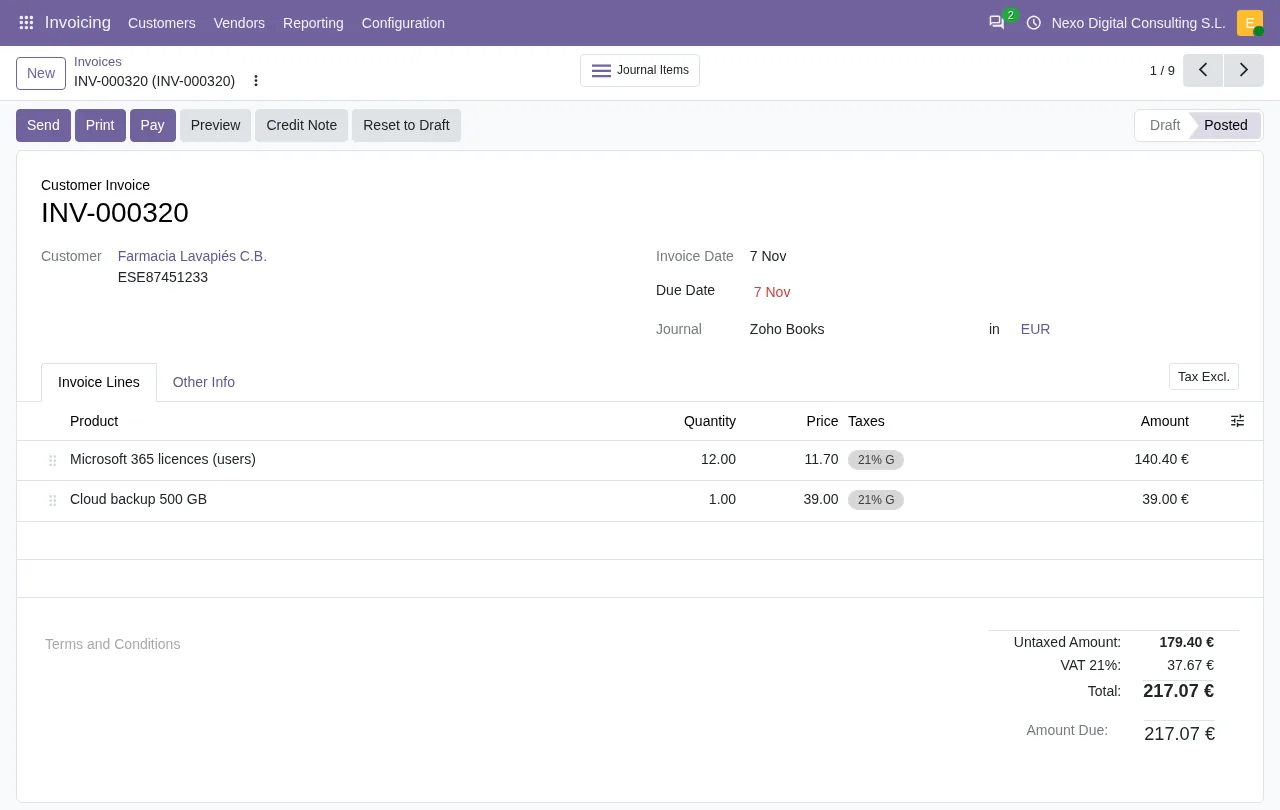
Each document has one row with its Zoho Document ID, the key that prevents duplicates, and its Zoho Invoice Number.
While a VERI*FACTU of Odoo is active for the company, these documents wait unposted, with the reason in the log. The Waiting for VERI*FACTU of Odoo to be off field counts them.
According to the AEAT note on RDL 15/2025, businesses that file Corporate Income Tax must have their invoicing system adapted before 1 January 2027, and everyone else before 1 July 2027. On 5 October 2026 Hacienda (the Spanish Ministry of Finance) announced the plan to postpone those obligations until October 2028.
Messages the Zoho Books connector can show
Each outcome (success, blocked or error) is stored as one row under Zoho Books › Configuration › Sync Log. Among the possible messages are these:
The Zoho Books organization … is already connected in this database (maybe in an archived account): use that account, so no invoice is posted twice.It appears when another account already has the sameOrganization ID.
- If the account has no
Organization IDyet, a message reminds you that every call needs one.
Odoo gave Zoho document … the number … instead of its Zoho number …: it is not posted.It appears when the entry's number does not match the Zoho one.
- If the document's currency exists in Odoo but is not active, the message asks you to activate it. If it does not exist, the connector also refuses to book it in the company currency.
Questions about the Zoho Books API in Odoo
Can I connect the same organisation in two accounts?
No. A Zoho Books organisation is connected once per database; if it is already in another account, you get the organisation already connected message.
What happens to a line whose item is not in Odoo?
Lines are matched to products by their Zoho item cross-reference. Lines without a matching product come in as a generic service line by tax rate, and no line is dropped.
Does it need the FlexigoTech Cloud subscription?
Yes, the connector needs the FlexigoTech Cloud subscription, Connector plan. You will find the module on Odoo Apps and the details on the connector page.
Keep reading
Checked in the connector's source code (version 20.0) and the linked sources
Sources
- Module source code: flexigobe_zoho_verifactu_connector 20.0 (fba95ab9): __manifest__.py
- Module source code: flexigobe_zoho_verifactu_connector 20.0 (fba95ab9): models/fgt_cloud.py
- Module source code: flexigobe_zoho_verifactu_connector 20.0 (fba95ab9): models/zoho_books_account.py
- Module source code: flexigobe_zoho_verifactu_connector 20.0 (fba95ab9): models/zoho_books_invoice_sync.py
- Module source code: flexigobe_zoho_verifactu_connector 20.0 (fba95ab9): wizards/zoho_books_onboarding_wizard.py
- Module source code: flexigobe_zoho_verifactu_connector 20.0 (fba95ab9): data/ir_cron.xml
- Module source code: flexigobe_zoho_verifactu_connector 20.0 (fba95ab9): README.md
- Module source code: flexigobe_zoho_verifactu_connector 20.0 (fba95ab9): static/description/index.html
- Module source code: flexigobe_zoho_verifactu_connector 20.0 (fba95ab9): views/menus.xml
- sede.agenciatributaria.gob.es/Sede/iva/sistemas-informaticos-facturacion-verifactu/nota-in
- www.hacienda.gob.es/sgt/gabsehacienda/nota-informativa-verifactu.pdf