

 Español
 Català
 Deutsch
 Français
 Italiano
 Nederlands
 Polski
What is Channable, in its own words
On its website, read on 16-11-2026, Channable defines itself as «One platform for all your eCommerce marketing». It explains the starting idea like this: «Import once from the eCommerce platform you already use and reach 3,000+ channels. Choose where to list your products, and Channable formats them for each one.»
It is aimed at anyone selling online in several places at once. Its website talks about retailers and agencies who choose it to grow margins and power their eCommerce performance. Channels you can have in Channable include bol.com, Amazon, Kaufland, Zalando and Google Shopping.
How Channable works: channels, feed and orders
These are the Channable pieces that come up when you connect it to Odoo:
- Channel
- Each place where you list your products. You choose the channels and Channable formats the products for each one.
- Product feed
- The list of products Channable imports. With the connector your Odoo builds it, and FlexigoTech Cloud stores it, updates it on every publication and serves it at its own address so Channable can import it. It is published in XML, CSV and JSON.
- Central management
- Its website puts it this way: «Manage product data and pricing centrally, with inventory and orders synced across all channels.»
- Marketplaces with Order Sync
- The Channable module you need so that marketplace orders reach Odoo.
- Project
- Your Channable projects. The connector's calls to them go through FlexigoTech Cloud. In Odoo they sit under
Channable › Configuration › Projects.
Channable with Odoo: what the connector sends and what it brings back
Everything hangs off the Channable menu in Odoo, with Dashboard, Orders, Catalog, Insights and Configuration. The connector's scheduled actions are active as soon as you install it. What the connection needs is covered in what the Channable API asks for from Odoo.
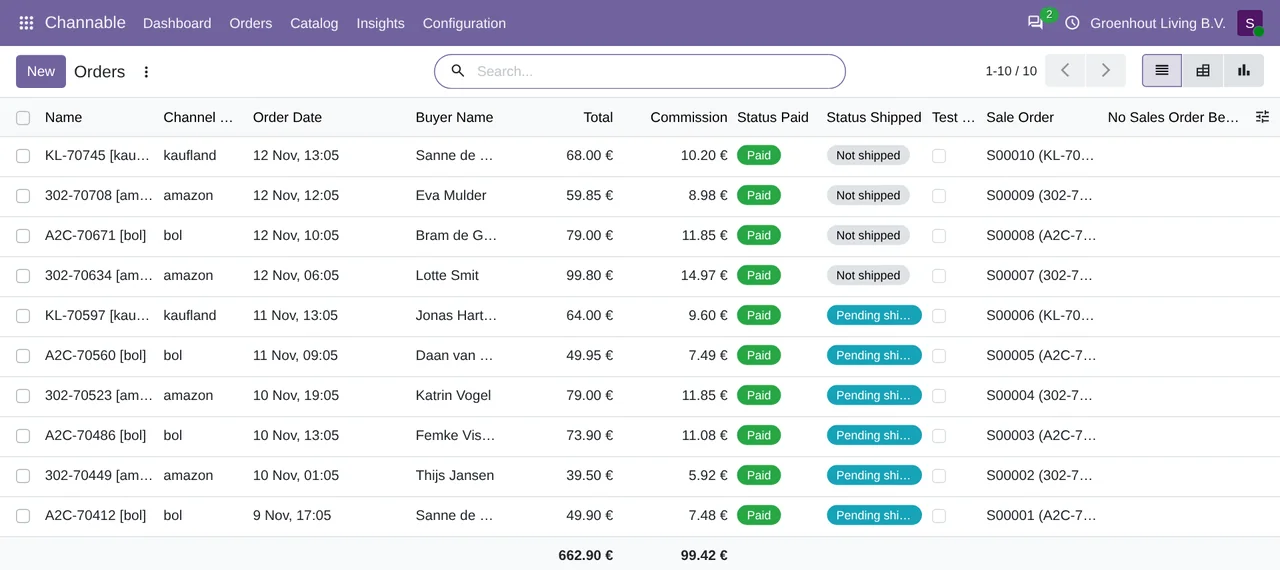
- Orders
- The
Channable: import ordersaction brings them in every 15 minutes and they land in Sales as sales orders. They are underChannable › Orders › Orders.
- Shipments
- The
Channable: push pending shipmentsaction runs every 15 minutes and the tracking goes out from Odoo. They are underChannable › Orders › Shipments.
- Returns
- The
Channable: import returnsaction brings them in every 30 minutes and you decide them from Odoo. Accepting refunds the money and creates the credit note, in draft unless you switch on its automatic posting. They are underChannable › Orders › Returns.
- Stock
- The
Channable: push stock updatesaction runs every 30 minutes. Stock goes out in batches of 50 and with a buffer. The catalogue also hasStock Reconciliation.
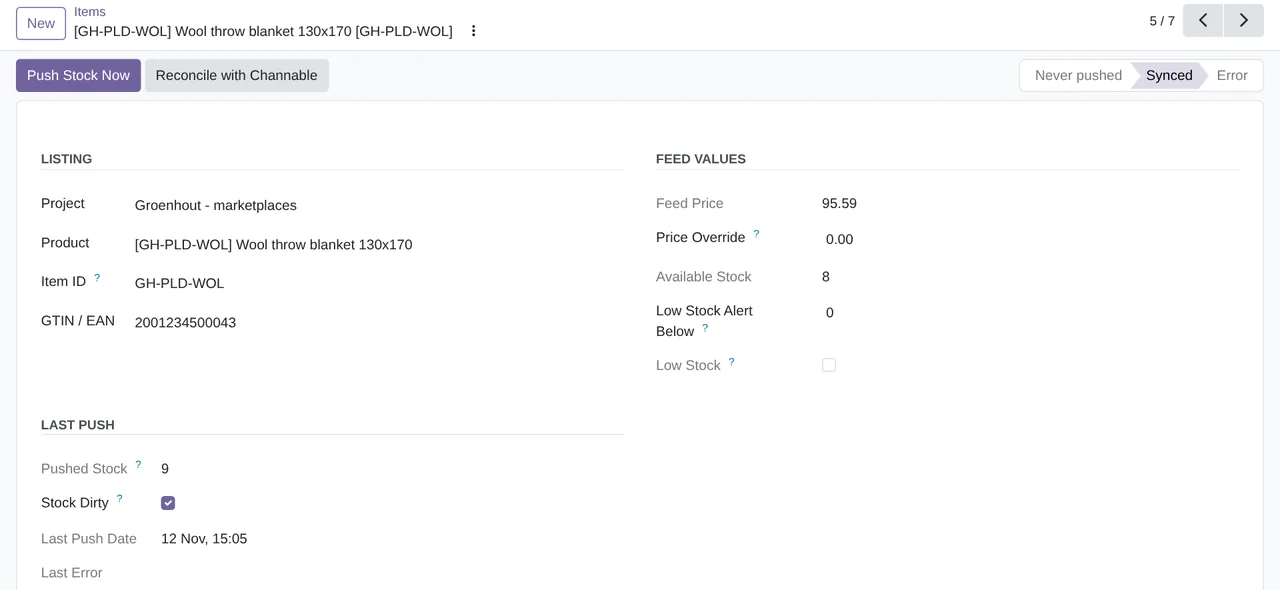
- Feed and items
- The
Channable: publish feeds on FlexigoTech Cloudaction runs every hour. UnderChannable › Catalogyou will findItemsandPublish Products.
- Invoices
- They also go out from Odoo, as shipments do, and sit under
Channable › Orders › Invoices. The Amazon case is covered in Channable and Amazon in Odoo.
- Channel statistics
- The
Channable: pull channel statisticsaction runs every day. UnderChannable › Insightsyou will findChannel StatisticsandSales by Channel. Revenue by channel also comes in from Channable.
Channable: API token expiry check also runs every day.
What you need to use Channable with Odoo
- A Channable account and, for orders, its Marketplaces module with Order Sync.
- Odoo 17, 18, 19 or 20, on Odoo.sh or on your own server, not on Odoo Online.
- The connector, which relies on Odoo's Sales, Inventory, invoicing and delivery methods.
- The FlexigoTech Cloud subscription (Connector plan), which every call to your Channable projects and the product feed go through.
You contract and pay for your Channable account, Odoo and your hosting yourself.
Questions about what Channable is and Odoo
Which channels can I use from Odoo?
The ones you have in Channable: bol.com, Amazon, Kaufland, Zalando, Google Shopping and many more. Odoo gives Channable the feed and receives the orders from the marketplaces you connect there.
Does it work with Odoo Online?
No. The connector is for Odoo 17, 18, 19 or 20 on Odoo.sh or your own server.
Does it need the FlexigoTech Cloud subscription?
Yes. The calls to Channable and the product feed go through FlexigoTech Cloud, on the Connector plan. You can find the connector on Odoo Apps and on its page at flexigotech.com.
Keep reading
Checked in the connector's source code (version 20.0) and the linked sources
Sources
- www.channable.com/
- www.channable.com/es
- flexigotech.com/conector-channable-odoo.html
- Module source code: flexigobe_channable_connector 20.0 (37916e47): __manifest__.py
- Module source code: flexigobe_channable_connector 20.0 (37916e47): static/description/index.html
- Module source code: flexigobe_channable_connector 20.0 (37916e47): views/menu.xml
- Module source code: flexigobe_channable_connector 20.0 (37916e47): data/channable_cron_data.xml