

 Español
 Català
 Deutsch
 Français
 Português
 Italiano
 Nederlands
 Polski
The menus the module adds
Once installed, a top-level entry appears: NIS2 Compliance. These options hang from it:
NIS2 Compliance › OverviewNIS2 Compliance › ApplicabilityNIS2 Compliance › Applicability › Company ProfilesNIS2 Compliance › Applicability › Run Applicability WizardNIS2 Compliance › Applicability › Entity LifecycleNIS2 Compliance › Applicability › Implementing Regulation Profiles(Odoo 19 only)NIS2 Compliance › Applicability › Profile Change LogNIS2 Compliance › Controls and RisksNIS2 Compliance › Controls and Risks › ControlsNIS2 Compliance › Controls and Risks › Risk Register
The Applicability block gathers company profiles, the applicability wizard, the entity lifecycle, implementing regulation profiles (in Odoo 19) and the profile change log. The Controls and Risks block holds the controls list and the risk register.
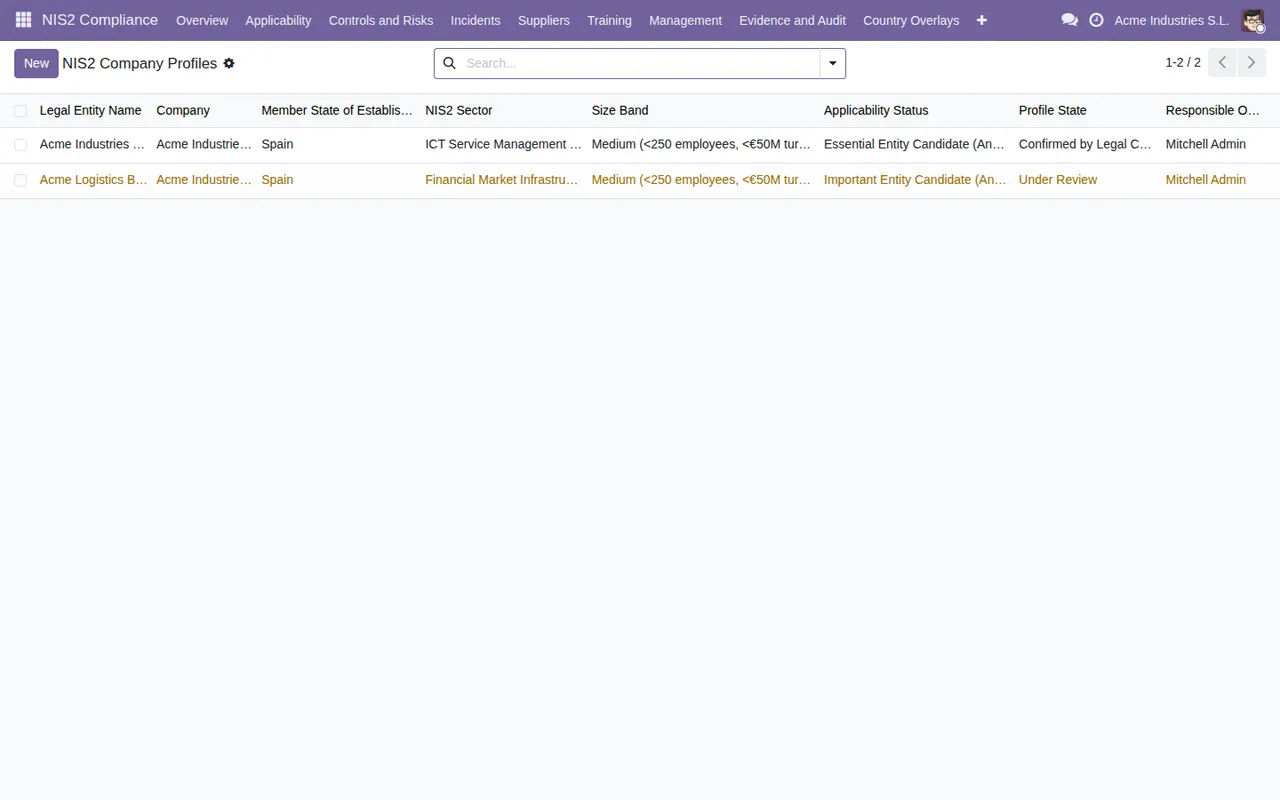
The profiles list has two separate status columns, one for applicability and one for the profile itself, plus the search bar and the button to create a new one.
Which records it stores under the bonnet
If you are a consultant or will be working with the database, these are some of the models the module creates, with their technical name and the description they carry:
nis2.company.profile:NIS2 Company Profile.nis2.compliance:NIS2 Compliance Record.nis2.action:NIS2 Corrective / Remediation Action.nis2.annex.sector:NIS2 Annex Sector.nis2.audit.pack:NIS2 Audit Pack.nis2.authority.submission:NIS2 Authority Submission.nis2.bcp.test:NIS2 BCP/DR Test.nis2.company.guard:NIS2 company rule checked after write.
The NIS2 Authority Submission and NIS2 Compliance Record models inherit from nis2.company.guard. That is useful to know if you develop on top of the module or import data into those records.
Timeline: what happens on save, every day and every month
This timeline brings together what happens without you opening any menu: the rule checked when certain records are written, and the scheduled tasks the module ships with, all active on installation.
- When a record is saved On the models that inherit from
nis2.company.guard(NIS2 Authority SubmissionandNIS2 Compliance Record), the module checks the company rule described asNIS2 company rule checked after write.
- Every day The task
NIS2: Check evidence retention expiryruns, checking evidence retention expiry.
- Every day The task
NIS2: Check overdue training recordsruns, checking overdue training records.
- Every day The task
NIS2: Check supplier review due datesruns, checking supplier review due dates.
- Every day The task
NIS2: Mark overdue improvement actionsruns, marking overdue improvement actions.
- Every month The task
NIS2: Annual management review reminderruns, the reminder for the annual management review.
The four daily tasks and the monthly one appear among Odoo's scheduled actions under those names. Before loading real data, try them in a staging database with a couple of training, supplier and action records, and see what changes the next day: that way you know what to expect from each task in your own configuration.
If you deactivate any of these tasks or change its frequency during your rollout, write it down: the monthly reminder and the daily checks rely on them staying active.
The statuses you will see in the lists
What a record goes through can be read from its status columns. Based on the module's screens:
- In
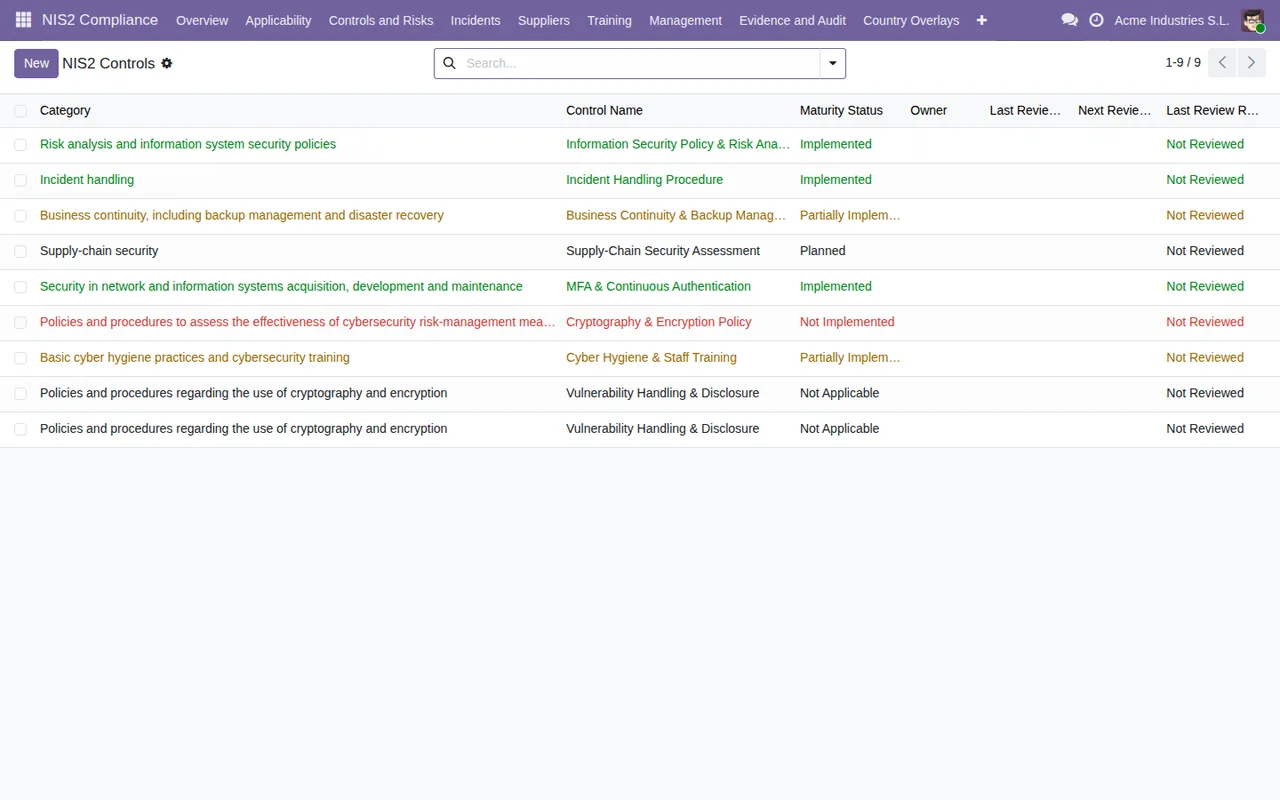
Controls, the maturity status takes the valuesImplemented,Partially Implemented,Planned,Not ImplementedandNot Applicable. - In the training records, the status takes the values
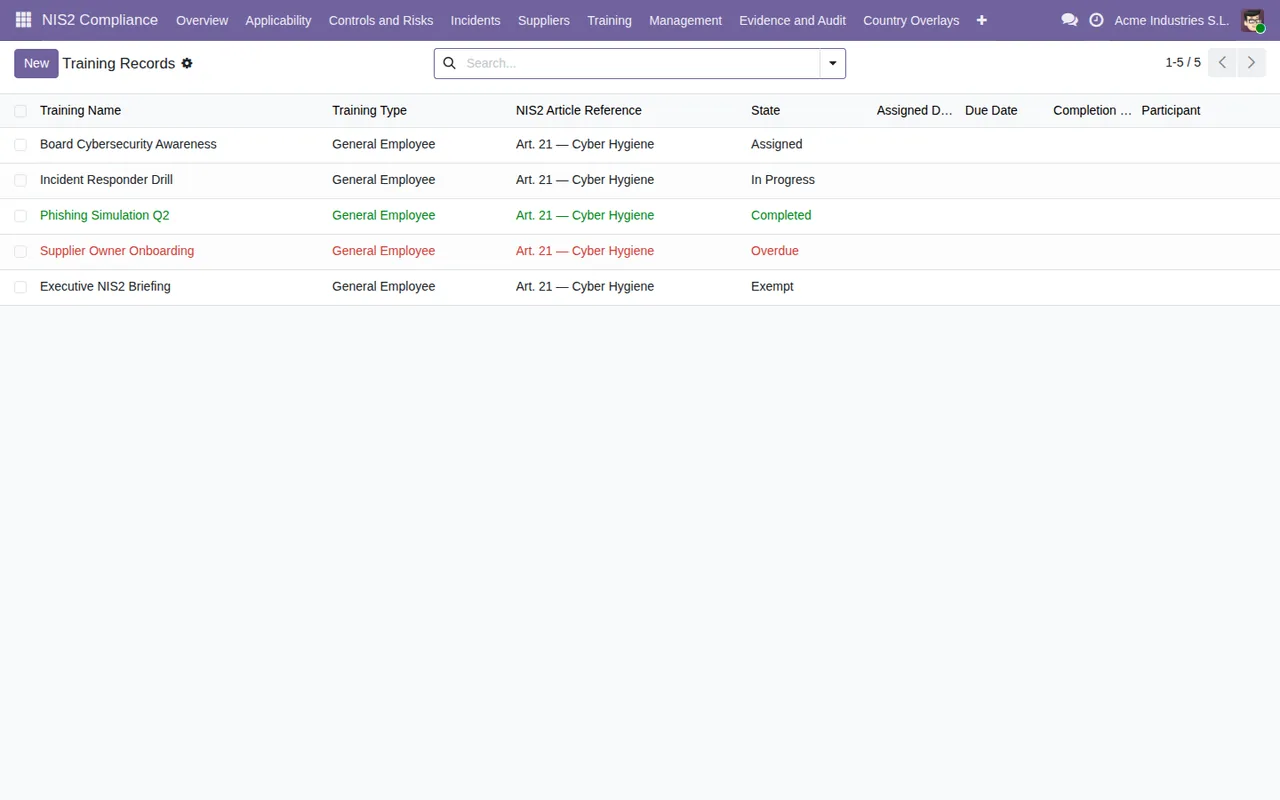
Assigned,In Progress,Completed,OverdueandExempt. - In
Risk Register, each risk carries impact, likelihood, residual risk, treatment decision and a status, with values such asDraft,Under Review,AcceptedandClosed. - In
Company Profilesthere is an applicability status and a profile status.
What the listing groups as key features
The Odoo Apps listing for Odoo 19 is headed NIS2 Cybersecurity Compliance Toolkit for Odoo 19 and, after setting out the problem NIS2-covered organisations face and how the module solves it, lists its key features under these headings:
Applicability profiles per entityArticle 21(2) control libraryCybersecurity risk registerIncident readiness pipelineSupplier and ICT dependency oversightManagement accountability and evidence vault
The first two match what you see in the Applicability and Controls menus, and the third matches Risk Register. For which fields to fill in and what to check in the first week, follow getting the module up and running. If you are still weighing it up, read whether it fits your company.
Odoo versions and price
The module is published on Odoo Apps for 17.0, 18.0 and 19.0, with a one-off payment of €49 excluding VAT per version on each of the three. You will find the details on the Odoo Apps listing and on the module page.
How FlexigoTech can help
FlexigoTech implements Odoo 17, 18, 19 and 20 and builds bespoke connectors and integrations. If you are rolling out the module and want to check how its profiles, controls and scheduled tasks fit with the rest of your Odoo, we can support you with the configuration and anything you need to connect.
Keep reading
Checked in the module's source code (version 19.0) and the linked sources
Sources
- Module source code: flexigo_nis2_cybersecurity_compliance_toolkit 19.0 (af4f82c6): views/menus_gen.xml
- Module source code: flexigo_nis2_cybersecurity_compliance_toolkit 19.0 (af4f82c6): data/nis2_cron.xml
- Module source code: flexigo_nis2_cybersecurity_compliance_toolkit 19.0 (af4f82c6): models/nis2_action.py
- Module source code: flexigo_nis2_cybersecurity_compliance_toolkit 19.0 (af4f82c6): models/nis2_annex_sector.py
- Module source code: flexigo_nis2_cybersecurity_compliance_toolkit 19.0 (af4f82c6): models/nis2_audit_pack.py
- Module source code: flexigo_nis2_cybersecurity_compliance_toolkit 19.0 (af4f82c6): models/nis2_authority_submission.py
- Module source code: flexigo_nis2_cybersecurity_compliance_toolkit 19.0 (af4f82c6): models/nis2_bcp_test.py
- Module source code: flexigo_nis2_cybersecurity_compliance_toolkit 19.0 (af4f82c6): models/nis2_company_guard.py
- Module source code: flexigo_nis2_cybersecurity_compliance_toolkit 19.0 (af4f82c6): models/nis2_company_profile.py
- Module source code: flexigo_nis2_cybersecurity_compliance_toolkit 19.0 (af4f82c6): models/nis2_compliance_model.py
- Module source code: flexigo_nis2_cybersecurity_compliance_toolkit 19.0 (af4f82c6): static/description/index.html
- apps.odoo.com/apps/modules/19.0/flexigo_nis2_cybersecurity_compliance_toolkit
- apps.odoo.com/apps/modules/17.0/flexigo_nis2_cybersecurity_compliance_toolkit
- apps.odoo.com/apps/modules/18.0/flexigo_nis2_cybersecurity_compliance_toolkit
- flexigotech.com/en/services.html