

 Español
 Català
 Deutsch
 Français
 Português
 Italiano
 Nederlands
 Polski
What you are really after with GoCardless recurring payments
If you already collect with GoCardless, or are about to start, the practical question is where the collection is triggered and where you see it afterwards. The GoCardless connector for Odoo sums it up in one line of its listing: Payment from Odoo. The collection is made from Odoo.
If you do not use Odoo yet, think of it as the business management system where your customers and invoices live. The connector puts GoCardless inside that system, so the invoice and the collection are viewed in the same place. The connector works with a FlexigoTech Cloud subscription.
Before going into detail, the limit is worth stating, because it decides whether the connector suits you: it collects in euros by SEPA Direct Debit, and nothing else.
What the connector covers and what it leaves out
| Case | Result with the connector |
|---|---|
| Collection in euros by SEPA Direct Debit | Collected from Odoo with GoCardless |
| Collection in another currency | Out: the connector collects in euros only |
| A collection scheme other than SEPA Direct Debit | Out: the connector collects by SEPA Direct Debit only |
| Pay by Bank | Out: the connector does not include it |
| Saved payment method with no GoCardless mandate | Warning: This payment method has no GoCardless mandate attached. |
Reading the table
The first row is the case the connector was built for. The next three are limits its listing states: no other currency, no other scheme and no Pay by Bank. If your business collects in another currency, or needs a route other than SEPA Direct Debit, this connector will not serve for that collection.
The last row records the warning the module gives when a saved payment method has no mandate, explained in the last section.
How a collection looks inside Odoo
These two screens come from a test installation with demonstration data (an invented gym) and a simulated GoCardless API. They show the invoice and the payout, not a real collection.
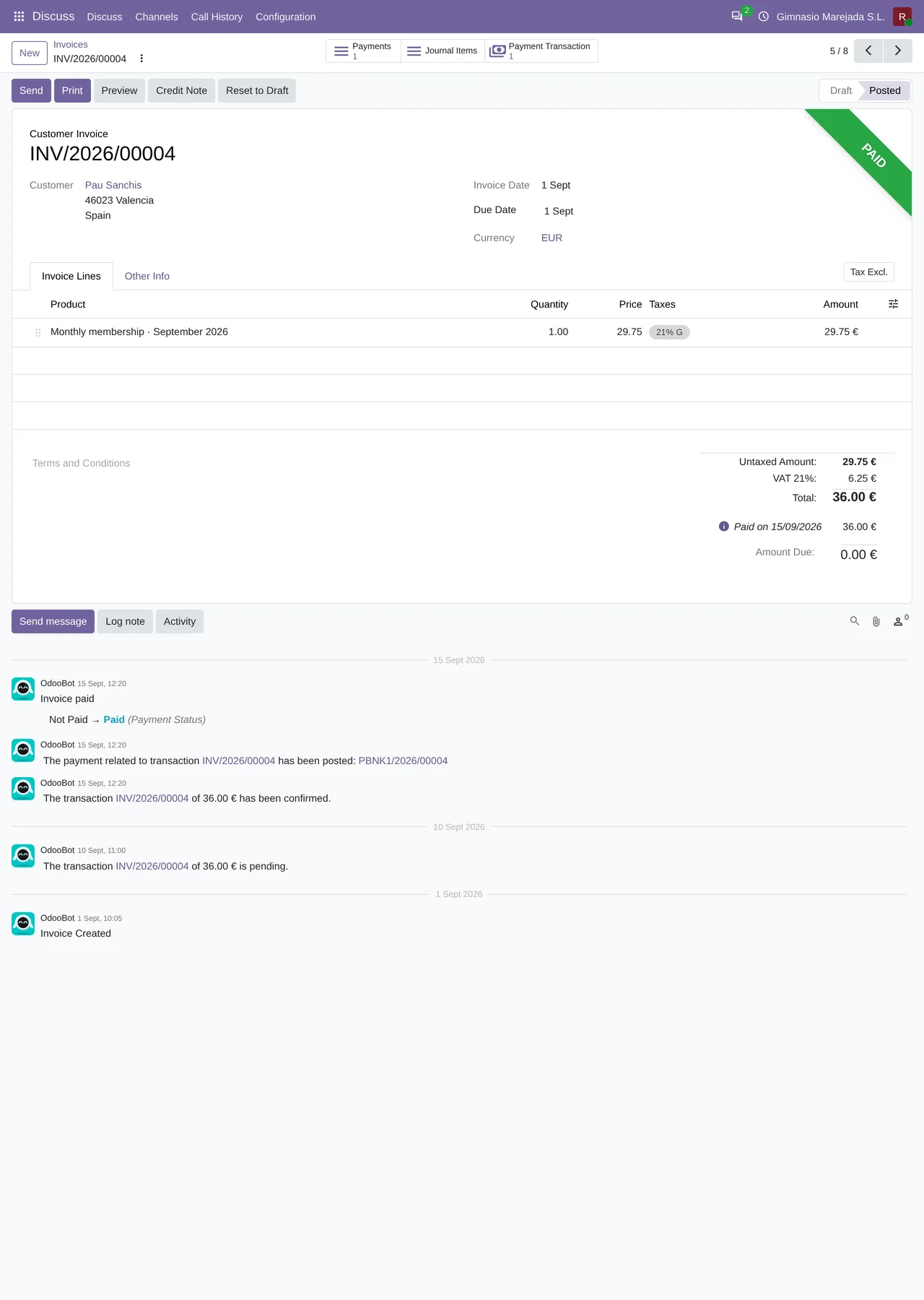
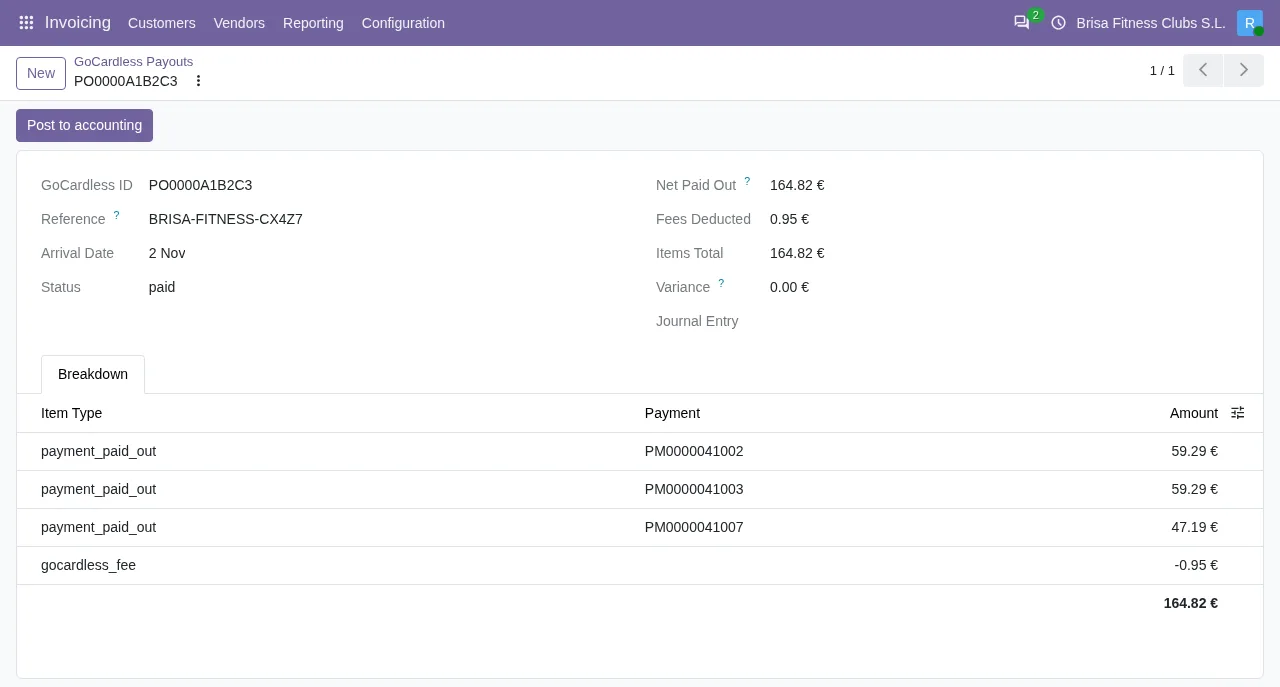
GoCardless Payouts screen, with demonstration data and test mode: you can see Arrival Date, Net Paid Out, Fees Deducted, Items Total, Variance at zero, the breakdown by collection with its fee and the Post to accounting button.On one screen you see the invoice with its payment status, on the other the payout with its figures, both inside the same application.
Who triggers each recurring collection
Each collection is triggered by Odoo, not by GoCardless on its own, and the connector does not create subscriptions in GoCardless. The first one goes out when the customer pays with GoCardless and authorises the mandate on GoCardless's page: the module stores that mandate as a payment method and collects against it. The next ones go out each time Odoo asks to charge that saved method, for example when you register an invoice payment with it or when an Odoo subscription renews. Each time, the module sends the collection to GoCardless against the mandate, with a fixed key so that a retry does not charge twice.
What happens if the payment method has no mandate
When it collects, the module looks for the GoCardless mandate in the provider reference of the saved payment method. If that value is empty, the collection stops with this message:
This payment method has no GoCardless mandate attached.
The text says it plainly: the chosen payment method has no GoCardless mandate attached. What you can do:
- Have the customer sign a mandate: when they pay with GoCardless and authorise it on GoCardless's page, the module stores it as a payment method and later collections find it.
- If your customers signed mandates in GoCardless before you used Odoo, an administrator can import them with the «Import existing mandates» button on the provider's form, shown once the account is connected: they review the list and confirm it with «Confirm and link».
Questions to ask before deciding
Do I collect in euros?
The connector collects in euros. If you need another currency, this connector does not cover it.
Are my collections SEPA Direct Debits?
It is the only scheme the connector collects by. Any other scheme is out.
Do I need Pay by Bank?
The connector does not include it.
Do I want to trigger collections from my management system?
That is what its listing describes with Payment from Odoo.
If the first three answers fit the way you collect and the fourth is what you want, the connector is on the right track. If one does not fit, it is better to know before implementing anything.
How FlexigoTech can help
If you do not have Odoo yet, the order is simple: the system first, the connector afterwards. FlexigoTech implements Odoo 17, 18, 19 and 20 and builds custom connectors and integrations, so it can take care of both, including when your case needs something the connector does not cover and you would like to look at a custom integration.
If you would rather look at the module first, there is its listing on Odoo Apps and its page on flexigotech.com, where you can buy it.
Keep reading
Checked in the connector's source code (version 20.0) and the linked sources
Sources
- Module source code: flexigo_payment_gocardless 20.0 (6fe1a716): models/payment_transaction.py
- Module source code: flexigo_payment_gocardless 20.0 (6fe1a716): models/payment_token.py
- Module source code: flexigo_payment_gocardless 20.0 (6fe1a716): static/description/index.html
- flexigotech.com/en/services.html
- Module source code: flexigo_payment_gocardless 20.0 (6fe1a716): views/payment_provider_views.xml
- Module source code: flexigo_payment_gocardless 20.0 (6fe1a716): models/payment_provider.py
- Module source code: flexigo_payment_gocardless 20.0 (6fe1a716): views/gocardless_mandate_sync_views.xml