

 Español
 Català
 Deutsch
 Français
 Português
 Italiano
 Nederlands
 Polski
If you use GoCardless and do not have Odoo yet, what you need to know is where each payout GoCardless pays you ends up. With the connector (listing on Odoo Apps), Odoo 20 keeps one record per payout: amount, deducted fees, arrival date, reference, status and type, plus its breakdown.
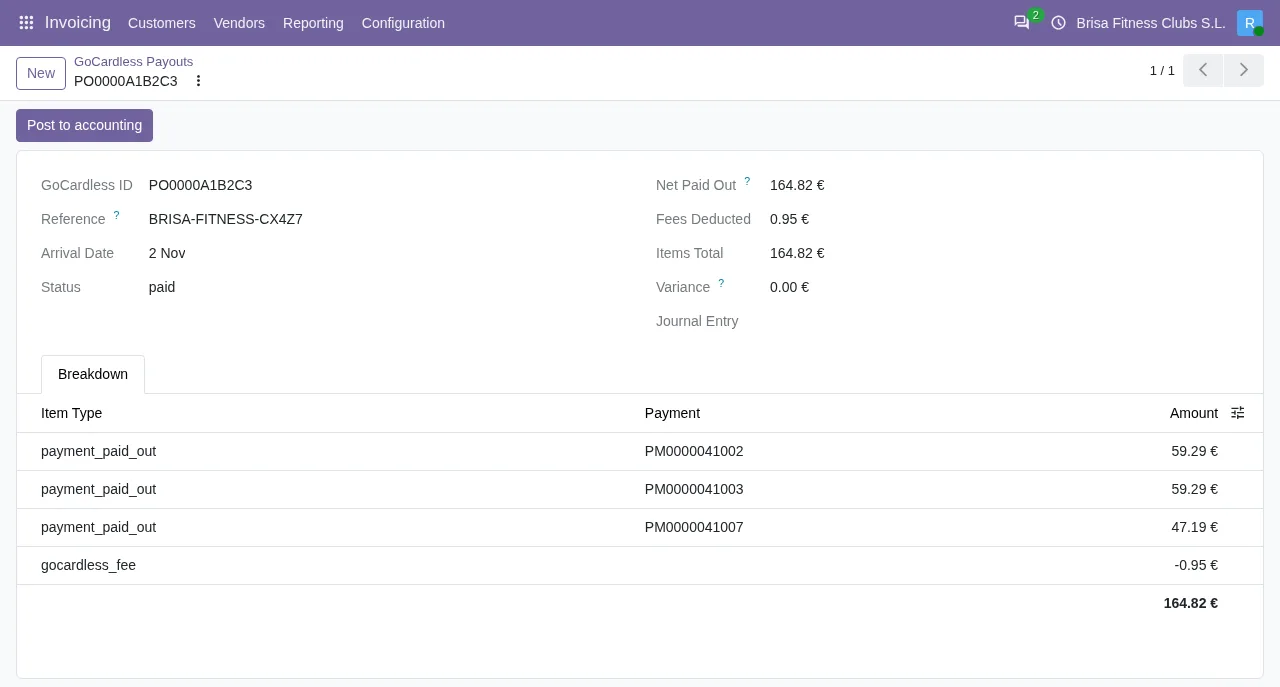
Post to accounting button.What each payout brings
When the module imports a new payout, it creates its record with the amount, the deducted fees, the arrival date, the reference, the status and the type that GoCardless gives, in the payout's currency. Then it pulls in the breakdown. Each record stays linked to the GoCardless account it came from.
The import returns only the payouts it has actually created. If the import runs again, what was already there does not count as new: the tally never claims the same money twice.
Two scheduled tasks, active on install
Once the module is installed, two scheduled tasks are already active:
GoCardless: import payoutsruns once a day.GoCardless: recover missed eventsruns every hour.
The first one is the task that brings the payouts in. It goes through the GoCardless accounts it can use and, when it finishes, counts how many payouts it imported and notes the failures with their type and a fixed code.
How collection is automated
Collections are also triggered by Odoo, against the mandate the customer signed. When the customer pays with GoCardless and authorises the mandate, the module stores it as a payment method and collects against it. After that, each time Odoo charges that saved method, for example when you register an invoice payment or when an Odoo subscription renews, the module sends the collection to GoCardless with a fixed key. If GoCardless does not answer that request, the hourly task sends it again with the same key, so the collection goes out only once. What comes next, the payouts, is brought in by the daily task.
The connector's paths, compared
| Situation | What the connector does | Detail |
|---|---|---|
| Every day | The task GoCardless: import payouts goes through the usable accounts and pulls in their payouts | Active on install |
| Every hour | The task GoCardless: recover missed events runs | Active on install |
| An account that is not connected, whose environment differs from its token's, or that is detected as a copy | The task does not call it | It would only repeat the same exception on every run |
| New payout | Creates the record with amount, deducted fees, arrival date, reference, status and type, and pulls in its breakdown | Counts as imported |
| Payout already imported | Updates the status and the arrival date | Does not count as new; if it has no breakdown, it fetches it again |
| Payout in an archived currency | Reactivates the currency | Odoo will not validate an entry in an archived currency |
| Payout in a currency Odoo does not know | Skips it | It is noted in the technical log |
| Many payouts | Follows the GoCardless cursor, page by page | The initial import does not lose the oldest ones |
| One account fails | Notes the failure and carries on with the others | Notes the type of failure and a fixed code |
| GoCardless limits the rate of requests | Waits and tries again, a limited number of times | If the retries run out, it counts as a failure of that account |
The cases in more detail
A pending payout can change later
A payout imported while it was still pending can bounce or be paid later. So when the payout already exists, the module does not create another: it updates its status and arrival date. Keeping the first status would allow a bounced payout to be booked to the bank as if the money had arrived.
If an earlier import created the header and then failed while fetching the breakdown, the next one asks for it again. Without that step, the payout would be left unbalanced and impossible to post.
A failure in one account does not stop the others
The task only calls the GoCardless accounts that are connected, in the environment of their token and not a copy. If an account errors, it notes the failure and moves on to the next. The failure is noted with its type and a fixed code, never with a GoCardless identifier or its text.
A complete initial import
GoCardless hands over payouts in pages. The module follows the cursor until they run out, because stopping at the first page would silently lose every older payout in the initial import.
Archived currencies
Odoo ships every currency but leaves the unused ones archived. If GoCardless pays out in one of them, the module reactivates it, because the money has arrived in that currency and it has to be usable in the books. If the currency does not exist in Odoo, the payout is skipped.
Rate limits
If GoCardless limits the rate of requests, the module waits and tries again, but only a limited number of times. If it still cannot get through, the task notes the failure of that account, with its type and a fixed code, and carries on with the others.
How FlexigoTech can help
If you do not use Odoo yet, FlexigoTech implements Odoo 17, 18, 19 and 20 and builds connectors and custom integrations: we can set up Odoo and get the GoCardless connector running. You will find the module on the Odoo Apps listing and on the connector page. The connector works with the FlexigoTech Cloud subscription.
Keep reading
Checked in the connector's source code (version 20.0) and the linked sources
Sources
- Module source code: flexigo_payment_gocardless 20.0 (6fe1a716): data/ir_cron_data.xml
- Module source code: flexigo_payment_gocardless 20.0 (6fe1a716): models/payment_provider.py
- flexigotech.com/en/services.html
- Module source code: flexigo_payment_gocardless 20.0 (6fe1a716): models/gocardless_payout.py