

 Español
 Català
 Deutsch
 Français
 Português
 Italiano
 Nederlands
 Polski
What Odoo does on its own, without a click
The scheduled task Amazon SP-API - Sync FBA ledger detail report (opt-in) runs every day and is active from the moment the module is installed. It only handles active accounts that have the detail sync switched on, and for each one it runs the same sync as the button.
There are some differences from a manual run: the summary shows the scheduled task as its source instead of manual, it is not posted to the account's chatter, and if an account fails the task leaves a warning in the server log and carries on with the next one. The button does not make that selection of accounts: it works on the account where you press it.
The button is in the Odoo 17, 18, 19 and 20 branches and is always visible on the Accounts screen, with no condition attached.

The Casa Olivar case: from the menu to the summary
Example Illustrative case: the company and its figures are made up to explain the flow.
Casa Olivar is an invented shop that sells olive oil and preserves through FBA and runs the connector on Odoo 20. Marta, in administration, has the Manager permission and wants to review an account's event history without waiting for the daily task.
- She goes to
Amazon › Configuration › Accountsand opens the account. - On the
FBA Reports (opt-in)tab, inside theReimbursement Claim Audit (find money Amazon owes you)group, there is theFBA reimbursement auditcheckbox, off by default. Marta wants the sync to go through the account's claim audit too, so she switches it on. - She presses
Sync FBA Ledger Detail. The action keeps querying Amazon, pausing between queries, until the report finishes, fails or the attempts run out. - When it ends with a summary, the account stores the date and text of the run and posts that summary to its chatter.
- If the report status in the summary is not
DONE, nothing from that run is imported and Marta can launch it again later. If it isDONEbut Amazon does not hand over the report document, the summary says so and nothing is imported either. If there is a document, the summary adds how many rows the report held and how many were captured, updated or skipped.
Her colleague Íñigo only has the Viewer permission: he does not see the Configuration and Accounts parts of the menu, so he never reaches this screen.
The next day the scheduled task does the same again without anyone pressing anything, but only on active accounts that have the detail sync switched on.
What it checks before calling Amazon
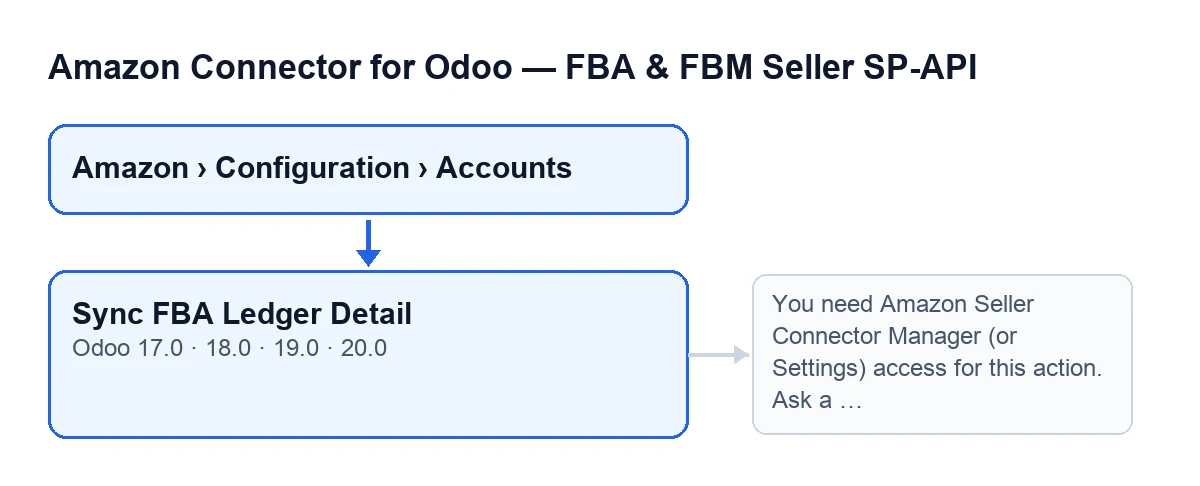
The Amazon › Configuration › Accounts path has permissions per segment: Amazon asks for Viewer, while both Configuration and Accounts ask for Manager. Without that permission you do not see those segments.
When you press the button, the first thing is a server-side check: unless you are a superuser, you must have the connector's Manager permission or Settings access. It then checks that you can write to that account. The superuser passes the group check, and the scheduled task does not go through it either, because it calls the sync directly.
What it does inside, in order
- It checks permissions, as above.
- It works on a single account.
- It asks Amazon to create the FBA ledger detail report. If Amazon does not return the report identifier, the action stops.
- It polls the report status until it is
DONE,CANCELLEDorFATAL, or until the attempts run out. The number of attempts and the seconds between them come from the account; if there is no value, the code uses twelve attempts with a ten-second pause. - If the report does not end up
DONE, it stores the date and a summary with the status it stopped at, posts it to the chatter and finishes without importing anything. - If it is
DONEbut Amazon gives no report document, the result is the same: summary stored, nothing imported and no row counts. - If there is a document, it downloads it and passes it to the import of the account's ledger event history.
- If
FBA reimbursement auditis on, the sync also goes through the account's claim audit. - It stores the date and summary and posts the summary to the chatter.
The summary shows the account, the source (manual if you launched it), the report ID and status and, if an import happens, the row counts: captured, updated and skipped.
What changes in your Odoo and what does not
- The account's ledger event history grows.
- The account stores the date and summary of the last run, and the chatter receives a note with the summary.
- With
FBA reimbursement auditon, the sync also goes through the claim audit. Its help text says that, once on, the sync also accumulates lost, damaged and found events, and that the audit cross-checks them against settlement reimbursements to surface the units Amazon still owes, with estimated value and claim deadline. It is read-only analysis. - According to the code itself, it is an independent sync that does not touch FBA stock: it only accumulates per-event history for the reimbursement audit.
The warning that can stop the action
When you press Sync FBA Ledger Detail, this warning can appear: You need Amazon Seller Connector Manager (or Settings) access for this action. Ask a manager to grant Manager access.
It appears when you are not a superuser and have neither the connector's Manager permission nor Settings access. The fix is what the text says: ask a manager to give you Manager access.
What the case teaches
- The daily task syncs the active accounts that have the detail sync switched on; the button is for running it by hand on the account you have open.
- Permission is checked when you press, on top of the menu restriction.
- The report status in the summary tells you whether anything was imported.
- The
FBA reimbursement auditcheckbox decides whether the sync also goes through the claim audit.
How FlexigoTech can help
FlexigoTech implements Odoo 17, 18, 19 and 20 and builds custom connectors and integrations. The module page and its Odoo Apps listing have the purchase details. The module is a one-off payment per version and needs a FlexigoTech Cloud subscription, Connector plan (€49 a month or €490 a year, excluding VAT). The connection goes through FlexigoTech Cloud, which stores the credentials encrypted, monitors the sync and emails you if it fails.
Keep reading
Checked in the connector's source code (version 20.0) and the linked sources
Sources
- Module source code: flexigobe_amazon_seller_connector 20.0 (8576afa5): views/amazon_spapi_account_views.xml
- Module source code: flexigobe_amazon_seller_connector 20.0 (8576afa5): models/amazon_spapi_account.py
- apps.odoo.com/apps/modules/20.0/flexigobe_amazon_seller_connector
- flexigotech.com/precios.html
- flexigotech.com/en/services.html