
 Español
 Català
 Deutsch
 Français
 Português
 Italiano
 Nederlands
 Polski


Zendesk connector for Odoo
Your Odoo customers in Zendesk, and each customer's tickets opened and read from Odoo.
€49/month14 days free, no card
Yearly and Pro
- Standard€49/month · €490/year
- Pro€98/month · €980/year
Reply within 1 working day; with Pro, 4 hours. FlexigoTech Cloud pricing
After you buy
- You pay for the license (€9 + VAT) and get an email with the link to download the module.
- You install it in your Odoo, on Odoo.sh or your own server.
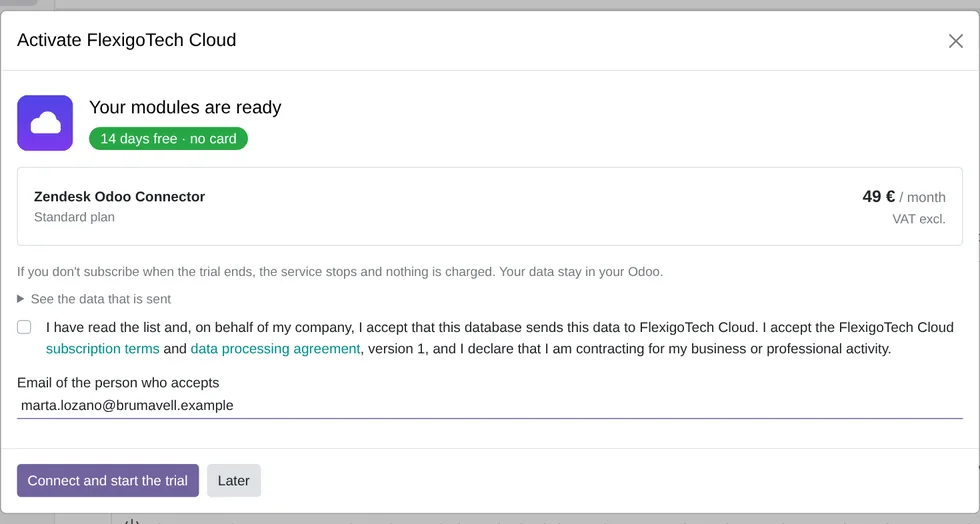
- In Settings → FlexigoTech Cloud you accept the data list and press «Try free for 14 days». The trial doesn't ask for a card.
- To continue, you press «Subscribe», create your account on app.flexigotech.com and pay for the plan by card.
Every purchase includes 2 months of support: we help you install it, set it up and get it working, by email and video call.
- Tested on Odoo 17, 18, 19 and 20
- Odoo Learning Partner
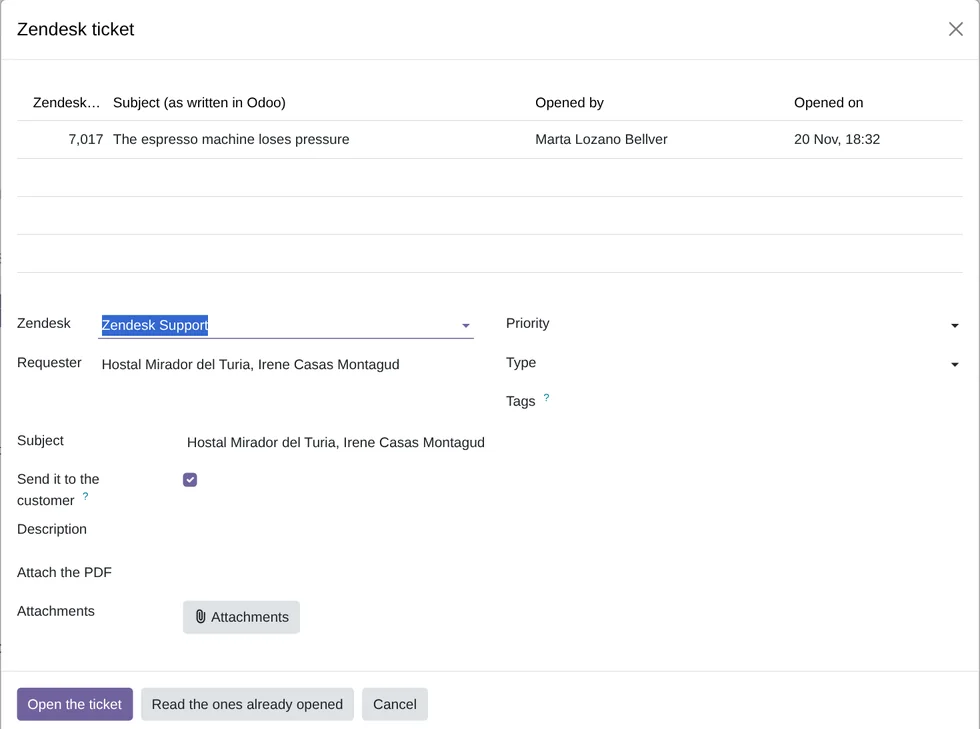 A new ticket from OdooReal Odoo screenshot
Get started in 3 steps
- Install the moduleFrom Odoo Apps, on Odoo.sh or on your own server.
- Start the trialAn administrator clicks «Activate» in the top bar, accepts the list of data and starts the 14-day trial, with no card.
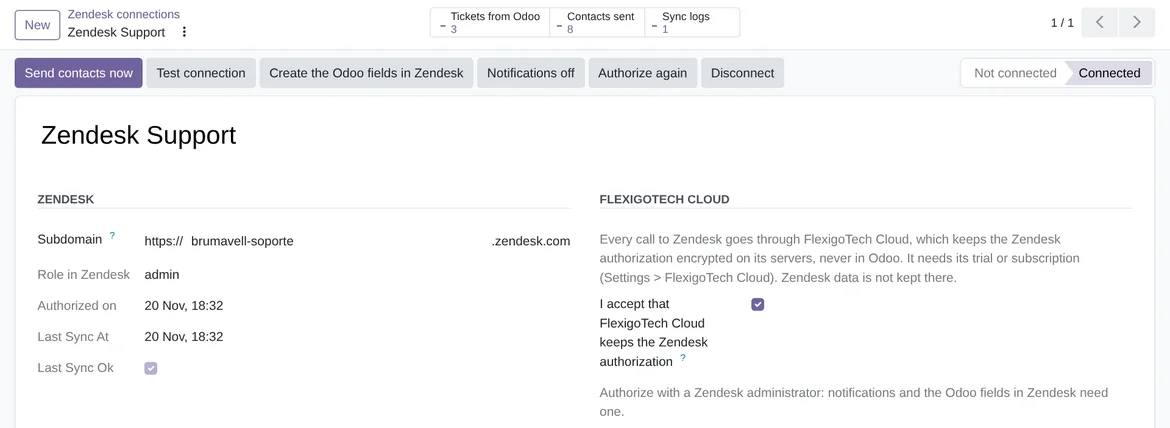
- Connect your ZendeskIn Zendesk › Configuration › Connections, an administrator writes your Zendesk subdomain, accepts that FlexigoTech Cloud keeps the authorization and clicks «Authorize with Zendesk». We do it with you during setup.
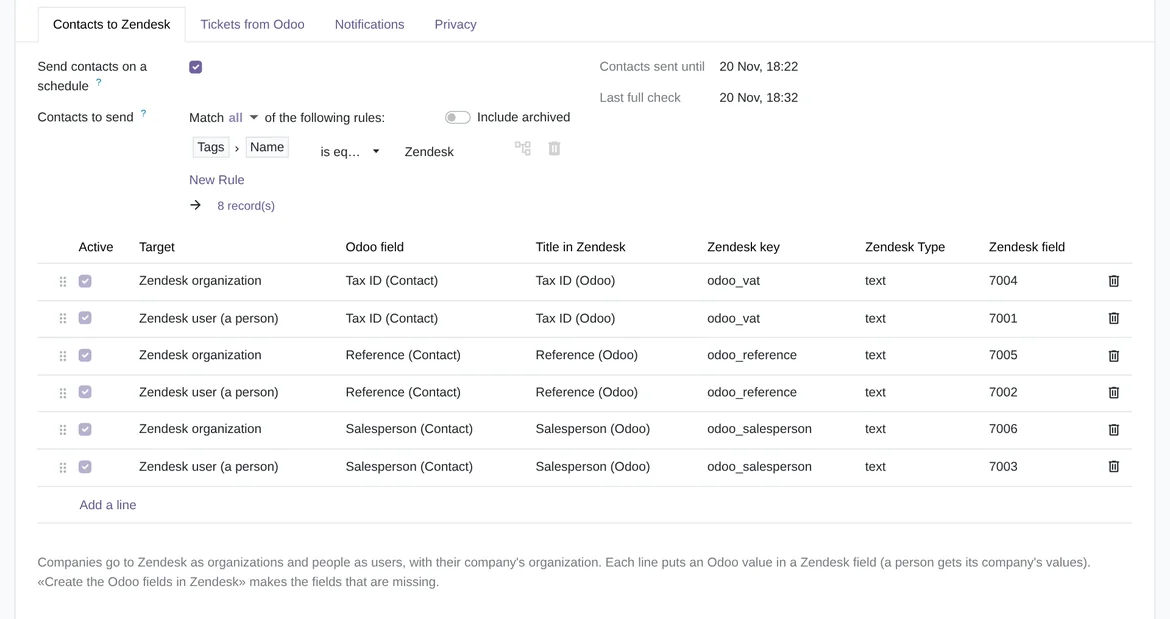
Choose which contacts go On the «Contacts to Zendesk» tab you choose the contacts and the Odoo data they carry, and «Create the Odoo fields in Zendesk» creates those fields there.
What you need A Zendesk Support account and one of its administrators to authorize the connection (the Odoo fields in Zendesk and the notifications need it). Odoo 17, 18, 19 or 20, Community or Enterprise, on Odoo.sh or your own server, not Odoo Online. For the notifications, your Odoo has to be reachable at an https address.
What it does
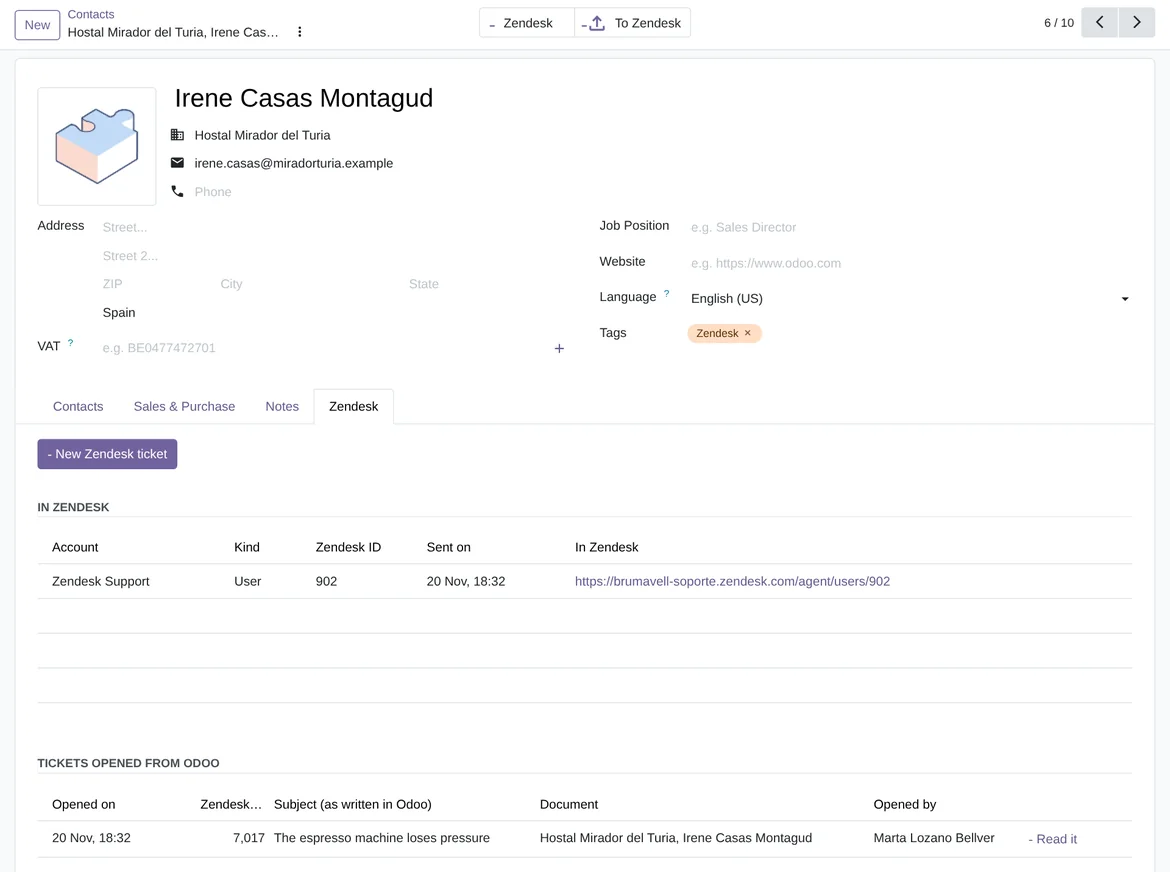
- Your customers, with their Odoo dataOdoo companies go to Zendesk as organizations and people as users. Their Odoo data goes into fields the connector creates: tax ID, reference and salesperson and, with Invoicing, payment terms, amount due and total invoiced.
- A ticket from any documentFrom a contact, a sales order, an invoice, a delivery or a task you open a Zendesk ticket with the document's PDF and attachments, as a reply to the customer or as an internal note. In the connection you choose which documents they can be opened from. Before opening it you see the ones already opened from that document.
- The customer's tickets, liveFrom the contact, the company or the document you read their tickets as they are in Zendesk, up to 1,000 per list. You see the conversation, reply or leave an internal note with attachments, and change the status.
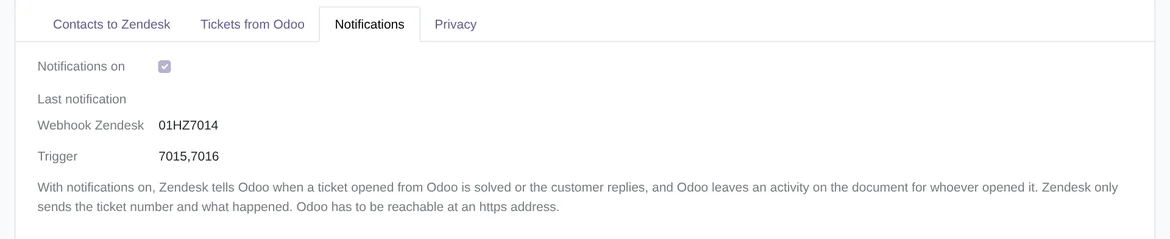
- Notifications on the documentIf you turn notifications on, when a ticket opened from Odoo is solved or the customer replies, whoever opened it gets an activity on the document.
How it works

Goes from Odoo to Zendesk
- Companies, as organizations
- People, as users
- The Odoo data you choose, in Zendesk fields
- New tickets, with the document's PDF and attachments
- Replies, internal notes and status changes
FlexigoTech Cloud
Comes from Zendesk
- The tickets of a contact, a company or a document, read live
- The conversation of each ticket
- The notice of a solved ticket or a customer reply, as an activity

The Zendesk authorization is kept encrypted in FlexigoTech Cloud, which renews it, and Odoo does not keep it. With notifications on, Odoo keeps the key Zendesk signs them with, to check them. Every call from Odoo to Zendesk goes through FlexigoTech Cloud with what it carries (contacts and companies with their Odoo data, tickets with their text and attachments, replies and notes), and your records stay in your Odoo.
Where you see it in Odoo
- Zendesk › Tickets opened from Odooeach ticket with its document, its requester and who opened it
- Contacts › a contact or a companythe Zendesk tab, with the button to open a ticket, and the «Zendesk» and «To Zendesk» buttons
- Sales orders, leads and Helpdesk ticketsa button to open a Zendesk ticket and another with the customer's tickets
- Zendesk › Configurationthe connections, which contacts and data are sent, the notifications and the sync log
Inside Odoo
Real Odoo screenshots.

Price
Standard
€49a month + VAT
€490 a year + VAT 2 months free
- The connection runs on our servers
- We alert you if sync fails
- First response 1 working day
- Video call included for the first 2 months
- Accounts per connector Up to 3
Pro
€98a month + VAT
€980 a year + VAT 2 months free
- Everything in Standard
- First response 4 working hours
- Video call if needed
- Accounts per connector Up to 10
- + €9 for the module license, per Odoo version
- 14 days free, no card
- Cancel in two clicks
- Every purchase includes 2 months of support: we help you install it, set it up and get it working, by email and video call. While you're subscribed, support for the service stays included. Still integrating or testing? Extend your free trial.
If you cancel What the subscription gives stops. Your data stays in your Odoo.
- Support with response timesMonday to Friday, 9:00 to 18:00 (Barcelona), except public holidays.
- Maintenance and improvementsOdoo 17-20, on Odoo.sh or your own server
- We handle changes to their APIIf the platform changes its API, we adapt the module and the service.
- Servers in GermanyWe store your credentials encrypted
- Tested On Odoo 17, 18, 19 and 20. On 18 November 2026 it was tested against the real Zendesk API, on a FlexigoTech test account, from Odoo 19 and Odoo 17: the connector's 18 functions, from the connection to the notifications. In that test the calls went straight to Zendesk, without FlexigoTech Cloud. The 77 automated tests of the Odoo 20 version use a simulator of the Zendesk API.
- 4,920 lines of code · 20-11-2026
- 77 automated tests · 20-11-2026
- No reviews yet · leave yours
Frequently asked questions
Can I buy it yet?
Yes. The module costs €9 per Odoo version, on flexigotech.com or on Odoo Apps. The FlexigoTech Cloud subscription, which the connector needs to work, costs €49 a month or €490 a year per production database, excluding VAT (with Pro, €98 a month or €980 a year) and starts with a 14-day trial, no card needed, from Settings › FlexigoTech Cloud.
Does it work without FlexigoTech Cloud?
No.
What does it take to connect my Zendesk?
An administrator of your Zendesk authorizes the connection from Odoo. The authorization goes through the global OAuth client that Zendesk gives FlexigoTech when it approves the integration. We sort it out with you during setup.
Do I have to paste a Zendesk API token?
No. An administrator authorizes the connection in Zendesk, and FlexigoTech Cloud keeps that authorization encrypted and renews it.
Does it copy my Zendesk tickets into Odoo?
No. It reads them live when you open them, and what was read is deleted when you read again or in Odoo's automatic cleanup. For each ticket opened from Odoo it keeps the number, the subject it was opened with, the document, the requester and who opened it.
Has it been tested with a real Zendesk?
Yes, with the real Zendesk API on a test account, from Odoo 19 and Odoo 17. In that test the calls went straight to Zendesk, without FlexigoTech Cloud.
Does it create contacts in Odoo from what comes into Zendesk?
No. Contacts go from Odoo to Zendesk. What is created in Zendesk does not create contacts in Odoo.
How often does it send contacts?
Every hour it sends the ones that changed, with up to 300 calls to Zendesk per run; what does not fit goes in the next one. You can also click «Send contacts now». Every 24 hours it rechecks the amounts that change without anyone touching the contact, such as the amount due.
What happens after you press «Buy now»?
1. You pay for the license (€9 + VAT) and get an email with the link to download the module. 2. You install it in your Odoo, on Odoo.sh or your own server. 3. In Settings → FlexigoTech Cloud you accept the data list and press «Try free for 14 days». The trial doesn't ask for a card. 4. To continue, you press «Subscribe», create your account on app.flexigotech.com and pay for the plan by card.
Does it work on Odoo Online?
No: Odoo Online does not allow third-party modules. It is for Odoo 17, 18, 19 and 20, on Odoo.sh or on your own server.
Who installs it?
You do: you buy it on flexigotech.com or on Odoo Apps and install it in your Odoo. We help you install it and set it up, by email and video call, during the 2 months of included support. Custom development and data migration are quoted separately.
What support is included?
Every purchase includes 2 months of support: we help you install it, set it up and get it working, by email and video call. While you're subscribed, support for the service stays included.
What if something fails?
We monitor the connection and email you if something fails. And support has response times: first response within 1 working day; with Pro, within 4 working hours.
What about my data? And if I cancel?
The connection goes through FlexigoTech Cloud, on our servers in Germany, with your credentials encrypted. You cancel in two clicks: if you don't subscribe when the trial ends, the service stops and nothing is charged. Your data stays in your Odoo, and you can always view and export it.
Using Zendesk but not Odoo yet?
We set up Odoo, connect it to Zendesk and stay on.
From €2,450 + VAT
Start with OdooRelated
Zendesk is a trademark of its owner. FlexigoTech publishes this connector on its own, with no endorsement or sponsorship from the trademark owner.