Rejections found too late
An empty required field, a broken sequence, or taxes that do not add up make the DIAN reject the document. If you find out after sending, you are already into correcting and re-sending — on the DIAN's clock, not yours.

If you issue POS tickets in Colombia, your electronic equivalent documents have to meet the DIAN format and be reported. This module validates each document inside Odoo, catches the errors before you send, and prepares the report — no spreadsheets, no external tools, no double entry.
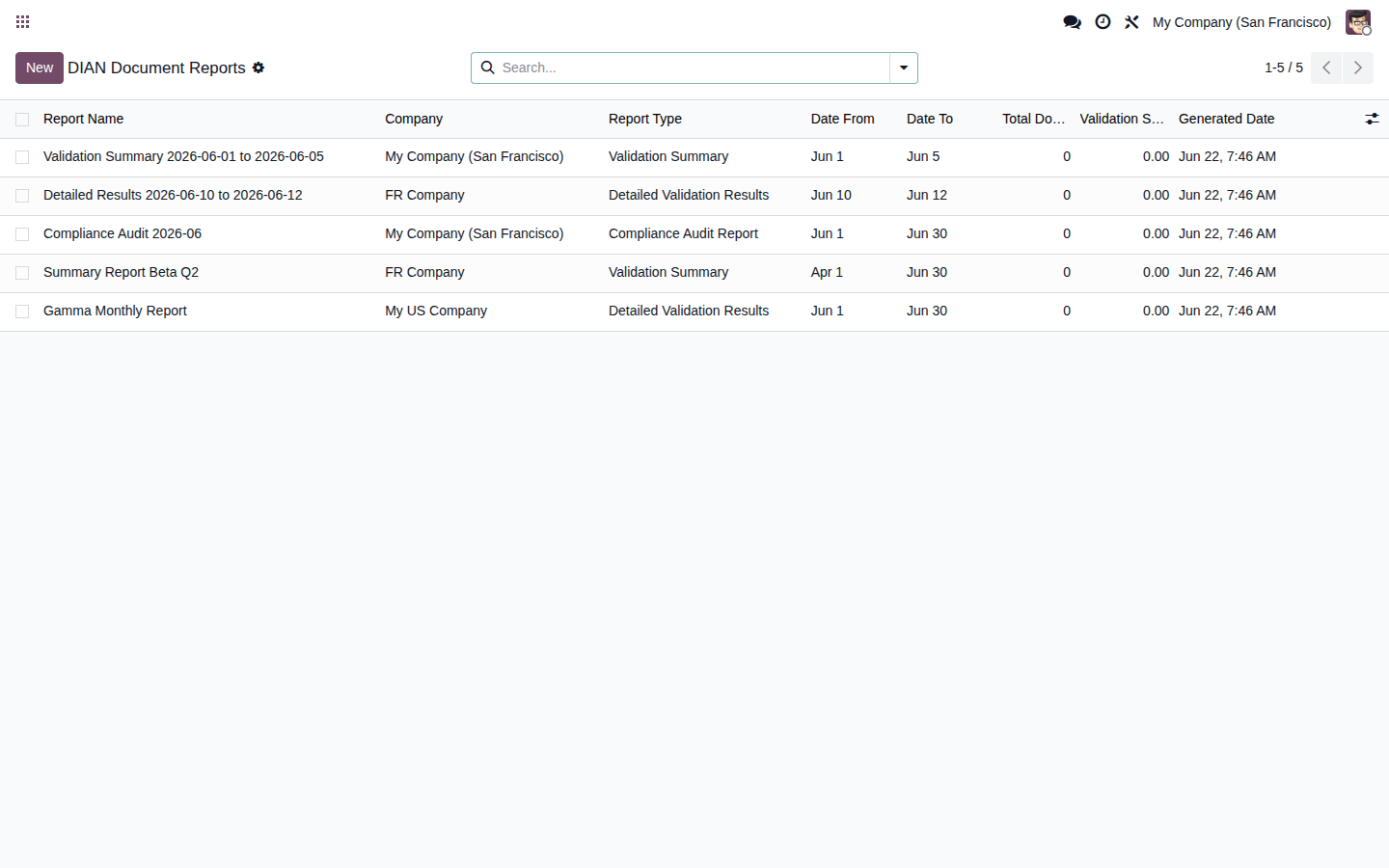
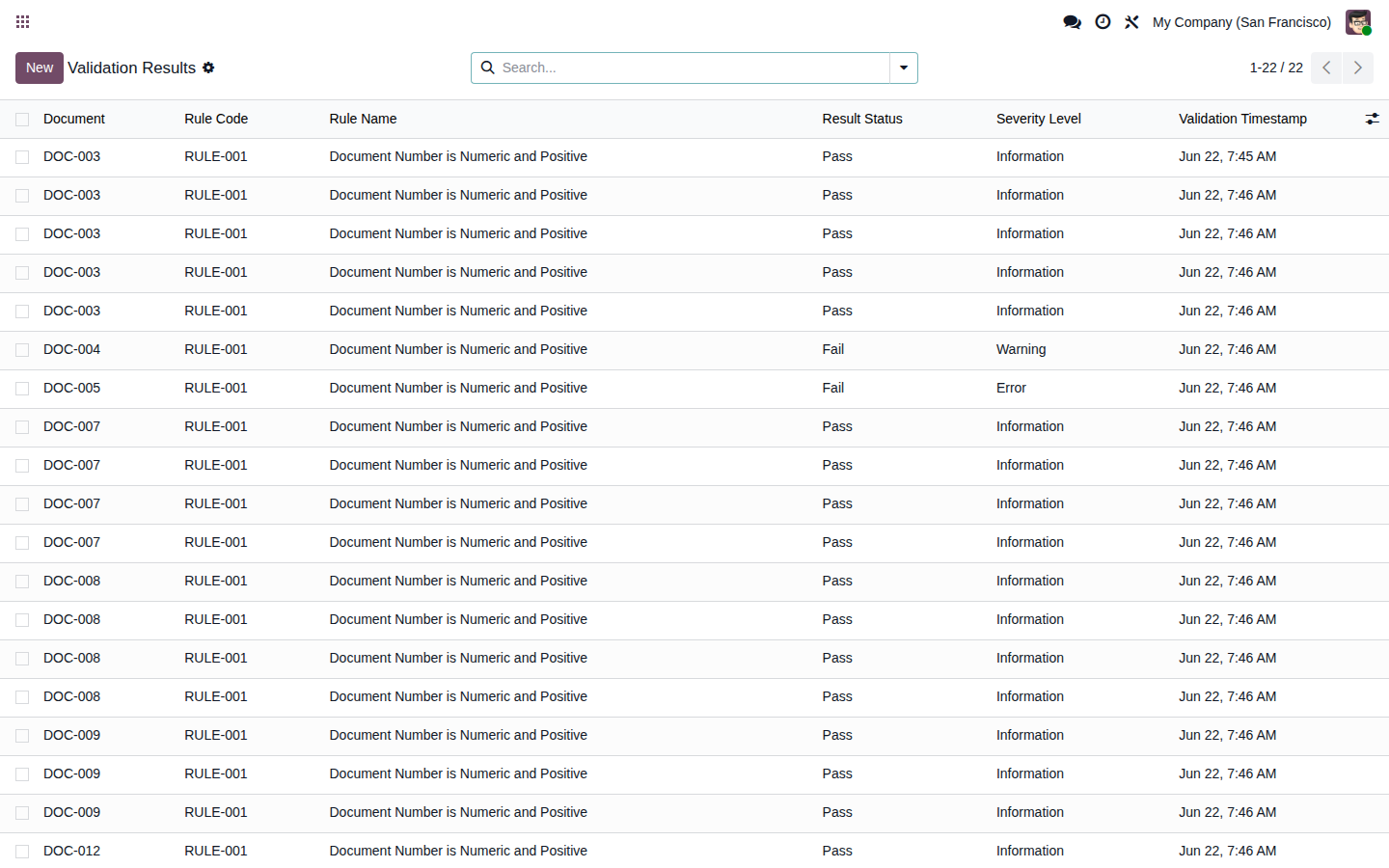
The very screens you get in Odoo — the real thing.
The DIAN requires electronic POS tickets to meet a defined format and be reported. A rejection you discover too late means rework, manual corrections, and real penalty risk for whoever is obliged to invoice.
An empty required field, a broken sequence, or taxes that do not add up make the DIAN reject the document. If you find out after sending, you are already into correcting and re-sending — on the DIAN's clock, not yours.
Pulling POS tickets into spreadsheets to build the report is slow and error-prone. Every manual export is a fresh chance for a figure to stop matching — and for the mismatch to surface at the worst moment.
Handling DIAN compliance outside Odoo adds a separate SaaS, another login, and double data entry. For a business that already runs the ERP, that is complexity with no upside.
It does not promise to invoice for you or transmit to the DIAN on your behalf. It does the concrete, useful part: validate your POS equivalent documents and leave the report ready.
Applies 10 DIAN rules to each electronic POS equivalent document: number format, valid dates, customer NIT, tax and total math, sequence gaps, fiscal year, and complete required fields.
Flags problematic documents so you fix them inside Odoo before transmitting, one by one or in batches. The bulk validation wizard checks your documents in seconds, with a clear pass/fail summary.
Generates validation summaries, detailed results, and compliance audit reports for the period, exportable to PDF or CSV: an audit trail ready to review and use in a DIAN inspection.
Validate your POS equivalent documents right inside Odoo (Accounting → DIAN Configuration), with switchable rules, per-company setup, and an optional link to the POS order. No separate SaaS, no double entry — one single system.
You install the module on your own Odoo, turn on the rules you need, and let it check every POS equivalent document before it goes to the DIAN.
From Accounting → DIAN Configuration you switch the 10 validation rules on or off per company and link them, optionally, to the POS order. Setup lives in Odoo, not in a separate portal.
Check documents one at a time or run the bulk validation wizard over a whole period. In seconds you get a pass/fail summary and every failing document flagged so you can fix it inside Odoo before you send.
Generate validation summaries, detailed results, and a compliance audit report for the period in PDF or CSV. You keep an audit trail ready to review internally or present in a DIAN inspection.
FlexigoTech is Flexibles y Accesorios Gobe, S.L., based in Barcelona. Development is handled by a single developer, so when you ask something about the DIAN or the POS equivalent document you talk straight to whoever wrote the code, not to a salesperson.
It is a native Odoo module, with no external platform and no extra SaaS fee. We do not invent reviews or customer cases: the tool validates your POS equivalent documents and prepares the report. The official transmission and the obligation to invoice stay yours — and we tell you that before you buy.
One payment for the module license. No per-ticket fees, no monthly subscription, no external platform to keep alive. You buy it once and it runs on your Odoo.
A single license price on the Odoo App Store. No recurring fee, no cost per POS ticket, no surprises tied to your sales volume.
You get the module source, so you can install it, audit it, and adapt it to your own point-of-sale flow. Nothing is hidden behind a black-box service.
Runs on Odoo 17, 18 and 19, Community and Enterprise. Whichever version you are on, you install the module and start validating without switching your ERP.
Buy the license on the App Store and, if you need it, ask us to help configure it for your operation in Colombia. Support comes from the developer, not a call center.
Tax compliance rarely comes alone. It usually shows up next to the need to tidy up invoicing, point of sale, and reporting inside a single Odoo.
It is the cash-register (POS) ticket in its electronic version, regulated by Colombia's DIAN. When you sell at the point of sale and do not issue an electronic sales invoice, the POS equivalent document must meet a defined format and be reported to the DIAN. This Odoo module validates those documents inside your ERP and prepares the report.
Yes. The module runs on Odoo Community and Enterprise, versions 17, 18 and 19. It lives inside Accounting as DIAN Configuration, with no separate SaaS platform or middleware to maintain. You buy the license once and get the source code, so you can install and adapt it on your own Odoo.
The module validates your POS equivalent documents and generates a structured report inside Odoo for you to review. The official transmission to the DIAN and the legal obligation to invoice remain the taxpayer's responsibility. The module leaves the data clean and consistent, but it does not assume your legal liability.
It applies 10 DIAN rules to each POS equivalent document: number format, valid dates, customer NIT, tax and total calculations, sequence gaps, fiscal year, and complete required fields. The goal is to catch rejections before you send to the DIAN, not after, when fixing them costs time and rework.
It is a one-time payment of 49 EUR with the source code included. There are no per-ticket fees, no monthly subscription, and no external platform. You can buy the license on the Odoo App Store, and if you need it, ask us to help configure it for your point-of-sale operation in Colombia.
Both. You can buy the module license on the Odoo App Store, and if you need it, we can help configure it for your specific point-of-sale operation in Colombia and get the first validation-and-report cycle squared away. You talk directly to the developer who wrote the code.
The question is whether you build it by hand each time or solve it once inside Odoo. Try the live demo and check the validation-and-report flow for yourself.