
Amazon · Odoo 19 · SP-API

Amazon connector for Odoo: what credentials SP-API asks for, what rate limits apply and what it must cover

Before you buy or build an Amazon connector for Odoo there are three credentials you will be asked for and one limit that decides the design: the SP-API application with its roles, the LWA keys, each seller's refresh token, and per-operation rate limits that force queues and backoff.

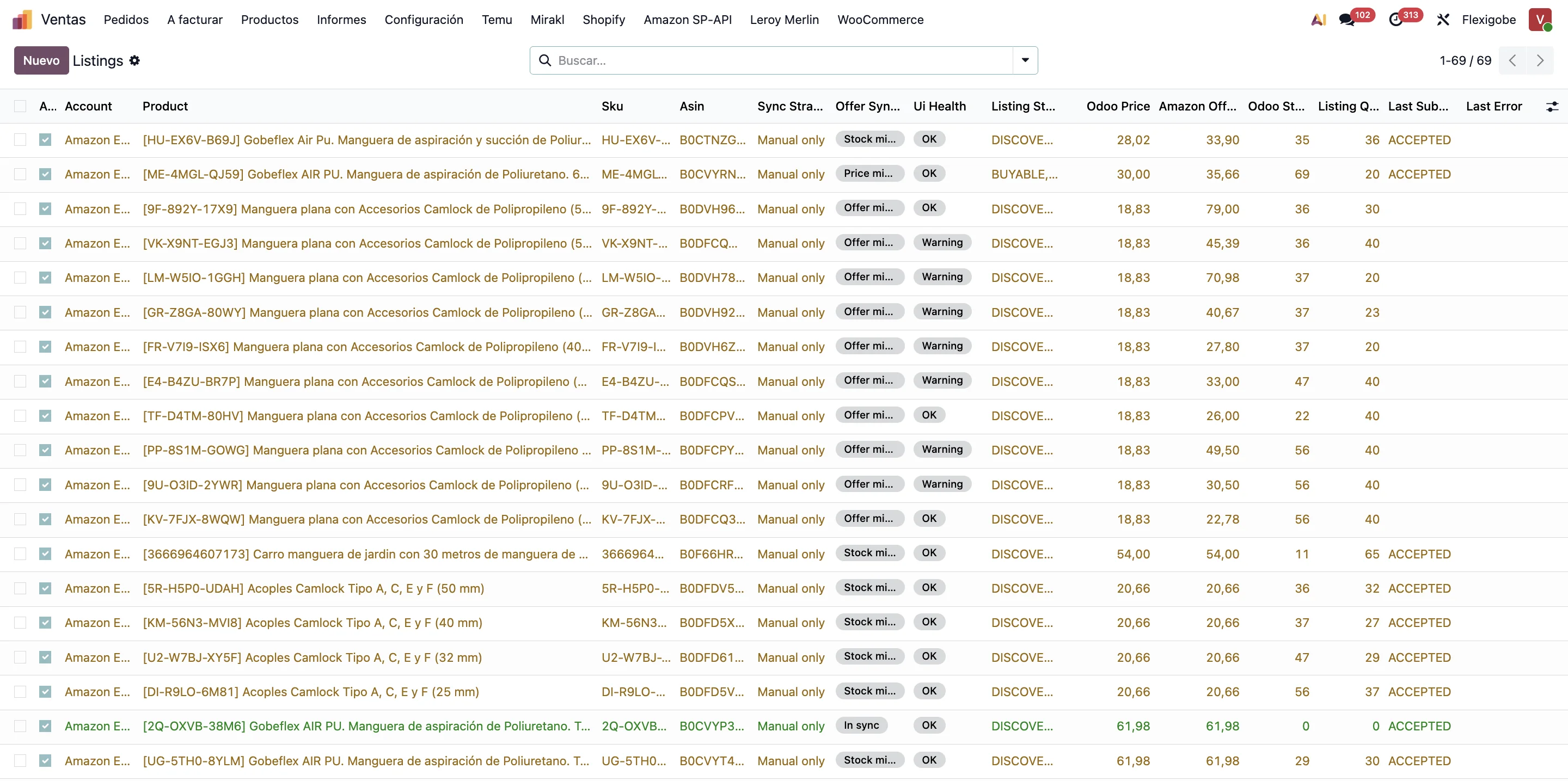
Amazon listings inside Odoo, with SKU, ASIN, channel, sync state, price and quantity

If you are searching for an Amazon Odoo connector or Amazon SP-API Odoo, the short answer is this: it takes three credentials that do not come from the same place —an SP-API application registered by a developer profile with approved roles, the LWA keys of that application, and a refresh token for every seller that authorises it—, plus the marketplace id and the regional endpoint. And one design decision: the limits are per-operation token buckets, so the connector carries queues and backoff, not loops.

Everything below was checked on 13 September 2026 in the official SP-API documentation and in the code of our own Amazon Seller Connector for Odoo, published on branches 19.0, 18.0 and 17.0, with 786 tests of its own on the Odoo 19 one and 685 on each of the other two.

A good Amazon-Odoo integration is not measured by having the credentials configured, but by whether it cuts manual work, prevents stock errors and leaves traceability when Amazon answers 429.

What an Amazon Odoo connector must solve

  • Reliable order import and stock reservation.
  • SKU, variant and listing mapping with no duplicates.
  • Sync of states, tracking and confirmations.
  • Pricing, incidents and error-case handling.
  • FBA handling when it is part of the operation.
  • Logs and retries when Amazon or the internal queue fails.

Each line comes through a different door —/orders/v0, /listings/2021-08-01, /feeds/2021-06-30, /reports/2021-06-30— and each door has its own limit.

What credentials SP-API asks for, and who issues them

1. The application. SP-API does not open with a Seller Central login but with an application registered in the Solution Provider Portal by an approved developer profile. Registering it means picking roles —Amazon documents eighteen— and only the approved ones are available. Four are restricted for touching personal data, among them Direct-to-Consumer Shipping. And the role alone is not enough: the shipping address is requested with a restricted data token (POST /tokens/2021-03-01/restrictedDataToken).

2. The LWA keys. The application yields a Login with Amazon client_id and client_secret. The secret expires after 180 days: Amazon warns 90 days ahead and the old one lasts seven days more. After that, calls fail without anyone touching anything, and the symptom —invalid_client at night— looks nothing like its cause; that is why the connector stores that date and warns through a daily cron.

3. The seller's refresh token. This is the one thing you do not fill in: the seller generates it by authorising the app at sellercentral…/apps/authorize/consent, with the application_id and your own state; if the app is still a draft you add &version=beta, and publishing it means taking that off. Amazon returns them to your redirect URI with an spapi_oauth_code to be exchanged within five minutes at https://api.amazon.com/auth/o2/token: out come an access_token, which expires in one hour, and the refresh_token.

4. Marketplace and region. An account is not a country: it is a marketplace id (Spain A1RKKUPIHCS9HS, France A13V1IB3VIYZZH) pointing at a regional endpoint, https://sellingpartnerapi-eu.amazon.com in Europe. Our connector ships the 23 marketplaces as data and every account points at a single one, so stock, taxes and channel come from the right place.

List of SP-API accounts in Odoo showing eu-west-1 region, marketplace id and Amazon endpoint
Two real marketplaces in production, each with its marketplace id and the same European endpoint.

Rate limits: why the connector needs a queue

Amazon shares traffic out with a token bucket: every operation has a rate (tokens per second) and a burst (capacity), and each request spends one token. When the bucket empties you get a 429, which the documentation calls retry-able, and —when available, which is not always— the x-amzn-RateLimit-Limit header returns the limit for your seller-application pair. Limits are per operation, and the ones in the table are the default values, which Amazon can raise for sellers moving more volume.

OperationRate (req./s)BurstIn practice
getOrders0.016720One list per minute: polling every ten seconds ends in 429.
getOrder / getOrderItems0.530Detail is far cheaper than the list.
confirmShipment210The risk is not quota: it is losing shipments.
createReport0.016715One report per minute: request it and wait.
getReportDocument0.016715Downloading shares quota with creating.
createFeed0.008315One every two minutes: it gets scheduled.
putListingsItem510For few changes it beats a feed.

That table explains the design. Because getOrders runs at one per minute, orders are read with a watermark (LastUpdatedAfter) and NextToken paging from a cron every fifteen minutes, not from a button. Because reports have to be waited for, the cycle is create, poll, download: we poll up to twelve times every ten seconds. And because report calls share a bucket, on a 429 the connector writes a shared cooldown of 90 seconds and FBA inventory falls back to the live API.

The retry lives in a single function: 429 and 500, 502, 503 and 504 are retried, Retry-After is honoured and, when it does not come, an exponential backoff from 1.5 seconds with random jitter keeps two crons from coming back at once. If the last attempt fails too, the error carries the Retry-After, the quota header and the path: the log says which quota ran out, not "sync error".

Hence the rule: whatever writes goes in a queue with an idempotency key; whatever reads goes with a watermark. Confirming a shipment can stay queued as "pending", and then the only sender is a cron every five minutes taking at most 200 deliveries from the last three days, with a per-delivery latch that stops the same tracking going twice. Prices and stock have their own queue every minute; if a write fails, another queue retries it every 180 seconds, twenty times per SKU at most.

Why Amazon breaks operations when Odoo is not in charge

If stock comes from several places or tracking is handled outside the ERP, the incidents pile up: unmapped orders, inconsistent inventory and pricier after-sales. With the limits in front of you it is clear why the channel that publishes stock must be a single one: publishing it twice costs twice the quota. We go into it in real-time stock on marketplaces and in selling on several marketplaces from a single Odoo.

Frequent Amazon SP-API errors in Odoo

Almost every failure we see comes from those three credentials, not from code: a redirect URI pointing at a different Odoo, so the seller's return lands on a screen saying nobody was expecting them; an authorisation made with version=beta when the app is already published; the expired LWA secret; the restricted role not approved, which gives no clear error but empty addresses; and the 429 loop when someone retries by hand while the cron retries too.

Each has a symptom that looks nothing like its cause, so we gathered them with their diagnosis in Amazon SP-API and Odoo: frequent errors and how to avoid them. If yours is the rollout, the walkthrough is in how to integrate Amazon with Odoo 19.

Start with what hurts most

With the limits in front of you there is a sensible order: orders, stock and tracking first, the three calls that hold the warehouse up; then listings, pricing, FBA or returns if the business asks for it. Reports come last: they are not hard, they eat the slow quota.

What to ask before you buy

  • Which flows are supported today and through which API each comes.
  • Whether the connection uses your application or the provider's, and who rotates the LWA secret.
  • What happens on a 429: does it retry, queue, honour Retry-After, leave a trace?
  • How FBA, returns and addresses with personal data are handled.
  • Whether confirming the same shipment twice sends the tracking twice.
  • Whether the provider implements or only sells a licence, and on which versions it maintains the module.

If the integration is not with Amazon but with your own management software, the approach is the same and we cover it in Odoo connector for your software; the catalogue is in modules and the map by problem in solutions.

Frequently asked questions

Do I need to be an Amazon developer to connect Odoo to SP-API?

Somebody has to be, but it need not be you: the application is registered by an approved developer profile, which receives the client id and secret. As a seller you can register your own or authorise your provider's and keep only your refresh token.

Why do Amazon reports take so long in Odoo?

Because it is not a query: you request it with createReport, Amazon generates it in its queue, you poll getReport until DONE and then download it with getReportDocument. Creating and downloading are limited to 0.0167 requests per second, one a minute each.

Should an Amazon Odoo connector handle FBA?

If you work with FBA, yes: inventory cannot be split in two. Bear in mind that official inventory arrives by report, on the slow quota, so a live read as a fallback is worth having.

Can Amazon and Odoo share tracking and states?

Yes. Shipment confirmation allows two requests per second, so the risk is not quota but losing shipments: demand a queue with retries and a latch that stops the same tracking going twice.

Can I start with orders and stock only?

Yes. Many rollouts start that way and later extend to pricing, listings, FBA or returns. It is also the order that spends least quota.

What separates a serious connector from a basic one?

That a 429 is told apart from a generic error and carries the quota in its message, that writes go through an idempotent queue, that the LWA secret warns before expiring, and that tests prove it.

Useful links inside FlexigoTech

Amazon module pageScope, screens and Odoo versionsAmazon Odoo landingShort version of the use caseModule catalogueConnectors published for Odoo 19, 18 and 17SolutionsIntegrations and automation by problemOdoo connector for your softwareHow we do it with technology partners

What we do about this

Amazon connectorWhat it does, screenshots, versions and price.

Want to review whether Amazon should be centralised in Odoo?

We look at SKUs, stock, logistics and channels to tell you where to start without oversizing the rollout, and which SP-API credentials you will have to request first. Write to comercial@flexigobe.com or call +34 616 809 504.

Talk to an engineer